Tracking and Optimizing AWS Textract Usage: A Cost Control Solution Using CloudTrail
It starts the same way for many teams: someone kicks off a quick proof-of-concept using Amazon Textract, a few PDFs get uploaded, and…
Tracking and Optimizing AWS Textract Usage: A Cost Control Solution Using CloudTrail
It starts the same way for many teams: someone kicks off a quick proof-of-concept using Amazon Textract, a few PDFs get uploaded, and suddenly your AWS bill jumps by hundreds of dollars.
Textract is incredibly powerful — it can read tables, forms, and handwriting straight from documents — but it hides one big blind spot: you can’t easily see who processed what, or how much it cost. Unlike Amazon Bedrock, which neatly logs every invocation and has also cost allocation tag feature, Textract provides only high-level CloudTrail entries and general view cloudwatch metrics.
That means while you can tell who ran Textract and when, you can’t see how many pages were analyzed, which features were used, or what the total cost was. For teams running experiments or shared environments, this creates a cost visibility black hole — the kind that shows up later as an unpleasant surprise on your AWS invoice.
Executive Summary (TL;DR)
AWS Textract lacks granular per-page cost tracking, creating a visibility gap when team POCs suddenly spike usage. This guide shows how to bridge that gap using CloudTrail logs, S3 metadata, and a Lambda-based cost tracker that posts daily usage summaries to Slack — giving your team real-time visibility and cost accountability. By combining these three components, you can transform scattered API logs into actionable cost intelligence, tracking exactly who processed which documents and calculating precise charges based on page count and features used.
Solution Architecture
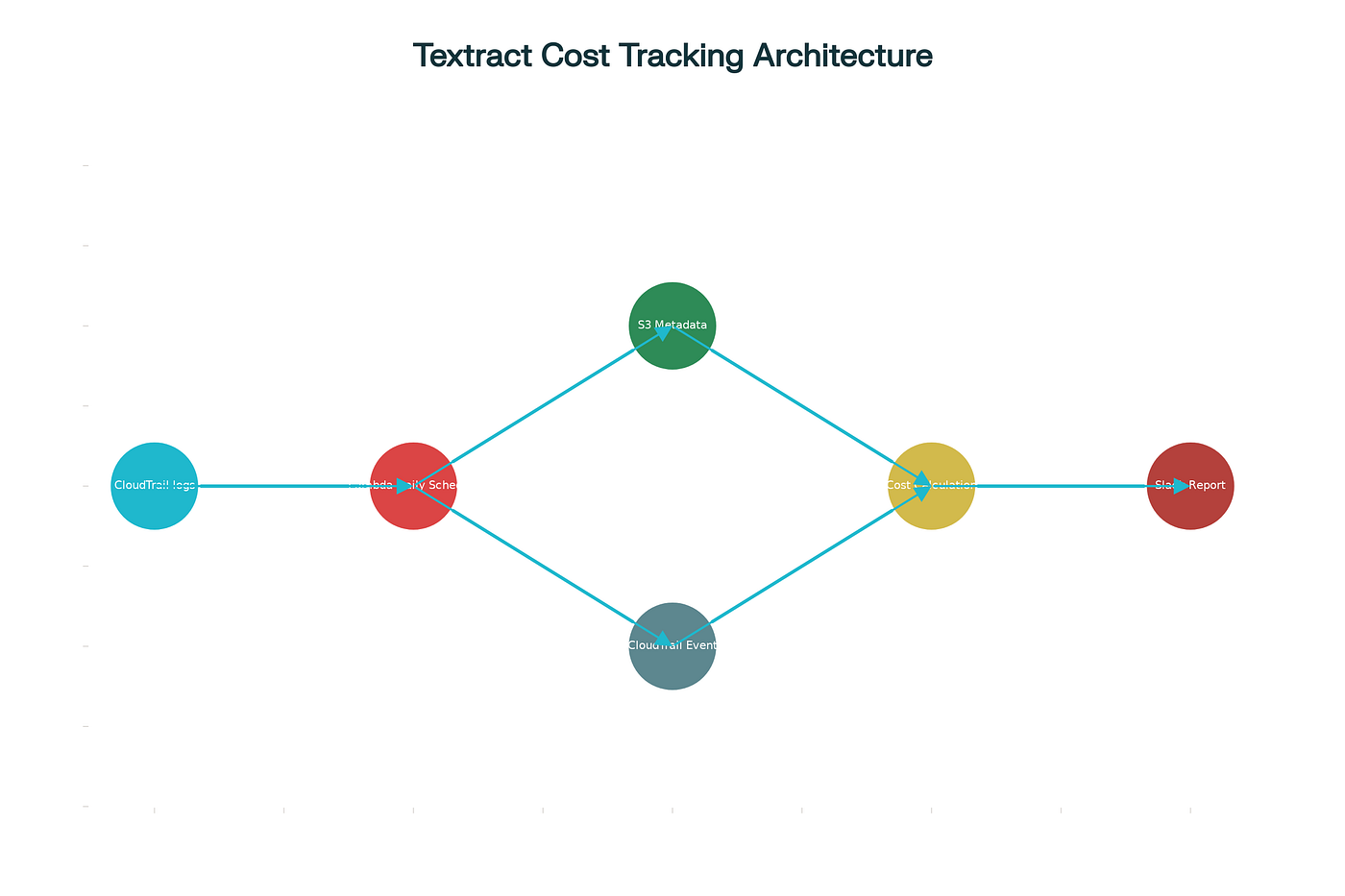
Textract Cost Tracking Architecture: CloudTrail events flow through a Lambda function that correlates with S3 metadata to calculate costs and post results to Slack
The Challenge: Limited Textract Logging
AWS CloudTrail logs Textract API calls, but with significant limitations. For privacy and security reasons, CloudTrail deliberately excludes certain request and response parameters. Specifically in our case our team used StartDocumentAnalysis API .
What CloudTrail logs :
- API call metadata (who made the call, when, from which IP)
- S3 bucket name and document key
- Feature types requested (TABLES, FORMS, etc.)
- Job ID for asynchronous operations
What CloudTrail does NOT log:
- Number of pages in the document
- Image bytes or document content
- Response data like bounding boxes
- Actual processing costs
This means that while you can see who initiated document analysis and which document was processed, you cannot directly determine how much it cost without additional work.
Understanding Textract Pricing
Amazon Textract charges based on pages processed and features used:
AnalyzeDocument API (0–1M pages per month):
- Tables extraction: $15 per 1,000 pages ($0.015 per page)
- Forms extraction: $50 per 1,000 pages ($0.050 per page)
- Combined features: Costs are additive ($0.065 per page for both)
For asynchronous processing via StartDocumentAnalysis, the same per-page rates apply. When multiple features are requested simultaneously (e.g., both TABLES and FORMS), both charges apply to each page processed.

The Solution: Lambda-Based Cost Tracking
The solution involves creating an AWS Lambda function that bridges the gap between CloudTrail logs and actual costs. Here’s how it works:
Architecture Overview
The solution combines CloudTrail, Lambda, and S3 metadata to close Textract’s cost visibility gap. Here’s how the flow works end to end:
- CloudTrail Event Capture:
CloudTrail continuously records every
StartDocumentAnalysisAPI call, capturing who triggered it, when, and for which document. These logs become the backbone of our cost-tracking pipeline. - Lambda Function Execution: A scheduled AWS Lambda function (usually running once a day) queries CloudTrail for all Textract events within the previous 24 hours. This automation ensures teams get a daily snapshot of exactly what was processed.
- Metadata Retrieval (and the Catch):
For each event, the Lambda retrieves the document’s page count from its S3 object metadata.
You could use a PDF library like PyMuPDF to calculate the number of pages dynamically — but that approach is expensive and inefficient at scale. Every file read adds compute time and cost, especially if you’re dealing with hundreds or thousands of documents.
A far better approach is to have your uploading application record the page count upfront as custom S3 user defined metadata (e.g.,
x-amz-meta-pagecount). This simple design choice dramatically improves performance and reduces cost. - Cost Calculation:
Using the retrieved feature types (e.g.,
TABLES,FORMS) and page count, the Lambda calculates the actual processing cost per document based on Textract’s pricing tiers. - Slack Notification: Finally, the results are neatly formatted into a Slack message and sent to your team’s FinOps or engineering channel — creating immediate visibility into who processed what, and how much it cost.
Key Implementation Details
Retrieving Page Count from S3 Metadata
Since CloudTrail doesn’t log page counts, the solution stores this information as custom S3 metadata when documents are uploaded. The Lambda function retrieves this using the head_object API call:
def get_page_count_from_metadata(bucket, key):
    head = s3.head_object(Bucket=bucket, Key=key)
    metadata = head.get("Metadata", {})
    page_count = int(metadata.get("pagecount", 0))
    return page_count
This approach leverages S3’s user-defined metadata feature (x-amz-meta-pagecount), which allows storing custom attributes alongside objects.
Querying CloudTrail Events
The Lambda function uses CloudTrail’s lookup_events API to retrieve all StartDocumentAnalysis events within a specific time window:
params = {
    "LookupAttributes": [
        {"AttributeKey": "EventName", "AttributeValue": "StartDocumentAnalysis"}
    ],
    "StartTime": start_time,
    "EndTime": end_time,
    "MaxResults": 50
}
resp = cloudtrail.lookup_events(**params)
This paginated approach handles large volumes of events efficiently.
Cost Calculation Logic
For each CloudTrail event, the function:
- Extracts the S3 bucket and object key from
requestParameters.documentLocation.s3Object - Retrieves feature types from
requestParameters.featureTypes(e.g., ["TABLES", "FORMS"]) - Fetches page count from S3 metadata
- Calculates cost based on pricing tiers
table_cost = pages * (15/1000) if "TABLES" in feature_types else 0
form_cost = pages * (50/1000) if "FORMS" in feature_types else 0
total_cost = table_cost + form_cost
Error Handling and Data Quality
The solution includes important safeguards:
- Skip failed API calls: Checks for
errorCodein CloudTrail events and excludes failed operations - Handle missing metadata: Returns
None(not zero) when page count metadata is absent, preventing false reporting - User attribution: Extracts user information from
userIdentity.arnfor per-user cost tracking
Slack Integration for Visibility
Rather than requiring teams to check dashboards, the solution proactively sends formatted reports to Slack using webhooks:
message = f"*Textract Usage Report — {start_time.date()}*\n``````"
http.request(
    "POST",
    SLACK_WEBHOOK_URL,
    body=json.dumps({"text": message}).encode("utf-8"),
    headers={"Content-Type": "application/json"}
)
The report includes:
- User who initiated the analysis
- Document processed
- Number of pages
- Features used (TABLES, FORMS)
- Calculated cost in USD
This creates accountability and enables teams to identify cost anomalies immediately.
import boto3
import json
import os
from datetime import datetime, timedelta
import urllib3

s3 = boto3.client('s3')
cloudtrail = boto3.client('cloudtrail')
http = urllib3.PoolManager()

# Textract pricing (per 1000 pages)
TABLE_RATE = 15 / 1000  # USD
FORM_RATE = 50 / 1000   # USD

# 🔒 Slack Webhook URL
SLACK_WEBHOOK_URL = "your_url"

def get_page_count_from_metadata(bucket, key):
    """Get page count from user-defined metadata 'x-amz-meta-pagecount'."""
    try:
        head = s3.head_object(Bucket=bucket, Key=key)
        metadata = head.get("Metadata", {})
        page_count = int(metadata.get("pagecount", 0))
        return page_count
    except Exception as e:
        print(f"⚠️ Error fetching metadata for {key}: {e}")
        return None  # ⛔ Return None instead of 0 to skip

def lambda_handler(event, context):
    # Time window: previous UTC day
    end_time = datetime.utcnow().replace(hour=0, minute=0, second=0, microsecond=0)
    start_time = end_time - timedelta(days=1)

    print(f"🔍 Fetching Textract StartDocumentAnalysis events from {start_time} → {end_time}")

    events = []
    next_token = None

    # Paginate through CloudTrail lookup
    while True:
        params = {
            "LookupAttributes": [
                {"AttributeKey": "EventName", "AttributeValue": "StartDocumentAnalysis"}
            ],
            "StartTime": start_time,
            "EndTime": end_time,
            "MaxResults": 50
        }
        if next_token:
            params["NextToken"] = next_token

        resp = cloudtrail.lookup_events(**params)
        events.extend(resp["Events"])
        next_token = resp.get("NextToken")
        if not next_token:
            break

    print(f"✅ Found {len(events)} StartDocumentAnalysis events")

    result_table = []
    user_totals = {}

    for evt in events:
        try:
            record = json.loads(evt["CloudTrailEvent"])

            # ⛔ Skip failed API calls
            if "errorCode" in record:
                print(f"⚠️ Skipping failed event ({record['errorCode']})")
                continue

            user_arn = record["userIdentity"]["arn"]
            params = record.get("requestParameters", {})
            s3info = params.get("documentLocation", {}).get("s3Object", {})
            feature_types = params.get("featureTypes", [])
            bucket = s3info.get("bucket")
            key = s3info.get("name")

            if not bucket or not key:
                continue

            pages = get_page_count_from_metadata(bucket, key)
            if pages is None:
                print(f"⚠️ Skipping event due to missing metadata for {key}")
                continue

            table_cost = pages * TABLE_RATE if "TABLES" in feature_types else 0
            form_cost = pages * FORM_RATE if "FORMS" in feature_types else 0
            total_cost = table_cost + form_cost

            result_table.append({
                "user": user_arn.split("/")[-1],
                "document": key.split("/")[-1],
                "pages": pages,
                "features": ",".join(feature_types),
                "cost_usd": round(total_cost, 2)
            })

            user_totals.setdefault(user_arn, 0)
            user_totals[user_arn] += total_cost

        except Exception as e:
            print(f"⚠️ Error processing event: {e}")

    # 🧾 Build Slack message
    if not result_table:
        message = f"No successful Textract StartDocumentAnalysis events found for {start_time.date()}"
    else:
        # Use code block to preserve alignment in Slack
        header = f"{'User':30} | {'Document':45} | {'Pages':>5} | {'Features':15} | {'Cost (USD)':>10}"
        separator = "-" * len(header)
        rows = [
            f"{r['user'][:30]:30} | {r['document'][:45]:45} | {r['pages']:>5} | {r['features'][:15]:15} | ${r['cost_usd']:>9.2f}"
            for r in result_table
        ]
        table = "\n".join([header, separator] + rows)
        message = f"*Textract Usage Report — {start_time.date()}*\n```{table}```"

    print(message)

    # ✅ Send to Slack
    try:
        response = http.request(
            "POST",
            SLACK_WEBHOOK_URL,
            body=json.dumps({"text": message}).encode("utf-8"),
            headers={"Content-Type": "application/json"}
        )
        if response.status != 200:
            print(f"⚠️ Slack post failed: {response.data.decode()}")
    except Exception as e:
        print(f"⚠️ Error sending to Slack: {e}")

    return {"status": "ok", "message": message}

Conclusion
When AWS services lack built-in usage analytics, CloudTrail provides the foundation for custom monitoring solutions. By combining CloudTrail event logs with S3 metadata and Lambda automation, you can create comprehensive cost tracking that fills the visibility gap. This approach not only helps control costs during POCs but establishes patterns that scale to production workloads, giving finance and engineering teams the transparency they need to make informed decisions about AWS resource consumption.
Thanks for reading — Happy Building ! ✨
메타데이터
- post_id
- 1d4e1b056070
- slug
- tracking-and-optimizing-aws-textract-usage-a-cost-control-solution-using-cloudtrail-1d4e1b056070
- url
- https://medium.com/@aadhith/tracking-and-optimizing-aws-textract-usage-a-cost-control-solution-using-cloudtrail-1d4e1b056070
- canonical_url
- https://medium.com/@aadhith/tracking-and-optimizing-aws-textract-usage-a-cost-control-solution-using-cloudtrail-1d4e1b056070
- author_url
- https://medium.com/@aadhith
- status
- ok
- fetched_at
- 2026-07-08 04:28:09