Mermaid: Turning Text Into Powerful Visual Diagrams for Modern Development
In modern software development and technical communication, diagrams play a critical role in explaining systems, workflows, architectures…
Mermaid: Turning Text Into Powerful Visual Diagrams for Modern Development
In modern software development and technical communication, diagrams play a critical role in explaining systems, workflows, architectures, and processes. However, creating diagrams manually using design tools can often be time-consuming, difficult to maintain, and disconnected from the actual codebase or documentation.
This is where Mermaid has become increasingly valuable.
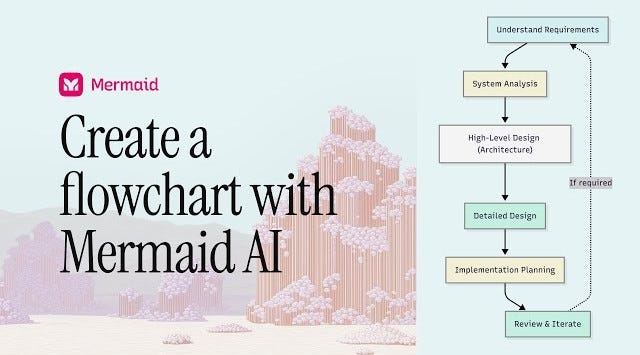
Mermaid is a text-based diagramming tool that allows users to create flowcharts, sequence diagrams, architecture diagrams, and other visual representations using simple syntax. Instead of drawing shapes manually, developers and teams can generate diagrams directly from structured text.
This article explores what Mermaid is, how it works, the benefits of using it, and why it has become an important tool in modern technical workflows.
What Is Mermaid?
Mermaid is an open-source diagramming and visualization tool that enables users to create diagrams using plain text syntax. It is widely used in technical documentation, software engineering, project planning, and system design.
Instead of using graphical interfaces to drag and place elements manually, Mermaid allows users to define diagrams through code-like instructions. These instructions are then automatically rendered into visual diagrams.
Mermaid supports multiple types of visualizations, including:
- Flowcharts
- Sequence diagrams
- Gantt charts
- Class diagrams
- State diagrams
- Entity relationship diagrams
- Journey maps
Because diagrams are text-based, they are easy to version, edit, and integrate into documentation workflows.
How Mermaid Works
Mermaid works by converting structured text syntax into rendered diagrams.
A user writes instructions in Mermaid syntax that describe relationships, flows, or structures. For example, nodes and arrows can define how different components connect within a workflow or system.
Once the syntax is processed, Mermaid interprets the structure and generates the corresponding visual representation automatically.
This rendering process can occur:
- Inside Markdown files
- Documentation platforms
- Developer tools
- Web applications
- Code editors
Because the diagrams are generated dynamically, changes to the text immediately update the visual output.
Why Mermaid Has Become Popular
Mermaid solves several problems associated with traditional diagram creation.
One of the biggest advantages is maintainability. In many projects, manually created diagrams quickly become outdated because updating them requires additional design work. Mermaid keeps diagrams synchronized with documentation because both exist in text form.
Another reason for its popularity is version control compatibility. Since Mermaid diagrams are written as text, they can be stored directly in repositories alongside code. This allows teams to track changes, review updates, and collaborate more effectively.
Mermaid also reduces friction in technical communication. Developers can create diagrams without switching to separate design tools, improving workflow efficiency.
Benefits of Using Mermaid
One of the most important benefits of Mermaid is simplicity. Developers can generate complex diagrams using lightweight syntax instead of manually arranging shapes and connectors.
It also improves collaboration. Since diagrams are text-based, multiple contributors can edit and review them using the same workflows already used for code and documentation.
Another major advantage is automation. Diagrams can be generated dynamically within documentation systems, ensuring consistency across projects.
Mermaid also enhances readability. Visual representations often communicate architecture and workflows more effectively than long textual explanations.
For teams practicing documentation-driven development, Mermaid provides a practical way to keep technical visuals updated and integrated with project documentation.
Common Use Cases of Mermaid
Mermaid is widely used across software engineering and technical domains.
In system architecture documentation, it helps visualize service interactions and infrastructure layouts. In workflow automation, it illustrates process flows and decision paths. In project management, it can generate Gantt charts and planning diagrams.
Developers also use Mermaid for:
- API flow visualization
- Database relationship diagrams
- CI/CD pipeline documentation
- AI agent workflow representation
- Technical onboarding materials
Its flexibility makes it suitable for both simple and highly complex systems.
How Mermaid Fits Into Modern Development Workflows
Modern development increasingly emphasizes:
- Documentation as code
- Infrastructure as code
- Automation and reproducibility
Mermaid aligns perfectly with these principles because diagrams become part of the development workflow rather than external assets.
It integrates well with:
- GitHub
- GitLab
- Markdown-based documentation systems
- Developer portals
- Static site generators
This allows teams to embed living diagrams directly within technical documentation.
Mermaid in AI and System Design
As AI systems become more complex, visualizing workflows has become increasingly important. Mermaid is often used to represent:
- AI pipelines
- Agent workflows
- Retrieval systems
- LangGraph architectures
- Automation flows
Its ability to quickly generate structured diagrams makes it valuable for explaining modern AI systems clearly.
Limitations and Considerations
While Mermaid is powerful, it is not intended to replace advanced design software for highly customized visuals.
Complex diagrams may require careful structuring to maintain readability. Additionally, users must learn Mermaid syntax, although it is relatively lightweight compared to traditional programming languages.
Despite these considerations, Mermaid remains highly effective for technical and operational documentation.
The Bigger Picture
Mermaid reflects a broader movement toward developer-centric tooling where visual communication becomes integrated into engineering workflows rather than treated as a separate task.
As systems become increasingly complex, tools that simplify understanding and collaboration will continue to grow in importance.
Conclusion
Mermaid transforms the way technical diagrams are created and maintained. By converting structured text into dynamic visualizations, it bridges the gap between documentation and system design.
For developers, architects, and technical teams, Mermaid offers a fast, scalable, and maintainable way to communicate ideas visually. In an era where clarity and collaboration are essential, Mermaid has become far more than a diagramming tool — it has become an integral part of modern technical communication.
메타데이터
- post_id
- 1d6e8f810a45
- slug
- mermaid-turning-text-into-powerful-visual-diagrams-for-modern-development-1d6e8f810a45
- url
- https://medium.com/@erharshraj/mermaid-turning-text-into-powerful-visual-diagrams-for-modern-development-1d6e8f810a45
- canonical_url
- https://medium.com/@erharshraj/mermaid-turning-text-into-powerful-visual-diagrams-for-modern-development-1d6e8f810a45
- author_url
- https://medium.com/@erharshraj
- status
- ok
- fetched_at
- 2026-06-09 15:37:30