User-Centred Design
User-centred design process enables you to look at every aspect of your product’s design through the lens of the user and optimise it in…
User-Centred Design
User-centred design process enables you to look at every aspect of your product’s design through the lens of the user and optimise it in such a way that it solves the user’s pain points and helps him/her achieve the user goals.
This process of user-centred design starts with the fundamentals of design, which are:
- The basics of UX design
- Conceptual design
- Information architecture
- Interaction design
- Visual design
UX Design
UX design, is a combination of the user needs, the business goals, and the technical constraints. These three together determine the design of your product.
Bad UX design: for example long forms, reset buttons next to the submit buttons makes the user experience really bad.

Reset button next to submit button
The following two aspects are very important for a good UX:
- Usability: The tasks the user needs to perform to achieve his/her user goals, and the effort required for these tasks.

Ease of doing & Amount of Effort— Usability
- Delight: The extent of enjoyment the user gets while using a product.
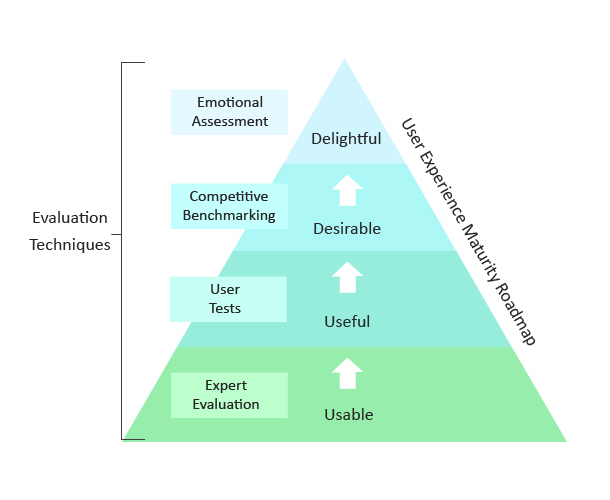
Make your product indispensable & simple— Delight
How to measure UX? Conversion could be one of the parameter. It varies as per the industry.
Conceptual design
Conceptual design is the first element of UX design, and the very first step of the product design process. The conceptual design of a product gives a basic description of what a product would do, how it would do it, and what it would look like. It describes the processes and interactions of the product.
working on an ‘Appointment scheduling app’
(1) Task: Create a new appointment
(2) Objects: Calendar, Contacts, Reminder
(3) Actions and Attributes of Objects: Calendar — book an appointment at a date and time by selecting contacts
(4) Steps: (a) User goes to contact list (b) User selects the contacts © User clicks ‘Book an appointment with the contacts’ (d) User selects free time slots available for the contact (e) Both user and contact get notification of appointment
Information Architecture
After developing the conceptual design for your product, you need to develop its information architecture (IA). For a software product, this is what defines the structure of the functionalities of your product. The IA of your product should be such that it makes it easy for the user to navigate your product and achieve the user goals.
Interaction Design
After information architecture comes interaction design. This element of UX determines how the user would interact with your product. The interaction design of your product should be well-thought out and each step should be logically sound, so that user has a great and seamless interaction with your product and fulfils the user goal he/she set out to achieve.
The interaction design gives details about each step the user would take while interacting with your product and the way the product would react at each of these points. The user can interact with a product through different ways such as a click, hover, drag, type, swipe or tab.
Interaction design can be developed in the form of flowcharts and wireframes:
- Flowcharts: They specify the flow of key tasks that the user would perform with your product
- Wireframes: They are the skeletal frameworks of your product
Visual Design
Visual design is an element of UX that focuses not on what your product does or how it does it, but on how your product looks. It is concerned with enhancing the usability of your product through colours, shapes, and typography.
There are various design principles which describe how humans visually perceive objects. These are as follows:
- Gestalt principles:
- Gestalt principle of proximity: This principle states that the brain perceives objects that are close together as more related than objects that are farther apart.
- Gestalt principle of similarity: This principle states that the brain perceives objects with similar characteristics as more related than objects which don’t share similar characteristics.
- Principle of visual hierarchy: Visual hierarchy is determined by colour and size, as the human brain assumes that bigger objects are more important than smaller ones.
There are a few differences between designing for web and mobile:
- Mobile has a limited amount of real estate, whereas web has more space to fit more information on one page. Therefore, designing for mobile first and then expanding it to the web is a wiser choice than retrofitting web into mobile.
- User interaction on mobile happens through touch and taps, whereas on web, it happens through clicks.
메타데이터
- post_id
- 1d7e54ddfc0a
- slug
- user-centred-design-1d7e54ddfc0a
- url
- https://medium.com/designer-in-transit/user-centred-design-1d7e54ddfc0a
- canonical_url
- https://medium.com/designer-in-transit/user-centred-design-1d7e54ddfc0a
- author_url
- https://medium.com/@jain-pranjal
- status
- ok
- fetched_at
- 2026-06-14 11:28:49