Hosting My GitHub Portfolio Page on a Custom IONOS Domain: A Detailed Guide
The Domain Name System (DNS) is a fundamental technology that runs behind the internet, converting user friendly domain names into numeric…
Hosting My GitHub Portfolio Page on a Custom IONOS Domain: A Detailed Guide
The Domain Name System (DNS) is a fundamental technology that runs behind the internet, converting user friendly domain names into numeric IP addresses that web servers recognize. Understanding DNS resolution is crucial when deploying websites, especially when hosting a site through platforms such as GitHub Pages with custom domains registered through providers like IONOS, Go Daddy.
In this blog, I will explain DNS concepts, terminologies, and illustrate how I successfully configured my GitHub Pages portfolio to work seamlessly with a custom domain purchased via IONOS so that you can also host using the same process.
Understanding DNS and Its Significance
Whenever you enter a URL in a web browser, DNS resolution occurs through a series of hierarchical queries to locate the web server that hosts your requested website. This structured resolution process ensures efficient and accurate website retrieval.
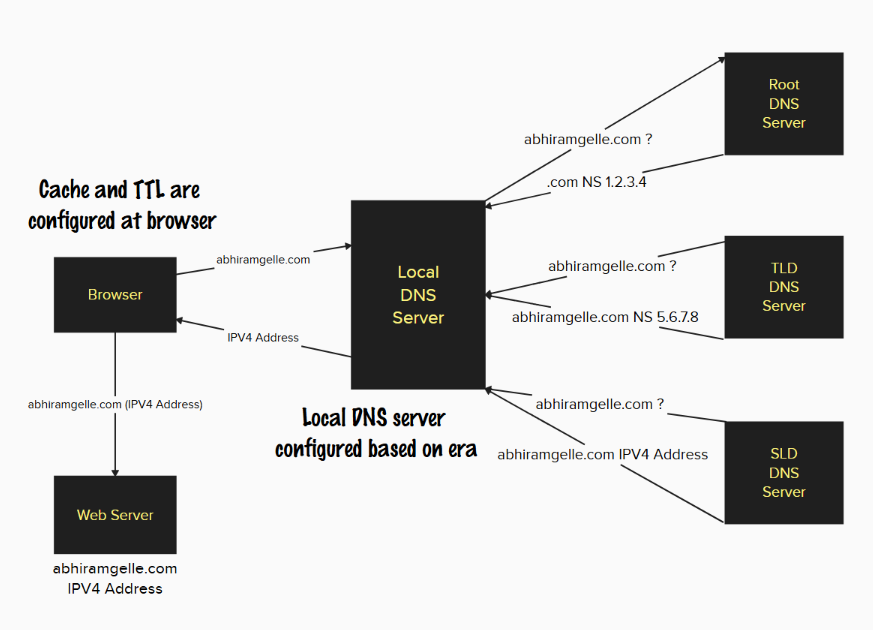
Here is the step-by-step DNS resolution process that takes place:
-
Browser Cache Check: Initially, the browser searches its cache memory to find previously stored DNS records for the requested domain. If a valid record exists (based on a predefined Time-to-Live, or TTL), it connects directly to the web server.
-
Local DNS Server Query: If the browser cache does not contain the necessary information, the request is forwarded to local DNS server, typically managed by Internet Service Provider (ISP). The local DNS server then checks its own cache.
-
Root DNS Server Interaction: If the local DNS server lacks the required record, it contacts a Root DNS Server managed by the Internet Corporation for Assigned Names and Numbers (ICANN). Root servers do not directly store domain records; rather, they direct the request to the appropriate Top-Level Domain (TLD) servers (.com, .org, etc.).
-
TLD Server Query: The TLD server, supervised by the Internet Assigned Numbers Authority (IANA, a department within ICANN), identifies the authoritative server (Second-Level Domain or SLD server) associated with your specific domain name.
-
Second-Level Domain (Registrar) DNS Server: The authoritative DNS server, typically managed by domain registrar (such as IONOS, GoDaddy, etc.), returns the precise IP address where your website is hosted.
-
Final IP Address Resolution: The resolved IP address is cached by the local DNS server and sent back to your browser, allowing your browser to finally request and load the web page from the hosting server.
Key DNS Terminologies
A solid understanding of essential DNS terminology simplifies the domain configuration process:
Domain Registrar — A company accredited to register and manage domain names, providing a platform to configure DNS settings. Common registrars include IONOS, GoDaddy, Namecheap, and Amazon Route 53.
DNS Records — Entries within DNS that map domain names to IP addresses or other domain names. Important types of DNS records include:
- A Record: Connects a domain name to an IPv4 address.
(`mydomain.com → 192.168.1.1`)- AAAA Record: Similar to A Records, but maps domains to IPv6 addresses.
- CNAME Record (Canonical Name): Points one domain or subdomain to another domain.
(`www.mydomain.com → mydomain.com`)- NS Record (Name Server): Specifies which servers hold authoritative records for a domain.
— — — — — — — — — — — — — — — — — — — — — — — — — — — — — — — — — — — — — —
Abstract Flowchart To Understand The Process:
— — — — — — — — — — — — — — — — — — — — — — — — — — — — — — — — — — — — — —
Step-by-Step: Hosting GitHub Pages on an IONOS Domain
I successfully deployed my personal portfolio website using GitHub Pages, linked to a custom domain purchased from IONOS.

Below are the exact steps I followed to achieve this integration:
Step 1: Set Up GitHub Page
-
Create a GitHub Repository: Sign into your GitHub account and create a new repository named appropriately.
-
Upload Website Content: Push your static website files (HTML, CSS, JavaScript, images) into the repository.
-
Enable GitHub Pages: Navigate to your repository’s settings, click on the ‘Pages’ option, select the branch containing your website files (typically
mainormaster), and save the settings. GitHub will then generate a website URL:

Step 2: Add Custom Domain to GitHub Pages
- Return to the GitHub repository’s Pages settings.
- Enter your purchased custom domain (
abhiramgelle.com) in the ‘Custom domain’ field. - Click ‘Save,’ allowing GitHub to automatically create a CNAME file that helps route requests properly.
Step 3: DNS Configuration in IONOS
- Sign into your [IONOS account] and select the domain you intend to configure. Navigate to the DNS settings for your domain.
Add these essential DNS records precisely using Add Record option in configured domain:
- A Records (for root domain resolution)
- CNAME Record (for ‘www’ subdomain)


Step 4: Propagation and HTTPS Enablement
After configuring DNS settings, please allow some time (usually between 15 minutes to several hours, occasionally up to 24 hours) for changes to propagate across global DNS servers.
Once propagation is complete, GitHub Pages will automatically issue a secure HTTPS certificate. You can enforce HTTPS connections by enabling the option ‘Enforce HTTPS’ in your GitHub Pages settings.
— — — — — — — — — — — — — — — — — — — — — — — — — — — — — — — — — — — — — —
Conclusion
By understanding DNS fundamentals and following the structured steps outlined above, anyone can easily integrate a custom IONOS domain with GitHub Pages to professionally showcase respective portfolio or personal projects. Proper DNS management and configuration not only improve our website’s reliability and accessibility but also significantly enhance our online presence.
메타데이터
- post_id
- 1dd8bc069bce
- slug
- hosting-my-github-portfolio-page-on-a-custom-ionos-domain-a-detailed-guide-1dd8bc069bce
- url
- https://medium.com/@abhiramgelle738/hosting-my-github-portfolio-page-on-a-custom-ionos-domain-a-detailed-guide-1dd8bc069bce
- canonical_url
- https://medium.com/@abhiramgelle738/hosting-my-github-portfolio-page-on-a-custom-ionos-domain-a-detailed-guide-1dd8bc069bce
- author_url
- https://medium.com/@abhiramgelle738
- status
- ok
- fetched_at
- 2026-07-25 08:33:11