How to make RVX App with Anddea patches
Get anddea patches by changing sources in the RVX manager app. Here is the guide to do that.
How to make RVX App with Anddea patches
Get anddea patches by changing sources in the RVX manager app. Here is the guide to do that.
Copy/paste, you’re welcome.
Repository: https://api.github.com
Patches organization: anddea
Patches source: revanced-patches
Integrations organization: anddea
Integrations source: revanced-integrations
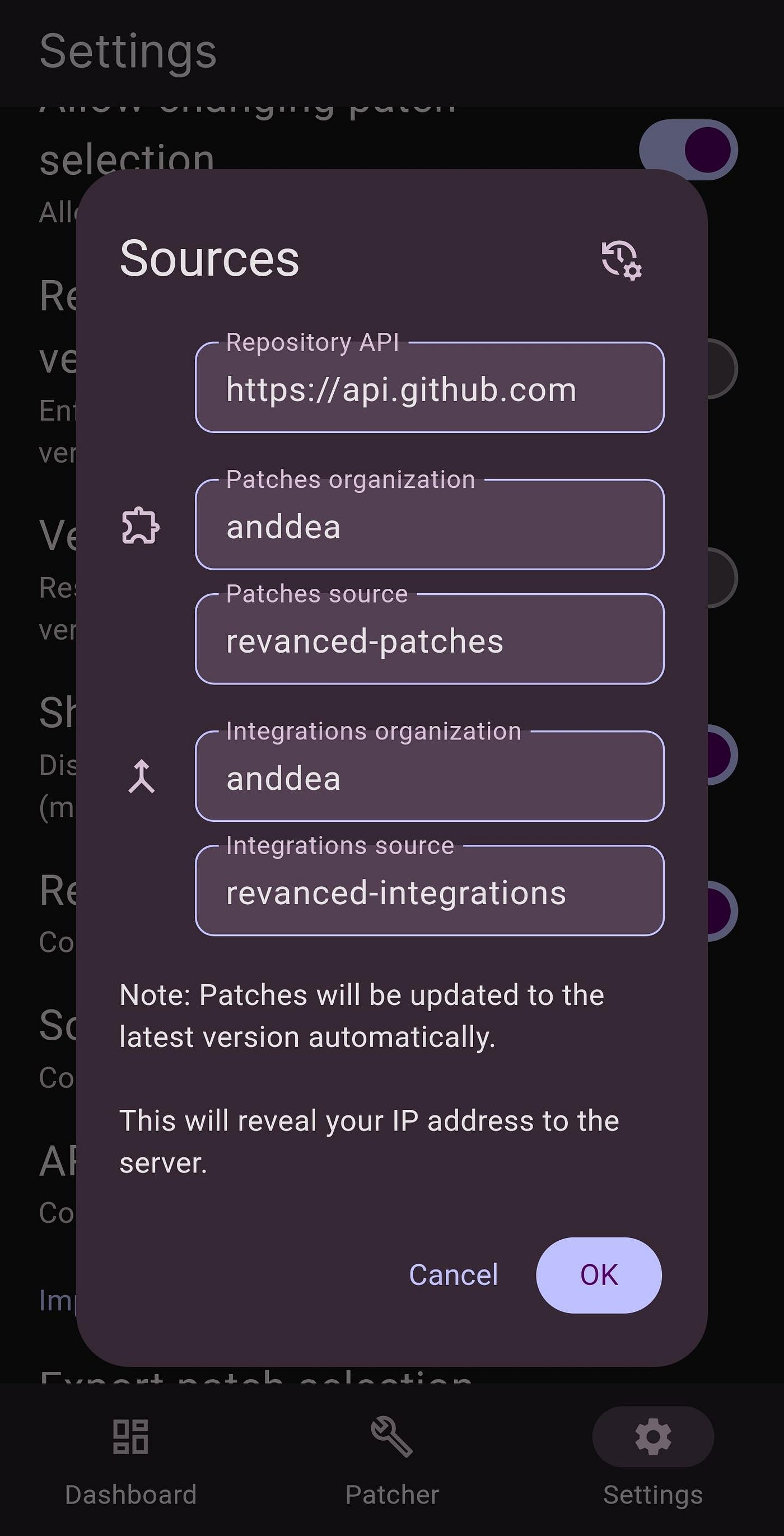
Use above settings to make a ReVanced Extended App (RVX) and then Use this guide to build APK by youself
Since inotia is back, I'm glad he merged some of my and ReVanced code, but still there are things that are unique to this repo (click on detail/spoiler elements for each app under "Unique features" at the end).
Close all your issues from this repo (some of them are implemented already, you can convert remaining open and relevant issues to inotia's repo).
Unique features:
Crossed out options mean that they already was contributed and merged. Please let me know if you find any mistakes that need to be fixed.
Icons:
Custom branding (YT and YTM)
- AFN Blue
- AFN Red
- Vanced Light
- Vanced Dark
- Other
- Icons refined
- Animation for MMT (others didn’t provide animation files)
- Player overlay buttons
- Rounded
- Thin (prev. Outline) — refined
- Shorts overlay buttons
- Outline — refined
- Outline circled
- TikTok
- Preferences
- Design fixes
- Custom wordmark header
- Force snackbar theme
- Force hide chapters in player (implemented in settings)
- Force hide fullscreen button in player (implemented in settings)
- Hide live chat replay
- Hide live chat messages
- Hide Shorts comment button if disabled
- Hide Shorts live header
- Hide player buttons background (it is buggy for some people but still some people wanted it to be implemented) (removed)
- Hide videos based on duration
- Hide videos based on views (with views more than specified value)
- Overlay buttons
- Adjustable margin option (less buggy)
- Speed button (on long press second time it reverts back to default speed)
- Time ordered playlist from all channel videos
- Premium header switch in settings
- Search bar
- Settings patch
- Custom ReVanced Extended preference name
- Move RVX settings position in Settings
- Start page (more options):
- “Watch later” playlist
- Less important
- Gaming
- Live
- Music
- Movies
- Sports
- Browse channels
- Swipe controls (adjustable swipe area)
- Tuck away preferences (implemented in settings)
- Translations (remove unused languages and add custom language)
- Whitelist
메타데이터
- post_id
- 1e04f51ec0d0
- slug
- how-to-make-rvx-app-with-anddea-patches-1e04f51ec0d0
- url
- https://medium.com/@rvxapp/how-to-make-rvx-app-with-anddea-patches-1e04f51ec0d0
- canonical_url
- https://medium.com/@rvxapp/how-to-make-rvx-app-with-anddea-patches-1e04f51ec0d0
- author_url
- https://medium.com/@rvxapp
- status
- ok
- fetched_at
- 2026-06-20 20:29:01


