The WordPress Plugin Update Notice Is Shouting at the Wrong Person
An amber row under every outdated plugin, for every admin, including the client you told not to run updates. Here is how to hide it, the…
The WordPress Plugin Update Notice Is Shouting at the Wrong Person
An amber row under every outdated plugin, for every admin, including the client you told not to run updates. Here is how to hide it, the snippet that quietly breaks your site instead, and the one condition that makes hiding it defensible.
Hide Plugin Update Notice for WordPress
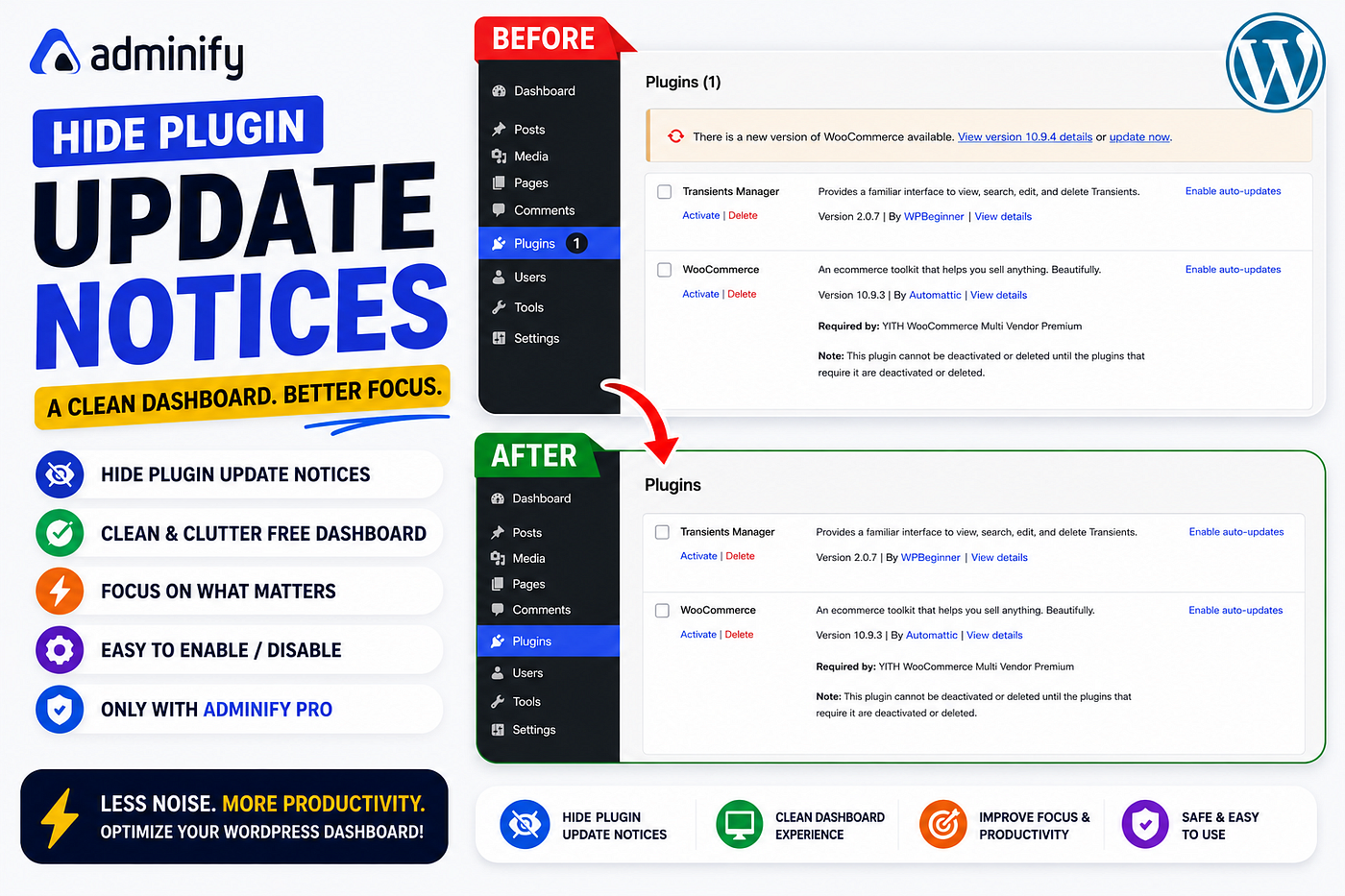
A month after handover, your client opens the Plugins screen. Under WooCommerce there is an amber row: there is a new version available, view version 10.9.4 details, or update now. Under the next plugin, the same row. Under the one after that, again. The Plugins menu item carries a count badge.
There is no dismiss button. There is not supposed to be. WordPress wants those updates run, and it is right to.
The trouble is who is reading it. On a maintained site, updates belong to whoever wrote the maintenance contract. They go to staging, they get checked against a compatibility list, they ship in a scheduled window with a rollback plan. The notice is written for a solo site owner who does their own updates, and on an agency build it lands in front of the one person who was explicitly asked not to touch them.
I have watched both failure modes. A client who learns, over months of amber rows, that the warnings on their dashboard are background noise, which is a habit that will cost somebody dearly on the day a real one appears. And a client who takes the row at face value, clicks update now on a live store on a Friday evening, and hits an extension conflict that nobody catches until Monday.
So there are two things tangled together here: the update, which is real work owned by a real person, and the notice, which is a reminder pointed at the wrong desk. You do the update. That is not in question. The reminder does not have to live on your client’s screen while you do it.
Now, the part where most articles about this go wrong. Search for how to remove plugin update notifications and you will be handed this:
add_filter('site_transient_update_plugins', '__return_null');The rows do disappear. Not because you hid them, but because you emptied the transient WordPress keeps update results in, so core no longer knows that any plugin has an update pending. The dashboard is quiet because the site has gone blind. I have inherited two sites carrying that line, both of them a year or more behind on security releases, both of them with a beautifully clean admin. That is not a productivity tip. It is a slow outage with good manners.
The honest version starts with what actually prints the row. wp_plugin_update_rows() runs on admin_init at priority 20 and attaches a wp_plugin_update_row callback to after_plugin_row_{$file} for each outdated plugin. Unhook the parent from an earlier priority on the same hook:
add_action('admin_init', function () {
    remove_action('admin_init', 'wp_plugin_update_rows', 20);
}, 1);
Rows gone, update check intact. Then the count badge is still sitting on the Plugins menu, because it never came from the rows. It is built by wp_get_update_data(), so it needs its own filter:
add_filter('wp_get_update_data', function ($data) {
    $data['counts']['plugins'] = 0;
    $data['counts']['total']   = 0;
    $data['title'] = '';
    return $data;
});
Now do the theme notice. Now core. You are maintaining a mu-plugin that travels to every build, and any site where you missed a hook has a half cleaned dashboard.
I tested the settings-panel route with Adminify Pro.
What actually changed:
-
One toggle. Productivity → Hide Admin Notices → Enable. The plugin update rows clear for every plugin, for every admin, on every screen.
-
The badge goes with them. No second filter, no
wp_get_update_datacall to remember. -
The update check keeps running. This is the difference that matters. The site still knows what is pending, so my maintenance report is still accurate. Nothing is hidden from me, only from the person who was not going to act on it anyway.
-
The rest of the pile-up too. Plugin promos, review requests, the whole stack that accumulates on WordPress admin screens, gone.
-
Nothing to carry. No snippet to re-paste after a migration, and it survives core updates.
The condition I put on all of it: hiding the plugin update notice does not update the plugin. Your versions are unchanged. Whatever security release you are behind on is still unapplied, and turning off the reminder does not buy a single day of safety. This is defensible when the update has an owner and a schedule, and indefensible when it does not. On a site nobody maintains, that amber row is the only warning system anyone will ever see, and hiding it is how a site ends up eleven security releases behind with a dashboard that looks finished. Decide who owns updates. Write it down. Then clean up the screen.
Handled in that order, the client gets a site that reads as finished and the updates get run by somebody qualified to run them. Handled in the other order, you have built a quiet dashboard on an unmaintained site, which is worse than the amber row ever was.
Step-by-step: How to hide plugin update notices in WordPress
adminify #WordPress #notices #plugin
메타데이터
- post_id
- 1e4aaa409fa7
- slug
- the-wordpress-plugin-update-notice-is-shouting-at-the-wrong-person-1e4aaa409fa7
- url
- https://medium.com/@lucasfenw/the-wordpress-plugin-update-notice-is-shouting-at-the-wrong-person-1e4aaa409fa7
- canonical_url
- https://medium.com/@lucasfenw/the-wordpress-plugin-update-notice-is-shouting-at-the-wrong-person-1e4aaa409fa7
- author_url
- https://medium.com/@lucasfenw
- status
- ok
- fetched_at
- 2026-07-13 06:23:13