Why I Built My Own Calendar Bridge
Building a Reliable Calendar Bridge Between Apple Calendar and Exchange Using EventKit and SMTP
Why I Built My Own Calendar Bridge
Building a Reliable Calendar Bridge Between Apple Calendar and Exchange Using EventKit and SMTP
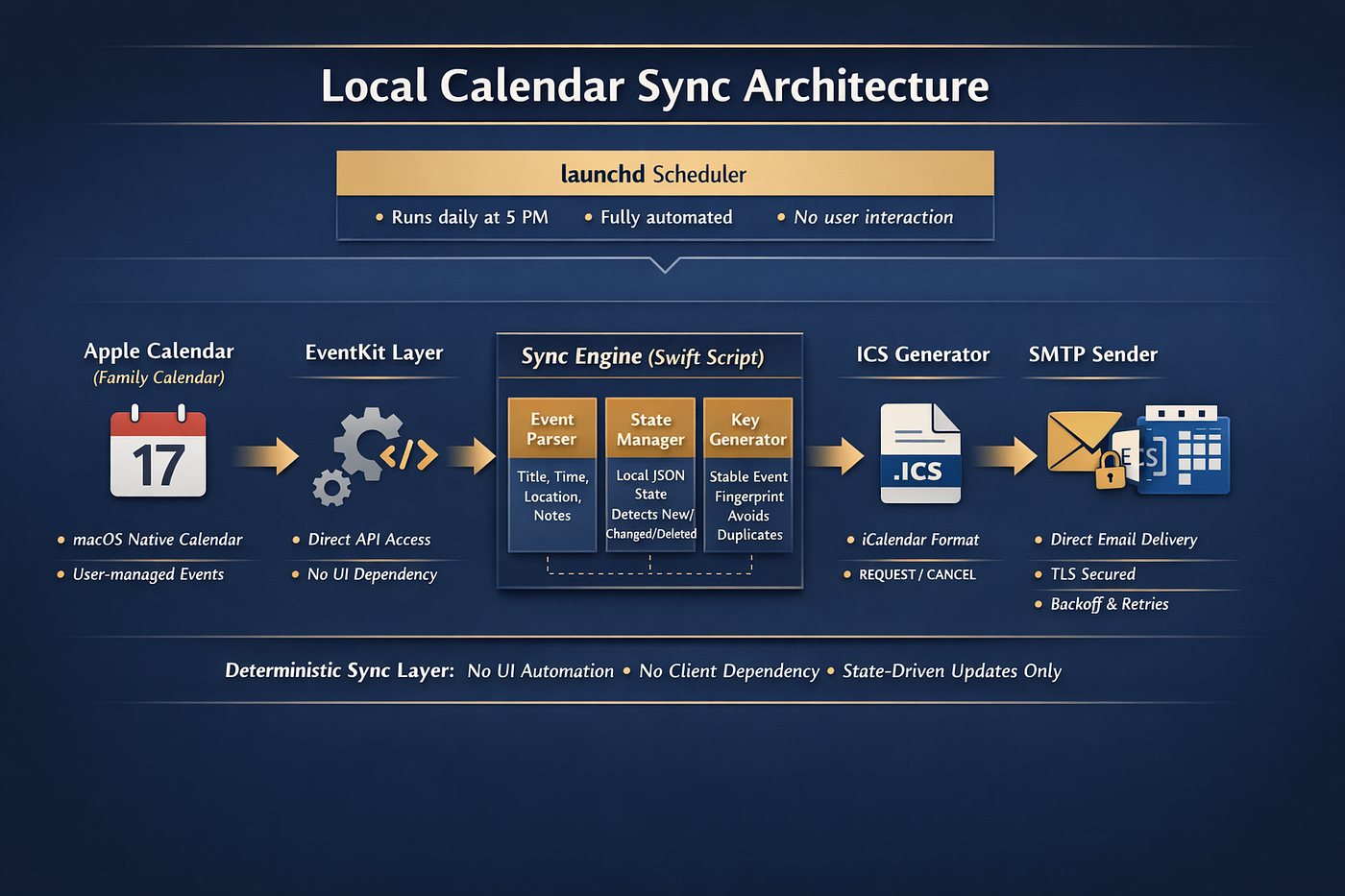
Source: Author and GPT
(Link to repository at bottom of article)
I ran into a problem that sounds simple until you actually try to solve it: I wanted events from the Family calendar on my Mac to flow reliably into another calendar environment through email invites, without depending on fragile manual forwarding, broken sync behavior, or consumer-grade calendar sharing. In theory, this should be easy. In practice, it turned into one of those classic technology gaps where mainstream tools almost work, but not consistently enough to trust.
The core issue was reliability. Native calendar syncing across ecosystems can be inconsistent, especially when one side is Apple Calendar and the other side ultimately depends on business email and scheduling infrastructure. Sometimes invites go through, sometimes they do not. Sometimes updates are reflected, sometimes duplicate events appear, and sometimes previously sent events get treated as new all over again. That is annoying for personal use, but it becomes unacceptable when the goal is to create a dependable daily automation that people can stop thinking about.
So, I built a lightweight calendar bridge that runs locally on my Mac every day at 5 PM. Instead of trying to force AppleScript or flaky UI automation to behave, the script uses Apple’s native EventKit framework to read the Family calendar directly. That matters because EventKit talks to the calendar data layer itself rather than pretending to be a person clicking around the Calendar app. It is faster, cleaner, and much less prone to hanging, timing out, or requiring the app to be open in the foreground.
From there, the workflow is straightforward but deliberate. The script looks ahead a fixed nine-month window, which keeps the scope practical and avoids scanning too far into the future. It reads each event’s title, start time, end time, location, and notes. Then it creates a stable fingerprint for that event so it can tell whether the event is genuinely new, has changed, or has already been sent before. That fingerprinting step turned out to be one of the most important parts of the whole project. Without it, the system can easily resend the same event over and over because calendar identifiers are not always stable enough for cross-run comparison.
Once the script knows what is new or changed, it generates a standard ICS calendar payload and sends it via SMTP email. I used direct SMTP rather than depending on a desktop email client because I wanted the system to work in the background whether Mail or Outlook was open or not. SMTP also gives much more predictable behavior for an unattended daily job. To keep the mail server from getting hammered, I added pacing and retry backoff so sends happen more gradually and can recover from temporary timeouts.
The automation also keeps a local state file. This is what allows it to behave intelligently from one day to the next. On the first run, it can send the current future events in scope. After that, it compares the latest calendar snapshot to the saved state. If an event has not changed, it does nothing. If an event changed, it sends an update. If a previously known future event disappears, it sends a cancellation. That state tracking is what turns a basic export script into an actual synchronization tool.
What I like most about this build is that it is small, understandable, and under my control. There is no dependency on a third-party sync service, no browser automation pretending to be a user, and no need to trust that a desktop app will behave the same way every day. It is just a focused local service: read the Family calendar, determine what changed, send the right invites, and write down what happened for next time.
This project started from frustration, but it ended up becoming a good reminder of how often the best automation is not the fanciest one. Sometimes the right answer is simply to identify the unstable layers, remove them, and build a narrow tool that does exactly one job well. In this case, that meant replacing unreliable sync with a direct, scheduled calendar bridge that finally behaves the way I wanted the whole time.
Architecture Overview
The system runs as a scheduled background job on macOS using launchd. It executes a Swift script that performs three core functions:
- Event extraction via EventKit
- State comparison and change detection
- ICS generation and SMTP delivery
Each component replaces a less reliable abstraction layer with a direct, controlled interface.
1. Event Extraction (EventKit)
Instead of AppleScript or UI automation, the script uses Apple’s native EventKit framework:
let store = EKEventStore()
let calendars = store.calendars(for: .event)
This is critical. AppleScript-based approaches introduce:
- UI dependency
- blocking behavior
- poor performance on large calendars
EventKit operates directly on the calendar database, providing:
- consistent performance
- no UI dependency
- reliable access to structured event data
The script queries a bounded time window:
let end = Calendar.current.date(byAdding: .month, value: 9, to: now)
Limiting to a 9-month horizon prevents excessive scanning and reduces processing time.
2. Stable Event Identity & Change Detection
A key challenge was that calendarItemIdentifier is not stable enough across runs in all environments.
Instead, I constructed a deterministic key:
stableKey = “(title.lowercased())|(startTimestamp)|(endTimestamp)”
This ensures:
- identical events map to the same key across runs
- no dependency on Apple’s internal identifiers
A separate signature tracks changes:
signature = “(title)|(start)|(end)|(location)|(notes)”
This allows:
- unchanged events → ignored
- modified events → trigger update
- removed events → trigger cancellation
State is persisted locally as JSON:
~/Library/Application Support/family_calendar_sync/state.json
This turns a stateless script into a proper synchronization engine.
3. ICS Generation
Each event is converted into a standard iCalendar payload:
BEGIN:VCALENDAR
METHOD:REQUEST
BEGIN:VEVENT
UID:…
DTSTART:…
DTEND:…
SUMMARY:…
END:VEVENT
END:VCALENDAR
Using ICS ensures compatibility with:
- Exchange
- Outlook
- mobile clients
The UID is derived from the stable key, ensuring consistency across updates.
4. SMTP Delivery (Decoupled from Email Client)
Rather than using Mail or Outlook, the script sends directly via SMTP using a Python helper:
s = smtplib.SMTP(host, port)
s.starttls()
s.login(user, password)
s.sendmail(…)
This removes:
- dependency on desktop clients being open
- UI state issues
- inconsistent send behavior
It also enables fully headless execution under launchd.
5. Backoff and Rate Control
SMTP servers will throttle or timeout under burst traffic. To address this:
- fixed delay between sends:
sleep(3)
- exponential backoff retries:
[5, 15, 30] seconds
This prevents:
- connection resets
- dropped emails
- temporary SMTP bans
6. Scheduling with launchd
The system runs daily at a fixed time using a LaunchAgent:
<key>StartCalendarInterval</key>
<dict>
<key>Hour</key><integer>17</integer>
<key>Minute</key><integer>0</integer>
</dict>
This ensures:
- consistent execution time
- no drift (unlike interval-based scheduling)
- no dependency on user interaction
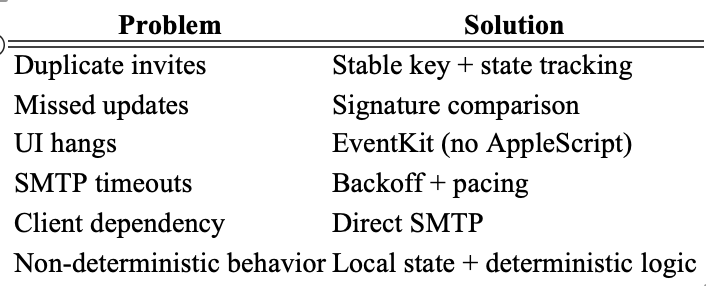
7. Failure Modes Eliminated
This design specifically addresses the issues that triggered the build:
Final Result
The system behaves as a proper synchronization layer:
- First run → seeds all future events
- Subsequent runs → only sends deltas
- Deletions → generate cancellations
- Runs unattended → no UI, no manual steps
It’s not a large system, but it replaces a surprisingly fragile chain of integrations with something deterministic, observable, and under full control.
Repository
Github — daveginsburg / Family-calendar-sync
- README.md
- com.family.calendar.sync.plist
- family_calendar_sync.swift
메타데이터
- post_id
- 1e903cd0996d
- slug
- why-i-built-my-own-calendar-bridge-1e903cd0996d
- url
- https://medium.com/@daveginsburg/why-i-built-my-own-calendar-bridge-1e903cd0996d
- canonical_url
- https://medium.com/@daveginsburg/why-i-built-my-own-calendar-bridge-1e903cd0996d
- author_url
- https://medium.com/@daveginsburg
- status
- ok
- fetched_at
- 2026-06-23 17:05:31