Windows Tokens Explained Simply: The Layer Most Red Teamers Skip
I wish I had this understanding long back when i started AD pen-testing, I knew the attacks. Kerberoasting, pass-the-hash, token theft…
Windows Tokens Explained Simply: The Layer Most Red Teamers Skip
I wish I had this understanding long back when i started AD pen-testing, I knew the attacks. Kerberoasting, pass-the-hash, token theft, privilege escalation — all familiar.
But if someone had asked me:
“What exactly happens inside Windows when a user logs in?”
I wouldn’t have answered 100% cleanly. And I think many professionals are in the same place. We learn attacks first — but skip the layer that actually makes them work
If you do not understand what Windows is creating during login, then many attacks remain half-understood forever. Like: I used to mix up LSASS and tokens a lot, thinking everything sits in LSASS. That was not a clean way to think.
This article is for that exact gap. Not deep kernel internals. Not textbook language. Just the clearest possible direction. May help all, or at least a refresher.
The simplest possible flow
This is the first mind map that made things click for me:
User Login ↓ Logon Session ↓ Access Token ↓ Processes ↓ Access Decision
If this one line becomes clear, many things start making sense.
1. Logon Session
When a user logs in, Windows creates a logon session.
Think of it as:
one login instance of a user
Multiple users → multiple sessions Same user logging twice → multiple sessions
[Logout kills the session]
2. Access Token
This is the most important part. use whoami /all in cmd.exe to find the token values
A token defines:
- who you are (SID).
- what groups you belong to, and SIDs associated to those.
- what you are allowed to do.
Simple way to remember:
Session = login Token = permissions
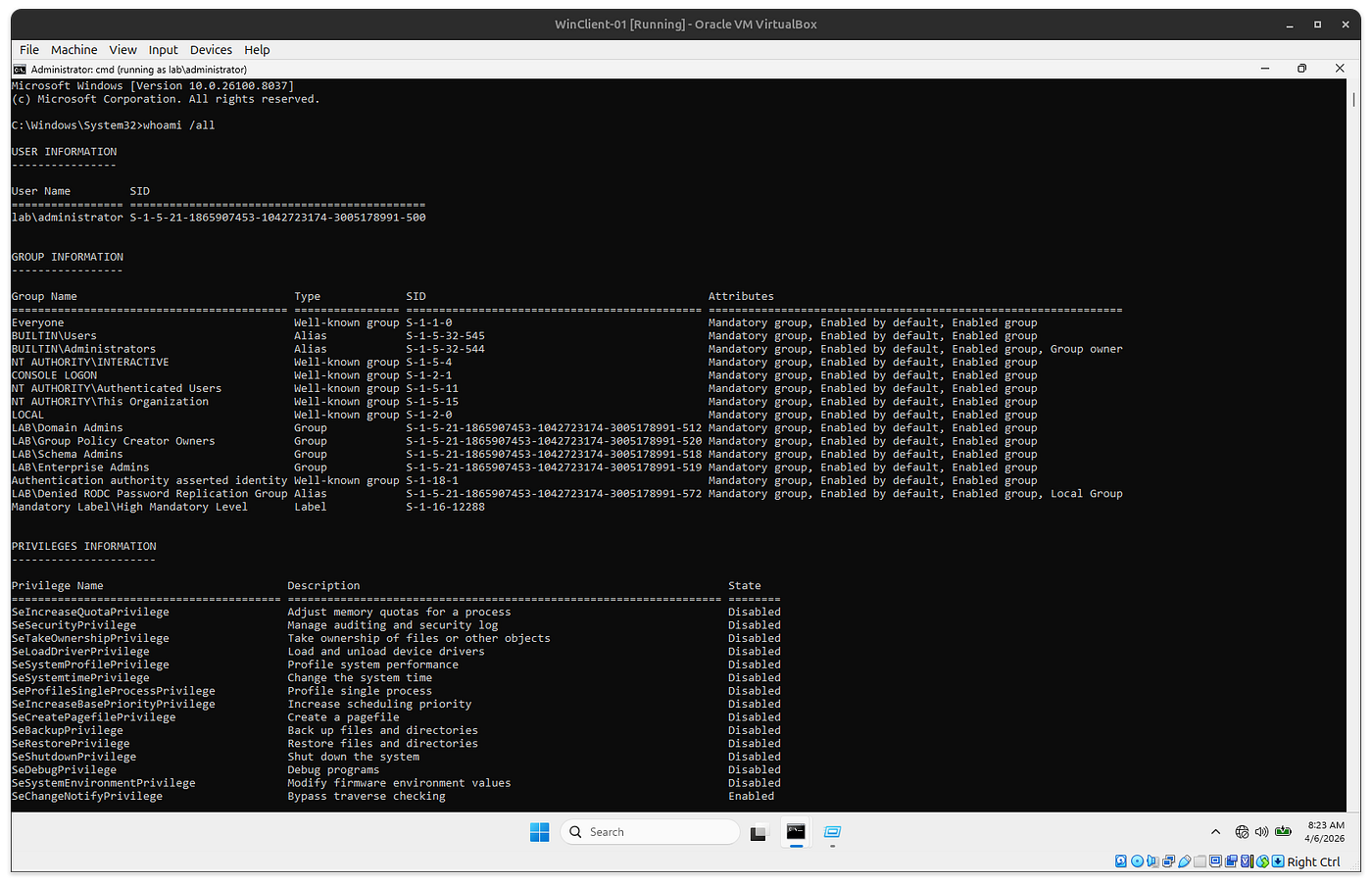
whoami /all
3. Process
Every process runs with a token.
That means:
- cmd.exe
- powershell.exe
- explorer.exe
👉 all carry identity through tokens.
4. Access decision
Windows does not check:
“Are you admin?”
It checks: Token vs Resource → Allow / Deny. thats it.
5. Session–Token Relationship and Isolation
Session A (user1) → Token A → Processes Session B (admin1) → Token B → Processes
When a user logs in, Windows creates a session. That session gets a token, and every process runs using that token. Sessions are kind of container, what and how much can be accessed is token which will be associated with a session.
The important part is Isolation.
- Sessions are separate
- Tokens are tied to their session/process
- Tokens are not shared
One session = primary token only.
Why same machine ≠ same access
If: you are normal user, admin is logged in
You are still not admin
Because: your process has your token, admin process has admin token.
Same machine ≠ same identity
Where things actually live
This cleared a big confusion for me:
Process → token LSASS → credentials Session → context
SYSTEM vs Domain Admin
Another confusion I had, which will have more control in various usecase :
SYSTEM → full control on one machine Domain Admin → control across domain
The real attack chain (simple view)
User access ↓ Better token (Admin/SYSTEM) ↓ Access credentials ↓ Reuse identity ↓ Higher access
The real question to ask
Instead of thinking:
“Admin is logged in, so I’m good”
Think:
“Can I access or use that admin token?”
That changes everything.
Conclusion.
Most of us learn attacks first. But without understanding:
- session
- token
- process
we end up memorizing instead of understanding.Once this layer is clear, things start connecting.
At he end, “This is not advanced research — this is a layer I personally struggled to understand clearly, and I’m writing it the way I wish I had learned it.”
Thanks and Happy Learning.
메타데이터
- post_id
- 1e9c66f7fcc2
- slug
- windows-tokens-explained-simply-the-layer-most-red-teamers-skip-1e9c66f7fcc2
- url
- https://medium.com/@varungreen01/windows-tokens-explained-simply-the-layer-most-red-teamers-skip-1e9c66f7fcc2
- canonical_url
- https://medium.com/@varungreen01/windows-tokens-explained-simply-the-layer-most-red-teamers-skip-1e9c66f7fcc2
- author_url
- https://medium.com/@varungreen01
- status
- ok
- fetched_at
- 2026-07-30 03:08:15




