Python Classes Explained Simply
A beginner’s guide to OOP — from blueprint to running code
Python Classes Explained Simply
A beginner’s guide to OOP — from blueprint to running code
When you start learning Python, you will easily follow through the basics like Variables and Data Types, Basic Data Structures, Control Flow, Functions, etc., without much difficulty. It's because it's easy to interrupt the usage of those as a beginner, and when we reach the term “Python Class,” most people feel lost in jargon, and might have to Google it to understand it better. When we first see self, init, constructors, instances, we might be thinking, What is it actually?
Most tutorials jump straight into the technical details without explaining the why.
In this article, we are going to walk through the Python Class step by step in layman’s language so that even a very biginer shall understand the concept.
Introduction
Python is an object-oriented language, allowing you to structure your code using classes and objects for better organization and reusability. Object Oriented Programming is a way of organizing code that uses objects and classes to represent real-world entities and their behavior. In OOP, an object has attributes thing that have specific data and can perform certain actions using methods.
- Organizes code into classes and objects.
- Supports encapsulation to group data and methods together.
- Enables inheritance for reusability and hierarchy.
- Allows polymorphism for flexible method implementation.
- Improves modularity, scalability, and maintainability.
Above is the theory behind the OOP concepts, but we need to understand that the core idea is to have reusability. As programmers, ideally, we keep our code DRY (Don’t Repeat Yourself).
What is a class?
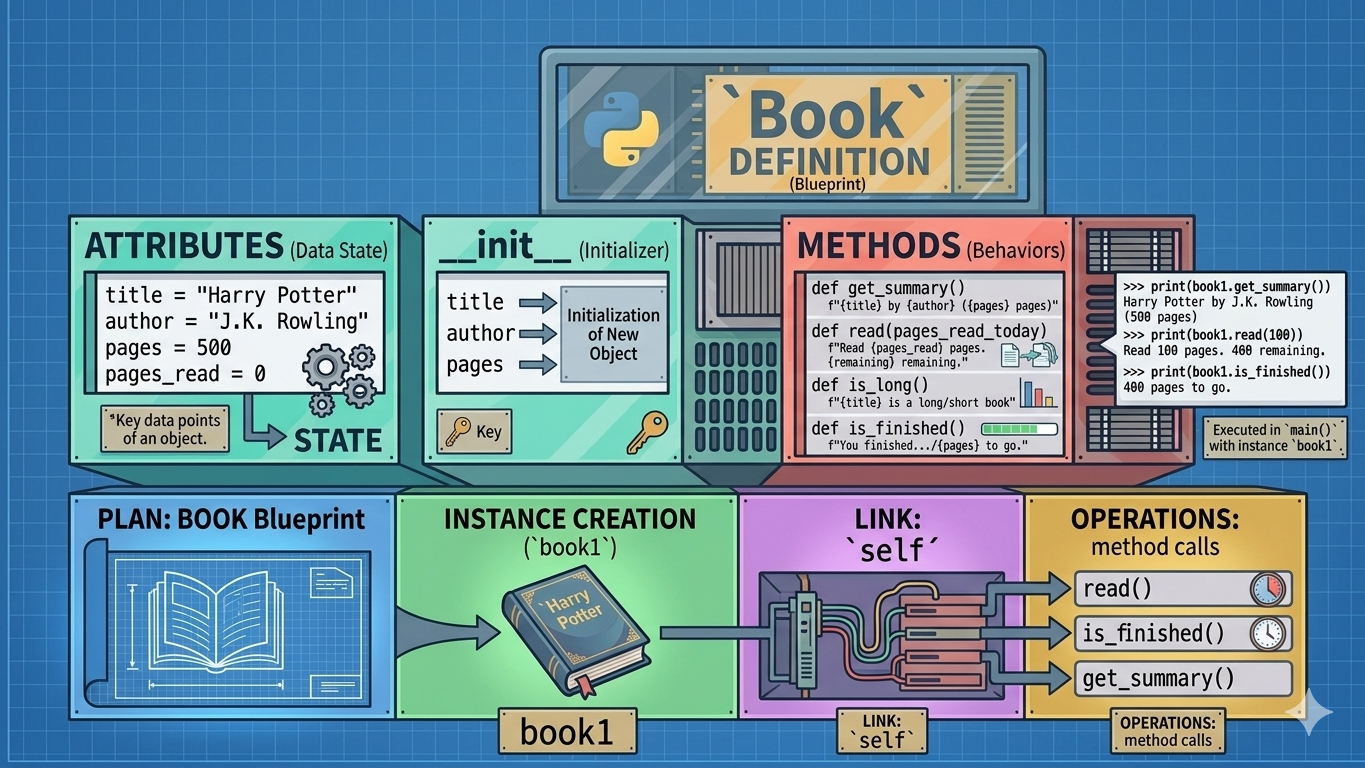
When we hear the term "class," we need to think of it as a blueprint. For example, a blueprint of a house is not a house. It's just a plan that describes what every house built from it will look like. Likewise, a Python class describes what every object created from it will contain.
To elaborate more, we can create a Book class. So Book class will describe what a Book is. Each book will have a title, an author, and some pages. So our class will be capturing it.
class Book:
    # This is just the blueprint
    # No actual book exists yet
The class itself does nothing. It’s just a description. The magic happens when you create an object from it.
The init method — the one-time setup
The __init__ a method in Python is a special initializer method (often referred to as a "constructor" in other languages) that runs automatically when a new instance (object) of a class is created. __init__is the short form for initialize. Python calls it automatically the moment you create an object. You never call it yourself; Python does it for you. Its main purpose is to initialize the object’s attributes and set up its initial state. When an object is created, memory is allocated for it, and init helps organize that memory by assigning values to attributes.
So what actully it do? Just think of it like the setup step when you first open a brand-new book. You stamp your name inside, write the date, and maybe dog-ear the first page. You’re setting it up before you start using it.
class Book:
    def __init__(self, title, author, pages):
        self.title = title
        self.author = author
        self.pages = pages
        self.pages_read = 0   # always starts at 0
But wait — what is self?
Most will be wondering why we are using the self. self is Python’s way of saying “this specific object”. Imagine you have three books on your shelf. When you call a method on book1, Python needs to know which book to act on. That’s what self does — it points to the specific object in memory.
book1 = Book("Harry Potter", "J.K. Rowling", 500)
book2 = Book("Dune", "Frank Herbert", 900)
book3 = Book("1984", "George Orwell", 300)

# Each book has its OWN separate data
# self.title for book1 = "Harry Potter"
# self.title for book2 = "Dune"
# self.title for book3 = "1984"
Why self.title and not just title?
In everyone's mind, this question pops up.
When you write self.title = title, there are actually two different things called title:
- title (right side) — a temporary parameter. It only lives inside init and disappears when the method finishes.
- self.title (left side) — a permanent attribute saved on the object. It lives as long as the object lives.
Without self.title, your data would vanish the moment init finished running. With it, the data is saved permanently on the object for every other method to use.
So, in common words, we can say that it is used to save data permanently on the object so that every other method can use.
Every self.something you plan to use anywhere in your class MUST be defined in init first. If you skip it, every other method will crash trying to access something that doesn’t exist.
Methods — what your object can do
After initializing, we need to write methods, and we can write as many methods as we want. So what is a method? By definition method is a function that is bound to an object or a class and operates on its data. So the method is very similar to functions orelse we can think of it as just functions with some changes. Below are difference between function and methods.
Function
- Can exist independently outside of classes (in procedural programming).
- Accepts parameters and may return a value.
- Can be called directly by its name.
Method
- Belongs to a class (can be an object or static method).
- Can access class variables and other methods.
- Called using the object (or class name if static).
Each method takes self as its first parameter so it can reach into the object’s stored data.
Think of the methods as the abilities of your Book object — things it can do or tell you about itself.
class Book:
    def __init__(self, title, author, pages):
        self.title = title
        self.author = author
        self.pages = pages
        self.pages_read = 0

    def get_summary(self):
        return f"{self.title} by {self.author} ({self.pages} pages)"

    def is_long(self):
        if self.pages > 400:
            return f"{self.title} is a long book"
        else:
            return f"{self.title} is a short book"

    def read(self, pages_read_today):
        self.pages_read += pages_read_today
        remaining = self.pages - self.pages_read
        return f"Read {self.pages_read} pages. {remaining} remaining."

    def is_finished(self):
        if self.pages_read >= self.pages:
            return f"You finished '{self.title}'!"
        else:
            return f"{self.pages - self.pages_read} pages to go."
Notice that every method carries self as its first parameter. This is how they share the same data, self is the shared memory locker that init stocked up, and every method has the key.
The main() function — where you use it all
The main() function is the entry point of an executable program. When a program starts running, the operating system or runtime environment calls main() to begin execution. Here you create objects using init and then call the methods you need.
def main():
    # __init__ fires here automatically
    book1 = Book("Harry Potter", "J.K. Rowling", 500)
    book2 = Book("Dune", "Frank Herbert", 300)

    print("=== Book 1 ===")
    print(book1.get_summary())
    print(book1.is_long())
    print(book1.read(100))
    print(book1.read(50))
    print(book1.is_finished())

    print("=== Book 2 ===")
    print(book2.get_summary())
    print(book2.is_long())
    print(book2.read(150))
    print(book2.read(160))
    print(book2.is_finished())
=== Book 1 ===
Harry Potter by J.K. Rowling (500 pages)
Harry Potter is a long book
Read 100 pages. 400 remaining.
Read 150 pages. 350 remaining.
350 pages to go.
=== Book 2 ===
Dune by Frank Herbert (300 pages)
Dune is a short book
Read 150 pages. 150 remaining.
Read 310 pages. -10 remaining.
You finished 'Dune'!if name == “main” :— the import guard
We have already covered how to create a class and execute it. But without mentioning if name == “main”: it won’t be complete, as it allows developers to separate executable code from reusable functions.
I am sure that most beginners have wondered why we are using this. What is the purpose?
Every Python file has a built-in variable called name. When you run a file directly, Python sets it to “main”. When another file imports it, Python sets it to the filename instead.
# Without the guard:
def main():
    ...
main()   # This runs even when imported

# With the guard:
def main():
    ...
if __name__ == "__main__":
    main()   # Only runs when you execute this file directly
Every Python file has a built-in variable called name. When you run a file directly, Python sets it to “main”. When another file imports it, Python sets it to the filename instead.
Always use if name == “main” at the bottom of any file that defines a class. It costs nothing and saves you headaches the moment your project grows beyond one file.
So, in simple terms, we can say that this is used to ensure that when a Python file is imported, only its functions/classes are used, and the main execution code does not run.
The Complete Code
If you would like to explore the complete working code of the Book class, you can refer to the code below.
class Book:
    def __init__(self, title, author, pages):
        self.title = title
        self.author = author
        self.pages = pages
        self.pages_read = 0

    def get_summary(self):
        return f"{self.title} by {self.author} ({self.pages} pages)"

    def is_long(self):
        if self.pages > 400:
            return f"{self.title} is a long book"
        else:
            return f"{self.title} is a short book"

    def read(self, pages_read_today):
        self.pages_read += pages_read_today
        remaining = self.pages - self.pages_read
        return f"Read {self.pages_read} pages. {remaining} remaining."

    def is_finished(self):
        if self.pages_read >= self.pages:
            return f"You finished '{self.title}'!"
        else:
            return f"{self.pages - self.pages_read} pages to go."

def main():
    book1 = Book("Harry Potter", "J.K. Rowling", 500)
    print(book1.get_summary())
    print(book1.read(100))
    print(book1.is_finished())

if __name__ == "__main__":
    main()
Key Concepts Covered :
• Class : The blueprint. It defines what the object will look like. No object exists yet.
• init : The one-time setup. Runs automatically when you create an object. Stores all the data using self.something, so every method can share it.
• self : The object itself. Passed into every method, so Python knows which specific object to act on.
• Methods : The abilities of the object. Each one takes self and uses the shared data set up by init.
- main() + if name == “main”: : where you create objects and use them. The guard ensures main() only runs when you execute the file directly, not when it is imported.
init builds the locker. self is the key. Every method uses that key to read and update what’s inside.
That’s a Wrap!:
I believe this article has given a general overview of what a class looks like in Python. I have tried to write this article as I would have approached this concept as a beginner, and what questions might come to my mind. I hope this has given an indepth over view about the fundamental concept of Object-Oriented Programming (OOP) — class.
Reference:
Furthermore!
Join my free newsletter where I share practical insights, real-world learnings, and weekly ideas from my journey as a Machine Learning Engineer and Data Scientist.
I write about Machine Learning, Data Science, and how to actually apply these concepts beyond theory, focusing on intuition, hands-on workflows, and building things that matter.
If you’re looking to better understand ML or see how it works in real-world scenarios, this is for you.
Connect With Me
You can also connect with me on Twitter, Kaggle, and LinkedIn.
Feel free to hold down the clap button 👏 (you can clap up to 50 times!) to help others find this article. What are your thoughts? Let me know in the responses!
Cheers,
Samith Chimminiyan
메타데이터
- post_id
- 1f3cd2acbf2c
- slug
- python-classes-explained-simply-1f3cd2acbf2c
- url
- https://medium.com/data-science-collective/python-classes-explained-simply-1f3cd2acbf2c
- canonical_url
- https://medium.com/data-science-collective/python-classes-explained-simply-1f3cd2acbf2c
- author_url
- https://medium.com/@samithc
- status
- ok
- fetched_at
- 2026-06-15 20:49:13