CQRS Doesn’t Have To Be Complicated | Clean Architecture
You don’t need 15 projects and a binder of UML diagrams to use CQRS.
CQRS Doesn’t Have To Be Complicated | Clean Architecture
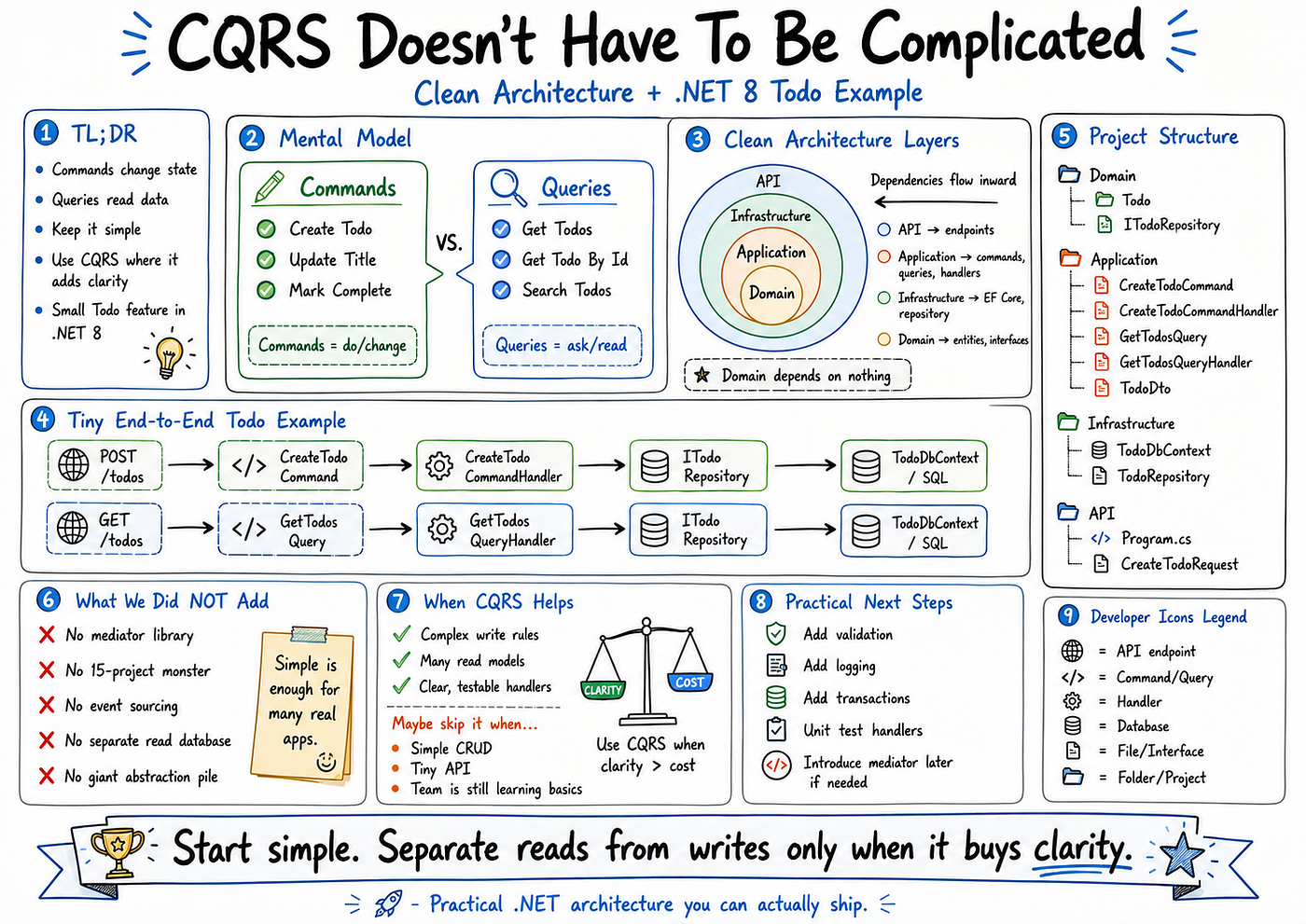
You don’t need 15 projects and a binder of UML diagrams to use CQRS.
You also don’t need to go full enterprise just to separate reads from writes.
If you’ve bounced off CQRS before because it felt heavy, this article is for you.
We’ll build a small, end-to-end Todo feature using CQRS inside a clean, layered .NET 8 solution.
By the end, you’ll have copy-pasteable code you can drop into a new Web API project and extend safely.
If this style of practical .NET architecture helps you, consider following for more focused, real-world patterns.
TL;DR
CQRS is just this: commands change state, queries read state.
You can implement it with a few classes per feature, not a giant folder tree.
Clean Architecture layering keeps dependencies flowing one way.
Start simple: add CQRS where it buys clarity, not everywhere on day one.
This article gives you a small Todo feature you can run and evolve.
The Mental Model: Commands vs Queries
CQRS stands for Command Query Responsibility Segregation.
The core idea is simple:
Commands change state. Create a todo, mark it complete, update a title.
Queries read state. List todos, get a single todo, search todos.
Think of it this way:
Commands are verbs: do this, change that.
Queries are questions: give me this data.
In code, this becomes one command class per intent handled by a command handler, and one query class per read use case handled by a query handler. Handlers live in the Application layer and depend on abstractions, not concrete EF DbContexts.
How CQRS Fits Into Clean Architecture
We’ll use a simple layered layout:
Domain: core entities and interfaces.
Application: commands, queries, handlers, DTOs.
Infrastructure: EF Core DbContext and repository implementations.
API: endpoints that call into the Application layer.
The dependency rule:
API depends on Application and Infrastructure.
Application depends on Domain.
Domain depends on nothing.
Infrastructure depends on Application and Domain.
The inner layers — Domain and Application — should not know about EF Core, ASP.NET, or any specific database. The outer layers adapt to frameworks and infrastructure concerns.
NuGet Packages You Will Need
Before we write code, here are the only packages required:
Microsoft.EntityFrameworkCore
Microsoft.EntityFrameworkCore.SqlServer (or .Sqlite for quick local testing)
Microsoft.EntityFrameworkCore.Design
Microsoft.Extensions.DependencyInjection (included with ASP.NET Core templates)
No mediator library. No additional abstractions. Just EF Core and the framework.
Domain Layer
The Domain layer holds the core model. No EF Core. No HTTP. Just the entity and its contracts.
File: Domain/Todos/Todo.cs
namespace Domain.Todos;

public sealed class Todo
{
    public Guid Id { get; private set; }
    public string Title { get; private set; }
    public bool IsCompleted { get; private set; }
    public DateTime CreatedAtUtc { get; private set; }

    private Todo() { }

    public Todo(string title)
    {
        Id = Guid.NewGuid();
        Title = title;
        IsCompleted = false;
        CreatedAtUtc = DateTime.UtcNow;
    }

    public void MarkCompleted()
    {
        IsCompleted = true;
    }
}
File: Domain/Todos/ITodoRepository.cs
namespace Domain.Todos;

public interface ITodoRepository
{
    Task AddAsync(Todo todo, CancellationToken cancellationToken);
    Task<IReadOnlyList<Todo>> GetAllAsync(CancellationToken cancellationToken);
    Task SaveChangesAsync(CancellationToken cancellationToken);
}
Application Layer: Commands
Commands represent write operations. Each command is a simple class that carries intent and data.
File: Application/Todos/CreateTodoCommand.cs
namespace Application.Todos;

public sealed class CreateTodoCommand
{
    public string Title { get; }

    public CreateTodoCommand(string title)
    {
        Title = title;
    }
}
File: Application/Todos/CreateTodoResult.cs
namespace Application.Todos;

public sealed class CreateTodoResult
{
    public Guid Id { get; }
    public string Title { get; }
    public bool IsCompleted { get; }

    public CreateTodoResult(Guid id, string title, bool isCompleted)
    {
        Id = id;
        Title = title;
        IsCompleted = isCompleted;
    }
}
File: Application/Todos/CreateTodoCommandHandler.cs
using Domain.Todos;

namespace Application.Todos;

public sealed class CreateTodoCommandHandler
{
    private readonly ITodoRepository _repository;

    public CreateTodoCommandHandler(ITodoRepository repository)
    {
        _repository = repository;
    }

    public async Task<CreateTodoResult> HandleAsync(
        CreateTodoCommand command,
        CancellationToken cancellationToken)
    {
        var todo = new Todo(command.Title);

        await _repository.AddAsync(todo, cancellationToken);
        await _repository.SaveChangesAsync(cancellationToken);

        return new CreateTodoResult(todo.Id, todo.Title, todo.IsCompleted);
    }
}
The handler only depends on ITodoRepository. No EF Core knowledge here whatsoever.
Application Layer: Queries
Queries return data shaped for the caller. The query itself is often just an empty class or a simple filter object.
File: Application/Todos/GetTodosQuery.cs
namespace Application.Todos;

public sealed class GetTodosQuery
{
}
File: Application/Todos/TodoDto.cs
namespace Application.Todos;

public sealed class TodoDto
{
    public Guid Id { get; }
    public string Title { get; }
    public bool IsCompleted { get; }

    public TodoDto(Guid id, string title, bool isCompleted)
    {
        Id = id;
        Title = title;
        IsCompleted = isCompleted;
    }
}
File: Application/Todos/GetTodosQueryHandler.cs
using Domain.Todos;

namespace Application.Todos;

public sealed class GetTodosQueryHandler
{
    private readonly ITodoRepository _repository;

    public GetTodosQueryHandler(ITodoRepository repository)
    {
        _repository = repository;
    }

    public async Task<IReadOnlyList<TodoDto>> HandleAsync(
        GetTodosQuery query,
        CancellationToken cancellationToken)
    {
        var todos = await _repository.GetAllAsync(cancellationToken);

        return todos
            .Select(x => new TodoDto(x.Id, x.Title, x.IsCompleted))
            .ToList();
    }
}
Infrastructure Layer
This is the only layer that knows about EF Core. Everything below it stays database-agnostic.
File: Infrastructure/Todos/TodoDbContext.cs
using Domain.Todos;
using Microsoft.EntityFrameworkCore;

namespace Infrastructure.Todos;

public sealed class TodoDbContext : DbContext
{
    public TodoDbContext(DbContextOptions<TodoDbContext> options)
        : base(options)
    {
    }

    public DbSet<Todo> Todos => Set<Todo>();

    protected override void OnModelCreating(ModelBuilder modelBuilder)
    {
        modelBuilder.Entity<Todo>(builder =>
        {
            builder.HasKey(x => x.Id);
            builder.Property(x => x.Title)
                .IsRequired()
                .HasMaxLength(200);
        });
    }
}
File: Infrastructure/Todos/TodoRepository.cs
using Domain.Todos;
using Microsoft.EntityFrameworkCore;

namespace Infrastructure.Todos;

public sealed class TodoRepository : ITodoRepository
{
    private readonly TodoDbContext _dbContext;

    public TodoRepository(TodoDbContext dbContext)
    {
        _dbContext = dbContext;
    }

    public async Task AddAsync(Todo todo, CancellationToken cancellationToken)
    {
        await _dbContext.Todos.AddAsync(todo, cancellationToken);
    }

    public async Task<IReadOnlyList<Todo>> GetAllAsync(CancellationToken cancellationToken)
    {
        return await _dbContext.Todos
            .OrderByDescending(x => x.CreatedAtUtc)
            .ToListAsync(cancellationToken);
    }

    public async Task SaveChangesAsync(CancellationToken cancellationToken)
    {
        await _dbContext.SaveChangesAsync(cancellationToken);
    }
}
API Layer: Minimal API Endpoints
Two endpoints: POST /todos to create, GET /todos to list. The endpoints delegate everything to the Application layer.
File: Api/Todos/CreateTodoRequest.cs
namespace Api.Todos;

public sealed class CreateTodoRequest
{
    public string Title { get; set; } = string.Empty;
}
File: Api/Program.cs
using Application.Todos;
using Domain.Todos;
using Infrastructure.Todos;
using Microsoft.EntityFrameworkCore;

var builder = WebApplication.CreateBuilder(args);

builder.Services.AddDbContext<TodoDbContext>(options =>
    options.UseSqlServer(builder.Configuration.GetConnectionString("Default")));

builder.Services.AddScoped<ITodoRepository, TodoRepository>();
builder.Services.AddScoped<CreateTodoCommandHandler>();
builder.Services.AddScoped<GetTodosQueryHandler>();

var app = builder.Build();

app.MapPost("/todos", async (
    CreateTodoRequest request,
    CreateTodoCommandHandler handler,
    CancellationToken cancellationToken) =>
{
    var command = new CreateTodoCommand(request.Title);
    var result = await handler.HandleAsync(command, cancellationToken);
    return Results.Created($"/todos/{result.Id}", result);
});

app.MapGet("/todos", async (
    GetTodosQueryHandler handler,
    CancellationToken cancellationToken) =>
{
    var query = new GetTodosQuery();
    var items = await handler.HandleAsync(query, cancellationToken);
    return Results.Ok(items);
});

app.Run();
CQRS Without Extra Ceremony
Notice what we did not add:
No generic ICommand or IQuery interfaces.
No mediator library or dispatch pipeline.
No separate read database or event sourcing.
We used one command class per write use case, one query class per read use case, and one handler per class with clear input and output. That is enough for the majority of real-world services, especially when starting from a simpler codebase.
When CQRS Is Not Worth It
CQRS adds value when:
You have multiple ways of reading data and complex write rules.
Different parts of the system evolve at different speeds.
You want handlers to be explicit, testable units you can reuse.
CQRS may not be worth it when:
Your API has only a few endpoints.
Your domain logic is simple CRUD with no real business rules.
Your team is small and still learning the basic stack.
A good alternative is to start with a simple service layer or put logic directly in controllers. Then extract commands and queries only when controllers get bloated or logic starts being duplicated across features.
Rule of thumb: start simple, then introduce CQRS where it reduces duplication and clarifies intent.
Practical Next Steps
Once this structure is in place, you can grow it incrementally:
Validation: add FluentValidation or simple guard clauses inside handlers before touching the repository.
Logging: log command and query names, durations, and key state changes.
Transactions: wrap multi-repository operations in a single transaction using IUnitOfWork.
Unit tests: test command and query handlers in isolation by mocking ITodoRepository.
You can also add more commands like UpdateTodoTitleCommand and CompleteTodoCommand, or more queries like GetTodoByIdQuery and GetCompletedTodosQuery, and introduce a mediator library later if the number of handlers grows large enough to justify a central dispatch mechanism.
The idea is to grow the architecture with your needs, not ahead of them.
If this kind of grounded, example-first .NET content is useful to you, follow for more architecture patterns you can actually ship in real projects.
메타데이터
- post_id
- 1f5db66a3dec
- slug
- cqrs-doesnt-have-to-be-complicated-clean-architecture-1f5db66a3dec
- url
- https://medium.com/@maged_/cqrs-doesnt-have-to-be-complicated-clean-architecture-1f5db66a3dec
- canonical_url
- https://medium.com/@maged_/cqrs-doesnt-have-to-be-complicated-clean-architecture-1f5db66a3dec
- author_url
- https://medium.com/@maged_
- status
- ok
- fetched_at
- 2026-06-11 15:16:29