How Business Units and Data Spaces Work Together in Marketing Cloud Next
Understanding how Data Spaces control records behind Business Units in Marketing Cloud Next.
How Business Units and Data Spaces Work Together in Marketing Cloud Next
Understanding how Data Spaces control records behind Business Units in Marketing Cloud Next.
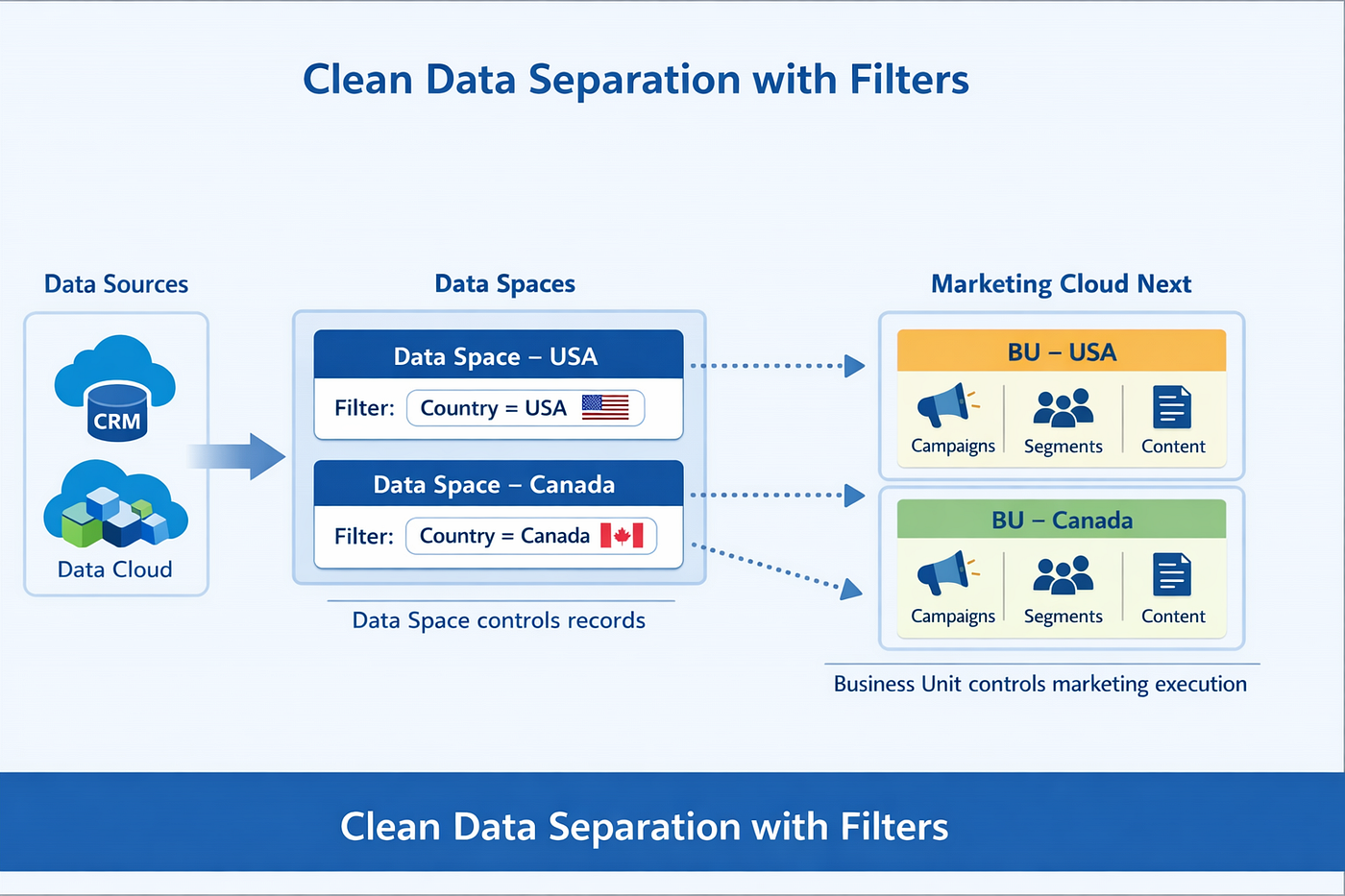
When we enable Business Units in Marketing Cloud Next (MCN), it looks like the setup is complete. But the real work starts after that: how the system controls records for each business unit.
In MCN, Business Unit is not only a marketing grouping. It works together with Data Cloud Data Spaces. If we understand this properly, it becomes very easy to manage record visibility for different countries, regions, products, or brands.
This blog explains how the system works and how to design it properly so teams can manage records cleanly across countries, regions, products, or brands.
1) Business Unit vs Data Space
Business Unit (in MCN) A Business Unit is used to separate marketing work such as:
- Campaigns
- Content workspaces
- Segments
- Users and access
A Business Unit helps teams operate independently and keeps marketing execution organized.
Data Space (in Data Cloud) A Data Space is where records are actually organized and controlled. It acts like a strong boundary so that only the right records are available for:
The key point:
- Business Units decide the marketing boundary, but Data Spaces decide the record boundary.
- So if a record is not in a Data Space, it will not appear in the Business Unit mapped to that Data Space.
2) Example Business Unit and Data Space Setup
For example, I have set up two Business Units in my org to understand how record visibility works with Data Spaces:
BU — USA
- Connected with USA Data Space
BU — Canada
- Connected with Canada Data Space
Each Business Unit works only within the context of its mapped Data Space. This mapping plays a key role in deciding which records are available for segmentation, campaigns, and marketing execution.
- Business Unit list showing mapping with Data Space

3) How records are managed in Marketing Cloud Next
The system does not separate records inside Business Unit directly. Instead, records are separated when they enter or are assigned to a Data Space.
Example: Country-based record separation You can used a filter based on Country, like this:
- USA Data Space → keep records where Country = USA
- Canada Data Space → keep records where Country = Canada
Now the result becomes automatic:
- In BU — USA, you see USA records

- In BU — Canada, you see Canada records

During the ingestion process, I applied filtering logic to control which records are ingested and mapped to the appropriate business unit.
- Data Space mapping / filter for Data Space (USA)

- Data Space mapping / filter for Data Space (Canada)

4) Filters are not only for Country (more real examples)
Country is just one example. The same approach works for many business needs.
✅ Product-based separation
If you want different Business Units for different products:
- Data Space 1 → Product Category = Mobile
- Data Space 2→ Product Category = Laptop
Now:
- One BU works only on Mobile customers
- Another BU works only on Laptop customers
✅ Region-based separation
For global companies:
- Data Space 1 → Region = North America
- Data Space 2 → Region = APAC
Now teams don’t mix audiences across regions.
✅ Brand-based separation
For multi-brand companies:
- Data Space 1 → Brand = Brand A
- Data Space 2 → Brand = Brand B
Now each brand team works only with their customers, campaigns, and segments.
✅ Business line / Department separation
If one org supports multiple business lines:
- Data Space 1→ Business Line = Retail
- Data Space 2 → Business Line = Enterprise
This helps keep operations and reporting clean.
5) Why this approach is best
When you control records at Data Space level:
- You reduce the chance of wrong targeting
- You avoid mixing different countries/brands/products in same audience
- Your teams work independently without interfering
- Security and governance become easier
- Segments become faster and cleaner because they run only on relevant records
In simple terms:
Data Space filtering keeps the system clean and safe.
6) Best practices (recommended approach)
Example 1: Keep Business Unit and Data Space mapping clean
- Keep the names clear like:
- Business Unit — USA
- Business Unit — Canada (Even if you don’t rename, at least document it)
Example 2: Filter records before marketing execution Always apply filters at Data Space level so only relevant records are available for:
- Segments
- Campaigns
- Journeys
- Activations
Example 3: Use filters that match your operating model Choose filters based on your organization design:
- Country / Region
- Product / Category
- Brand
- Department / Business line
Example 4: Don’t depend on segments for “data separation”
- Segments are for selecting an audience, not for controlling who can see which base records.
- Record separation should happen earlier at Data Space level.
Conclusion
A well‑designed Business Unit strategy is not just about structure, but about long‑term control and clarity. When data ownership is clearly defined from the start, teams can work independently without risking overlap or confusion. This approach simplifies campaign execution, improves governance, and creates a foundation that can easily grow with future business needs.
That’s all for this article.
Stay tuned for more tips and practical insights on Salesforce Marketing Cloud Next.
Salesforce #MarketingCloudNext #DataCloud #MarketingAutomation
메타데이터
- post_id
- 1fa608ae5f08
- slug
- how-business-units-and-data-spaces-work-together-in-marketing-cloud-next-1fa608ae5f08
- url
- https://medium.com/@marketingcloudlab/how-business-units-and-data-spaces-work-together-in-marketing-cloud-next-1fa608ae5f08
- canonical_url
- https://medium.com/@marketingcloudlab/how-business-units-and-data-spaces-work-together-in-marketing-cloud-next-1fa608ae5f08
- author_url
- https://medium.com/@marketingcloudlab
- status
- ok
- fetched_at
- 2026-06-21 12:17:11





