Unpacking Microsoft Defender for Office 365: Day 3 SOC Triage — Safe Links & URL Detonation…
90% of phishing attacks wait for your click. Safe Links stops them at the last second.
Unpacking Microsoft Defender for Office 365: Day 3 SOC Triage — Safe Links & URL Detonation Explained Simply
90% of phishing attacks wait for your click. Safe Links stops them at the last second.
Most SOC teams think email scanning = protected. Wrong. Safe Links checks them AGAIN when clicked. Day 3 makes this crystal clear.
What Are Safe Links & Safe Attachments? (Simple Definition)
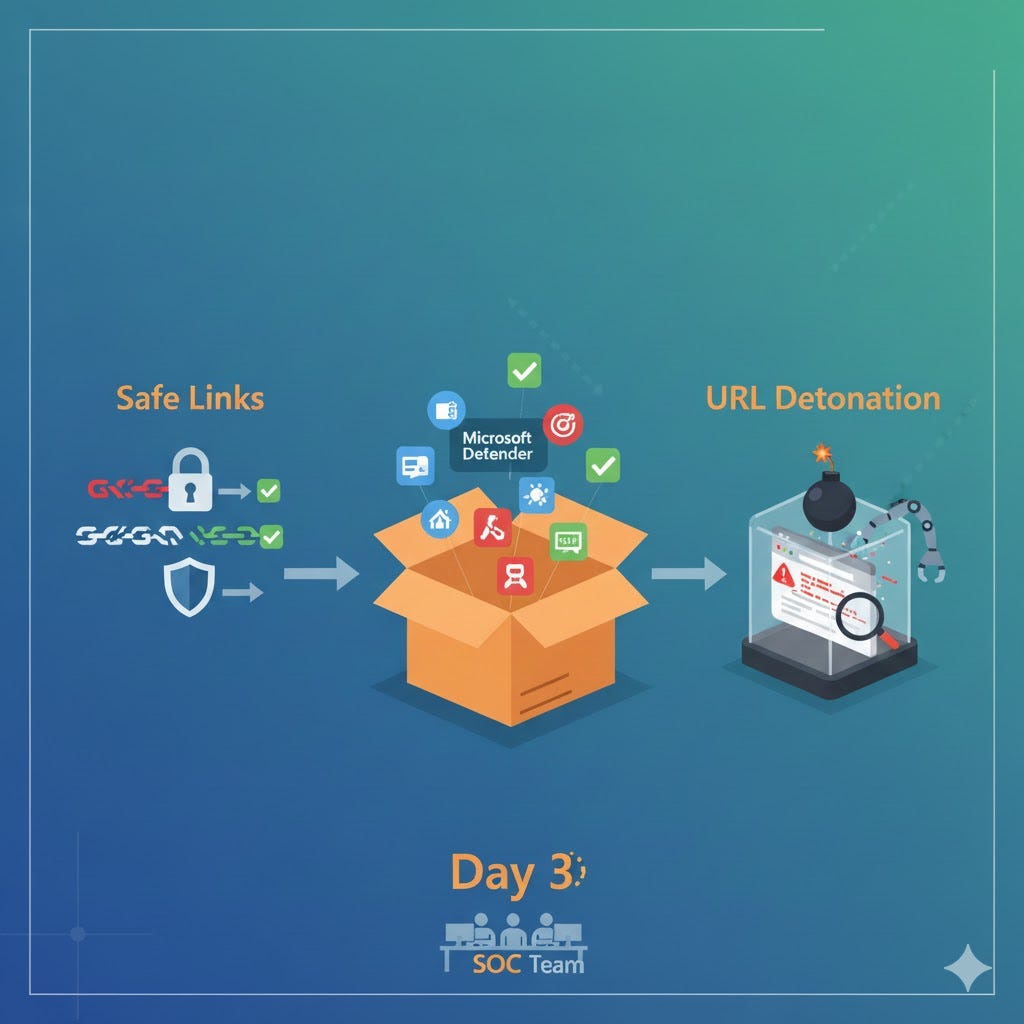
Safe Links = Protects you from dangerous website links in emails/Teams/Word. It says, “Don’t click that link!” Safe Attachments = Protects you from virus-infected files in emails/Teams/OneDrive. It says, “Don’t open that file!”
Think of it like this:
- Safe Links = Security guard who checks ID when you enter the building (click time)
- Safe Attachments = Security guard who opens every package before delivery (sandbox detonation)
Both live in Microsoft Defender portal > Policies & rules > Threat policies.
How Safe Links Actually Works (Step by Step)
-
Email arrives with link: https://example.com/login → Normal scanning (anti-spam, anti-malware) at the backend
-
Safe Links REWRITES every link → https://safelinks.protection.outlook.com/?url=https://example.com/login
-
User clicks on that link → Safe Links service checks:
· Microsoft’s checks 300 BILLION URL database (known BAD? → and IMMEDIATELY BLOCKS)
· Real-time reputation (known safe? → Go straight to website)
· Unknown/suspicious links? → Send to URL DETONATION
- User sees result:
· SAFE = Green checkmark → Goes to website
· DANGEROUS = Red BLOCK page → “Access denied”
Key: Safe links in email delivery turn malicious LATER. Safe Links re-checks every click.
What is URL Detonation? (The Sandbox Magic)
URL Detonation = Opening suspicious links in a fake, locked computer (sandbox) to see if they’re dangerous.
Suspicious link clicked → Safe Links sends to:
-> DETONATION CHAMBER (isolated VM)
-> Opens full browser + JavaScript
-> Watches: Downloads? Redirects? Pop-ups?
-> AI verdict: SAFE/BLOCK (cached 24h+)
-> User sees: Green check OR Block page
Why detonation matters: Catches zero-day phishing (new links, never seen before).
Safe Attachments: File Detonation (Bonus Context)
Email with attachment arrives with Word/Excel attachment → Safe Attachments starts to work:
-
Sends file to detonation chamber
-
Executes file in sandbox (Word/Excel/PDF)
-
Watches: Creates files? Calls home? Encrypts?
-
Verdict: SAFE → Deliver OR BLOCK → Quarantine
Time: 30–90 seconds. The user sees the “Scanning…” message.
Where Do Safe Links/Safe Attachments Work? (All Microsoft Apps)
· Email (Outlook)—Primary use case
· Teams messages/chats
· Word/Excel/PowerPoint—Links/documents
· OneDrive/SharePoint—Shared file links
· Yammer—Posts/comments
-> Not on Browser tabs (Edge/Chrome need separate protection)
One policy rules everything. No app-by-app config needed.
Why Safe Links is Different From Normal Email Scanning
NORMAL EMAIL SCANNING:
• Day 1: Link looks safe → Email delivered to inbox
• Day 2: Hackers change link to malware → Email still in inbox (DANGER!)
SAFE LINKS (Time-of-Click Protection):
• Day 1: Link rewritten by Safe Links
• Day 2: User clicks → Safe Links CHECKS AGAIN → BLOCKS malware
Hackers change websites AFTER emails are delivered. Safe Links catches this.
Real Prevention Power (What Safe Links Stops):
- Zero-day phishing (97% effectiveness) (brand new attacks, never seen before)
- Drive-by downloads (a legitimate website suddenly serves malware)
- Fake login pages (looks real, steals passwords)
- Time-delay attacks (safe today, dangerous tomorrow)
- JavaScript Malware (invisible website code attacks)
Microsoft blocks 10–15 phishing attacks per 1,000 users every week.
Day 3 Triage: Simple 5-Minute Audit
-
Go to: Defender portal > Policies & rules > Safe Links
-
Check: “Safe Links scanning: ON?”
-
Check recipients: “All users” covered?
-
Send a TEST email to yourself: Send email with https://testsafebrowsing.appspot.com/s/phish
-
Click the link. You Should see BLOCK PAGE + “Scanning…” message
Report’s location: Threat protection > Safe Links > Detections (last for 7 days)
Configuration That Actually Works
· Turn ON: “Apply Safe Links to email messages”
· Turn ON: “Real-time URL scanning for suspicious links”
· Turn ON: “Wait for URL scanning to complete”
· Action: BLOCK malicious → Quarantine
· Track user clicks: ON (SOC visibility)
· Exclusions: Only trusted vendors (no wildcards)
Preset Policy Bonus: Standard/Strict presets auto-enable Safe Links. No manual work.
Common Mistakes Everyone Makes
-> Disabled by default in many tenants
-> No click tracking = blind SOC
-> Over-exclusion = phishing slips through
-> Forget Teams/Office = unprotected apps
-> No testing = false confidence
Test It Yourself (EICAR Method)
-
Email this link to yourself
-
Click → Should see BLOCK PAGE
-
Check Threat Explorer → Safe Links detection logged
Day 3 Value: What You Gained
Safe Links = Your phishing kill switch. Catches what email filters miss. Works across Outlook/Teams/Office instantly.
• User clicks → “Scanning…” 1–3 SECONDS → Green/Red page
SAFE ATTACHMENTS (files):
• User double-clicks attachment → “Scanning…” 30–90 SECONDS → The file opens OR is blocked.
Expected result: 60–80% phishing reduction Week 1. Real-time detonation = future-proof.
Day 3 Essential Links (Click to Learn More)
Enable Safe Links Today
Takes 5 minutes. DM “Safe Links Day 3” for the exact policy screenshot + test links. Repost if this cleared confusion!
Day 4 tomorrow. 30-Day MDO Series
CyberSecurityAwareness #SafeLinks #SafeAttachments #MDO #PhishingProtection #Microsoft365
메타데이터
- post_id
- 1ff77084c6ef
- slug
- unpacking-microsoft-defender-for-office-365-day-3-soc-triage-safe-links-url-detonation-1ff77084c6ef
- url
- https://medium.com/@eugeniacyber/unpacking-microsoft-defender-for-office-365-day-3-soc-triage-safe-links-url-detonation-1ff77084c6ef
- canonical_url
- https://medium.com/@eugeniacyber/unpacking-microsoft-defender-for-office-365-day-3-soc-triage-safe-links-url-detonation-1ff77084c6ef
- author_url
- https://medium.com/@eugeniacyber
- status
- ok
- fetched_at
- 2026-06-27 07:40:21