How to Use Semantic Caching with Qdrant to Optimize Token Costs in Customer Support
Stop Paying to Answer the Same Question Twice: A Developer’s Guide to Vector-Based Response Caching
How to Use Semantic Caching with Qdrant to Optimize Token Costs in Customer Support
Stop Paying to Answer the Same Question Twice: A Developer’s Guide to Vector-Based Response Caching
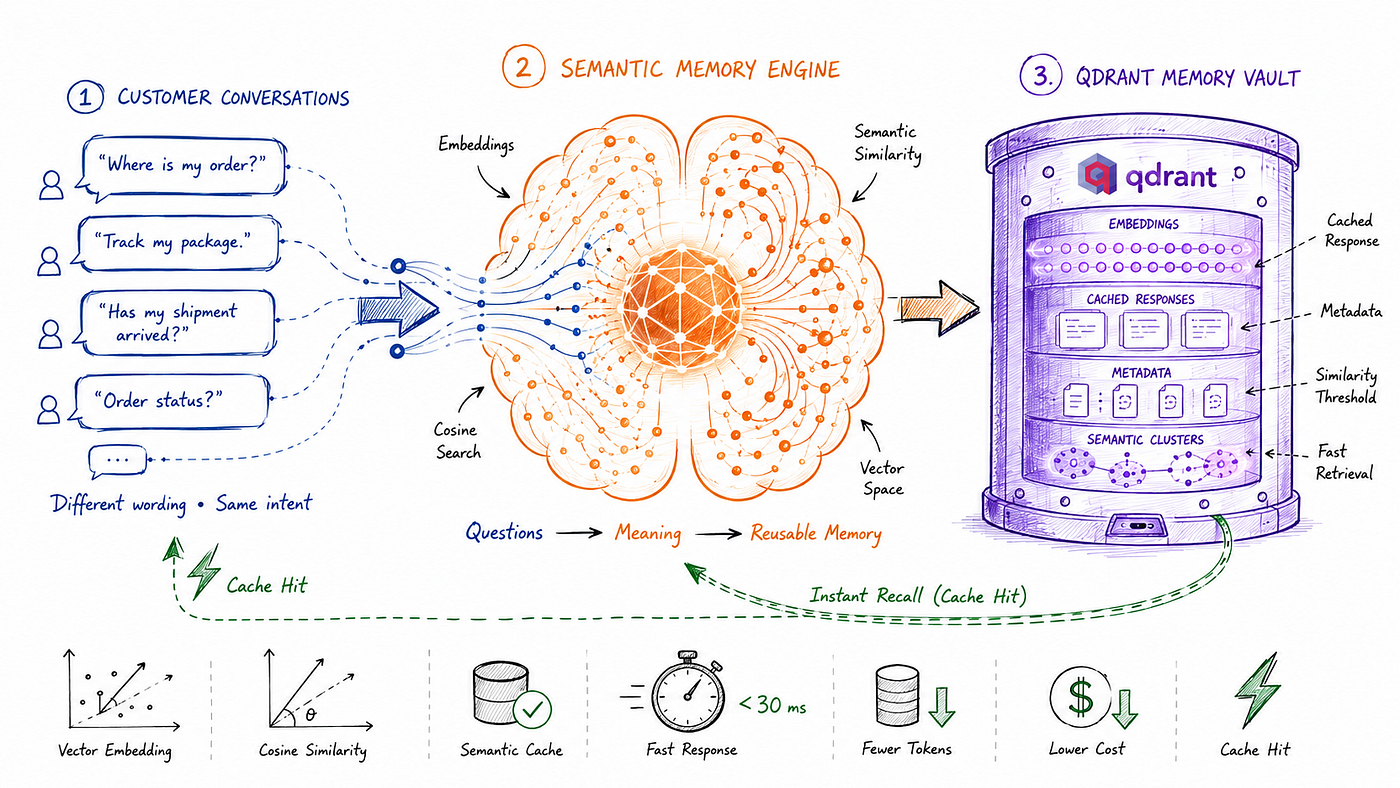
Semantic Caching with Qdrant to Optimize Token Costs in Customer Support. Cover Image Credits ChatGPT
Most people remember the story because it was funny.
Someone asked McDonald’s AI-powered drive-through assistant to write Python code instead of ordering food. The internet laughed. Engineers noticed something else.
Every prompt triggered another LLM call, consuming tokens, increasing latency, and adding to the bill. LLMs don’t care whether a request is necessary — if it reaches the model, you pay for it.
The same pattern exists in almost every LLM-powered customer support system.

Fig 1: Every prompt triggers new LLM calls, consuming more tokens and increasing cost. All GIFs are created using Python
One customer asks, “Where is my order?” Another says, “Has my package been shipped?” Someone else asks, “Can I track my delivery?” The wording changes, but the intent is almost identical. Yet most applications still send each request to the LLM independently, paying for three generations that produce nearly the same answer.
At a small scale, this isn’t a problem you’ll even notice. With a few hundred conversations a day, the extra cost is negligible. But as traffic grows into hundreds of thousands of conversations every month, repeated questions start becoming one of the biggest contributors to LLM inference costs. The larger the user base, the more often the same questions are asked in different ways. Industry estimates suggest that nearly 40% of customer support queries are semantic duplicates. The wording changes, but the intent stays the same. Yet every one of those requests still triggers another expensive LLM call.
This is exactly the problem semantic caching is designed to solve.
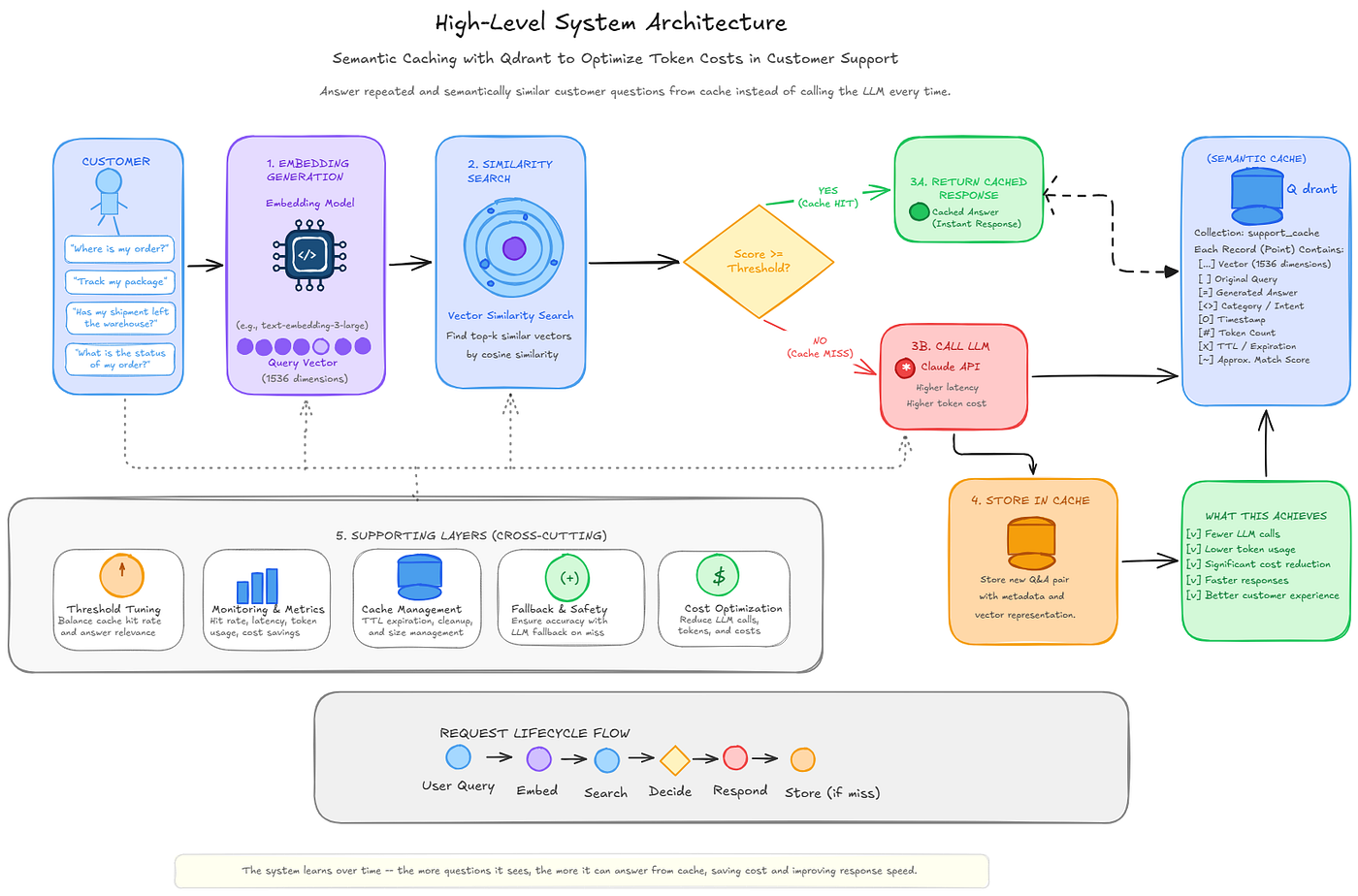
Fig 2: High level architecture of Schematic Cache. User queries are embedded, searched against cached vectors in Qdrant, and either served directly from the cache or forwarded to the LLM before the response is stored for future requests. Tool used: excalidraw
Instead of asking the LLM to regenerate an answer every time, we first check whether a semantically similar question has already been answered. If it has, we can return the existing response in milliseconds without consuming additional tokens. Building that kind of cache requires understanding meaning rather than exact text matching, which is where a vector database like Qdrant becomes essential.

Fig 3: Reusing context reduces redundant inference and lowers token costs.
In this article, I’ll walk you through the complete engineering journey of building a semantic cache with Qdrant — from the first prototype to debugging, benchmarking, and comparing single-vector and multi-vector retrieval. Every graph, latency measurement, cache hit rate, and cost figure comes from real benchmark runs, not theoretical estimates.
Why Traditional Caching Cannot Help Here
The first instinct when you notice the same answer being generated repeatedly is to add a cache. Store the question as the key, the response as the value, and return the cached answer whenever the same request appears again. It’s the same idea web browsers use to cache images and CDNs’ use for static assets. When requests are identical, this approach works extremely well.
Natural language, however, rarely behaves that way.
Customers almost never ask the same question using the exact same words. A small typo like “wher is my order” is enough to break an exact-match cache. So is replacing one word with a synonym, forgetting a question mark, or typing everything in lowercase from a phone. To a traditional cache, each variation looks like a completely new request, even though the customer is asking exactly the same thing.
Consider how different customers might ask for the status of the same order:
“Where is my order?”
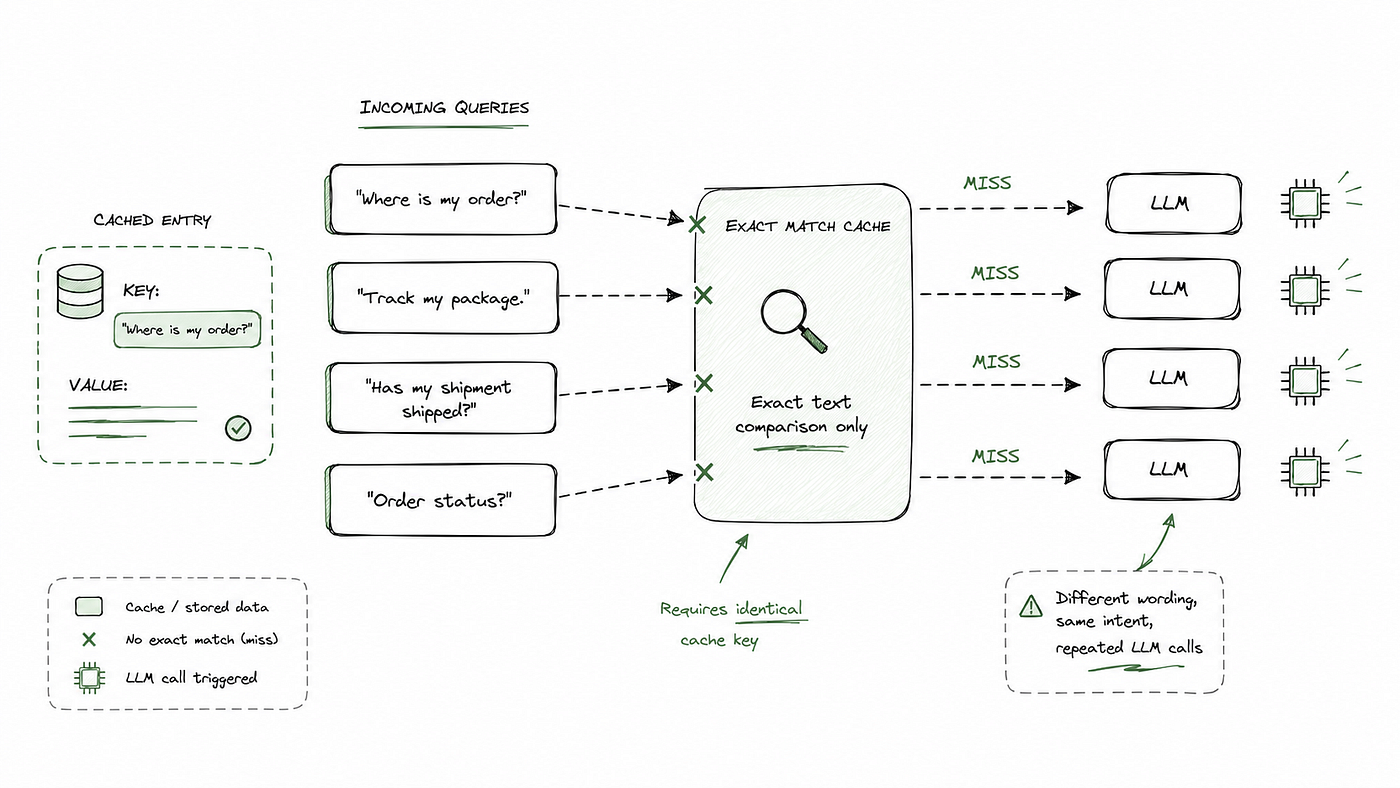
Fig. 4. An exact-match cache compares queries as plain text rather than meaning. Although each customer asks about the same order status, the different wording prevents cache hits, resulting in a separate LLM call for every request. Credits: GPT
A traditional cache treats each query as a completely different key because it compares characters, not meaning. That’s the real limitation. A user asking “Track my package” and another asking “Where is my order?” are looking for the same answer, yet a string-based cache sees them as unrelated because the words don’t match.
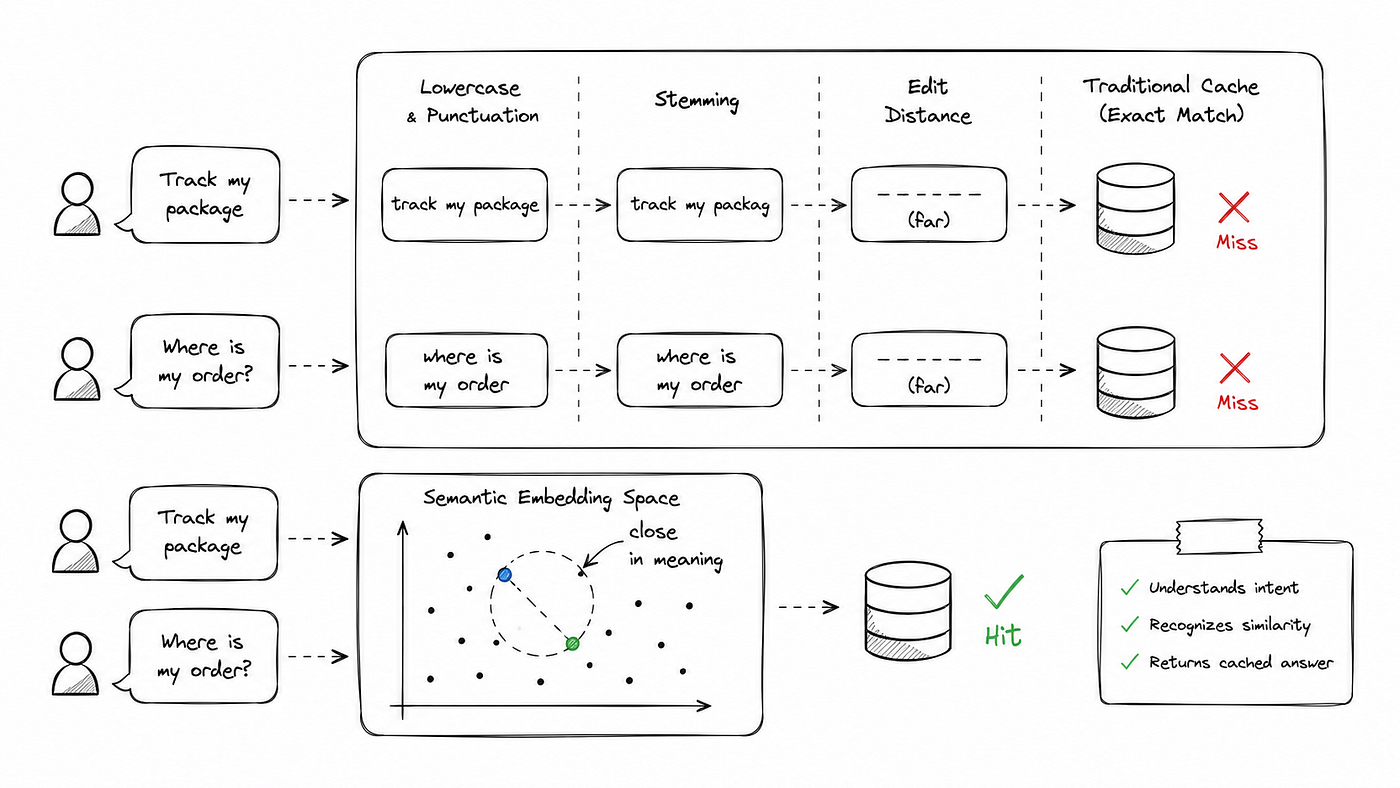
Fig.5: Traditional text-processing techniques compare words, while semantic embeddings compare meaning. As a result, differently worded queries with the same intent can produce a semantic cache hit even when exact string matching fails. Credits GPT
Before introducing a more advanced solution, it’s worth asking whether simpler techniques can bridge this gap. Converting text to lowercase and removing punctuation handles formatting differences, but it cannot recognize “Track my package” and “Where is my order?” express the same intent. Stemming helps by reducing words to their root form, so “tracking” and “track” become comparable, but it still fails when two sentences use entirely different vocabulary. Even edit distance, which measures the number of character changes needed to transform one string into another, considers these two queries almost completely different, despite any human immediately recognizing that they are asking the same question.
These techniques compare the surface form of text, not its meaning. As soon as two semantically identical queries are phrased differently, they break down just like a traditional string-based cache.
Turning Language into Numbers
To compare the meaning of two sentences instead of just matching their characters, we first need a way to represent meaning mathematically. That’s exactly what an embedding model does. It converts a sentence into a high-dimensional numerical vector — a list of numbers that captures the semantic meaning of the text.

Fig 6: Cache repeated requests to deliver faster responses at a fraction of the cost.
The individual numbers don’t mean much by themselves. What matters is where the vector sits relative to other vectors. Sentences with similar intent naturally end up close together in the embedding space, while unrelated sentences are placed farther apart.
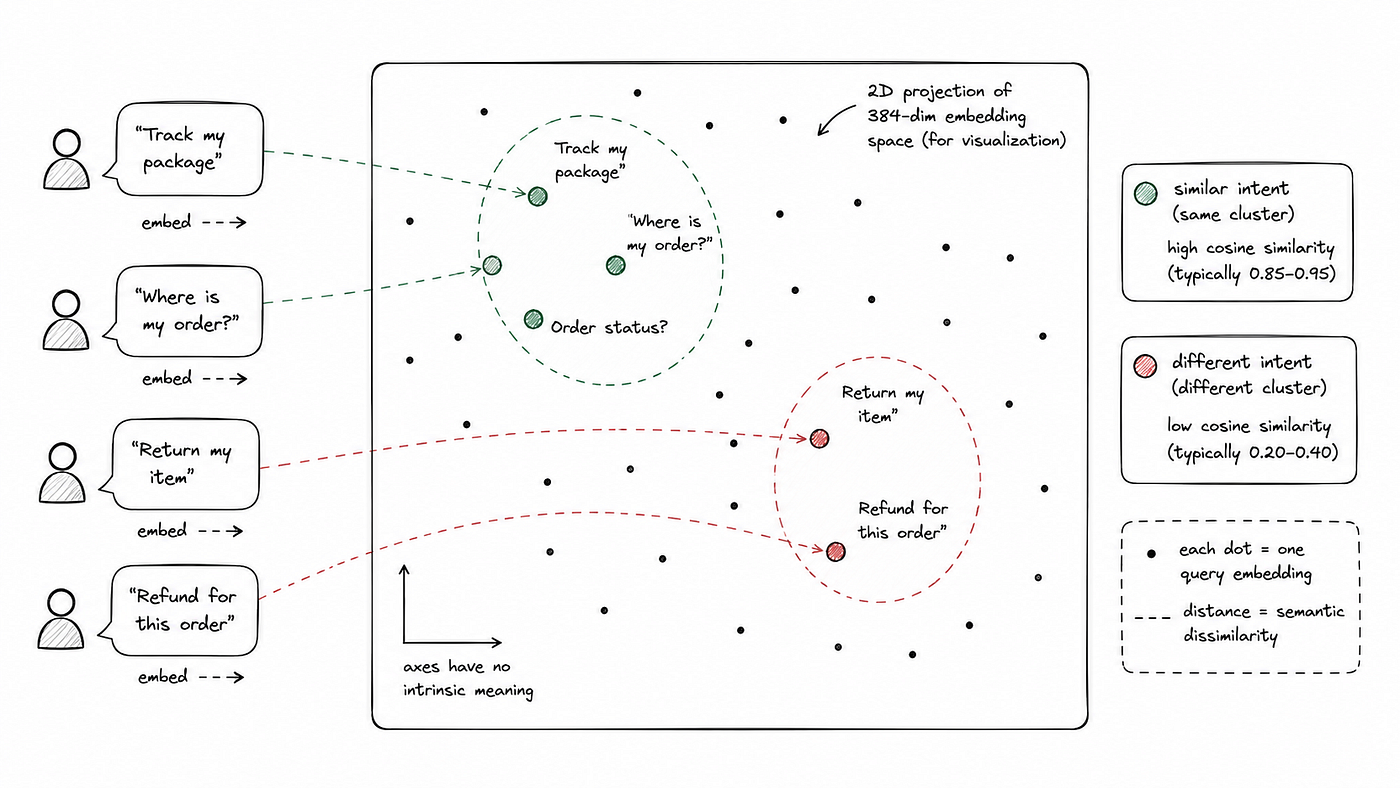
Fig. 7: A 2D projection of a high-dimensional embedding space. Queries with similar meaning tend to appear close together, while queries expressing different intents are generally farther apart. Semantic caching uses this property to retrieve cached responses based on meaning rather than exact text matching.
For example, “Where is my order?” and “Track my package” produce nearby vectors using the BAAI/bge-small-en-v1.5 embedding model because they express the same intent. On the other hand, “Reset my password” is mapped to a completely different region. This geometric relationship is what makes semantic similarity search possible.
In this project, embeddings are generated locally using the fastembed library. The process takes roughly 2 milliseconds and doesn’t require any API calls, making it both fast and free. Generating an embedding is relatively inexpensive. The real challenge is finding the most similar embedding among thousands already stored.
A naive approach compares the new vector against every cached vector using cosine similarity. The first version of this semantic cache did exactly that, storing (vector, answer) pairs in a Python list and performing a full scan for every query.
This works well for a small cache, but it doesn’t scale. A cache with 50,000 embeddings requires 50,000 similarity calculations per request, regardless of whether the query is a cache hit or miss.
Traditional database indexes like B-trees can’t solve this problem because high-dimensional vectors have no natural ordering. Instead, semantic search relies on specialized nearest-neighbor indexes that can quickly identify the most similar vectors without scanning the entire collection.
This is exactly what a vector database provides. The embedding model converts meaning into numbers, while the vector database makes those numbers searchable at scale.
If you’ve used Retrieval-Augmented Generation (RAG), this pipeline may look familiar. Both use embeddings and vector search, but they solve different problems. RAG retrieves relevant documents to improve the LLM’s context, whereas semantic caching retrieves a previously generated answer. When a close match exists, the system can return it immediately and skip the LLM entirely. These approaches complement each other rather than compete.
In a production AI system, a semantic cache typically sits in front of the entire retrieval pipeline. Every request checks the cache first. A cache hit returns the stored response in milliseconds without invoking the LLM. Only when no suitable match is found does the request continue through the normal RAG pipeline for retrieval and generation.
The Dual-Path Execution Flow
With the concept established, it helps to see the actual shape of the request path this creates.
The architecture keeps each responsibility separate. Every query is first converted into an embedding locally, so there’s no network overhead at this stage. That embedding is then searched against Qdrant, which typically adds only a few milliseconds of latency.
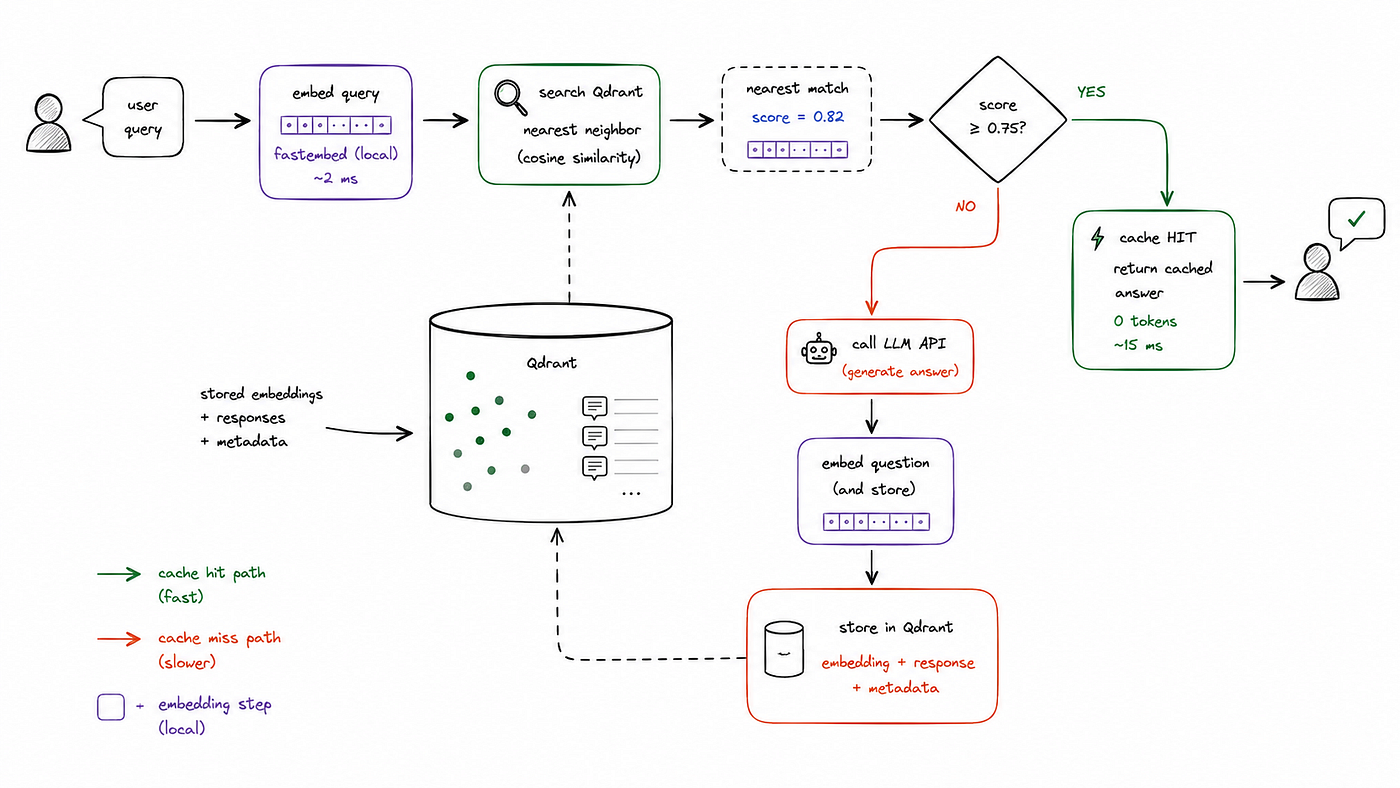
Fig. 8: Every query follows one of two paths:
If the similarity score is above the configured threshold, the semantic cache returns the stored response immediately. Since the answer is already available — often as Markdown ready to render in a chat interface — there’s no LLM call, no token consumption, and no extra inference cost. In practice, the entire lookup usually completes in under 30 milliseconds.
If no sufficiently similar match is found, the application simply follows the normal path and sends the request to the LLM. Once the model generates a response, it’s stored in Qdrant for future queries. That cache write doesn’t have to block the user either. It can happen asynchronously because it only benefits future requests, not the one currently being served.
The first customer asks a question the semantic cache has never seen before, so the request goes to the LLM and the response is stored. Later, another customer asks the same thing using different wording. This time, vector search recognizes the shared meaning, finds the cached response, and returns it instantly — without ever calling the LLM.

Fig 9. Semantic caching request flow. A customer query is converted into an embedding, searched against cached vectors, and either served from the cache or forwarded to the LLM before the response is stored for future reuse.
It doesn’t replace any part of your existing application. Instead, it adds an early checkpoint that runs before the expensive LLM call. If a matching response is found, the request ends there. If not, the rest of the pipeline continues exactly as it always has.
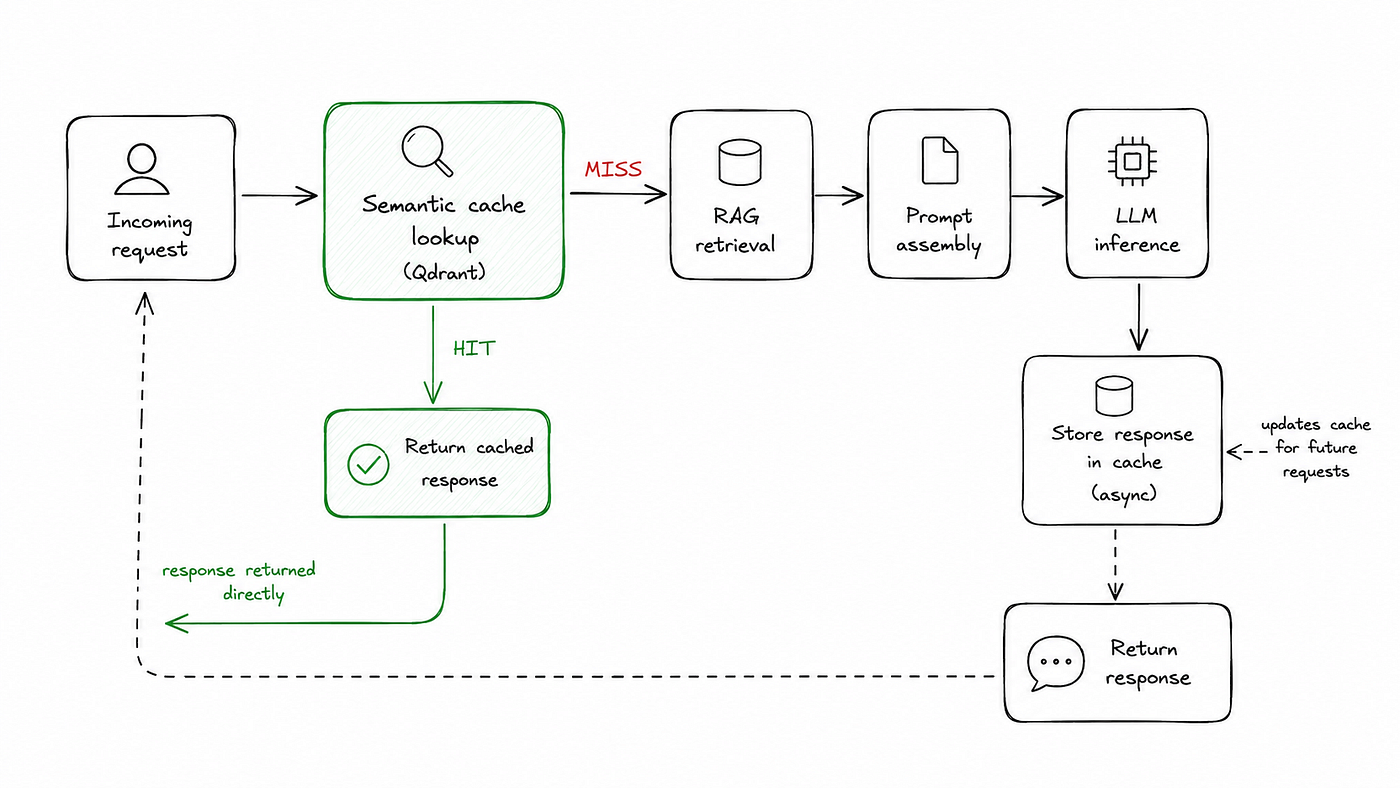
Fig. 10: The semantic cache acts as an early checkpoint in the request pipeline.
If your application already has a request pipeline with RAG retrieval, prompt assembly, and an LLM call, adding semantic caching is usually a small change rather than a major architectural overhaul. In most cases, you only need a cache lookup at the beginning of the request flow and a cache write after a new response is generated. If there’s a cache miss, the rest of the pipeline continues exactly as it always has, making semantic caching easy to integrate without changing your existing RAG workflow.
Where Semantic Caching Works, and Where It Does Not
Semantic caching works best when people ask the same question in different ways and the answer remains consistent across users and over time. That’s why it’s a natural fit for customer support, internal knowledge assistants, FAQ systems, IT help desks, and HR chatbots. These applications deal with a predictable set of recurring questions where only the wording changes, making them ideal candidates for semantic cache hits.

Figure 11. Brute force similarity search in a semantic cache
It becomes less effective when responses depend on user-specific or real-time data. Questions like “What is my account balance?” require a fresh answer for each user, so serving a cached response could be inaccurate or even misleading. The same applies to queries about live inventory, current prices, order status, or real-time conditions, where the underlying information can change at any moment. In these scenarios, generating a fresh response is usually the safer and more reliable choice.
Guidelines
Consider caching responses that are stable across users and over time. Avoid caching
responses that depend on who is asking, or on information that changes frequently.
If semantic caching makes sense for your application, the next challenge is making it scale. Comparing every new query against every cached embedding works when you have a handful of entries, but it quickly becomes too slow for a production workload. At some point, you need a system that can perform fast nearest-neighbor searches across thousands or even millions of vectors without scanning them one by one.
What kind of database is actually designed for this kind of vector search?
Choosing a Vector Database
The previous section established the real requirement: efficiently finding the nearest neighbors of a query within a growing collection of embeddings without comparing it against every stored vector. That need, rather than a preference for any particular technology, is what determined the choice of storage layer. The most sensible way to evaluate the options is the same way an engineer would: by looking at what each solution was designed to do.
A Python list is the simplest place to start and works perfectly well for a small cache with only a few dozen entries. Once the cache grows, though, every lookup still requires comparing the incoming embedding with every stored embedding. It’s easy to implement, but it doesn’t scale.
The next logical option is SQLite. It requires almost no setup, is already available in many applications, and can store embeddings alongside the cached response. You can compute cosine similarity during queries, making it suitable for small datasets. However, SQLite doesn’t provide built-in approximate nearest neighbor (ANN) indexes, so every lookup remains a full scan. As the cache grows into the thousands of vectors, lookup latency increases for both cache hits and misses, recreating the exact scaling problem we were trying to solve.
For teams already using PostgreSQL, adding the pgvector extension is often the most practical upgrade. It brings ANN indexes such as IVFFlat and HNSW directly into an existing relational database, allowing vector search without introducing another piece of infrastructure. If semantic caching is just one feature in a larger application backed by PostgreSQL, this is an attractive option because operational workflows remain unchanged.
Redis offers a similar advantage. Many production systems already rely on it for session storage, rate limiting, and traditional caching. With RedisSearch, it also supports approximate vector search.
Chroma takes a different approach. It’s designed to make similarity search easy to prototype, with a lightweight API and minimal setup. For experiments, proofs of concept, or smaller applications, it’s a straightforward way to get semantic search working quickly.
Why I Chose Qdrant
There are many excellent vector databases available today, and each one has strengths for different use cases. I chose Qdrant because its capabilities aligned closely with the requirements of this semantic caching project.
1. Native Support for Multiple Vectors
One of the goals of this project was to experiment with multi-vector semantic caching, where each cached response stores several embeddings instead of just one. Qdrant supports multiple named vectors for a single record, making this architecture straightforward to implement without introducing unnecessary complexity.
2. Flexible Metadata Filtering
Every cached response contains additional metadata such as its category and creation time, not just the embedding itself. Qdrant makes this metadata easy to query and filter, allowing the cache to invalidate only the responses that become outdated while leaving unrelated entries untouched.
3. Simple Development, Ready for Production
I wanted a solution that was easy to develop locally without sacrificing production readiness later. Qdrant’s in-memory mode allowed me to build, debug, and benchmark the entire semantic cache on my own machine, while the same application can later switch to persistent storage with minimal changes.
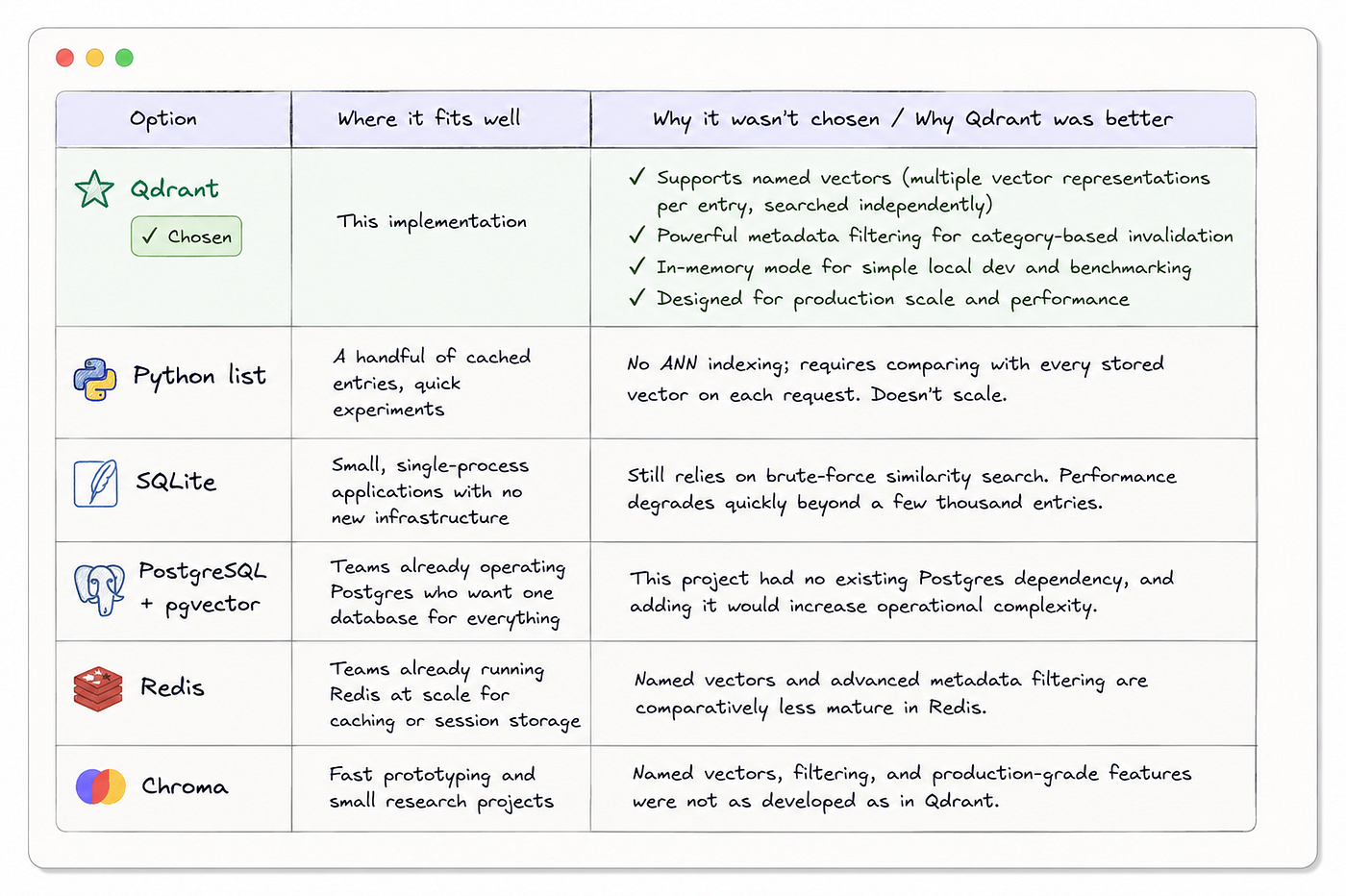
Fig. 12: Qdrant was chosen because its named vectors, metadata filtering, and in-memory mode aligned best with the requirements of this semantic caching implementation, while the other options remain strong choices for different use cases. Credits: ChatGPT
Building the Cache
Embedding Each Query
Every query passes through an embedding model before touching the database. The BAAI/bge-small-en-v1.5 model from fastembed produces 384-dimensional vectors, runs entirely on the local CPU, and requires no API credentials. The model loads once and is reused across all subsequent calls:
from fastembed import TextEmbedding

_EMBED_MODEL_NAME = "BAAI/bge-small-en-v1.5"
_embedding_model = None

def get_embedding_model():
    global _embedding_model
    if _embedding_model is None:
        _embedding_model = TextEmbedding(model_name=_EMBED_MODEL_NAME)
    return _embedding_model

def embed(text: str) -> list[float]:
    model = get_embedding_model()
    vectors = list(model.embed([text]))
    return vectors[0].tolist()
Creating the Qdrant Collection
from qdrant_client import QdrantClient
from qdrant_client.http import models as qdrant_models

client = QdrantClient(location=":memory:")  # in-memory for development

client.create_collection(
    collection_name="support_cache",
    vectors_config=qdrant_models.VectorParams(
        size=384,
        distance=qdrant_models.Distance.COSINE,
    ),
)
Checking for a Cache Hit
def check_cache(query: str, threshold: float = 0.75) -> str | None:
    vector = embed(query)
    response = client.query_points(
        collection_name="support_cache",
        query=vector,
        limit=1,
        score_threshold=threshold,
        with_payload=True,
    )
    if response.points:
        return response.points[0].payload.get("cached_response")
    return None
Storing a New Answer
import uuid
from datetime import datetime, timezone

def update_cache(query: str, response: str, category: str = "general"):
    vector = embed(query)
    client.upsert(
        collection_name="support_cache",
        points=[
            qdrant_models.PointStruct(
                id=str(uuid.uuid4()),
                vector=vector,
                payload={
                    "original_prompt": query,
                    "cached_response": response,
                    "category":        category,
                    "timestamp":       datetime.now(timezone.utc).isoformat(),
                },
            )
        ],
    )
The Main Query Function
def query(user_query: str, category: str = "general") -> dict:
    cached = check_cache(user_query)
    if cached:
        return {"answer": cached, "cache_hit": True, "total_tokens": 0}

    llm_result = call_llm(user_query)
    update_cache(user_query, llm_result["text"], category=category)

    return {
        "answer":       llm_result["text"],
        "cache_hit":    False,
        "total_tokens": llm_result["total_tokens"],
    }
The logic here stays simple. We check the cache first, return immediately if there’s a hit, and otherwise call the LLM and store the result for future queries. The entire implementation is contained in a single SemanticSupportCache class in the accompanying repository.
Measuring What Actually Happens
It’s easy to say that semantic caching reduces costs. Proving it is the important part. I benchmarked the implementation using the same model, the same pricing, and a realistic mix of customer support queries to measure the impact.
The benchmark consisted of 21 test queries based on common customer support interactions. These naturally fell into three categories.
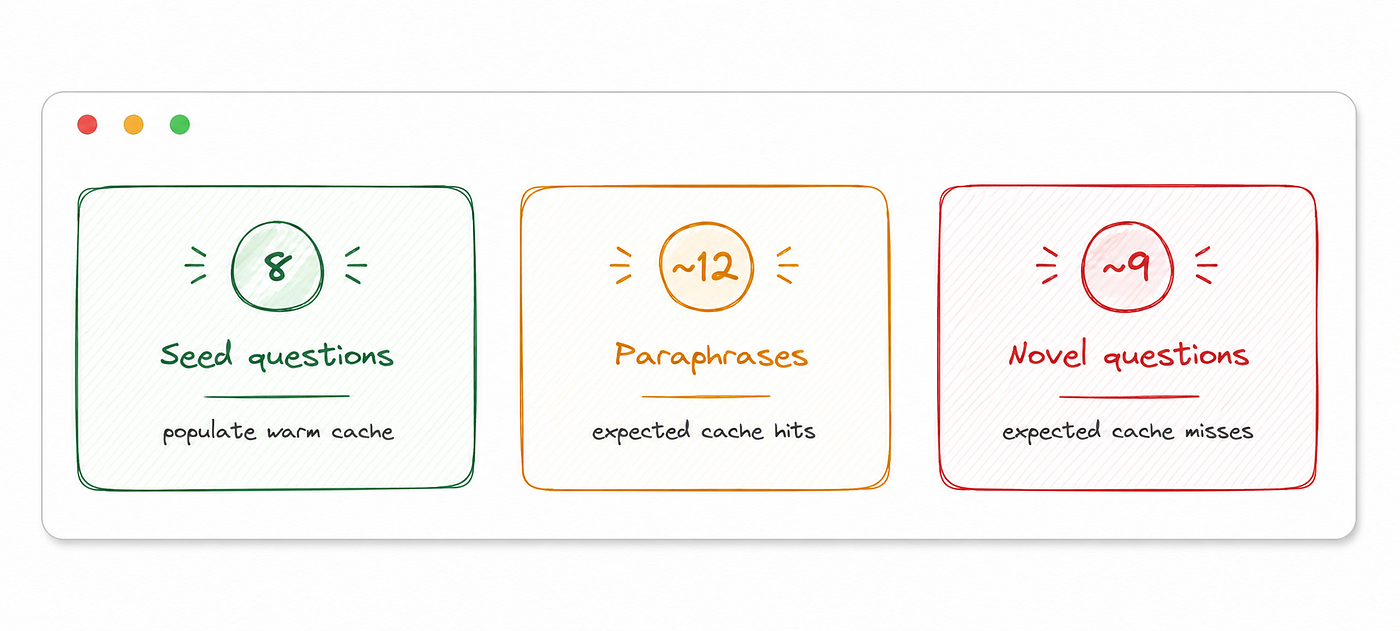
Two complete passes ran over the test queries. Run A sent every query directly to the LLM with no cache, establishing the baseline cost. Run B queried the warm cache first, falling back to the LLM only on misses.
A Design Mistake Worth Sharing
The first version of this benchmark ran Run A with caching disabled, so nothing was stored, and then ran Run B against an empty cache. The result was a 0% hit rate, not because the cache itself was wrong, but because it had never been populated in the first place. The fix was to seed the cache separately, before either run, using the 8 seed questions. Benchmark design deserves the same care as the system it’s measuring.
The Results
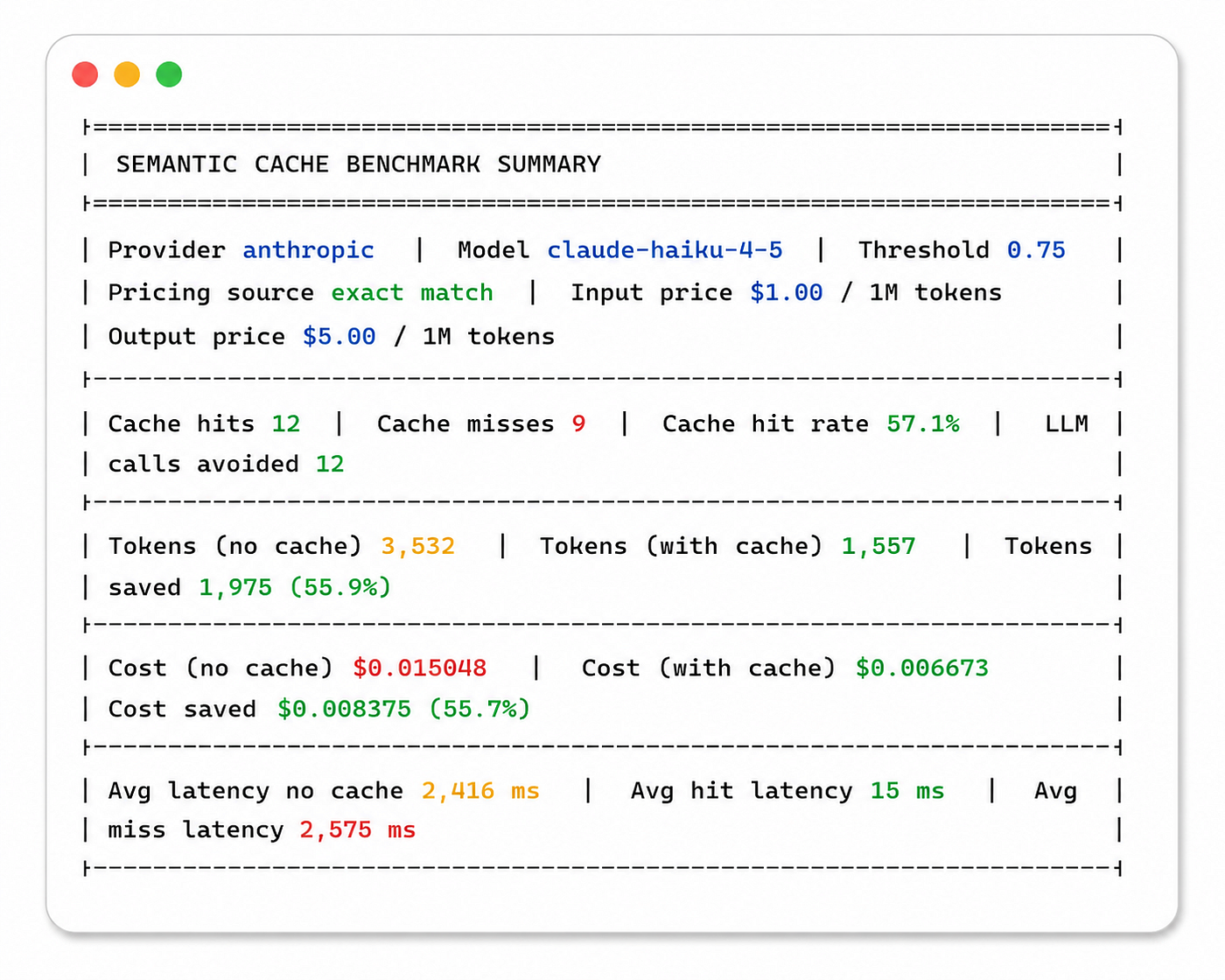
Fig 13. Benchmark summary comparing semantic caching against direct LLM inference, highlighting improvements in cache hit rate, token usage, cost savings, and response latency.
A few numbers are worth paying attention to. A 57.1% cache hit rate means more than half of the requests were answered directly from the semantic cache without invoking the LLM. Those cache hits averaged 15 ms, compared to 2,575 ms for cache misses — roughly a 171× reduction in response time for requests served from the cache. The benchmark also reports pricing lookup: exact match, confirming that the model name matched a verified pricing entry instead of falling back to a default estimate, making the cost calculations more reliable.
For completeness, the benchmark output below shows the raw terminal results from an actual run.
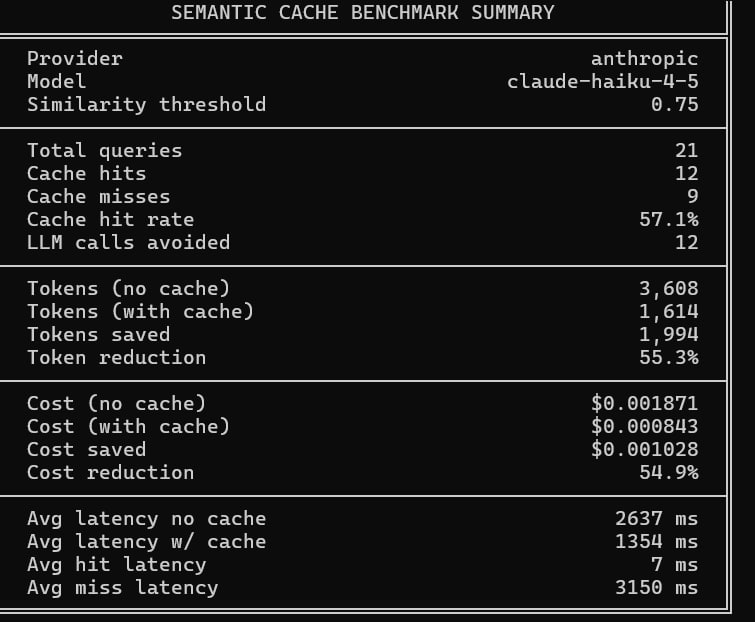
Fig 14. Benchmark results demonstrating the impact of semantic caching on cache hit rate, token usage, inference cost, and response latency compared with direct LLM execution.
The Threshold That Disabled the Cache
I initially set the similarity threshold to 0.92 because it seemed like a safe, conservative choice. The first benchmark quickly showed that it was far too high: the cache recorded a 0% hit rate. After digging into the embeddings, the reason became obvious.
v1 = embed("Where is my order?")
v2 = embed("Track my package")
# cosine similarity: 0.7307
Although both queries express the same customer intent, their cosine similarity was only 0.73 — well below the configured threshold. The semantic cache wasn’t failing, and neither was Qdrant. The threshold simply hadn’t been calibrated for the embedding model’s similarity distribution. That benchmark turned an educated guess into a measured configuration.
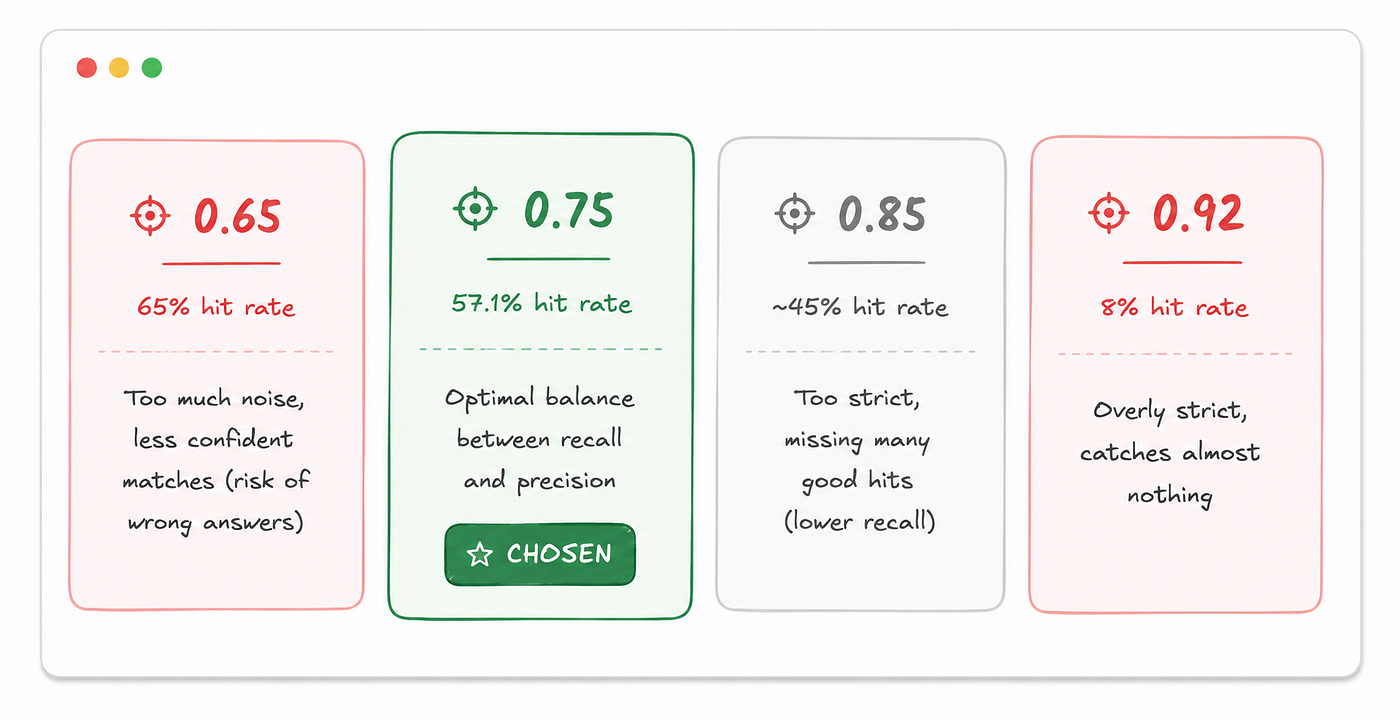
A cache hit isn’t automatically a good thing. Every time you lower the similarity threshold, you increase the chance of a false positive — a cached response that is similar enough to match but not similar enough to be correct.
For example, at a threshold of 0.75, questions like “How do I cancel my order?” and “How do I cancel my subscription?” can end up close enough in embedding space that, without additional safeguards such as category-aware filtering, the semantic cache may occasionally treat them as the same request. If the topic is shipping times, a mismatch like that is usually just an inconvenience. If it’s about billing, account access, or legal policies, serving the wrong cached response can become a much more serious problem because the customer has no indication that the answer came from a near match rather than a fresh LLM response.
Across many embedding models, the trade-off tends to look similar. A threshold around 0.80 is often too permissive, increasing false positives enough to hurt answer quality. A threshold of around 0.98 sits at the opposite extreme, where the cache rarely finds a match and provides little benefit. My initial value of 0.92 fell into that second category for this embedding model, producing almost no useful cache hits.
In practice, there isn’t a single threshold that’s right for every application. Different categories carry different levels of risk. Questions about billing or account security may justify a stricter threshold, while lower-risk topics such as order tracking or shipping times can tolerate a more relaxed one.
Key takeaway: The right similarity threshold depends on both the embedding model and the distribution of queries in your application. Treat it as a value to benchmark and calibrate with real data — not one to choose by intuition.
Keeping Cached Answers Current
A semantic cache is only useful as long as its answers stay accurate. Once the underlying information changes — whether it’s a return policy, shipping partner, or pricing — the cached response can quickly become outdated.
There are two common ways to handle cache invalidation.
The first is time-to-live (TTL). Each cached response stores a timestamp in its payload, and a background job periodically removes entries older than a defined age.
def invalidate_by_ttl(max_age_seconds: int):
    cutoff = datetime.now(timezone.utc).timestamp() - max_age_seconds
    for point in scroll_all_points():
        ts = datetime.fromisoformat(point.payload["timestamp"]).timestamp()
        if ts < cutoff:
            client.delete(collection_name, ids=[point.id])
TTL works well when information naturally expires over time, but sometimes waiting isn’t an option. If a return policy changes today, you probably don’t want outdated responses lingering in the cache until their TTL expires.
That’s where the second approach comes in: category-based invalidation. Qdrant’s payload filters let you delete every cached response belonging to a specific category the moment the underlying data changes.
def invalidate_by_category(category: str):
    client.delete(
        collection_name="support_cache",
        points_selector=FilterSelector(
            filter=Filter(must=[FieldCondition(
                key="category",
                match=MatchValue(value=category)
            )])
        ),
    )
For example, if the return policy changes, calling invalidate_by_category(“return_policy”) immediately removes every cached response in that category while leaving unrelated entries — such as order tracking, shipping, and account support — untouched.
In practice, most production systems combine both strategies. TTL prevents stale entries from accumulating over time, while category-based invalidation provides an immediate way to clear affected responses whenever policies or business data change.
Key takeaway: Cache invalidation isn’t just a maintenance task; it’s what keeps a semantic cache trustworthy. The best strategy depends on how often your underlying data changes and how quickly outdated responses need to disappear.
Going Further: Multi-Vector Retrieval
Single-vector semantic caching works well for most queries, but it has an important limitation. Some requests express more than one idea at the same time.
Take the query:
“I need to cancel my damaged subscription.”
This sentence contains several distinct pieces of information:
- the intent (cancel)
- the condition (damaged)
- the subject (subscription)
A traditional embedding model compresses all of that into a single 384-dimensional vector. In doing so, it produces one semantic representation that averages every aspect of the query into a single point in the embedding space.
Most of the time, that’s exactly what you want. But when a query contains multiple signals, one of them may dominate the embedding. The resulting vector might end up closer to cached responses about subscription cancellation, or it might drift toward responses about damaged products, even though neither captures the complete meaning of the request.
The limitation isn’t the embedding model — it’s asking one vector to represent several different semantic facets simultaneously.
One way to address this is multi-vector semantic caching.
We generate several embeddings from the same query, with each one capturing a different aspect of its meaning.
- Intent vector — embeds the complete query, preserving its overall meaning.
- Keywords vector — embeds only the important content words after removing stop words, strengthening the topical signal.
- Question vector — embeds a normalized question so that statements and questions expressing the same intent produce similar embeddings.
The implementation generates all three representations before storing the cache entry.
def _extract_named_vectors(query: str) -> dict[str, list[float]]:
    return {
        "intent":   embed(query),
        "keywords": embed(_extract_keywords(query)),
        "question": embed(_extract_question(query)),
    }

# "I forgot my password"  → "How do I reset my password?"
# "track my package"      → "How do I track my package?"
# "Where is my order?"    → "Where is my order?"  (already a question)
During retrieval, each vector is searched independently against its corresponding vector space. Rather than trusting the strongest match alone, the system combines all three similarity scores into a single confidence score.
final_score = 0.6 × best_score + 0.4 × average_scoreThis makes cache hits more reliable. A query can’t trigger a cache hit simply because one embedding happens to match well while the other representations disagree. Instead, the different semantic views reinforce one another before the cached response is returned.
Supporting this approach requires the storage layer to associate multiple embeddings with a single cached entry. This is where Qdrant’s named vectors become valuable.
Qdrant allows multiple independently searchable vector fields to be attached to the same record. In this implementation, each cached response stores an intent, keywords, and question vector. At query time, the application searches each vector space separately using the using parameter before combining the similarity scores into the final decision.
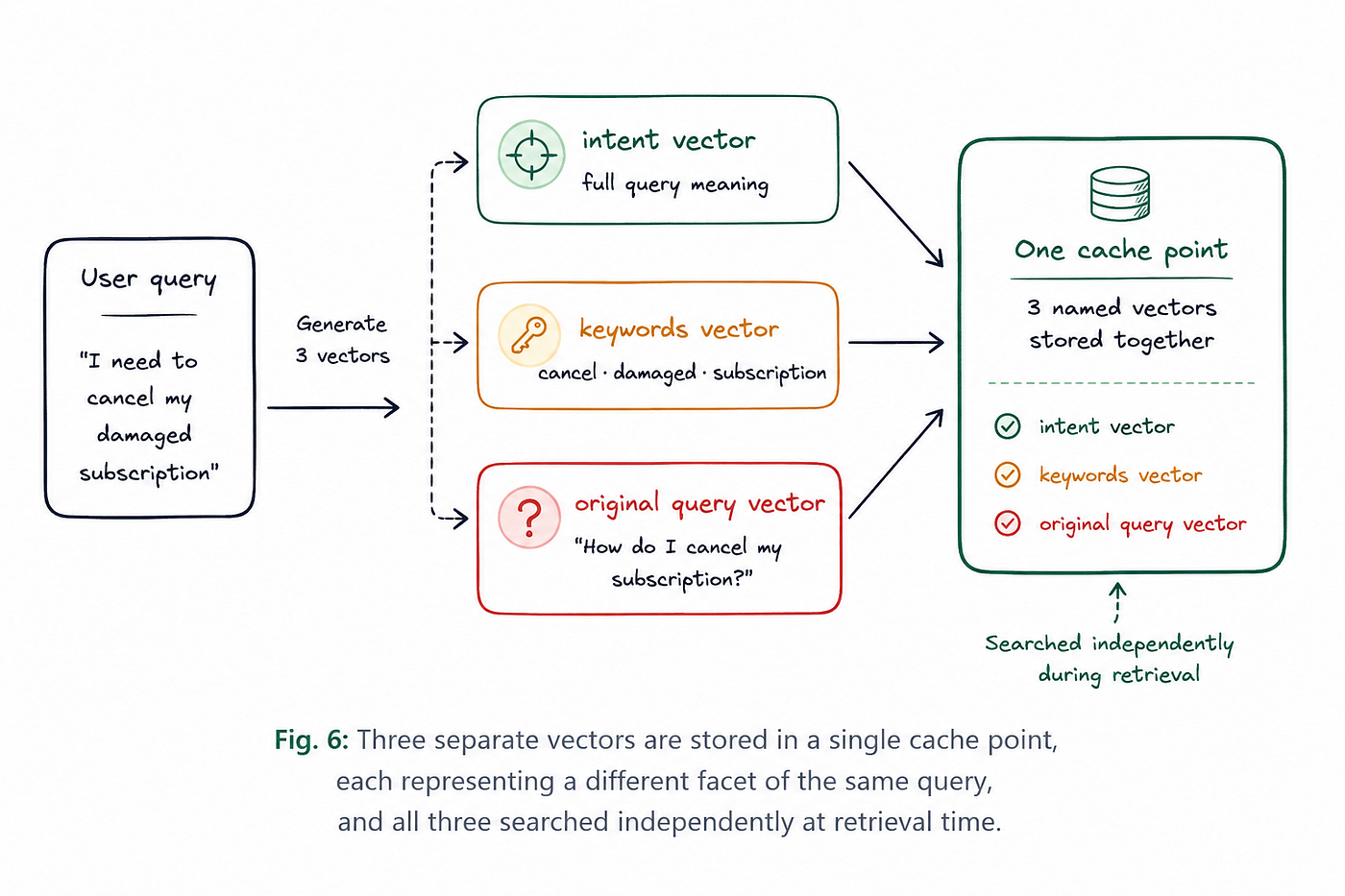
Fig 15. A single cache point stores three named vectors — intent, keywords, and original query — allowing each representation to be searched independently while remaining associated with the same cached response.
On this dataset, which consists primarily of short, focused customer support queries, single-vector semantic caching proved to be the more practical choice. Both approaches achieved the same cache hit rate, but single-vector caching delivered lower retrieval latency and greater overall cost savings. Although multi-vector indexing was significantly faster during ingestion (302 ms versus 904 ms), that advantage mattered only when writing new cache entries. During retrieval — the operation performed for every incoming query — the additional overhead of searching multiple vector spaces increased cache-hit latency from 15 ms to 42 ms.
Key takeaway: Multi-vector retrieval is most valuable for long, compound queries where a single embedding may blur multiple intents into one representation. For short, focused customer support questions, single-vector semantic caching often delivers the same retrieval quality with lower latency, making it the more efficient choice.
What These Numbers Mean in Production
The benchmark used 21 customer support queries, which was sufficient to validate the semantic cache implementation and measure relative performance. While this isn’t large enough to represent production traffic, the cost savings scale almost linearly as query volume increases.
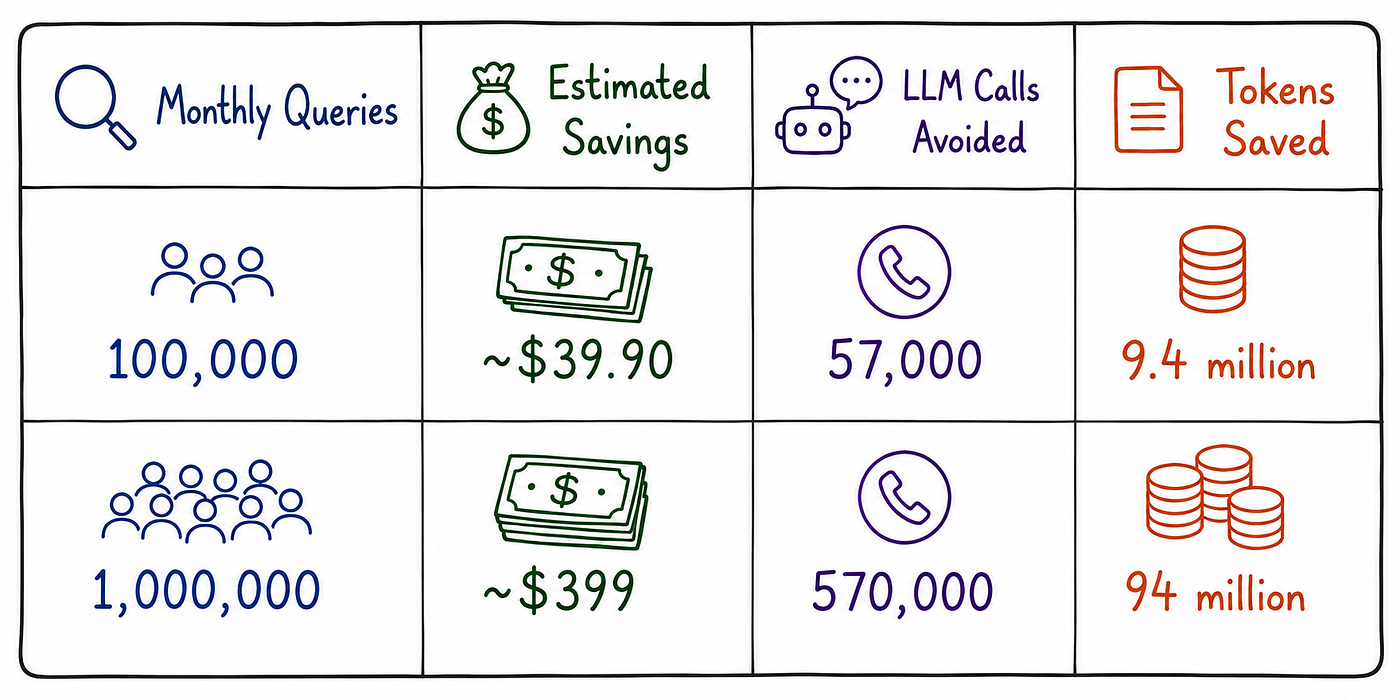
These estimates are based on the benchmark’s 57.1% cache hit rate and Claude Haiku 4.5 pricing. In practice, production systems often perform even better. As the cache fills with frequently asked questions, repeated requests are increasingly served from the semantic cache instead of the LLM, naturally improving the hit rate over time.
For a mature customer support system with recurring user questions, a 65–75% cache hit rate is a realistic expectation. That means lower inference costs, fewer LLM requests, and faster response times without changing the application logic.
Considerations for a Production Deployment
The benchmark used an in-memory Qdrant instance, which is ideal for testing but doesn’t persist data across restarts. In production, the client would connect to a persistent Qdrant deployment — either self-hosted or **Qdrant Cloud** — allowing the semantic cache to survive deployments, accumulate historical queries, and improve its cache hit rate over time.
As the cache grows, cache hit rate becomes one of the most useful metrics to monitor. Breaking it down by question category can reveal patterns that overall metrics hide. A consistently low hit rate may indicate that the similarity threshold is too strict for that category or that the questions naturally exhibit greater linguistic variation. Once these metrics are available, per-category threshold tuning becomes a practical way to improve retrieval performance.
For applications serving multiple languages, the architecture requires very little change. Replacing BAAI/bge-small-en-v1.5 with a multilingual embedding model such as paraphrase-multilingual-MiniLM-L12-v2 is usually sufficient. The semantic caching pipeline remains the same — the only changes are the embedding model and the corresponding vector dimensionality.
Finally, semantic caches aren’t entirely “set and forget.” As products, documentation, and customer behavior evolve, the relationships between queries and cached responses can gradually change, a phenomenon known as embedding drift. Periodically reviewing similarity score distributions helps detect these shifts early, allowing thresholds or embeddings to be updated before cache quality begins to decline.
What This Project Taught Me
The biggest lesson was simple: measure before making claims. It would have been easy to say that semantic caching reduces costs by some impressive percentage, but those numbers wouldn’t have meant much without evidence. Building the benchmark took considerably more time, yet it produced results based on the actual embedding model, LLM, and customer support queries used in this project.
I also learned that similarity threshold tuning is one of the most important parts of semantic caching. My initial threshold of 0.92 sounded safely conservative, but it resulted in a 0% cache hit rate. After experimenting with different values, 0.75 proved to be a much better fit for BAAI/bge-small-en-v1.5 on this dataset. That doesn’t make 0.75 the “correct” threshold — every embedding model and application has its own sweet spot, which is why calibration should always be based on real data rather than intuition.
Another takeaway was that more sophisticated architectures aren’t always better. I expected multi-vector retrieval to improve cache performance, but on this dataset it produced the same hit rate as the simpler single-vector approach while increasing retrieval latency and implementation complexity. The experience reinforced an engineering principle I’ll carry into future projects: choose the simplest solution that the measurements support, and only introduce additional complexity when the data justifies it.
One practical lesson had nothing to do with vector databases at all. LLM pricing changes surprisingly quickly. Between the first version of this benchmark and the final draft of this article, several pricing entries had already been updated or deprecated. Verifying costs against the official API documentation — and recording the pricing source alongside benchmark results — turned out to be a simple habit that helps keep cost analyses accurate over time.
Finally, I came away with a different perspective on cache invalidation. It’s easy to think of it as a purely technical problem, but in practice it reflects how frequently the underlying business information changes. A company that updates its return policy every few months needs a different invalidation strategy than one whose policies remain stable for years. Designing an effective semantic cache ultimately means understanding both the system and the content it serves.
What This Adds Up To
Stepping back from the benchmark results, the value of semantic caching comes from two complementary benefits.
The first is a dramatic reduction in time to the first token (TTFT) — the delay before a user sees the beginning of a response. In this benchmark, a cache hit returned in 15 ms, compared with an average of 2,575 ms for an LLM call. That’s the difference between a response that feels instantaneous and one that makes users wait, and every cache hit delivers that improvement regardless of which LLM is sitting behind the application.
The second benefit is lower LLM inference cost. Across the 21 benchmark queries, semantic caching avoided generating 1,975 tokens, reducing token consumption by 55.7%. As traffic grows, those savings scale almost linearly because every repeated question answered from the cache is one less request sent to the LLM.
If I were measuring the success of a production rollout, these are the two metrics I’d watch first: TTFT and token consumption. A successful deployment should push both downward as the cache fills with frequently asked questions.
There’s also a third benefit that’s harder to capture in a benchmark but often matters just as much in production: resilience.
Every cache hit bypasses the LLM entirely. If the upstream provider experiences higher latency, rate limiting, or a temporary outage, cached requests continue returning in milliseconds while only cache misses depend on the LLM. The same behavior reduces pressure on API rate limits during traffic spikes because a significant portion of requests never reaches the provider in the first place.
That resilience won’t appear in a cost report, but it’s often what separates a support system that continues serving customers under load from one that slows down when it’s needed most.
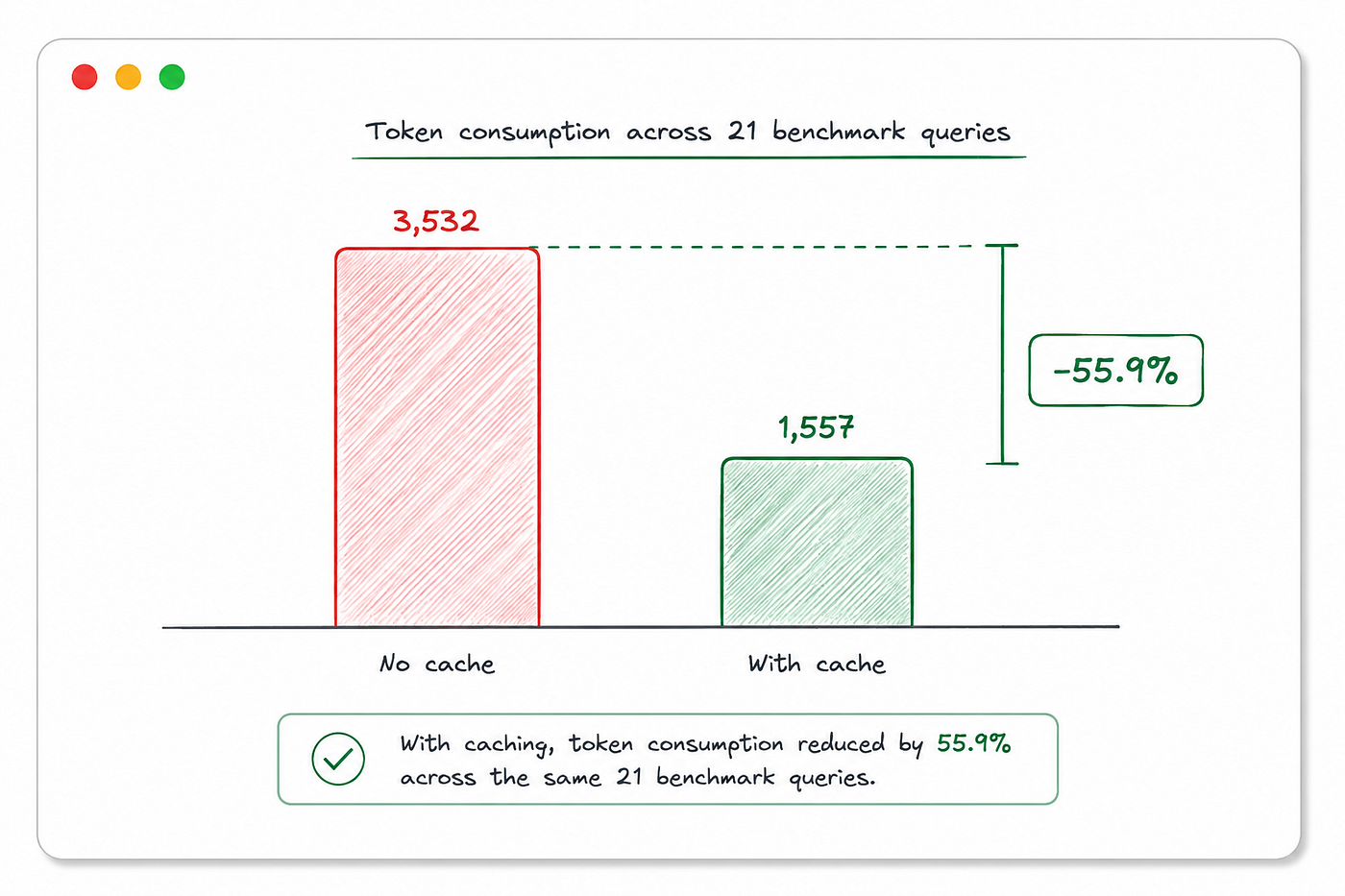
Semantic caching doesn’t make an LLM more intelligent. What it does is make the system around the model more efficient. It recognizes when a previous answer is still relevant and reuses it. That reduces latency, lowers inference costs, and improves the user experience — all without changing the model itself.
As LLM applications grow, optimizing inference becomes just as important as choosing the right model. Sometimes the biggest performance gain doesn’t come from upgrading to a larger model. It comes from recognizing when the model doesn’t need to run in the first place.
If you want to explore the implementation, benchmark it with your own data, or experiment with different embedding models and similarity thresholds, the complete project is available on GitHub. It includes the semantic cache implementation, benchmark scripts, automated tests, and the code used to generate the charts shown throughout this article.
Want to see how schematic cache works in practice?
Explore the complete project, source code, and architecture here:
Try It Yourself
Clone the repository, point it at your preferred LLM and embedding model, and run the benchmark against your own query distribution. The most useful similarity threshold isn’t something you can copy from someone else’s project — it’s the one your own data reveals.
References
-
Qdrant Documentation — Semantic Search: https://qdrant.tech/documentation/
-
OpenAI. Embeddings Guide. https://platform.openai.com/docs/guides/embeddings
-
Qdrant Documentation — Collections & Search: https://qdrant.tech/documentation/concepts/collections/
메타데이터
- post_id
- 2012c7b920fd
- slug
- how-to-use-semantic-caching-with-qdrant-to-optimize-token-costs-in-customer-support-2012c7b920fd
- url
- https://ai.gopubby.com/how-to-use-semantic-caching-with-qdrant-to-optimize-token-costs-in-customer-support-2012c7b920fd
- canonical_url
- https://ai.gopubby.com/how-to-use-semantic-caching-with-qdrant-to-optimize-token-costs-in-customer-support-2012c7b920fd
- author_url
- https://medium.com/@itinasharma
- status
- ok
- fetched_at
- 2026-07-08 20:12:56