Real-Time Data Streaming with Azure Databricks: Mastering PySpark Structured Streaming and Delta…
Introduction: Why This Matters in Modern Data Engineering
Real-Time Data Streaming with Azure Databricks: Mastering PySpark Structured Streaming and Delta Tables
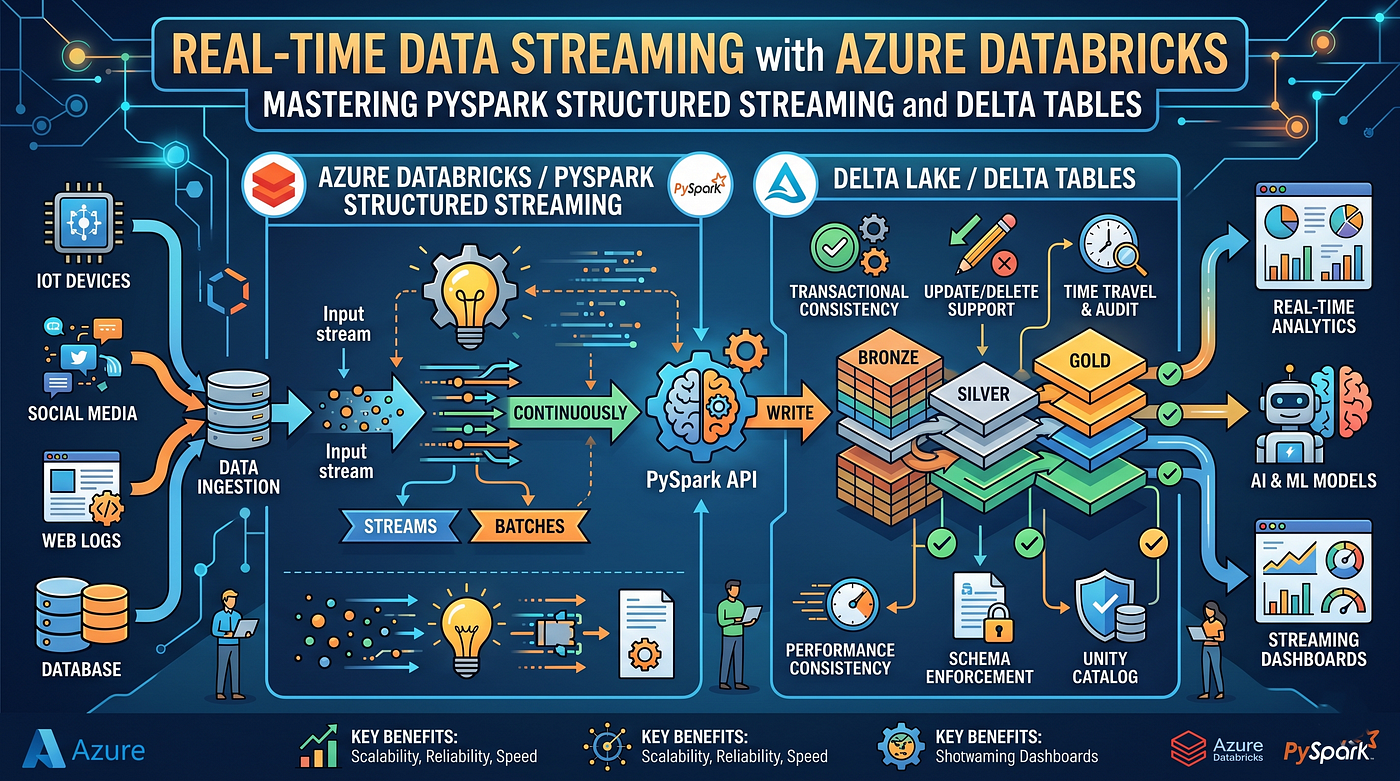
Mastering PySpark Structured Streaming and Delta Tables
Introduction: Why This Matters in Modern Data Engineering
In today’s data-driven world, businesses can’t afford to wait hours for batch processing. Companies like Netflix process 450+ billion events daily, Uber analyzes ride data in real-time, and financial institutions detect fraud within milliseconds. The secret? Real-time streaming architectures powered by Azure Databricks, PySpark Structured Streaming, and Delta Lake.
Azure Databricks with Delta Tables has become the industry standard for building reliable, scalable streaming pipelines. Whether you’re processing IoT sensor data, tracking user behavior, or monitoring financial transactions, mastering this technology is essential for modern data engineers. This article will take you from beginner to advanced, with production-ready code examples used by Fortune 500 companies.
What is PySpark Structured Streaming with Delta Tables?
PySpark Structured Streaming is Apache Spark’s scalable stream processing engine built on the Spark SQL engine. It treats streaming data as an unbounded table that continuously grows.
Delta Lake is an open-source storage layer that brings ACID transactions, schema enforcement, and time travel to data lakes. When combined with streaming, Delta Tables provide:
- ACID Transactions: Ensures data consistency
- Schema Evolution: Handles changing data structures
- Exactly-Once Processing: No duplicate records
- Time Travel: Query historical data versions
- Unified Batch & Streaming: Same API for both workloads
Real-World Industry Use Cases
- E-Commerce (Amazon, Flipkart)
- Real-time inventory updates
- Live product recommendation engines
- Fraud detection during checkout
- Streaming Platforms (Netflix, Spotify)
- User activity tracking
- Content recommendation updates
- Quality of Service monitoring
- Banking & Finance (JPMorgan, HDFC)
- Real-time fraud detection
- Stock market data processing
- Transaction monitoring
- Healthcare (Philips, GE Healthcare)
- Patient vital signs monitoring
- Medical device data streaming
- Alert systems for critical conditions
- IoT & Manufacturing
- Sensor data processing
- Predictive maintenance
- Quality control monitoring
Step-by-Step Implementation Guide
Step 1: Set Up Azure Databricks Environment
First, create a Databricks cluster with:
- Runtime: 11.3 LTS or higher
- Spark 3.3+
- Delta Lake pre-installed
Step 2: Create a Streaming Source
Let’s simulate a real-time e-commerce clickstream:
from pyspark.sql import SparkSession
from pyspark.sql.functions import *
from pyspark.sql.types import *

# Initialize Spark Session
spark = SparkSession.builder \
    .appName("DeltaStreamingDemo") \
    .getOrCreate()

# Define schema for incoming streaming data
clickstream_schema = StructType([
    StructField("user_id", StringType(), True),
    StructField("product_id", StringType(), True),
    StructField("action", StringType(), True),
    StructField("timestamp", TimestampType(), True),
    StructField("price", DoubleType(), True)
])
Line-by-line explanation:
- Line 1–3: Import necessary PySpark libraries
- Line 6–8: Create SparkSession (entry point for Spark functionality)
- Line 11–17: Define schema to ensure data quality and type safety
Step 3: Create Streaming DataFrame
# Read streaming data from a source (e.g., Azure Event Hub, Kafka, or file stream)
streaming_df = spark.readStream \
    .format("cloudFiles") \
    .option("cloudFiles.format", "json") \
    .option("cloudFiles.schemaLocation", "/mnt/schema/clickstream") \
    .schema(clickstream_schema) \
    .load("/mnt/raw/clickstream/")

# Add processing timestamp
processed_df = streaming_df \
    .withColumn("processing_time", current_timestamp()) \
    .withColumn("date", to_date(col("timestamp")))
Explanation:
- readStream: Creates a streaming DataFrame (unbounded table)
- cloudFiles: Auto Loader for efficient incremental data ingestion
- schemaLocation: Stores inferred schema for consistency
- withColumn: Adds metadata columns for tracking
Step 4: Write to Delta Table with Checkpointing
# Define checkpoint location (critical for fault tolerance)
checkpoint_path = "/mnt/checkpoints/clickstream"
delta_table_path = "/mnt/delta/clickstream_events"

# Write streaming data to Delta Table
query = processed_df.writeStream \
    .format("delta") \
    .outputMode("append") \
    .option("checkpointLocation", checkpoint_path) \
    .option("mergeSchema", "true") \
    .trigger(processingTime="10 seconds") \
    .start(delta_table_path)

# Keep the stream running
query.awaitTermination()
Critical parameters explained:
- checkpointLocation: Stores offset information for exactly-once processing
- outputMode=”append”: Adds new records (alternatives: complete, update)
- mergeSchema: Allows schema evolution
- trigger: Micro-batch interval (10 seconds)
Step 5: Advanced — Streaming Aggregations
# Real-time aggregation: Count actions per product every minute
aggregated_stream = streaming_df \
    .withWatermark("timestamp", "10 minutes") \
    .groupBy(
        window(col("timestamp"), "1 minute"),
        col("product_id"),
        col("action")
    ) \
    .agg(
        count("*").alias("action_count"),
        sum("price").alias("total_revenue")
    )

# Write aggregated results to Delta Table
agg_query = aggregated_stream.writeStream \
    .format("delta") \
    .outputMode("update") \
    .option("checkpointLocation", "/mnt/checkpoints/aggregated") \
    .start("/mnt/delta/product_metrics")
Key concepts:
- withWatermark: Handles late-arriving data (10-minute tolerance)
- window: Time-based grouping (1-minute windows)
- outputMode=”update”: Updates existing aggregations
Step 6: Query Delta Table (Batch + Streaming)
# Batch query on streaming Delta Table
df = spark.read.format("delta").load("/mnt/delta/clickstream_events")

# Show top 10 products by views
top_products = df.filter(col("action") == "view") \
    .groupBy("product_id") \
    .count() \
    .orderBy(desc("count")) \
    .limit(10)

top_products.display()

# Expected Output

+----------+-----+
|product_id|count|
+----------+-----+
|PROD_1234 | 5420|
|PROD_5678 | 4890|
|PROD_9012 | 4321|
+----------+-----+
Common Interview Questions
- What’s the difference between Spark Streaming and Structured Streaming?
- Structured Streaming uses DataFrame API, provides exactly-once semantics, and integrates with Delta Lake.
- How does checkpointing work?
- Stores offset information to enable fault tolerance and exactly-once processing.
- What are watermarks?
- Mechanism to handle late-arriving data in streaming aggregations.
- Why use Delta Lake over Parquet?
- ACID transactions, time travel, schema evolution, and better streaming support.
- How to handle schema changes in streaming?
- Use mergeSchema=true option in writeStream.
Common Mistakes Beginners Make
❌ Forgetting checkpoint locations → Leads to data reprocessing
❌ Not using watermarks → Memory issues with aggregations
❌ Wrong output modes → Incorrect results (append vs. update vs. complete)
❌ Ignoring schema enforcement → Data quality issues
❌ Not partitioning Delta Tables → Poor query performance
Best Practices from Fortune 500 Companies
✅ Partition by date/hour for time-series data
✅ Use Z-ordering for frequently filtered columns
✅ Implement data quality checks before writing
✅ Set up monitoring with Databricks metrics
✅ Use Auto Loader for cloud storage ingestion
✅ Enable Delta Lake optimizations (auto-compaction, vacuum)
✅ Implement idempotent writes for reliability
Performance Optimization Tips
# Optimize Delta Table
spark.sql("OPTIMIZE delta.`/mnt/delta/clickstream_events` ZORDER BY (product_id)")

# Vacuum old files (7 days retention)
spark.sql("VACUUM delta.`/mnt/delta/clickstream_events` RETAIN 168 HOURS")

# Enable auto-compaction
spark.conf.set("spark.databricks.delta.optimizeWrite.enabled", "true")
spark.conf.set("spark.databricks.delta.autoCompact.enabled", "true")
Performance gains:
- Z-ordering: 10–100x faster queries on filtered columns
- Auto-compaction: Reduces small file overhead
- Vacuum: Manages storage costs
Summary & Career Benefits
You’ve learned how to build production-grade real-time streaming pipelines using Azure Databricks, PySpark Structured Streaming, and Delta Tables. This technology stack is used by 80% of Fortune 500 companies for their data platforms.
Career Impact:
- Average salary: $130,000 — $180,000 for Data Engineers with streaming expertise
- High demand: 45% YoY growth in streaming data engineer roles
- Certifications: Databricks Certified Data Engineer Associate/Professional
- Industries hiring: Tech, Finance, Healthcare, E-commerce, IoT
Next Steps:
- Practice with Databricks Community Edition (free)
- Build a portfolio project with real-time data
- Pursue Databricks certification
- Contribute to open-source Delta Lake projects
Master this skill, and you’ll be equipped to handle the most challenging data engineering problems in the industry. The future of data is real-time, and you’re now ready to build it! 🚀
메타데이터
- post_id
- 20649f45b4e8
- slug
- real-time-data-streaming-with-azure-databricks-mastering-pyspark-structured-streaming-and-delta-20649f45b4e8
- url
- https://medium.com/@aspinfo/real-time-data-streaming-with-azure-databricks-mastering-pyspark-structured-streaming-and-delta-20649f45b4e8
- canonical_url
- https://medium.com/@aspinfo/real-time-data-streaming-with-azure-databricks-mastering-pyspark-structured-streaming-and-delta-20649f45b4e8
- author_url
- https://medium.com/@aspinfo
- status
- ok
- fetched_at
- 2026-06-09 15:37:30