LetsDefend Linux for Blue Team Course WriteUp
📌 Hello Cybersecurity Enthusiasts
LetsDefend Linux for Blue Team Course WriteUp
📌 Hello Cybersecurity Enthusiasts
I am continuing with LetsDefend WriteUps. These write-ups are not just solution shares but also a source of encouragement for those at the beginning of their cybersecurity journey. Every step is a milestone in the endless journey of knowledge.
• 🗂️ Course Name: Linux for Blue Team
• 📜 Detail: Linux fundamentals for getting started in cybersecurity
• 🔗 Course URL: https://app.letsdefend.io/training/lessons/linux-for-blue-team
• ⚡ Difficulty Level: Beginner
• 🏹 Role: Security Analyst
• 🎯 Lessons in Course: About This Course Introduction to Linux Linux File System Hierarchy Basic Terminal Commands — 1 Basic Terminal Commands — 2 Permissions Management User Management and Groups Archive File Formats Process Management Network Management Package Management Service Management Scheduled Tasks
• 🔍 Specifically Tools Mentioned in Room: -
• 🛠️ Types of Tools Used in Room: -
• 🎯 Target System: Linux
• 🏳️ Duration: 240'

Lesson 1 — About This Course
Lesson 2 — Introduction to Linux
2.1 Which Linux distribution ranked first with the most number of visits to the page visits on the distrowatch.com web address in 2009?
We shouldn’t forget that distrowatch.com’s data is not a good indicator. But in order to answer the question, after a little bit search, we see that the answer is Ubuntu: https://distrowatch.com/weekly.php?issue=20100104#stats
Answer: Ubuntu
Lesson 3 — Linux File System Hierarchy
Lesson 4 — Basic Terminal Commands — 1
Lesson 5 — Basic Terminal Commands — 2
5.1 When the repeated words in the file below are removed, how many words remain in total?
Let’s open the zip file with unzip /root/Desktop/QuestionFiles/BasicTerminalCommands-2/sortme.zip
The question looks vague and is one of the type of LetsDefend questions that I don’t like which I call “soup of words”. But fortunately we can infer that it wants to ask the number of unique words in the file. For this we need to sort the lines of file and extract only unique ones and count how many. And that is:
cat sortme.txt | sort | uniq | wc -l
Answer: 8
5.2 What is the extension of the file below? (Find it with Linux commands.)
Let’s first extract the file from zip with unzip /root/Desktop/QuestionFiles/BasicTerminalCommands-2/letsdefend.zip
And investigate the file with file :

Answer: png
5.3 Find how many “d” letters are in the file below with Linux commands.
This was not something we were taught in the lesson, but no worries.
Let’s do a grep --help to see what we can use if we don’t know what to do:

This should allow us to list the lines only matching ‘d’. So let’s get to the action:
cat grepme.txt | grep -o 'd' | wc -l
Answer: 7
5.4 What is the output of the following command?
Easy one. Only copy and paste the command to see the result.
But know that this is called ROT13 which shifts all the characters by 13 to encrypt. And when to decrypt the same process is carried out to convert to the first input string.

Answer: learning_linux_fundamentals
Lesson 6 — Permissions Management
6.1 In the output of the following file content, how many files have the numerical representation of their permissions equal to “704”?
Let’s first unzip file, then read it and list lines only with 704 which means “rwx---r-- ”:
unzip /root/Desktop/QuestionFiles/PermissionsManagement/permissions.zip
cat permissions.txt | grep "rwx---r--" | wc -l
Answer: 2
6.2 Some changes have been applied to the permissions of the files listed in the file contents above. One of the two files above shows the permissions of the files under the directory before the permission change command is applied, and the other shows the file permissions after the permission change command is applied. What is the command applied according to these two files?
Let’s read the file contents in turn and find the difference between them: (diff command is not in curriculum but I believe it is very useful im situations such as permissions, logs e.t.c. and that’s why we need to learn. But you can choose either to read the files or display the difference with diff)
unzip /root/Desktop/QuestionFiles/PermissionsManagement/q2.zip
cat after2.txt
cat before2.txt
diff after2.txt before2.txt
Output shows that all the files were permitted as rwxrwxrwx which means 777.
Answer: chmod 777
6.3 Some changes have been applied to the permissions of the files listed in the file contents above. One of the two files above shows the permissions of the files under the directory before the permission change command is applied, and the other shows the file permissions after the permission change command is applied. What is the command applied to these two files?
unzip /root/Desktop/QuestionFiles/PermissionsManagement/q3.zip
cat after3.txt
cat before3.txt
diff after3.txt before3.txt
So the difference here seems to be the first x which means execute permission for user was added to file. So chmod was used with user + execute which results in command:
Answer: chmod u+x file6
Lesson 7 — User Management and Groups
7.1 What is the username of the user with the UID of “1001”?
We start with:
unzip /root/Desktop/QuestionFiles/UserManagementAndGroups/linuxfile.zip
cat linuxfile
We see this is a usual shadow file. So it’s easy to filter for 1001:

Answer: letsdefend
7.2 What is the name of the file containing the groups on Linux?
This is clearly stated in the passages.
Answer: /etc/group
7.3 According to the file given above, how many users are in the “sudo” group?
unzip /root/Desktop/QuestionFiles/UserManagementAndGroups/group.zip
cat group.txt
This looks like a regular passwd file:

Let’s grep and find the sudos:

Answer: 3
Lesson 8 — Archive File Formats
8.1 With which command can files with “.zip” extension be opened on Linux command line?
This is clearly stated in the passages, and we used it many times during this writeup.
Answer: unzip
8.2 With which command can files with “.rar” extension be opened on Linux command line?
This is clearly stated in the passages.
Answer: unrar
Lesson 9 — Process Management
9.1 What is the command that should be used to view the process with the Process ID value of “36726”?
This is clearly stated in the passages.
Answer: ps --pid
9.2 Which command does the following file content which is in the output of the whatis command with the definition of “display a tree of processes”, belong to?
Yet another soup of words question from LetsDefend eventually meaning “Which command’s output is the file given?”
Similar procedures:
unzip /root/Desktop/QuestionFiles/ProcessManagement/process2.zip
cat processes2.txt
This output displays the processes in tree format, and this reminds us only one command:
Answer: pstree
9.3 What is the PID (Process ID) value of the “gnome-calculator” process in the process output given below??
unzip /root/Desktop/QuestionFiles/ProcessManagement/process3.zip
cat processes.txt
This is a process list and we can filter gnome-calculator line and then investigate:

cat processes.txt | grep calculator
Answer: 8409
Lesson 10 — Network Management
10.1 All network interfaces on the Linux system are recorded in the file given below.
Question expects us to work on the file provided, but from the question itself we can understand that it’s teh command “ifconfig -a”
Answer: ifconfig -a
10.2 One of the files given below is the “ifconfig -a” output before the command is executed, and the other is the “ifconfig -a” output after the command is executed. What is the command applied to these files?
unzip /root/Desktop/QuestionFiles/NetworkManagement/q2.zip
diff after.txt before.txt
Output shows the only difference is present on line 9 and it is the word “UP”. So it means before the interface was UP but later DOWN. And the command to be executed for that is:
Answer: ifconfig down
10.3 What is the command that provides the output in the file given below?
unzip /root/Desktop/QuestionFiles/NetworkManagement/network3.zip
cat network2.txt
File is an output for a ping directed to letsdefend.io (104.21.47.22) for 4 times.
Answer: ping -c 4 letsdefend.io
10.4 In the file below, server logs of file sharing with Python are recorded. How many files have been successfully accessed according to this file?
unzip /root/Desktop/QuestionFiles/NetworkManagement/network4.zip
cat network3.txt
Successful access requires HTTP 200 which are shown on screenshot.
LetsDefend please be careful about file naming! It puzzles human mind to extract a “network2” file from “network3.zip” in question 3, and extract a “network3” file from “network4.zip” in question 4!
Answer: 3
Lesson 11 — Package Management
Lesson 12 — Service Management
Lesson 13 — Scheduled Tasks
13.1 What is the number of the scheduled task that ensures regular backups hourly every day?
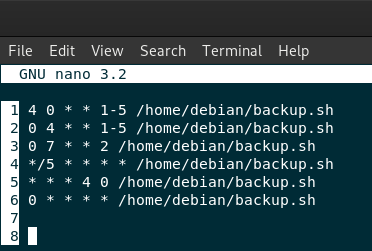
Hourly cronjobs require the minutes bit (the first bit) in the cronjabs to be 0.
So we need a line with first bit is set to 0 and others asterisk (*).
Answer: 6
QUIZ
Q1 — What is the name of the directory where the configuration files are kept in Linux?
/tmp /etc /proc /root
Q2 — What is the most authorized user in Linux?
user apache root sys
Q3 — What is the command used to go back to the previous directory in the Linux command line?
cd - cd ~ cd . cd ..
Q4 — What is the proper command on the Linux command line that displays the permissions of the files in the current directory?
chmod +x ls -a chmod -x ls -l
Q5 — What is the command and parameter that allows creating nested directories on the Linux command line?
touch -a mkdir -v mkdir -p id -u
Q6 — What is the command used to change filenames in the Linux command line?
rm mv cp uniq
Q7 — What is the operator sign used to append to the end of a file on the Linux command line?
>>
- %
Q8 — What is the command to be applied to read the first 8 lines of the file named “note.txt” in the Linux command line?
head -c 8 note.txt tail -n 8 note.txt tail -c 8 note.txt head -n 8 note.txt
Q9 — What is the numerical representation of the permissions of the file that the permissions are “r w x r — x r — -”?
754 457 547 755
Q10 — What is the command used to find out which user is operating on the Linux command line?
whoami cat man ls
Q11 — Which file contains the encrypted version of the passwords of the users in Linux?
/etc/passwd /etc/shadow /etc/resolv.conf /etc/hosts
Q12 — What is the command that should be executed on the command line just to find out the user’s UID value?
whoami id -u ls /tmp cd /var
Q13 — What is the command that helps switch users on the command line
su passwd chgrp chown
Q14 — Which command is used to decompress gzip files?
extract echo rm gunzip
Q15 — What is the command used to view processes in real-time?
ps top netstat tree
Q16 — What is the command to view current network connections and their status on the Linux command line?
netstat ifconfig iwconfig ping
Q17 — What is the file extension of the packages installed on Debian-based Linux distributions?
zip rpm deb tar
Q18 — What is the command used to list available scheduled tasks?
ls -h ls -l crontab -l crontab -e
I’ve not only tried to explain what works but also to highlight what doesn’t, providing detailed information to help beginners gain a better perspective. I hope it has been informative enough!
Best regards!
If you enjoyed this article and want to see more content like this, you can:
• 👏 Clap to show your support,
• 📰 Follow me for upcoming articles on AI security and ethical hacking, and
• 💬 Feel free to share your thoughts or ask about any issues you encountered in the comments — I’d be happy to hear your ideas!
Thank you for being part of this journey, and see you in the next one! 🌟
메타데이터
- post_id
- 207e321c55a8
- slug
- letsdefend-linux-for-blue-team-course-writeup-207e321c55a8
- url
- https://medium.com/traditional-cyber-security/letsdefend-linux-for-blue-team-course-writeup-207e321c55a8
- canonical_url
- https://medium.com/traditional-cyber-security/letsdefend-linux-for-blue-team-course-writeup-207e321c55a8
- author_url
- https://medium.com/@akyuksel
- status
- ok
- fetched_at
- 2026-07-29 23:11:35



