Reuse XSpec Scenarios Across XSLT and XQuery
1 XSpec scenario set, 2 languages, 3 architectures
Reuse XSpec Scenarios Across XSLT and XQuery
1 XSpec scenario set, 2 languages, 3 architectures
Did you ever implement the same function in both XSLT and XQuery? Maybe you were migrating a project from one language to the other. Or, maybe the function behavior was needed in an XSLT portion of a code base as well as an XQuery portion. Or, perhaps you created a function library for an audience of XSLT and XQuery users.
While the Testing an XPath Function Library with XSpec 3.0 topic is about XSLT and XQuery functions that can share an XPath implementation, this topic is about functions with distinct implementations in XSLT and XQuery. To the extent that you are testing user-visible behaviors (“black-box” testing) that are identical in the XSLT and XQuery implementations, you should be able to reuse the XSpec code across implementations. This topic shows three approaches for doing so.
The code repository (see link at bottom of topic) contains examples of all three approaches, testing the helper functions from the Ignoring Code Comments During XSpec Testing and Ignoring Code Comments During XSpec Testing for XQuery topics.
A) XSpec File Points to Both Modules
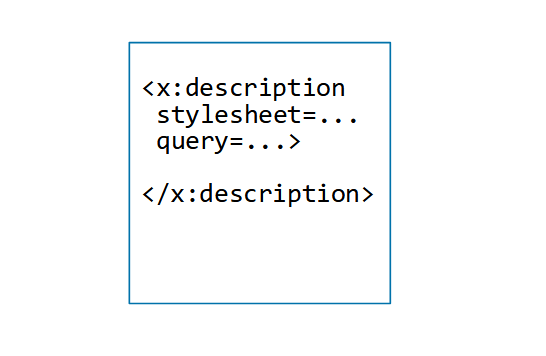
In this approach, you create one XSpec file. It points to both modules that contain an implementation of the function you want to test. On the <x:description> element,
- The
queryandquery-atattributes point to the XQuery module - The
stylesheetattribute points to the XSLT stylesheet
Example 1. Attributes point to XSLT and XQuery
<x:description
  query="urn:x-xspectacles:functions:helper:remove-comments"
  query-at="../../helper-comments/helper-remove-comments.xqm"
  stylesheet="../../helper-comments/helper-remove-comments.xsl"
  xmlns:frc="urn:x-xspectacles:functions:helper:remove-comments"
  xmlns:x="http://www.jenitennison.com/xslt/xspec">
Simple, right? But wait — the success of this approach depends on how you plan to execute the test suite.
Some ways of running an XSpec test suite will run it against only one of the two languages, leaving the other language untested.
Running the Test Suite Twice
Here are some ways to ensure your test suite gets tested with both languages, depending on how you run it:
- Shell or batch script (as described in Running Scenarios): Run it with the
-tflag to test the XSLT implementation of the function, and again with the-qflag to test the XQuery implementation. - XProc (as described in Running with XProc): Run it with the
saxon-xslt-harness.xprocpipeline to test the XSLT implementation of the function, and again with thesaxon-xquery-harness.xprocpipeline (or one of the two pipelines that uses BaseX instead of Saxon) to test the XQuery implementation. Alternatively, you can create your own pipeline that automates the pair of operations. - Ant (as described in Running XSpec’s Ant build file from the command line): Run it with the
test.type=tproperty to test the XSLT implementation of the function, and again with thetest.type=qproperty to test the XQuery implementation.
When to Pick Another Approach
If you are using one of the Maven plugins described at the top of Running with Maven, you face two problems:
- Of the three plugins listed there, the first two do not support XSpec tests for XQuery.
- The plugin at
[https://github.com/nkutsche/xspec-maven-plugin/](https://github.com/nkutsche/xspec-maven-plugin/) supports XSpec tests for XQuery, but it cannot execute a single XSpec file against both XSLT and XQuery.
To avoid these problems when using Maven, use the nkutsche plugin with separate XSpec files as in Approach B or C, below.
Similarly, the out-of-the-box transformation scenarios in Oxygen XML Editor are not designed to execute a single XSpec file against both XSLT and XQuery. Use Approach B or C, below.
B) One XSpec File Imports Another
In this approach, you create two files:
- A “big” XSpec file that contains all your scenarios and uses the
<x:description>element to point to one of the two modules that contain an implementation of the function you want to test. It can be either the XSLT or XQuery implementation; if you have no preference, pick XQuery for a reason I explain near the end of this topic. - A small XSpec file whose
<x:description>element points to the other language’s module and uses the<x:import>element to import the file from step 1. This file does not have any scenarios.

This approach is asymmetric because the big file contains the scenarios, while the small file relies on the import operation to get them. Both files are executable.
Samples
Example 2. Big file testing XQuery
<x:description query="urn:x-xspectacles:functions:helper:remove-comments"
  query-at="../../helper-comments/helper-remove-comments.xqm"
  xmlns:frc="urn:x-xspectacles:functions:helper:remove-comments"
  xmlns:x="http://www.jenitennison.com/xslt/xspec">

  <x:scenario label="Some scenario goes here...">
    <!-- ... -->
  </x:scenario>

  <!-- There could be many more scenarios... -->

</x:description>
Example 3. Small file testing XSLT
<x:description stylesheet="../../helper-comments/helper-remove-comments.xsl"
  xmlns:frc="urn:x-xspectacles:functions:helper:remove-comments"
  xmlns:x="http://www.jenitennison.com/xslt/xspec">

  <!-- Scenarios for XQuery also work for XSLT -->
  <x:import href="test-the-helper_xq.xspec"/>

</x:description>
C) Shared XSpec File Has Two Importers
In this approach, you create three files:
- A “big” XSpec file that contains all your scenarios and whose
<x:description>element does not point to any modules at all. - A small XSpec file whose
<x:description>element points to the XSLT stylesheet and uses the<x:import>element to import the file from step 1. This file does not have any scenarios. - A small XSpec file whose
<x:description>element points to the XQuery library module and uses the<x:import>element to import the file from step 1. This file does not have any scenarios, either.

This approach is symmetric because the test for XSLT and the test for XQuery both rely on the import operation to get scenarios.
The file from step 1 is not executable, however, because it doesn’t point to any modules. Consider adding a code comment to explain the architecture.
Also, if you are using the Maven plugin at https://github.com/nkutsche/xspec-maven-plugin/, use the exclusion capability to prevent the file from step 1 from executing. For instance, if the file from step 1 is named scenarios.xspec, then your configuration of the Maven plugin can contain something like:
<excludes>
   <exclude>**/scenarios.xspec</exclude>
</excludes>
The files from steps 2 and 3 are executable.
Samples
Example 4. Big file containing scenarios
<x:description
  xmlns:frc="urn:x-xspectacles:functions:helper:remove-comments"
  xmlns:x="http://www.jenitennison.com/xslt/xspec">

  <!--
    NOTE: This file cannot be executed as is, because its
    <x:description> element does not point to a stylesheet or
    library module.

    Import this file from an XSpec file that does point to a
    stylesheet or library module.
  -->

  <x:scenario label="Some scenario goes here...">
    <!-- ... -->
  </x:scenario>

  <!-- There could be many more scenarios... -->

</x:description>
Example 5. Small file testing XSLT
<x:description stylesheet="../../helper-comments/helper-remove-comments.xsl"
  xmlns:frc="urn:x-xspectacles:functions:helper:remove-comments"
  xmlns:x="http://www.jenitennison.com/xslt/xspec">

  <x:import href="test-the-helper_scenarios-only.xspec"/>

</x:description>
Example 6. Small file testing XQuery
<x:description query="urn:x-xspectacles:functions:helper:remove-comments"
  query-at="../../helper-comments/helper-remove-comments.xqm"
  xmlns:frc="urn:x-xspectacles:functions:helper:remove-comments"
  xmlns:x="http://www.jenitennison.com/xslt/xspec">

  <x:import href="test-the-helper_scenarios-only.xspec"/>

</x:description>
What If You Need More Than Just Scenarios?
If testing your function requires <x:helper> elements (presumably one for XSLT and one for XQuery), it is fine to include them in Approach A or have them picked up in the import operations of Approach B or C. Executing a test for XSLT ignores XQuery helpers, and vice versa. In Approach C, you might prefer to place each <x:helper> element in its respective language-specific XSpec file instead of the shared XSpec file.
If testing your XSLT implementation requires global <x:param> elements to override global stylesheet parameters or global XSLT variables, then you must ensure that these <x:param> elements do not end up in a test for XQuery. They will cause an error because XQuery tests don’t support <x:param> as a child of <x:description>. You can either use Approach B with the big file pointing to the XQuery module, or use Approach C. Either way, place the global <x:param> elements in the small file that points to the XSLT stylesheet.
Key Takeaways
- When you implement a function with the same behavior in both XSLT and XQuery, you should not need to maintain two copies of the XSpec test scenarios for language-independent behaviors.
- Approach A minimizes the number of XSpec files, but there are limitations and a bit of complexity related to executing the test suite.
- Approach B is my favorite because there is no complexity around executing the XSpec files, including via Oxygen and Maven.
- Approach C requires more XSpec files and one of them is not executable, but you might like the symmetry; unlike Approach B, this approach treats XSLT and XQuery alike.
Code is downloadable from https://github.com/galtm/xspectacles/ on GitHub, in the src/two-languages folder.
메타데이터
- post_id
- 211fa86e1b27
- slug
- reuse-xspec-scenarios-across-xslt-and-xquery-211fa86e1b27
- url
- https://medium.com/@xspectacles/reuse-xspec-scenarios-across-xslt-and-xquery-211fa86e1b27
- canonical_url
- https://medium.com/@xspectacles/reuse-xspec-scenarios-across-xslt-and-xquery-211fa86e1b27
- author_url
- https://medium.com/@xspectacles
- status
- ok
- fetched_at
- 2026-07-18 21:36:33