Automating Discord Bug Triage With AI and Kestra
Replacing weeks of manual Discord review with an Al orchestration flow that links, flags, and escalates issues to GitHub
Automating Discord Bug Triage With AI and Kestra
Replacing weeks of manual Discord review with an Al orchestration flow that links, flags, and escalates issues to GitHub
I was exploring some cool AI stuff that’s when I came across Kimchi, I found it cool, explored it’s codebase a little, and joined it’s discord and that’s when I saw something in there.
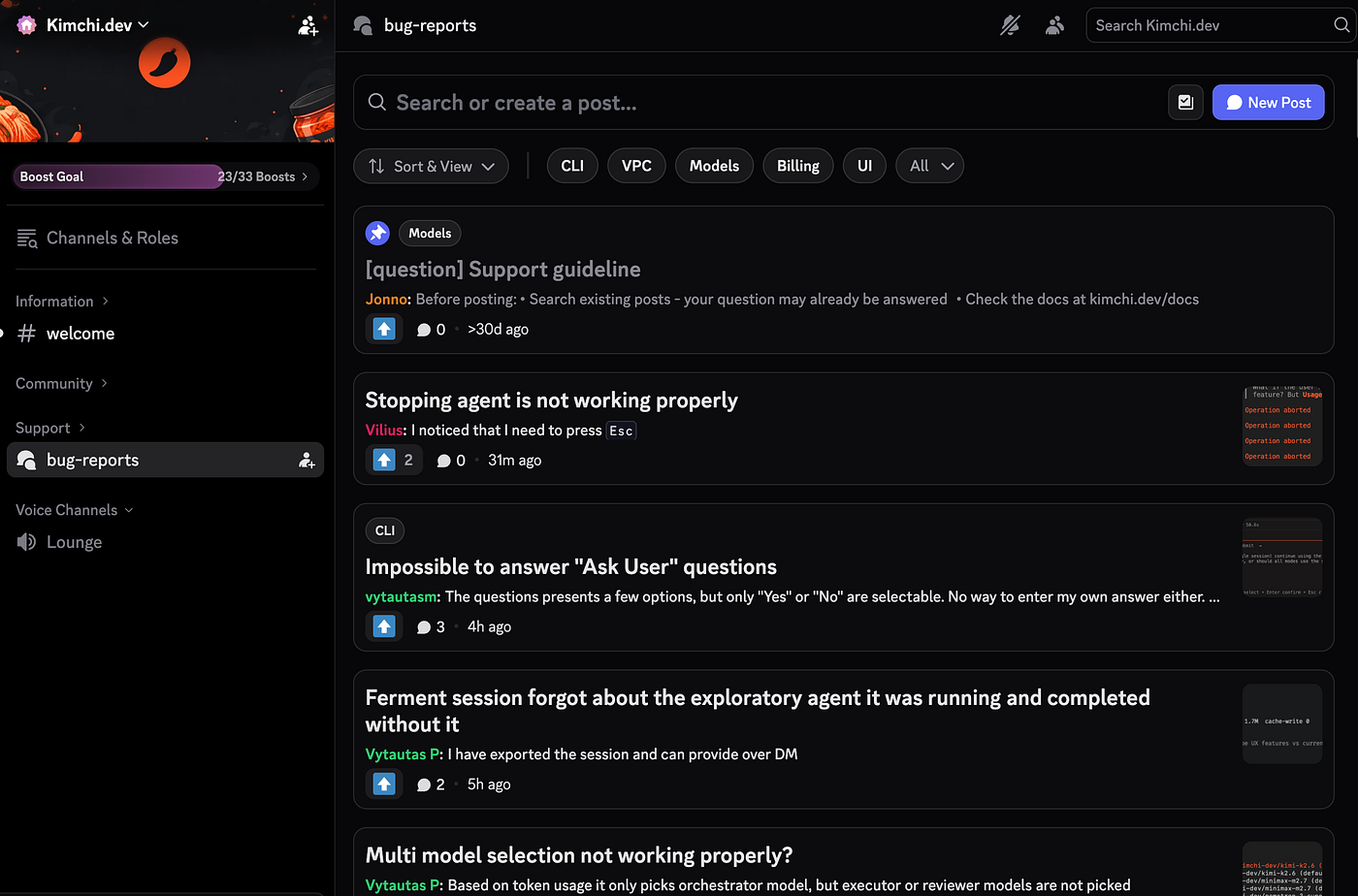
Bug reports, and since I’ve come from GitHub I saw some these were already open, and people were still opening new posts. Duplicates. That’s when I came up with and Idea
Hmmmm. What if I could tell these people that there’s already an issue regarding that on GitHub. 💡 Wait. What if I could automate this somehow…
I wasn’t sure how I was gonna do it back then. but I had already completed the Kestra Fundamentals course and I knew Kestra could do it. Put my head through it.
Before we begin / An advice
I would suggest you to use KestraMCP and KestraDocsMCP attached to whatever AI Agent you’re using. They’re super super useful. They’re superpowers.
The Problem
Developer-facing products in early access tend to end up in Discord. It’s where the users already are, the feedback loop is tight, and threads are easier than a support ticket system nobody wanted to set up.
Open Source Communities like Appwrite & Kimchi run their alpha support entirely this way — a dedicated bug-reports forum in their Discord server. Users post when something breaks. At 30–40 reports a week, that’s not overwhelming on its face. But each post needs the same sequence of manual work: read it, search GitHub for a matching open issue, scan the last few weeks of threads for duplicates, decide whether it’s worth escalating, write a reply. Do that 35 times a week and it stops being a support process and starts being someone’s entire job.
The other thing: most of those posts are the same issue. Not literally, but effectively. A handful of known bugs generating five, ten, fifteen separate reports from different users, each one waiting for a human to connect it to something already tracked.
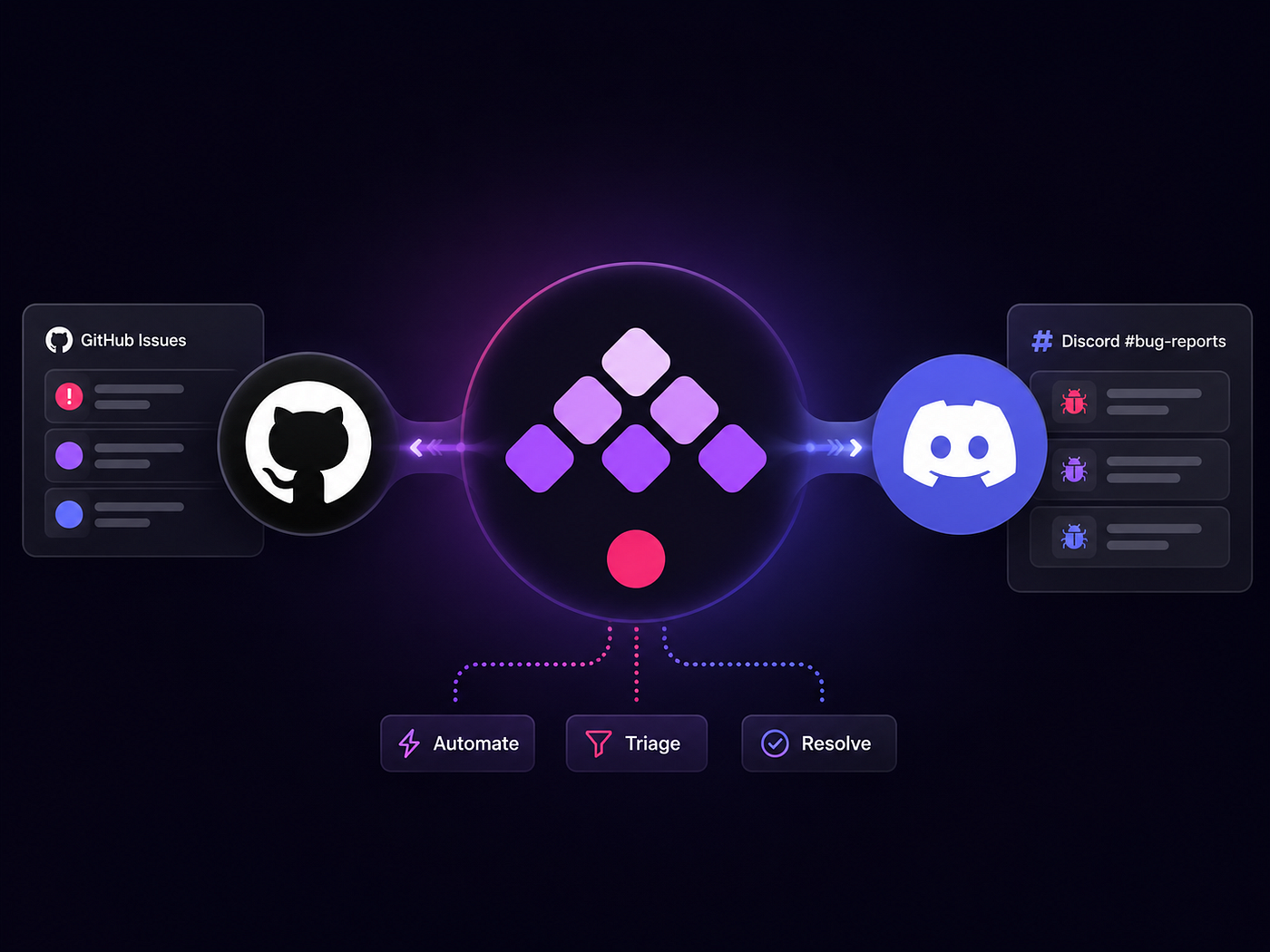
Triage Bot cuts through that. New forum post comes in, the pipeline checks GitHub and past threads, figures out what it is, and handles it — reply, react, archive, escalate. Kestra runs the whole thing.
Two layers, one clear boundary
Two layers. The Discord bot’s job is to receive events and POST to Kestra webhooks. No routing, no AI, no state. The moment it delivers the payload, it’s out of the picture.
Kestra handles everything else. New forum post: triage flow. Upvote reaction: escalation flow. Slash command: config write. Each flow is independent, reads its own KV state, makes its own Discord API calls.
We kept the bot shallow deliberately. If triage logic lived in TypeScript, every change to the AI agent’s search strategy or the escalation threshold would mean a bot redeploy. In Kestra, it’s a YAML edit. The bot doesn’t know and doesn’t care.
The entry point for each flow is a webhook trigger. The bot POSTs to it, Kestra picks it up:
triggers:
  - id: webhook
    type: io.kestra.plugin.core.trigger.Webhook
    key: YOUR_TRIAGE_WEBHOOK_KEY
    inputs:
      discord_thread_id: "{{ trigger.body.discord_thread_id }}"
      discord_guild_id: "{{ trigger.body.discord_guild_id }}"
      thread_name: "{{ trigger.body.thread_name }}"
      first_message: "{{ trigger.body.first_message }}"
Three flows, three webhook keys. The bot doesn’t know what happens after the POST.
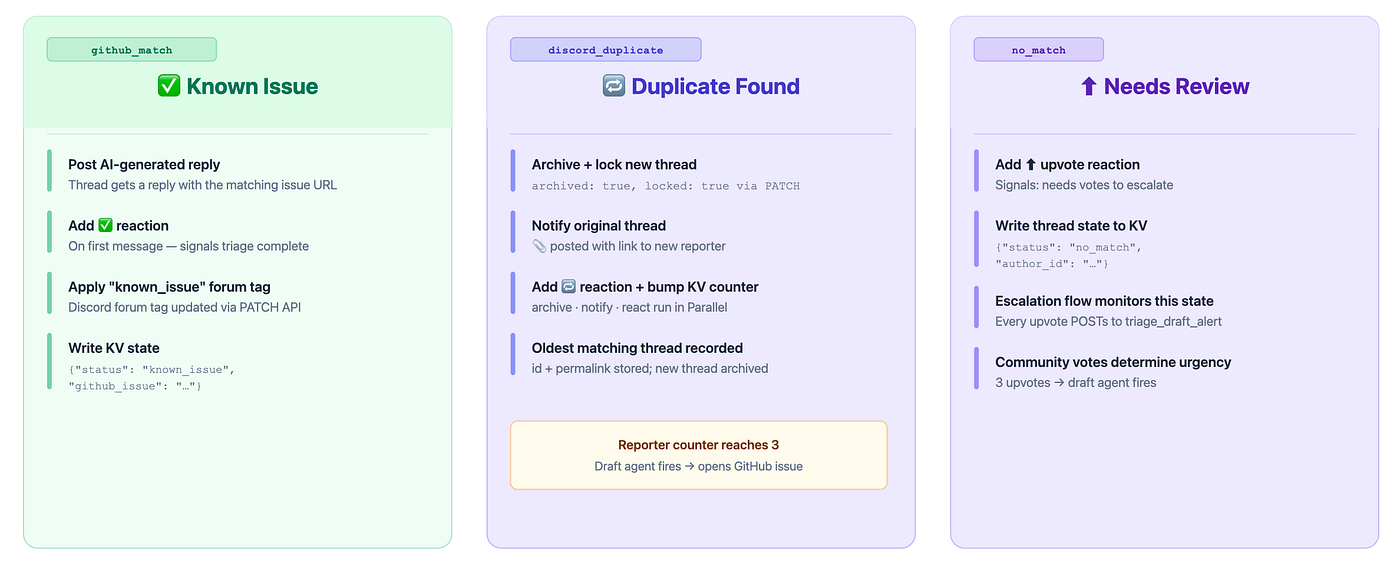
Three flows in our workflow based on cases
The Triage flow
Every new post hits discord_triage.yaml . First thing it does: check a KV key called **TRIAGE_ENABLED**. If the key isn’t set, or isn’t true, the flow stops. Simple kill switch, no bot redeploy needed.
- id: gate
  type: io.kestra.plugin.core.flow.Switch
  value: "{{ kv('GUILD_TRIAGE_ENABLED') | default('true') }}"
  cases:
    "true":
      - id: triage_agent
        # ... main flow tasks
  defaults:
    - id: skip
      type: io.kestra.plugin.core.log.Log
      message: "Triage disabled via KV store"
If triage is running, an AIAgent task fires with Gemini and Coral MCP.
- id: triage_agent
  type: io.kestra.plugin.ai.agent.AIAgent
  provider:
    type: io.kestra.plugin.ai.provider.GoogleGemini
    apiKey: "{{ secret('GEMINI_API_KEY') }}"
    modelName: gemini-3.5-flash
  tools:
    - type: io.kestra.plugin.ai.tool.StdioMcpClient
      command: ["{{ vars.CORAL_PATH }}", "mcp-stdio"]
The agent runs three GitHub searches per report, each using a different keyword framing of the same problem: visible symptom, affected component, likely root cause. Users don’t describe bugs consistently. “Login crashes on startup” and “NullPointerException in AuthManager during token refresh” can be the same issue. A single-angle search only catches one of them.
That strategy is baked into the system prompt
systemMessage: |-
    STEP 1: Search GitHub issues
    Run exactly 3 queries using different keyword angles:
    - Angle 1: error message or visible symptom
    - Angle 2: component or feature name
    - Angle 3: root cause or unexpected behavior

    A MATCH means same root cause, same component, or same error pattern. Not just shared keywords.

    STEP 2: If no GitHub match, search Discord forum for duplicates
    Return the id and permalink of the OLDEST matching post.

    STEP 3: Return structured result:
      outcome: "github_match" | "discord_duplicate" | "no_match"
      github_issues: [{ number, title, url }]
      discord_duplicate_thread_id: "..."
      reply_message: "..."
All three searches use Coral’s semantic mode. Lexical search only works when the reporter uses the same words as the issue title. Semantic catches the overlap even when they don’t. I confirmed this the hard way. A single-angle lexical search was missing roughly 30% of real duplicates in our early testing because the language gap between “dashboard won’t load” and “NPE in chart renderer on init” was enough to keep them apart.
The agent outputs prose, not JSON. A JSONStructuredExtraction task sits right after and pulls out the structured fields before any branching logic runs. The extraction task keeps agent output from leaking directly into flow logic.
- id: parse_triage
  type: io.kestra.plugin.ai.completion.JSONStructuredExtraction
  schemaName: TriageResult
  jsonFields:
    - outcome
    - github_issues
    - discord_duplicate_thread_id
    - discord_duplicate_permalink
    - reply_message
  prompt: "{{ outputs.triage_agent.textOutput }}"
  provider:
    type: io.kestra.plugin.ai.provider.GoogleGemini
    apiKey: "{{ secret('GEMINI_API_KEY') }}"
    modelName: gemini-3.1-flash-lite
From there, If tasks branch on the extracted outcome:
- id: if_github_match
  type: io.kestra.plugin.core.flow.If
  condition: "{{ fromJson(outputs.parse_triage.extractedJson).outcome == 'github_match' }}"
  then:
    - id: add_reaction_tick
      type: io.kestra.plugin.core.http.Request
      uri: "https://discord.com/api/v10/channels/{{ inputs.discord_thread_id }}/messages/{{ inputs.first_message_id }}/reactions/%E2%9C%85/@me"
      method: PUT
      headers:
        Authorization: "Bot {{ secret('DISCORD_BOT_TOKEN') }}"
Three outcomes — each handled differently:
Three outcomes
- id: duplicate_actions
  type: io.kestra.plugin.core.flow.Parallel
  tasks:
    - id: archive_new_thread
      type: io.kestra.plugin.core.http.Request
      uri: "https://discord.com/api/v10/channels/{{ inputs.discord_thread_id }}"
      method: PATCH
      body: '{"archived": true, "locked": true}'
      headers:
        Authorization: "Bot {{ secret('DISCORD_BOT_TOKEN') }}"
    - id: notify_old_thread
      type: io.kestra.plugin.core.http.Request
      uri: "https://discord.com/api/v10/channels/{{ fromJson(outputs.parse_triage.extractedJson).discord_duplicate_thread_id }}/messages"
      method: POST
      body: |-
        {"content": "📎 New reporter with the same issue: https://discord.com/channels/{{ inputs.discord_guild_id }}/{{ inputs.discord_thread_id }}"}
      headers:
        Authorization: "Bot {{ secret('DISCORD_BOT_TOKEN') }}"
    - id: add_reaction_duplicate
      type: io.kestra.plugin.core.http.Request
      uri: "https://discord.com/api/v10/channels/{{ inputs.discord_thread_id }}/messages/{{ inputs.first_message_id }}/reactions/%F0%9F%94%81/@me"
      method: PUT
      headers:
        Authorization: "Bot {{ secret('DISCORD_BOT_TOKEN') }}"
    - id: apply_duplicate_tag
      type: io.kestra.plugin.scripts.python.Script
      script: |
        # reads TAG_MAP KV config, applies "duplicate" forum tag to thread via Discord PATCH API
A KV reporter counter on the original thread gets bumped. At 3, a second agent fires, reads all the duplicates via Coral, and drafts a GitHub issue.
no_match: ⬆️ upvote reaction added, thread state written to KV so the escalation flow can find it:
The escalation path
Every upvote fires the bot’s reaction handler, which POSTs to triage_draft_alert.yaml. Not just when the count crosses a threshold every vote. The flow reads current state and decides whether to act.
First it reads the thread’s KV entry. Then a Python script checks two things: was this thread previously classified as no_match? Has it hit at least 3 upvotes? Both need to be true. Admins can skip this entirely with a force=true flag via slash command.
force = "{{ inputs.force }}" == "true"

if force:
    Kestra.outputs({"should_escalate": "true", "forced": "true"})
elif data and data.get("status") == "no_match" and count >= 3:
    Kestra.outputs({"should_escalate": "true", "forced": "false"})
else:
    Kestra.outputs({"should_escalate": "false"})
Before the draft agent runs, the flow writes {“status”: “escalated”} to KV. That write happens before any other work. The reason: with QUEUE concurrency, two upvotes arriving close together execute one at a time. The second run reads escalated and exits. Skip that early write and both runs pass the eligibility check and create duplicate GitHub issues.
- id: claim_escalation
  type: io.kestra.plugin.core.kv.Set
  key: "GUILD_{{ inputs.guild_id }}_THREAD_{{ inputs.channel_id }}_TRIAGE"
  value: '{"status": "escalated"}'
  overwrite: true
The draft agent gets the thread ID from the webhook payload but reads the actual messages fresh via Coral MCP — the webhook only delivers the event, not the content. JSONStructuredExtraction handles the output the same way as the triage flow.
GitHub auth uses Kestra’s AppToken task, which exchanges the GitHub App private key and installation ID for a short-lived token at runtime. No long-lived credentials in KV.
- id: get_github_token
  type: io.kestra.plugin.github.auth.AppToken
  clientId: "{{ secret('GITHUB_APP_ID') }}"
  privateKey: "{{ secret('GITHUB_APP_PRIVATE_KEY') }}"
  installationId: "{{ kv('GUILD_' ~ inputs.guild_id ~ '_GITHUB_APP_INSTALLATION_ID') }}"
The reply message is built using Kestra’s Return task with Pebble templating — no Python needed for string construction. It renders differently depending on whether an admin forced the issue or it crossed the vote threshold organically:
- id: compute_reply_message
  type: io.kestra.plugin.core.debug.Return
  format: |-
    {%- if outputs.check_eligibility.vars.forced == "true" -%}
    ✅ Admin filed on GitHub: **[{{ fromJson(outputs.parse_draft.extractedJson).title }}]({{ outputs.create_github_issue.issueUrl }})**
    {%- else -%}
    {{ outputs.check_eligibility.vars.author_id != "" ? ("<@" ~ outputs.check_eligibility.vars.author_id ~ "> ") : "" }}🎉 Confirmed by {{ inputs.reaction_count }} users — filed on GitHub: **[{{ fromJson(outputs.parse_draft.extractedJson).title }}]({{ outputs.create_github_issue.issueUrl }})**
    {%- endif -%}
Design tradeoffs and lessons
Building this pipeline revealed several design tradeoffs. I adjusted my architecture based on three key lessons.
Stateless bot vs. Kestra orchestration
In my first iteration, the Discord bot handled some of the outcome logic: deciding whether to archive a thread, post a reaction, or notify. This meant any change to the triage rules or tag mappings required a bot deployment. For an alpha product where my support workflow changed weekly, this was a significant bottleneck.
I moved all routing, logic, and API calls into Kestra YAML. The bot now acts as a thin event relay. The bot’s code has not changed in four months, while I edited the triage flow eleven times this month alone.
Concurrency queues vs. distributed locks
During early tests, I faced a race condition. When two users upvoted the same thread at the same time, both webhooks triggered flows simultaneously. Both runs checked the eligibility status, saw the thread was not yet escalated, and created duplicate GitHub issues.
Instead of deploying a distributed lock manager like Redis, I resolved this using Kestra’s built-in queue system and state management:
- I set the flow’s concurrency behavior to
QUEUEso executions run sequentially. - I write the
escalatedstatus to KV immediately at the start of the flow, rather than at the end. The subsequent queued execution reads the updated status and exits.
Semantic search vs. single-angle lexical search
Lexical search only matches issues containing identical terms. I found it missed roughly 30% of duplicates because users describe issues differently. A report about a startup crash might match a GitHub issue detailing an auth initialization failure, but only when searched semantically.
To catch these duplicates, I implemented a three-angle search strategy: searching by symptom, by component, and by root cause. Although this triples the number of API calls, the increase in recall was worth the trade-off.
KV store vs. database
I opted for Kestra’s native KV store instead of a relational database. Since I only track per-thread status, configuration, and a basic counter, I did not need schemas or migrations. When I needed to add fields to a thread’s state, I simply updated the JSON payload in KV.
The data layer: Coral MCP
Both agents pull live data at runtime from GitHub and Discord. They do this through **Coral, a read-only SQL layer** over external APIs. GitHub issues and Discord threads are queryable tables. The agent writes SQL, Coral calls the API, rows come back.
The triage agent’s GitHub search uses semantic mode:
SELECT title, html_url, state, number, score, label_names
FROM github.search_issues(
  q => 'repo:kimchi-dev/kimchi is:issue is:open login crash',
  mode => 'semantic'
)
WHERE is_pull_request = false
LIMIT 5
Wiring it into the AIAgent task is one entry in tools:
- type: io.kestra.plugin.ai.tool.StdioMcpClient
  command: ["{{ vars.CORAL_PATH }}", "mcp-stdio"]
The binary path comes from a namespace variable (vars.CORAL_PATH), so different deployments point to different installs without touching the flow YAML. If you want to go deeper on how Coral works, the docs are at withcoral.com.
Why Kestra was the right orchestrator
Using Kestra to orchestrate this logic offered several advantages over building a monolithic service.
Instead of writing a custom event dispatcher, I route each Discord event to its own Kestra webhook trigger. Adding a new event type means writing a new flow rather than editing the bot. Adding a new Discord server only requires setting up a few KV keys.
Because Kestra manages state natively, I did not have to spin up or maintain a database. Adding a new tracking state only requires executing Get and Set operations in the YAML flow, eliminating database migration steps.
The AI agent configuration remains declarative. Changing Gemini models or adding Coral MCP requires updating a few lines of YAML. I wrote zero code to connect to LLMs. Even conditional replies use Kestra’s Return task with Pebble templates instead of custom scripts.
By keeping the bot simple, the code remains stable. I manage retries, concurrency, and branching entirely within Kestra’s declarative workflow engine.
Explore the Implementation
The code is at github.com/xkaper001/triage.
Key files:
kestra/flows/discord_triage.yaml— the main triage flow, from forum post to outcome branchingkestra/flows/triage_draft_alert.yaml— the escalation flow, from upvote to GitHub issuekestra/flows/update_config.yaml— the config write flow, triggered by slash commandsbot/src/— the Discord bot (TypeScript), intentionally minimal
The bot is a thin relay. If you want to understand what actually runs, start with the three YAML files.
Config values you’ll need:
DISCORD_BOT_TOKEN— Discord bot token with permissions to read/write forum channels and reactionsGEMINI_API_KEY— Google Gemini API key (**3.5-flashfor agents, `3.1-flash-lite`** for extraction)CORAL_PATH— path to the Coral binary on the Kestra workerGITHUB_APP_IDandGITHUB_APP_PRIVATE_KEY— GitHub App credentials; the installation ID per guild is stored in KV atGUILD_{guild_id}_GITHUB_APP_INSTALLATION_ID
KV keys follow a naming scheme: GUILD_{guild_id}_{KEY} for per-guild config and GUILD_{guild_id}_THREAD_{thread_id}_TRIAGE for per-thread triage state. The update_config.yaml flow writes KV via slash command; you can also set keys directly in the Kestra UI.
Explore Kimchi
I build this workflow using Kimchi, end-to-end. Kimchi’s cool especially the /ferment. Wire up Kestra MCP & Kestra Docs MCP in It and you’re good to go. For every big feature use /ferment <feature name> and It’ll take quite some time but give you a result you’ll be happy with :) I tried and now I prefer it over Claude and Codex. Try Here
Reference Links
- https://github.com/xkaper001/triage — source code
- https://kestra.io — open-source workflow orchestrator
- https://github.com/kestra-io/mcp-server-python — Kestra MCP
- https://kestra.io/docs/ai-tools/kestra-mcp-resources — Kestra Docs MCP
- https://kestra.io/plugins/plugin-ai —
AIAgent,JSONStructuredExtraction, and LLM provider tasks - https://withcoral.com — read-only SQL layer over external APIs (GitHub, Discord, and more)
- https://kimchi.dev/ — AI Coding Platform.
- https://discord.com/developers/docs — forum channel and reaction API reference
- https://ai.google.dev — LLM used for triage and extraction tasks
About the Author
Ayan Gupta is a developer, a builder, an AI enthusiast, a Cyber Security enthusiast, and basically builds and breaks what he likes. With 3 years of development experience and a track record spanning mobile, web, backend, and cybersecurity, he builds production-grade systems across platforms. A certified penetration tester (CAPT), active CTF participant, and open-source contributor (GSSoC, Hacktoberfest, FOSS), Ayan has shipped apps for real-world clients and led projects at the intersection of AI and security. Find him on GitHub · X · LinkedIn · Website
Happy Orchestrating :)
메타데이터
- post_id
- 2142c4fe215f
- slug
- automating-discord-bug-triage-with-ai-and-kestra-2142c4fe215f
- url
- https://medium.com/kestra-engineering/automating-discord-bug-triage-with-ai-and-kestra-2142c4fe215f
- canonical_url
- https://medium.com/kestra-engineering/automating-discord-bug-triage-with-ai-and-kestra-2142c4fe215f
- author_url
- https://medium.com/@xkaper
- status
- ok
- fetched_at
- 2026-06-14 11:28:49