What Actually Happens When a Browser Renders Your Website
A friendly walk through the critical rendering path — and why it quietly decides whether your site feels fast or sluggish.
What Actually Happens When a Browser Renders Your Website
A friendly walk through the critical rendering path — and why it quietly decides whether your site feels fast or sluggish.
You type a URL, hit Enter, and a fraction of a second later a fully styled page appears. It feels instant, almost magical. But underneath that instant is a precise, multi-stage assembly line, and once you understand it, a lot of front-end advice that used to sound like superstition suddenly makes sense.
This is the story of what the browser does between receiving a wall of HTML and showing you a finished page. Engineers call it the critical rendering path.
First, the page has to arrive
Before any rendering happens, the browser has to go get the page.
It resolves your domain name into an IP address (DNS), opens a connection to the server (TCP, plus a TLS handshake if you’re on HTTPS), and sends an HTTP request. The server responds with a stream of HTML.
Notice the word stream. The HTML doesn’t land as one tidy file the browser opens at the end. It arrives in chunks, and the browser starts working on it the moment the first bytes show up. That eagerness matters later.
Step 1: HTML becomes the DOM
The browser reads the HTML character by character and builds a tree of objects called the DOM — the Document Object Model.
Every tag becomes a node. An <h1> inside a <body> inside an <html> becomes a parent-child-grandchild relationship in the tree. This is the same DOM your JavaScript talks to later when you call something like document.querySelector.
Because parsing is incremental, the browser can build the top of the tree while the bottom of the page is still traveling across the network.
Step 2: CSS becomes the CSSOM
Styles get the same treatment. Every stylesheet — external files, <style> blocks, inline styles — gets parsed into a parallel tree called the CSSOM, the CSS Object Model.
The CSSOM captures not just the rules you wrote, but the computed result after the cascade and inheritance are resolved. If a paragraph inherits its color from <body> and overrides its font size locally, the CSSOM is where that final answer lives.
Here’s the catch that surprises people: CSS is render-blocking. The browser refuses to paint anything until it has the full CSSOM. If it painted early, you’d see a flash of unstyled text that then violently rearranges itself once the styles loaded — an experience so jarring that browsers would rather wait. This is why a giant blocking stylesheet in your <head> can delay your entire page from appearing.
Step 3: The two trees merge into the render tree
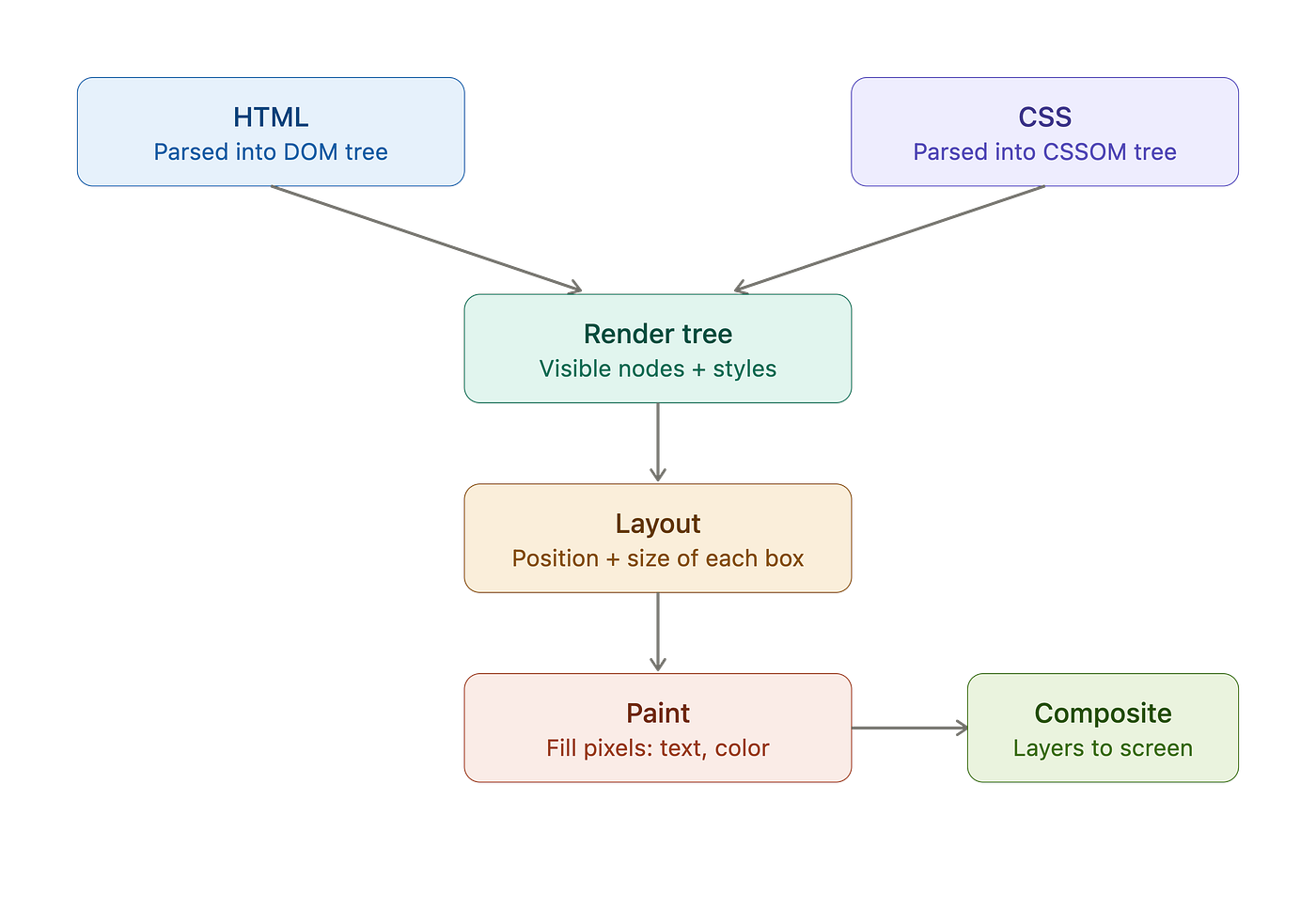
Now the browser combines the DOM and the CSSOM into a single structure: the render tree.
The key word here is render. This tree contains only what will actually be drawn. The <head>, your <script> tags, and anything styled with display: none are all left out, because none of them produce visible pixels.
One subtle distinction worth remembering: display: none removes an element from the render tree entirely, but visibility: hidden does not — that element is invisible yet still occupies its space, so it stays in the tree. That difference trips up a lot of people in interviews.
Step 4: Layout figures out where everything goes
The render tree knows what to draw and how it’s styled, but not where. That’s the job of layout, sometimes called reflow.
The browser walks the tree and calculates the exact geometry of every box: its position and size, in real pixels, relative to the viewport. This is the stage where all your relative units get resolved into concrete numbers. A width of 50%, a flexbox that splits remaining space, a grid track sized with 1fr, a margin in em — layout is where all of that collapses into "this box starts at x=240, y=88, and is 360 pixels wide."
Layout is expensive precisely because it’s relational. Move one element and everything after it may need to shift.
Step 5: Paint fills in the pixels
With geometry settled, the browser finally paints — it fills in the actual pixels for each box. Text glyphs, background colors, borders, shadows, gradients, image data: all of it gets rasterized, often across several separate layers rather than one flat canvas.
Think of layout as drawing the blueprint and paint as actually applying the ink.
Step 6: Compositing assembles the final image
Those painted layers still have to be stacked in the right order and drawn to your screen. That final assembly is compositing, and modern browsers hand much of it to the GPU.
This last detail is the secret behind a lot of smooth-animation advice. Some changes — most notably transform and opacity — can be handled by recompositing existing layers without redoing layout or paint at all. That's why animating transform: translateX(...) is buttery smooth while animating left or width can stutter: the latter forces the browser all the way back to the layout stage on every frame.
Where JavaScript crashes the party
There’s one more actor that complicates this clean pipeline: JavaScript.
By default, a <script> tag is parser-blocking. When the HTML parser reaches one, it stops building the DOM, downloads the script (if external), executes it, and only then resumes parsing. The reason is that scripts can rewrite the DOM mid-flight, so the browser can't safely keep building the tree while a script might be reshaping it.
This is why you’ll see two classic patterns:
- Scripts placed at the very bottom of the
<body>, so the DOM is already built before they run. - The
deferattribute, which downloads the script in parallel and runs it only after parsing finishes, andasync, which runs it as soon as it's downloaded without guaranteeing order.
Knowing this turns “put your scripts at the bottom” from a memorized rule into an obvious consequence.
Why any of this matters
The whole point of understanding the pipeline is that changes after the first render don’t redo everything — and knowing what triggers what is the foundation of front-end performance.
- Change an element’s geometry (its size or position) and you force a reflow, followed by a repaint and composite. Expensive.
- Change something purely visual like color and you skip layout — just a repaint.
- Animate
transformoropacityand you can often skip all the way to compositing. Cheapest of all.
A surprising amount of performance work is just arranging your code so the browser stays in the cheap lanes: batching DOM reads and writes so you don’t trigger repeated reflows, avoiding layout-thrashing loops, and preferring transform-based animations.
The one-paragraph version
When a page loads, the browser parses HTML into the DOM and CSS into the CSSOM, merges them into a render tree of everything visible, runs layout to compute exact positions and sizes, paints the pixels, and composites the layers onto your screen. JavaScript can pause the whole thing while it runs, and later updates re-enter the pipeline at different stages depending on what changed — which is exactly why some changes feel free and others make your page crawl.
Once you can picture the assembly line, you stop guessing about performance and start reasoning about it. That’s the real payoff.
메타데이터
- post_id
- 217f7208db78
- slug
- what-actually-happens-when-a-browser-renders-your-website-217f7208db78
- url
- https://medium.com/@anjalisinghattri/what-actually-happens-when-a-browser-renders-your-website-217f7208db78
- canonical_url
- https://medium.com/@anjalisinghattri/what-actually-happens-when-a-browser-renders-your-website-217f7208db78
- author_url
- https://medium.com/@anjalisinghattri
- status
- ok
- fetched_at
- 2026-06-20 20:29:01