Introduction to cross-compilation for Banana Pi BPI-R-18-AI (Allwinner SoC-Only 3-Mic Far-Field Dev…
Image by davidm 96boards
Introduction to cross-compilation for Banana Pi BPI-R-18-AI (Allwinner SoC-Only 3-Mic Far-Field Dev Kit)
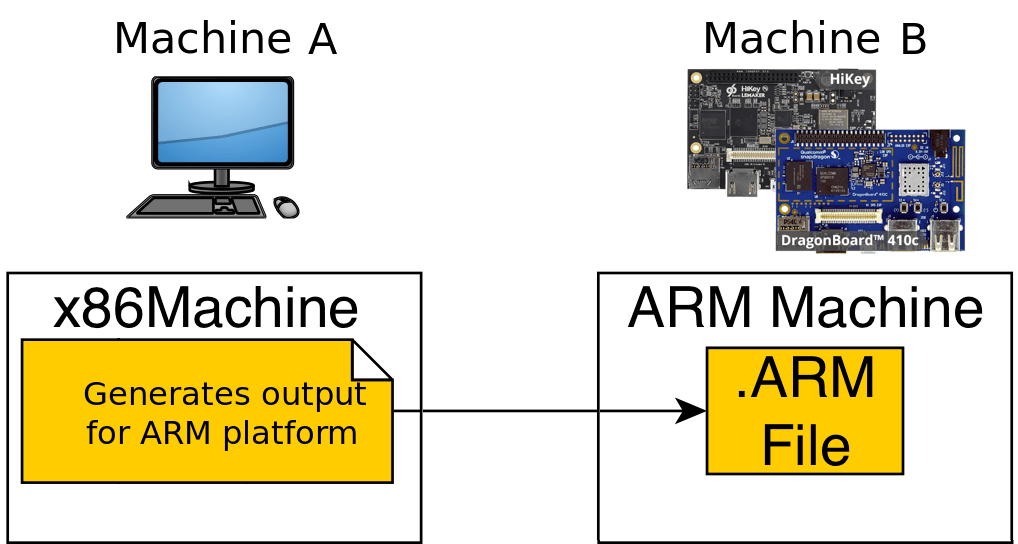
Image by davidm 96boards
Compiling tools natively on single board computers is very time consuming, the only way to save out time is cross-compilation. Cross-compilation means compiling the source code for some target systems. The target system is the system on which our code will be running (in our case it is BPI-R-18-AI). This compilation will be done on some other system; which we call host system ( in our case it an x86_64 system running Linux mint 19.1).
Banana Pi BPI-R-18-AI is one of the single-board computers suggested by Amazon for Alexa SDK. The problem with this board is that there are very little information and guides available for this system. This board has only 1 GB of RAM on it; which makes compiling apps natively on it very slow and time-consuming. Like compiling Amazon’s Alexa on this board can take up a whole day. So I and my team decided to cross-compile apps for this system. This tutorial is about cross-compilation of the basic HelloWorld program for Banana Pi BPI-R-18-AI board. It starts with the basics of cross-compilation, toolchain and creating a CMake project that will cross-compile for our target board.
The first thing we need to know for cross-compilation is “toolchain”. According to this article
“A toolchain is a set of distinct software development tools that are linked (or chained) together by specific stages such as GCC, binutils and glibc (a portion of the GNU Toolchain). Optionally, a toolchain may contain other tools such as a debugger or a compiler for a specific programming language, such as C++.”
Wait, That Was Hard to Understand ! Let us Make it Easy
Keeping the long story short a toolchain is a set of tools that will help you compile your code for some specific target system. It contains the cross-compilers in it which run on your host system but generate binaries for target systems. Moreover, toolchains are of different types. This is a link to youtube video that has a nice introduction to types and components of the toolchain.
But, How Do We Get the Required Toolchain?
There is more than one way to do that.
-
A toolchain provided by Banana Pi organization which is specifically for M64 board but on search we found M64 and R18 have similar architecture and it should work. We have tested it and the files generated using that toolchain does work on R18.
-
But we will be going for an easier approach. We will install toolchain using a simple apt-get on the Debian system. There are different toolchains available by **Linaro for different types of ARM systems. Even toolchains can also be compiled. But that is not the focus of this tutorial. Tools like Crosstool-NG** can be used for that purpose.
Check the Target System’s Architecture
We need to know exactly the architecture of our board before proceeding. For knowing that I simply compile a HelloWorld program on our board and check its details using the “file” command.

The above figure shows that the architecture of our board is “aarch64”.
Installing Toolchain
The toolchain for required architecture by Linaro can be installed by the following command
$ sudo apt-get install gcc-aarch64-linux-gnu g++-aarch64-linux-gnuAfter installation, we can check the details of cross-compilers installed. by the following command
$ aarch64-linux-gnu-g++ --version
1- Cross-compiling a Basic HelloWorld program
As we have the compilers ready. We can try compiling now. Write a basic HelloWorld Program. Type following command to create a blank file
$ nano helloworld.cppText editor “nano” will be opened copy-paste the following code
[embed]
Then press “Crtl+x” and then press “y”.
Your program will be saved. Now we need to compile it. Following is the command to compile
$ aarch64-linux-gnu-g++ helloworld.cpp -o hellowrold.armA binary file named “helloworld.arm” will be generated. If everything went well. We will be able to check the details of that file by the following command
$ file helloworld.armYou should get following type of output

Now we need to send this file to our board to run it. You can transfer it via USB drive. We are using a protocol named “SCP”. It is used to securely transfer files over the network. For using it you need to know the username and IP address of your board. Following are commands to know them respectively
$ whoami
$ ifconfig
Following is the command to transfer file
$ scp helloworld.arm pi@192.168.2.150:/home/pi/DesktopNote that “pi” is our username and “192.168.2.150” is the IP of our board. Moreover “/home/pi/Desktop” is the location on the board where we are going to store the file.
Now run the file on board by following command
$ ./helloworld.arm
If everything went well you will be getting a similar output. Congratulations! if that is the case.
2- Using CMake For Cross-compiling
CMake is a tool that helps us manage bigger projects. It is very convenient when source code is in different files and code is using different dependencies etc. Here we will be writing a CMake file for cross-compiling the project for the target system. Remember we are expecting that you already have some basic knowledge of CMake and making CMakelist files etc. To cross-compile using CMake, we just need to set compiler variables in our CMakelist.txt file. Following is an example CMakeList.txt file
[embed]
Majorly two variables CMAKE_C_COMPILER and CMAKE_CXX_COMPILER are needed to be set to cross-compilers.
Create a hello.cpp file and then add your desired code in it. You may use the same code given above. Then make a CMakeList.txt file and add the above-given code in it. Then create a folder named “build”. And go in it by
$ mkdir build
$ cd build
Then type following command
$ cmake ..Then type make command
$ makeFile named demo will be created. You will get such output on terminal

Now send demo file to board by
$ scp demo pi@192.168.2.150:/home/pi/h2Output of its execution on board is shown below

Conclusion
We have learned about toolchains, basics of cross-compilation and how to write CMake files for cross-compilation.
References
메타데이터
- post_id
- 21dcf6fa223f
- slug
- introduction-to-cross-compilation-for-banana-pi-bpi-r-18-ai-allwinner-soc-only-3-mic-far-field-dev-21dcf6fa223f
- url
- https://medium.com/emumba/introduction-to-cross-compilation-for-banana-pi-bpi-r-18-ai-allwinner-soc-only-3-mic-far-field-dev-21dcf6fa223f
- canonical_url
- https://medium.com/emumba/introduction-to-cross-compilation-for-banana-pi-bpi-r-18-ai-allwinner-soc-only-3-mic-far-field-dev-21dcf6fa223f
- author_url
- https://medium.com/@hamza.imran_67775
- status
- ok
- fetched_at
- 2026-07-08 22:45:43