Android OS Fundamentals: Android Architecture
Android is an open-source mobile operating system primarily designed for touchscreen devices like smartphones and tablets. It is built on a…
Android OS Fundamentals: Android Architecture
Android is an open-source mobile operating system primarily designed for touchscreen devices like smartphones and tablets. It is built on a modified version of the Linux kernel and other open-source software.
Android powers a wide range of devices, including 5G phones, tablets, smart TVs, and even cars. Developed by the Open Handset Alliance, led by Google, it has become the world’s most widely used mobile OS.
At its core, Android is known as the Android Open Source Project (AOSP), which is free and open-source software licensed under the Apache License. However, most devices run a proprietary version developed by Google, which includes additional software like Google Mobile Services.
The architecture of Android consists of multiple layers, including the Linux Kernel, native libraries, the Android Runtime (ART), and the application framework. These layers have been continually refined and improved through custom code and open-source technologies.
Over the years, numerous companies have collaborated and invested significantly in the development of Android, making it a robust and versatile platform.
Developing an Android operating system for touchscreen devices presents several challenges. The architecture of the Android platform is designed to support a wide range of Android-enabled devices through a set of software components.
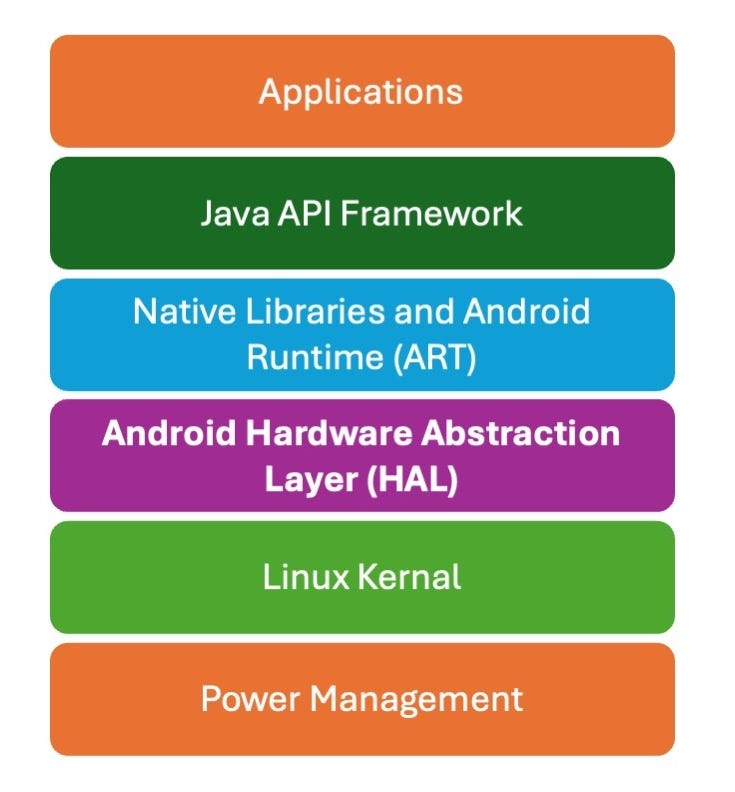
Android mobile OS layered architecture
This android mobile operating system is based on a layered architecture of software stacks, which include:
Linux Kernel:
The foundation of the Android OS, providing core system services like security, memory management, and hardware abstraction.
The Linux kernel is a fundamental part of Android’s architecture, serving as the base layer of the system. It manages all the essential drivers required during the operation of an Android device, such as those for the camera, display, audio, Bluetooth, and memory.
Key features of the Linux kernel include:
- Security: Ensures secure interactions between applications and the host system.
- Memory Management: Efficiently handles memory allocation, allowing developers to focus on creating applications without memory concerns.
- Process Management: Oversees workflow processes and allocates resources as needed.
- Network Stack: Manages network communications effectively and efficiently.
- Multitasking: Supports preemptive multitasking, enabling multiple processes to share CPUs and other resources, with each CPU dedicated to one task at a time.
These features provide a stable and efficient foundation for the Android operating system.
Android Runtime Environment:
Includes the Android Runtime (ART) which allows apps to run in their own processes with optimised performance.
For devices running Android version 5.0 (API level 21) or higher, each app operates in its own process with its own instance of the Android Runtime (ART).
ART is designed to run multiple virtual machines on low-memory devices by executing Dalvik Executable (DEX) files, a byte code format optimised for minimal memory usage.
Build tools like d8 compile Java sources into DEX byte code, which can then run on the Android platform
Key Features of ART
- Ahead-of-Time (AOT) and Just-in-Time (JIT) Compilation: ART supports both AOT and JIT compilation, improving app performance and efficiency.
- Optimised Garbage Collection (GC): ART includes enhanced garbage collection mechanisms to reduce memory usage and improve performance.
- Compact Machine Code: Starting from Android 9 (API level 28), ART converts DEX files to more compact machine code, further optimizing performance.
- Enhanced Debugging Support: ART offers better debugging tools, including a dedicated sampling profiler, detailed diagnostic exceptions, crash reporting, and the ability to set watchpoints for monitoring specific fields.
Before Android 5.0, Dalvik was the runtime environment. While apps that run well on ART are likely to work on Dalvik, the reverse may not always be true.
Additionally, Android includes a set of core runtime libraries that provide most of the functionality of the Java programming language, including some Java 8 features, which are used by the Java API framework
Native Libraries:
Supporting libraries that provide functionalities such as graphics, media, and database management.
Many core components and services of the Android system, such as the Android Runtime (ART) and the Hardware Abstraction Layer (HAL), are built using native code written in C and C++.
The Android platform provides Java framework APIs to expose the functionality of these native libraries to applications. For instance, you can use the Java OpenGL API within the Android framework to access OpenGL ES, enabling support for 2D and 3D graphics in your app.
SQLite offers database support, allowing apps to store and manage data efficiently.
If your app requires C or C++ code, you can utilise the Android Native Development Kit (NDK) to directly access these native platform libraries from your native code.
FreeType provides font support, enabling the rendering of various fonts.
The NDK allows you to implement parts of your app in native code, which can be beneficial for performance-intensive tasks
SSL (Secure Socket Layer) ensures Internet security by encrypting data transmitted over the web. WebKit offers browser support, enabling web browsing capabilities within apps.
Android Application Framework
The Android Application Framework sits atop the native libraries and runtime layer, providing Application Programming Interfaces (APIs) and higher-level services essential for developing Android applications. This framework includes classes, interfaces, and utilities that facilitate app development.
Key Components
- Java Application Programming Interfaces (APIs): These APIs offer the building blocks for creating Android apps, simplifying the reuse of core system components and services.
- Hardware Abstraction Layer (HAL): HAL allows applications to communicate with hardware-specific device drivers such as bluetooth, audio, camera and sensors etc. The Android HAL is written in C/C++, It leverages features provided by the lower-layer Linux kernel to support Android applications and the framework.
High-Level Services
The Android framework includes several high-level services that are beneficial for mobile app development:
- View System: A rich and extensible system for building an app’s UI, including lists, grids, text boxes, buttons, and an embeddable web browser.
- Resource Manager: Provides access to non-code resources such as localised strings, graphics, and layout files.
- Notification Manager: Enables apps to display custom alerts in the status bar.
- Activity Manager: Manages the lifecycle of apps and provides a common navigation back stack.
- Content Providers: Allow apps to access data from other apps, such as the Contacts app, or to share their own data.
These components and services ensure that developers have the necessary tools to create robust and efficient Android applications.
Applications
In the Android architecture, applications are at the top layer. This includes pre-installed apps (contacts, music, app store, cameras, galleries) and those downloaded from the Google Play Store (social apps, games, professional apps). Applications run within Android’s runtime environment, using the classes and services provided by the application framework. Users primarily interact with this layer for basic functions like web browsing, making calls, and viewing galleries.
Included Core Apps:
- SMS messaging
- Calendars
- Internet browsing
- Contacts etc
No Special Status:
- Core apps have no special status among user-installed apps.
- Third-party apps can become the default for web browsing, SMS messaging, or even the keyboard.
- Exceptions include system apps like the Settings app.
Functionality for Users and Developers:
- System apps serve both as user apps and provide key capabilities for developers.
- Example: To deliver SMS messages, developers can invoke the installed SMS app instead of building the functionality from scratch.
Benefits of Android’s Layered Architecture
- Problem Isolation: Different problems can be broken down and addressed at different levels, ensuring efficient problem-solving.
- Focus on Business Value: Developers can avoid low-level issues and concentrate on delivering business value related to the specific layer they are working on.
- Separation of Concerns: App developers do not need to worry about the implementation details of the application framework, which is handled by system developers.
- Independent Updates: The layered structure allows for updates, bug fixes, or improvements to be applied independently to each layer, minimising the risk of intertwined effects.
- Collaborative Development: Developers working on different levels of the operating system can collaborate without interfering with each other, which is crucial for updating and publishing new versions of the OS.
메타데이터
- post_id
- 2204e9d1183b
- slug
- android-os-fundamentals-android-architecture-2204e9d1183b
- url
- https://medium.com/@jeswani.pradeep/android-os-fundamentals-android-architecture-2204e9d1183b
- canonical_url
- https://medium.com/@jeswani.pradeep/android-os-fundamentals-android-architecture-2204e9d1183b
- author_url
- https://medium.com/@jeswani.pradeep
- status
- ok
- fetched_at
- 2026-06-29 01:02:39




