Building a Snort IDS on a VPS and Testing Attacks from Kali Linux
By : Tegar Fatwa Nugroho
Building a Snort IDS on a VPS and Testing Attacks from Kali Linux
By : Tegar Fatwa Nugroho
In today’s increasingly connected world, network security is more important than ever. One of the most effective tools to detect suspicious activity in real-time is Snort, an open-source Intrusion Detection System (IDS) that inspects network traffic and identifies potential threats.
n this article, I’ll share my experience setting up Snort on a Virtual Private Server (VPS) and simulating attacks using Kali Linux to evaluate the effectiveness of the IDS.
🔧 Environment Overview
1. VPS as the IDS Server
I used a publicly accessible VPS with the following setup:
- Public IP:
103.193.x.x(for example you can replace with your own public IP) - OS: Ubuntu 22.04
- Role: Hosts and runs Snort
2. Kali Linux as the Attacking Machine
- Kali Linux was run locally to simulate external attacks.
- Tools used:
ping,nmap, etc.
📦 Installing Snort on the VPS
To install Snort on Ubuntu
sudo apt update && sudo apt upgrade
sudo apt install snort -y
During installation, you’ll be prompted to define the HOME_NET variable. I set it to the VPS’s public IP:
103.193.x.x/32This tells Snort to monitor all traffic directed to and from this IP.
⚙️ Configuring Snort Rules
To define custom detection rules, edit the local.rules file:
sudo nano /etc/snort/rules/local.rulesHere are the rules I added to detect ping requests and SYN scans:
# Detect ICMP Ping
alert icmp any any -> any any (msg:"ICMP Ping Detected"; sid:1000001; rev:1;)
# Detect SYN Scan (e.g., with Nmap)
alert tcp any any -> any any (flags:S; msg:"SYN Scan Detected"; sid:1000002; rev:1;)# Detect SYN Scan (e.g., with Nmap)
alert tcp any any -> any any (flags:S; msg:"SYN Scan Detected"; sid:1000002; rev:1;)Ensure your snort.conf includes the local rule set:
include $RULE_PATH/local.rules🚀 Running Snort
To run Snort in console mode and start detecting traffic:
sudo snort -A console -q -c /etc/snort/snort.conf -i eth0Replace eth0 with your VPS's active network interface (check using ip a).
🔍 Simulating Attacks from Kali Linux
From the Kali Linux machine, I ran a few basic attacks to test detection:
1. ICMP Ping:
ping 103.193.176.20Result: Snort triggered an alert — “ICMP Ping Detected”
2. SYN Port Scan using Nmap:
nmap -sS 103.193.176.20Result: Snort triggered an alert — “SYN Scan Detected”
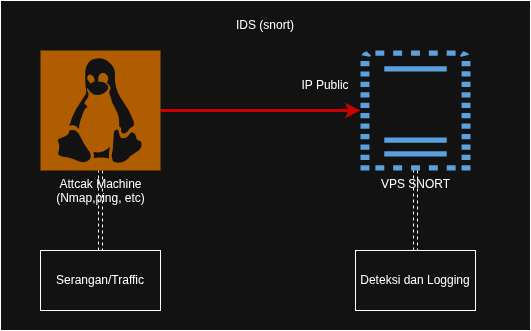
🌐 Network Topology Overview
Here’s a simplified network topology of the system:
✍️ Final Thoughts
Setting up Snort on a VPS and simulating real-world attacks is a great way to understand how IDS works and the importance of monitoring network activity. This project gave me a deeper appreciation of how threat detection systems function and how crucial they are in any security architecture.
If you’re interested in building a similar setup or have questions about implementation, feel free to share your thoughts or start a discussion!
CyberSecurity #SnortIDS #NetworkSecurity #EthicalHacking #KaliLinux #VPS #LinuxSecurity #ThreatDetection #IDS #OpenSourceSecurity #TryHackMe #CyberSecurityLab #PenetrationTesting #BlueTeam #InfoSec
메타데이터
- post_id
- 220af8eea2b8
- slug
- building-a-snort-ids-on-a-vps-and-testing-attacks-from-kali-linux-220af8eea2b8
- url
- https://medium.com/@tegarfatwa/building-a-snort-ids-on-a-vps-and-testing-attacks-from-kali-linux-220af8eea2b8
- canonical_url
- https://medium.com/@tegarfatwa/building-a-snort-ids-on-a-vps-and-testing-attacks-from-kali-linux-220af8eea2b8
- author_url
- https://medium.com/@tegarfatwa
- status
- ok
- fetched_at
- 2026-08-06 18:17:54


