The Runtime Is the Hard Part: Running AI Agents in Production on Azure Container Apps
Learn how Azure Container Apps Sandboxes, Express, and serverless GPUs run AI agents in production with sub-second starts, isolation, and…
The Runtime Is the Hard Part: Running AI Agents in Production on Azure Container Apps
Learn how Azure Container Apps Sandboxes, Express, and serverless GPUs run AI agents in production with sub-second starts, isolation, and snapshots.
The Runtime Is the Hard Part: Running AI Agents in Production on Azure Container Apps
This article walks through the runtime layer that AI agents need in order to run in production, using Azure Container Apps as the reference. You will see why an agent that works in a demo tends to fall apart once it runs continuously, what a runtime has to provide to prevent that, and how the pieces fit together: serverless GPUs for inference, isolated sandboxes for untrusted code, sub-second cold starts, memory-aware resume, snapshots, and network egress control. By the end, you will know where these components fit and how to start building with them.
Reference here.
Why agents break between the demo and production
If you have shipped an AI agent, you know the pattern. It works beautifully in a demo, but it goes sideways the moment it runs on its own for a few hours. The common industry projection is that a large share of agentic AI projects, on the order of 40 percent, will be canceled by 2027. When you dig into the failures, most of them are not the model getting the reasoning wrong. They are the runtime failures occurring beneath a model that is doing its job.
Here are the five failure modes, and every one of them is an operational problem rather than a modeling problem:

- Budgets that burn unattended. Agents are very good at spending money, and they get better at it when nobody is watching. A runaway loop overnight can burn through a month of token budget before you notice.
- Untrusted code on a developer laptop. If an agent has access to the same machine that holds your SSH keys, browser cookies, and production credentials, that is not a sandbox. It is a liability.
- Cold starts that throttle the loop. A ten second startup was fine a few years ago. It is not fine when an event-driven agent has to wake, act, and idle over and over. The bar has moved to sub-second.
- Workspaces that die on every restart. Cache, intermediate state, and context are gone on each restart. A long-running agent stops being long-running the moment that context floor is pulled away, and you pay the environment setup tax again.
- Tooling stitched together by hand. Every runtime ships its own configs, packaging, and rules. Moving an agent from development tooling to production produces fragile glue code.
What the runtime actually has to do
This is the checklist I now use when I evaluate where agents should live:
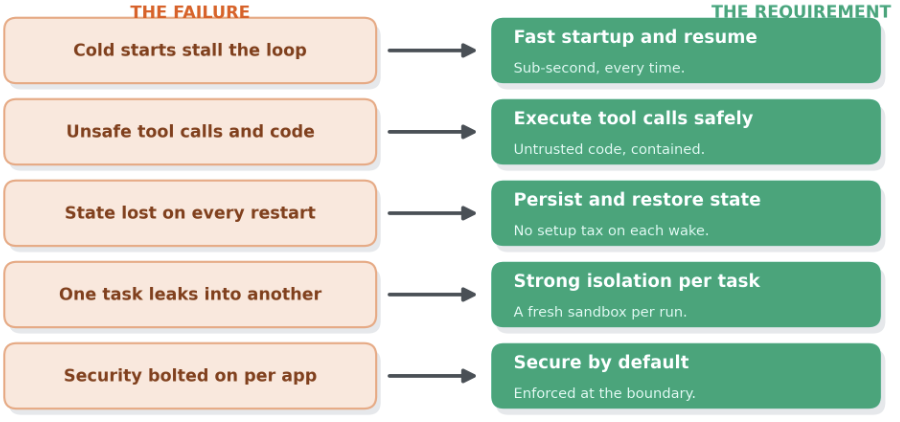
- Fast startup and resume, so an event-driven agent stays responsive. Full starts need to be sub-second every time, not something you tune your way into on day five.
- Execute tool calls and untrusted code safely, inside the runtime itself, because an agent is only useful when it is acting: calling APIs, running code, talking to other services.
- Persist and restore state, so a workflow that reasons across hours does not pay the setup tax on every wake.
- Strong isolation per task, so every execution lands in its own fresh sandbox and one task cannot leak into another.
- Secure by default, enforced at the runtime boundary rather than per agent or per project, so access control governs which systems a tool call can even reach.
The architecture at a glance
Here is a reference scenario. Everything runs on a single Azure Container Apps environment, with a sandbox group holding the agents and a set of bridges wiring voice and text together.

Two speech models run on serverless GPU. A multi agent broker sits in the middle and converts every prompt that flows in and out of every agent between text and audio. Below that is the agent tier: two sandboxes running Copilot CLI, an Azure SRE Agent watching the system, and proxy bridges connecting the sandboxes to the broker. A browser handles the voice conversation, and a Twilio call gateway running on Azure Container Apps brings a real phone into the loop.
Azure Container Apps overview: https://learn.microsoft.com/en-us/azure/container-apps/overview?WT.mc_id=AZ-MVP-5000671
Official Azure Container Apps Sandboxes samples: https://github.com/Azure-Samples/azure-container-apps-sandboxes
Voice pattern accelerator: https://github.com/Azure-Samples/call-center-voice-agent-accelerator
Serverless GPUs for inference
The two models in the scenario, Whisper for speech to text and Kokoro for text to speech, run on Azure Container Apps serverless GPU. The property that matters is billing behavior: you pay only while the app is running, and when it goes idle a scale-to-zero event kicks in. This is the easiest way I have found to run custom models, whether they come from Hugging Face, a local model runner, or any model-hosting container. The platform offers NVIDIA T4 and A100 GPUs across multiple Azure regions.
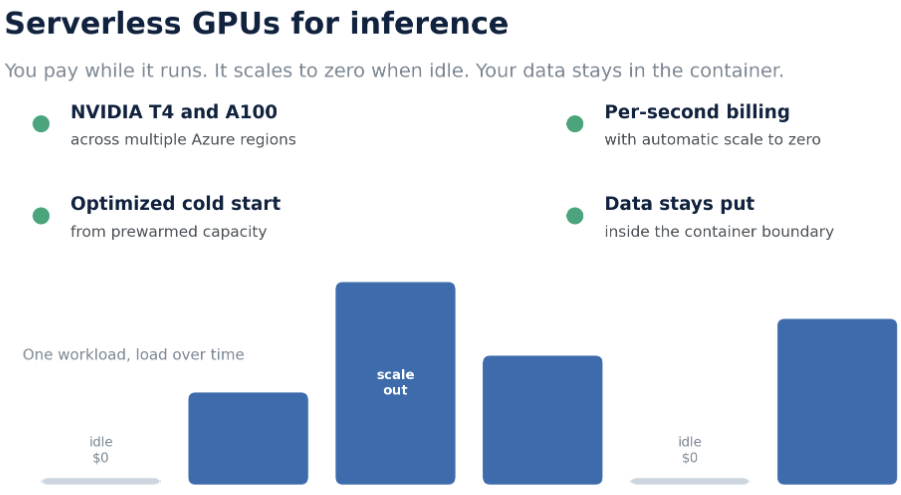
Inference for agents is bursty and unpredictable, which is exactly the workload the Consumption profile is built for. You get automatic scaling, optimized cold start, per-second billing, scale to zero, and your data stays inside the container boundary.
Serverless GPU overview: https://learn.microsoft.com/en-us/azure/container-apps/gpu-serverless-overview?WT.mc_id=AZ-MVP-5000671
Workload profiles overview: https://learn.microsoft.com/en-us/azure/container-apps/workload-profiles-overview?WT.mc_id=AZ-MVP-5000671
Three agents, one conversation
The scenario runs three agents with distinct roles, which is the cleanest way to show why isolation and connectors matter.
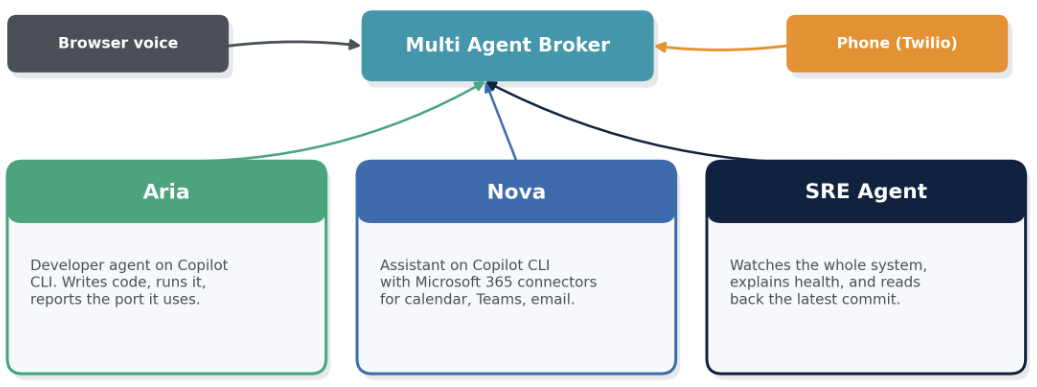
Aria is a general developer agent running Copilot CLI. You give her a job in plain language, for example build a small game and report the port it listens on, and she goes off, writes the code, runs it, and reports back that it is live on a port. This is AI code execution in its purest form: the agent writes code and runs it, and you do not want that happening on your production host.
Nova is a personal assistant, also on Copilot CLI, but created with Microsoft 365 connectors attached. She answers a spoken question about which meetings are on the calendar and reads back the most recent Teams message with the correct sender and channel. The important detail is that this works through the sandbox connectors. Sandboxes connect to a large number of endpoints natively, and Nova inherited calendar, Teams, and email access from her sandbox group with no manual wiring.
Azure SRE Agent watches the whole application. Ask what it is monitoring and it describes the real time voice platform, the WebSocket audio sessions, the speech to text and text to speech pipeline, and the Azure Container Apps infrastructure with Log Analytics behind it. The SRE Agent is generally available, and it runs on this same runtime family.
Azure SRE Agent overview: https://learn.microsoft.com/en-us/azure/sre-agent/overview?WT.mc_id=AZ-MVP-5000671
Azure SRE Agent documentation home: https://learn.microsoft.com/en-us/azure/sre-agent/?WT.mc_id=AZ-MVP-5000671
Azure SRE Agent repository: https://github.com/microsoft/sre-agent
Sandbox groups and inheritance
The heart of this design is the sandbox group. In the portal, it is a first-class management boundary that owns connectors, volumes, snapshots, disk images, and secrets. Sandboxes run inside the group and inherit its settings.
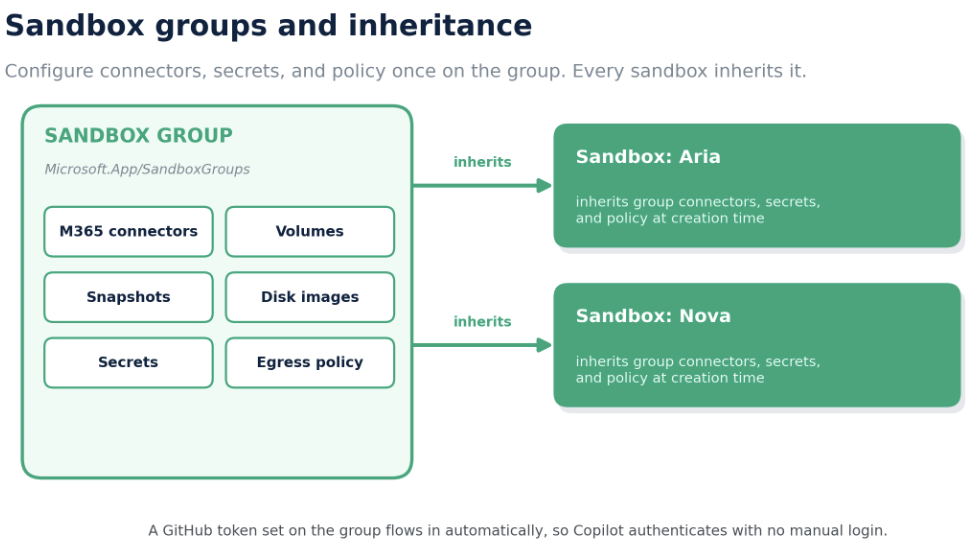
That inheritance is why Nova had Microsoft 365 access the instant she was created: the connectors were configured once on the group, and every sandbox in the group picks them up. The same mechanism passes a GitHub token into a freshly created sandbox, so Copilot authenticates immediately and is ready to use with no manual login.
In Azure Resource Manager terms, this is a new resource type, Microsoft.App/SandboxGroups, which sits alongside apps, jobs, and dynamic sessions. To manage sandboxes, you need the Container Apps SandboxGroup Data Owner role.
Sandboxes overview: https://learn.microsoft.com/en-us/azure/container-apps/sandboxes-overview?WT.mc_id=AZ-MVP-5000671
Sub-second cold start and memory-aware resume
This is the feature that changed how I think about long-running agents. Leave a sandbox running a background task, let it sleep for twenty to twenty-five minutes, then wake it, and in a second or two, it is back, and the task continues exactly where it stopped. The point is not only that startup is fast. It is that the resume captures the memory state, not just the disk. You can configure a sandbox to capture disk and memory, or disk only, when it suspends.
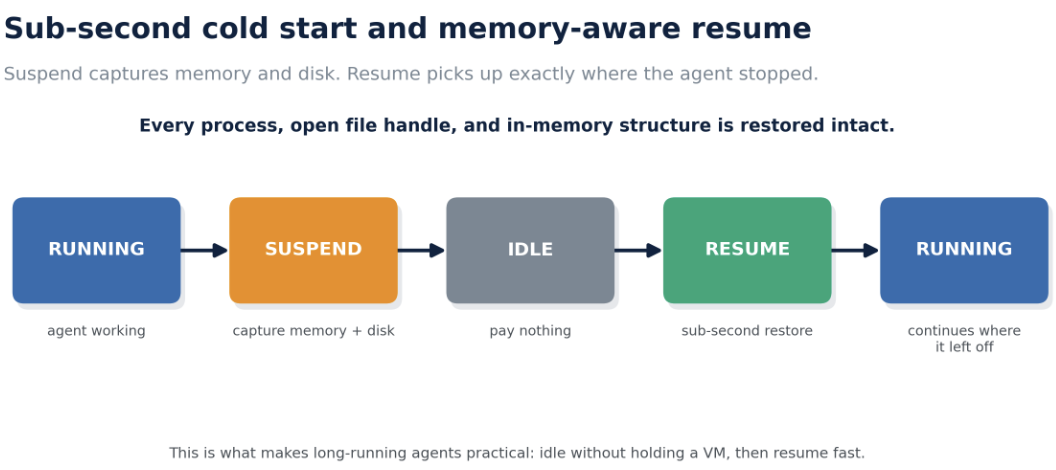
That is what makes long-running agents workable in practice. An event-driven agent can idle without holding a running VM, then resume with every process, open file handle, and in-memory data structure intact. Startup runs from prewarmed pools and lands in the sub-second range.
Snapshots and state management: https://learn.microsoft.com/en-us/azure/container-apps/sandboxes-snapshots-state-management?WT.mc_id=AZ-MVP-5000671
Snapshots for clone and rollback
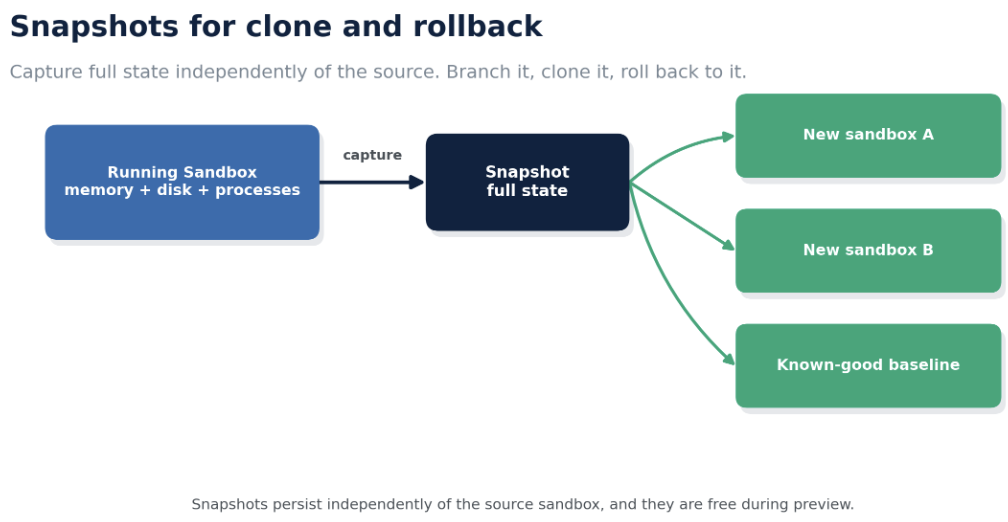
Agents constantly do work that has to be undone and redone, so snapshotting the whole environment matters more for agents than for people. Git helps, but agents miss things. A snapshot captures the full state, memory pages, disk, and processes, and it persists independently of the source sandbox. You can suspend and resume, clone a known-good baseline into a brand new sandbox, or hand a preconfigured environment to your team. During preview, snapshots are free. In one pass, you can snapshot a working sandbox and spin up an exact copy from it, sessions and all.
Network isolation and the layer 7 egress firewall
Isolation here is more than process isolation. A sandbox is a controlled entity with network isolation, and it exposes a layer 7 firewall where you set exactly which hosts are allowed and which routes on which hosts are denied. The posture I recommend for anything running untrusted code is deny by default, plus an explicit allowlist of the destinations the workload actually needs.
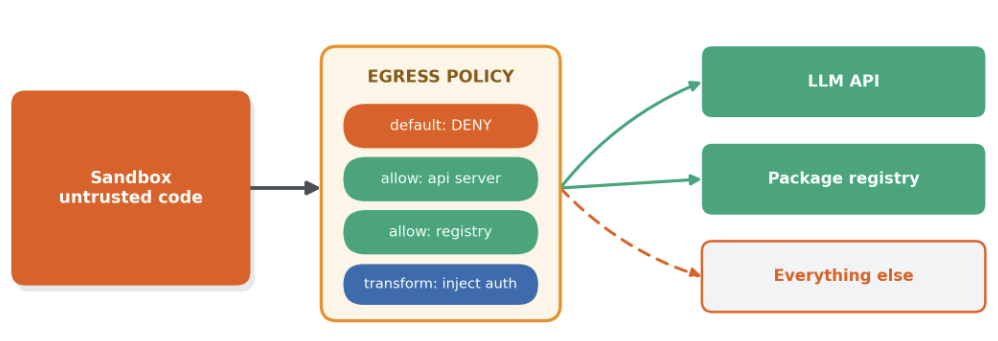
The egress engine goes past simple allow and deny. It can transform an outbound request, for example, by injecting an authentication header pulled from a secret or a managed identity, so a sandbox calls an authenticated upstream API without ever holding the credential itself. For an agent that needs to reach an LLM API, this keeps the key entirely out of the agent’s hands.
Egress policies and network controls: https://learn.microsoft.com/en-us/azure/container-apps/sandboxes-egress-policies?WT.mc_id=AZ-MVP-5000671
Exposing a port and closing the loop with voice
To finish the developer flow, you expose the port the agent’s app is listening on and open it in the browser, live. Then you can reach the same agents over a real phone through the Twilio call gateway running on Azure Container Apps. The same set of agents is reachable across browser voice, text, and telephony through the multi-agent broker, which is a good demonstration that the runtime, not the transport, is doing the coordination.
What is new: Sandboxes in public preview
The engine underneath all of this is Azure Container Apps Sandboxes, now in public preview.
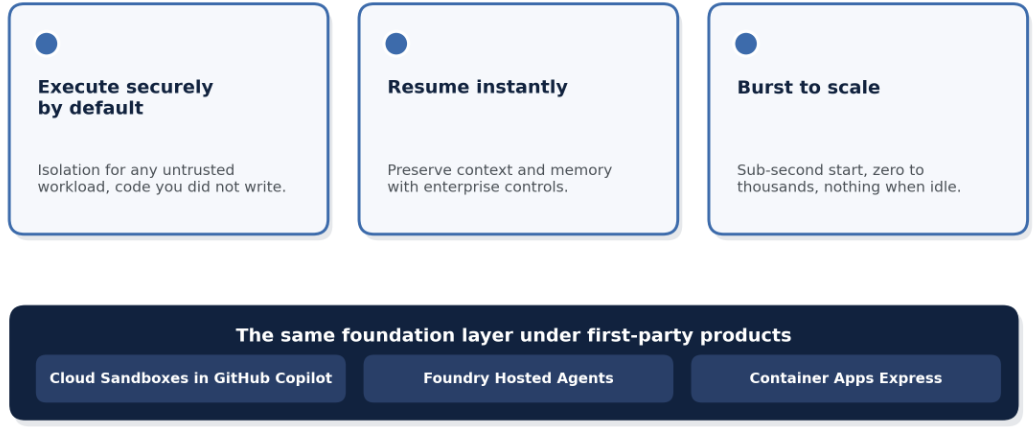
It is fast, isolated, stateful compute on demand, and it rests on three properties the scenario proves in practice: execute securely by default for any untrusted workload, resume instantly while preserving context, and burst to scale by spinning up in sub-second time, going from zero to thousands, and paying nothing when idle.
The part I find most useful is that this is a foundation layer, not a niche add-on. Sandboxes are the same primitive that runs under Cloud Sandboxes in GitHub Copilot, Foundry Hosted Agents, and Azure Container Apps Express. You are building on the isolation fabric that already backs production developer products, rather than adopting a new trust model you have to prove out from scratch.
Introducing Azure Container Apps Sandboxes: https://techcommunity.microsoft.com/blog/appsonazureblog/introducing-azure-container-apps-sandboxes-secure-infrastructure-for-agentic-wor/4524131
Container Apps Express, the app tier next to the agents
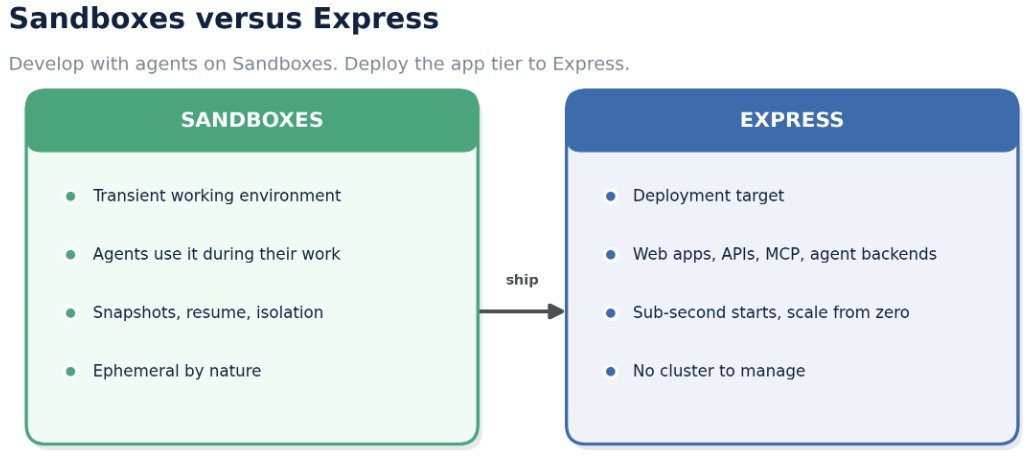
There is a clean line between the two newer offerings. Sandboxes are a fast, transient environment that agents use during their own work, closer to a working laptop than to a deployment target. Express is what you deploy to. Express is the streamlined side of Container Apps with no cluster to manage, essentially just an app, and it fits web apps, APIs, MCP servers, and agent backends. You develop with agents on Sandboxes, and you host the app tier on Express.
Express removes the environment provisioning step and gives you sub-second cold starts from prewarmed pools, scale from zero, and per-second billing. During preview it is HTTP only and available in a limited set of regions, so it suits prototypes, internal tools, dashboards, and agent backends more than regulated production microservices that need VNet, managed identity, or GPU.
Azure Container Apps Express overview: https://learn.microsoft.com/en-us/azure/container-apps/express-overview?WT.mc_id=AZ-MVP-5000671
Deploy an Express app with the Azure CLI: https://learn.microsoft.com/en-us/azure/container-apps/deploy-express-cli?WT.mc_id=AZ-MVP-5000671
Express frequently asked questions: https://learn.microsoft.com/en-us/azure/container-apps/express-faq?WT.mc_id=AZ-MVP-5000671
Six places Sandboxes fit
Across the teams building on this, six patterns show up again and again:

- Agent workflows, persistent isolated workspaces that survive across task boundaries, which is what the Aria and Nova roles show.
- AI code execution, running model-generated code safely with instant startup, so a production agent can build and run code without touching the production environment.
- Platform building, building your own platform on the same primitive that powers first-party services, whether you are a startup shipping your own copilots or an ISV.
- Burst workloads, scaling from zero to thousands of sandboxes on demand.
- Secure multi-tenant compute, strong isolation for untrusted workloads from many tenants.
- Interactive user sessions, giving each user their own isolated compute environment.
Two public examples anchor these. A content and experience platform, Sitecore AI, runs long-lived autonomous agents that execute code, manage workflows, and interact with enterprise systems inside governed, multi-tenant environments. An education platform, EdChat from the Department for Education in South Australia, gives students isolated, scale-to-zero environments with filesystem and network guardrails, plus persistence and snapshots so a student can resume a notebook or a longer task with context intact.
A production example: Augur’s autonomous supply chain
The most demanding example is a supply chain company, Augur. The framing is memorable: think about a single pen. It touches roughly 50 actors across 8 tiers and 17 countries, from oil wells and a tungsten mine through component assembly, ocean freight, warehouses, and the retail shelf. Most ERP systems see only the last three tiers, so when a tungsten mine floods upstream, the ERP does not know. Now scale that to an iPhone or a GPU and add every product variant, and the coordination problem explodes.
Augur builds autonomous supply chains where agents coordinate across that entire tree and remove the coordination tax. Three pillars carry the design, and each leans on Azure Container Apps.
Agentic Data Integration
The first problem is that data lives in silos, and the most valuable knowledge, supplier confirmations, expedite requests, standard operating procedures, is buried in email and institutional memory and never integrated. Every deployment is bespoke, and once you solve the first 20 percent, the rest turns into edge cases. A human team facing a new customer with 900 tables, each with a thousand-plus columns and millions of rows, can spend a year just getting started.
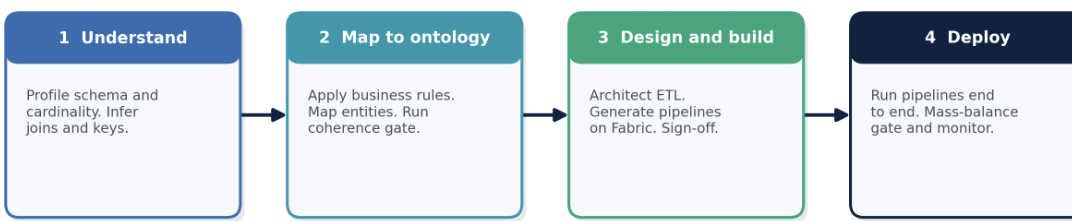
The answer is an agentic harness. Using Azure Container Apps to run thousands of agents at once, the system profiles schema and cardinality, enriches business meaning with AI, infers joins and keys, maps entities to a shared ontology, generates ETL pipelines and machine learning notebooks on Microsoft Fabric, and gates the whole flow with mass-balance coherence checks and human-in-the-loop sign-off. Long-running agents sleep, wake through an approval workflow, gather context, and continue. That compresses roughly a year of integration work into days, across four stages: understand, map to ontology, design and build, deploy.
AUSCO, the world model
Without a shared world model, agents break, because a word like “order” means something different to every integration and nothing composes or audits consistently. Augur built AUSCO, the Augur Unified Supply Chain Ontology, referred to out loud as “OSCO.” It is not just a data schema. It is an object-oriented representation inside the codebase, and every agent and object is registered with it. It codifies entities, actions, functions and KPIs, optimization and ML models, stateful multi-step workflows, and knowledge, plus an aliasing layer so that “DC” and “fulfillment center,” or “OTW” and “in transit,” resolve to the same concept while each customer keeps its own terminology.
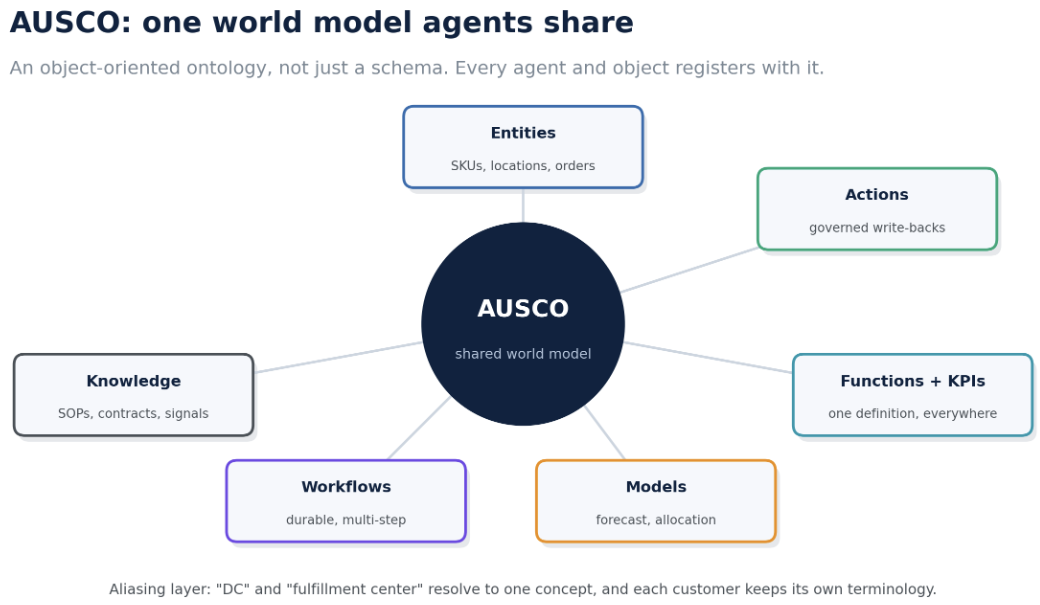
The design rule is a clean split: agents do the reasoning and decisions, and deterministic work runs inside strong deterministic blocks that are exposed to agents as tools. That is how one world model scales across many customers instead of one bespoke build per customer per year.
The context layer
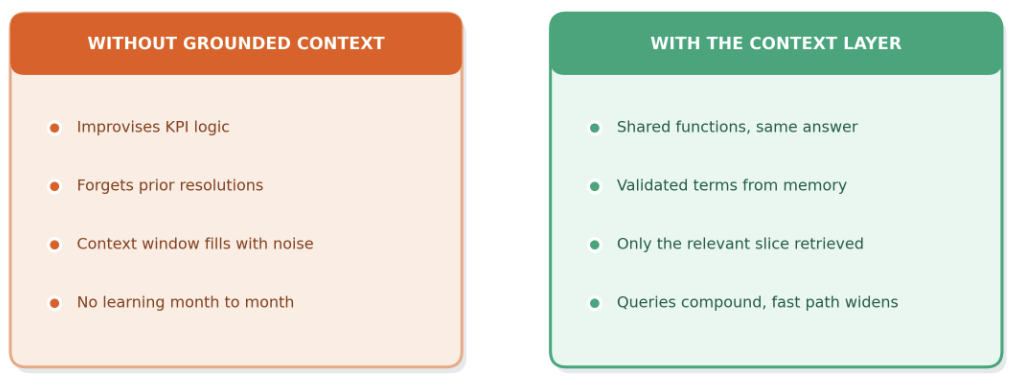
The third pillar is that context quality, not the model, is the performance multiplier. Two systems with the same model and the same data perform very differently based on context.
Without grounded context, an agent improvises KPI logic, forgets earlier terminology resolutions, fills its context window with noise, and shows no learning from month one to month twelve. With a context layer, shared functions return the same answer for every agent, validated terminology is retrieved from tenant memory, only the relevant slice of the ontology is packed into a bounded context packet, and queries compound so the fast path widens with use.
This maps onto two workload shapes, both on Azure Container Apps. The offline shape uses thousands of agents to reason toward a solution over long-running events. The real time shape answers what-if questions, for example where to place a new warehouse, by parameterizing a simulation pipeline, spinning up fast agents that open sandboxes, run the model, and return results in about ten seconds.
The backend can take its time; the front end stays fast. Four self-learning loops, onboarding, usage, execution, and global signals, all feed back into the ontology and compound across tenants, with reported outcomes of 50 percent faster executions and 85 percent autonomous decisions, running 40-plus services and thousands of agents on Azure Container Apps.
How to build this yourself
The fastest path is the Sandboxes portal and the official samples, then an app tier on Express.
- Start with the Azure Container Apps overview to ground the platform model: https://learn.microsoft.com/en-us/azure/container-apps/overview?WT.mc_id=AZ-MVP-5000671
- Read the Sandboxes overview, then the snapshot and egress docs linked above, and open the Sandboxes portal: aka.ms/aca/sandboxes/portal
- Clone the official samples and run the first web app sample end to end: https://github.com/Azure-Samples/azure-container-apps-sandboxes
- If you live in Copilot CLI or Claude Code, install the sandbox skills from the plugin marketplace repository: https://github.com/microsoft/azure-container-apps
- For the voice pattern, start from the accelerator: https://github.com/Azure-Samples/call-center-voice-agent-accelerator
- Product blogs and entry points: aka.ms/aca/build and aka.ms/aca/sandboxes and aka.ms/aca/express
Key takeaways
- Azure Container Apps gives you a cohesive agent runtime today: Apps, Sandboxes, Express, and serverless GPUs, in one environment instead of assembled by hand.
- Azure Container Apps Sandboxes are in public preview: fast, isolated, stateful compute that runs untrusted code securely by default.
- It is already in production: GitHub Copilot, Foundry Agent Service, Sitecore AI, EdChat, and Augur all run on it.
Final Thoughts
For a while, the whole agent conversation was about picking the right model. Spend enough time putting agents into production, and you notice the model is rarely the thing that breaks. The runtime is. An agent that cannot start fast, cannot resume with its memory intact, cannot run its own code safely, and cannot reach a tool without leaking a credential is going to look great in a demo and struggle everywhere else.
What makes this encouraging is that the fixes are concrete and available right now. Sub-second starts, memory-aware resume, per-task isolation, inherited connectors, and secure defaults at the boundary are not research ideas. They are features you can turn on today, on the same fabric that runs large production systems. Give an agent those properties, and it graduates from a demo into a service you can operate.
If you are building agents, the useful next step is to take one agent that has been fragile, run it in a sandbox, give it a snapshot and an egress allowlist, and see how much of the instability was really the runtime all along. The distance between an idea and a production-ready agent turns out to be short, and most of it is runtime you no longer have to build yourself.
메타데이터
- post_id
- 22315ff802f4
- slug
- the-runtime-is-the-hard-part-running-ai-agents-in-production-on-azure-container-apps-22315ff802f4
- url
- https://medium.com/codex/the-runtime-is-the-hard-part-running-ai-agents-in-production-on-azure-container-apps-22315ff802f4
- canonical_url
- https://medium.com/codex/the-runtime-is-the-hard-part-running-ai-agents-in-production-on-azure-container-apps-22315ff802f4
- author_url
- https://medium.com/@daverendon
- status
- ok
- fetched_at
- 2026-07-10 11:40:45