Python Programming Basics for Data Science [Part 4: Python Control Flow Statements and Loops]
We would have come across a situation where we have to choose between the options based on the situation. What if we want to implement it…
Python Programming Basics for Data Science [Part 4: Python Control Flow Statements and Loops]
We would have come across a situation where we have to choose between the options based on the situation. What if we want to implement it by coding? Python provides constructs for this purpose.
In Python programming, flow control is the order in which statements or blocks of code are executed at runtime based on a condition.
1. Control Flow Statements
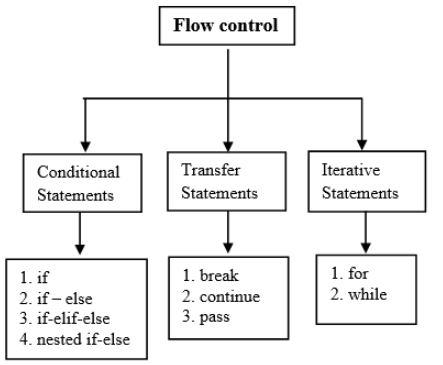
The flow control statements are divided into three categories
- Conditional statements
- Iterative statements.
- Transfer statements
1.1 Conditional Statements in Python
Did you ever get a pop-up message when you forgot to fill any of the fields in a form? We get this message because in the backend the program checks for empty fields. And if it comes across any of them, it alerts, else it submits the form.
Like this, there are many cases where we need to use conditionals while programming to take further steps. For these purposes, Python provides the following constructs:
1. If statements
2. If-else statements
3. Elif ladders
4. Nested if-else statements
We will discuss each of them with examples in the following sections of this article.
✦ Python If statements
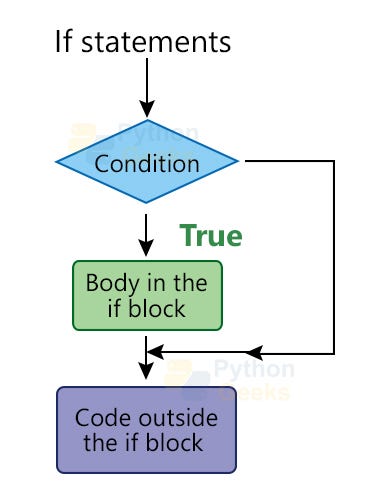
If statements take an expression, which is the condition it checks. If the condition is satisfied then it executes the block of code under it, called the body. If the condition is not satisfied then it skips the execution of the body and executes the further code, if any. The syntax is:
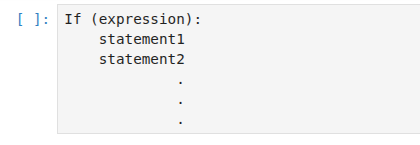
The statements form the body of the if block. It is important to give the gap (tab or four spaces) for the statements, only then the statements will be considered as a part of the body. And this procedure is called indentation.
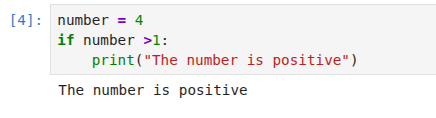
◾ Example of an if-statement:
1. Values as expressions
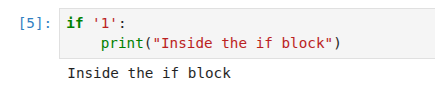
It printed that the number is positive only because the condition ‘n>0’ is True. The expression can even be a number or a string or a sequence. Remember, these are considered True if they are non-empty/ 0 else False. The expression can also be a boolean.
◾ Example of if-statement:
2. Using parentheses for the expression:
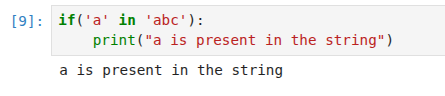
We can also enclose the expression in the brackets as shown below.
◾Example of if-statement:
3. Giving proper indentation
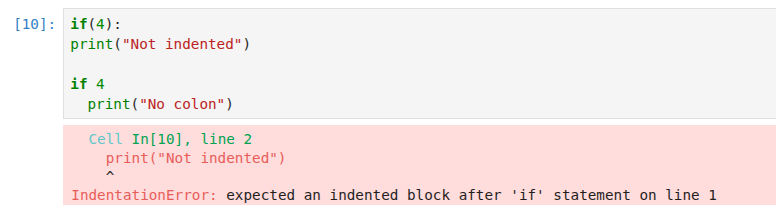
However, if we do not indent the block of the code, we get an error asking us to indent properly. We also get an error if we don’t add the colon (:) after the expression. The below example shows this.
◾Example of getting an indentation error:
◾Real-Life Scenario Examples of if Statements in Python
if statements are used in real life to make decisions.
Just like humans make decisions based on conditions, programs do the same.
ATM Balance Check:
You try to withdraw money from an ATM. The ATM checks if your balance is enough.
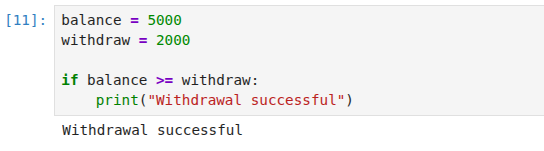
Since 5000 >= 2000 is True, The withdrawal is allowed.
Door Lock Security System:
A smart door opens only if the fingerprint matches.
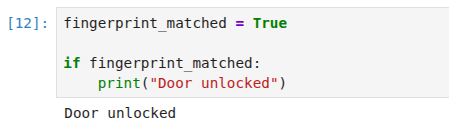
✦ Python If-else statements
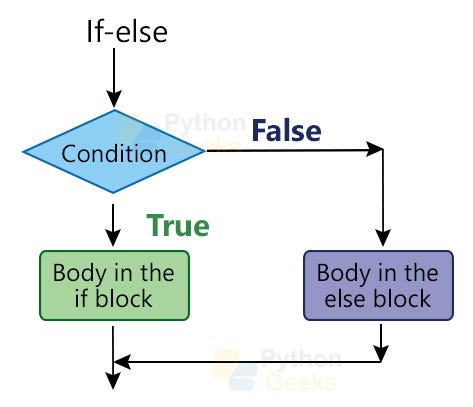
We saw above that if the condition is True then the block of code is executed. What if we want a different action to take place if the expression gives False?
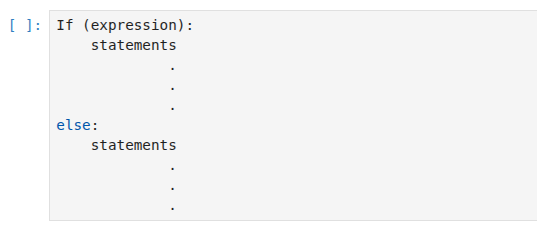
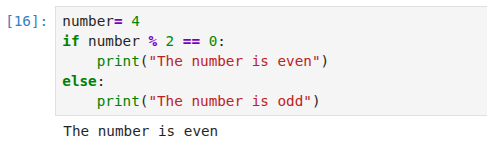
This is the case where we use the if-else statements. If the condition is True, the statements under if block executes, or else, the ones under the else block executes. The syntax is :
◾Example of if-else statement:
1. Giving proper indentation
Again, an important thing to note is the indentation. Look at the below example for more understanding. ◾Example of getting an error on not indenting:
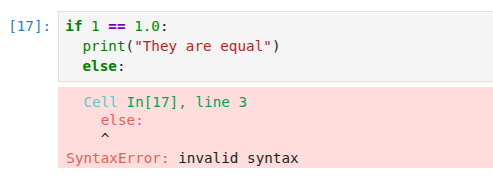
We got an error above because the else cannot be inside the if block, we have to make its indentation aligned to that of the if expression.
2. Writing more than one else block
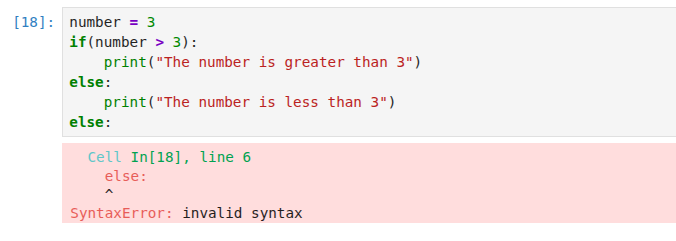
Another important point is that we cannot have more than one else block. We get a SyntaxError if we use more than one else block for an if-else statement.
◾Example of getting an error on writing more than one else statements:
◾Real-Life Scenario Examples of if-else Statements in Python
An if-else statement helps programs make decisions, just like humans do in daily life.
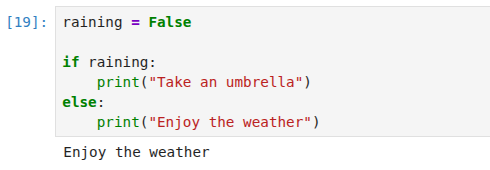
Weather Decision:
If it is raining, take an umbrella. Otherwise, go normally.
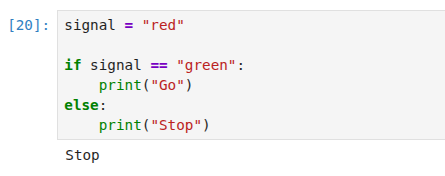
Traffic Signal System:
Cars move if the light is green; otherwise, they stop.
✦ Python elif ladder
We saw above that we get an error if we include more than one else statement. So, we can only check for one condition and have only two cases. What if we have wanted to give more than one option?
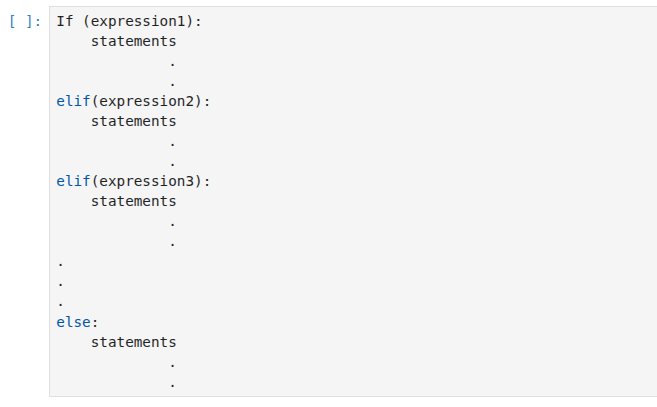
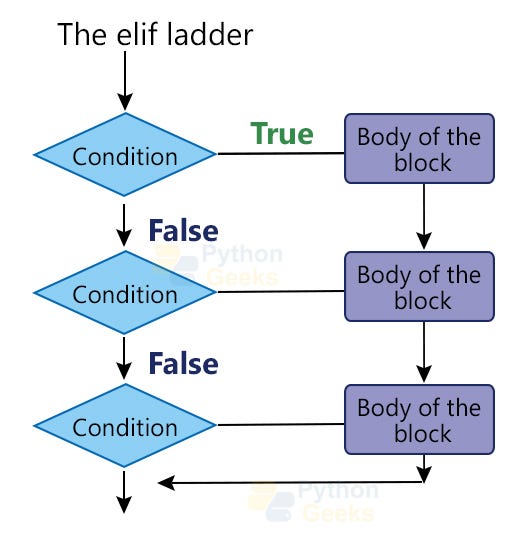
We can use elif ladder to have more than two cases. It checks the conditions till it reaches that line where the expression is satisfied and executes the corresponding block of code. The syntax is shown below.
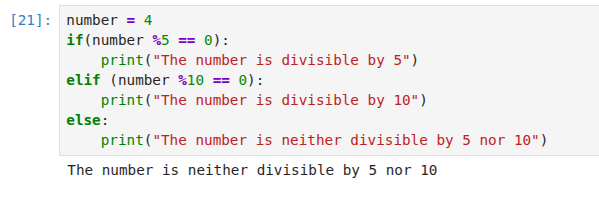
◾Example of elif ladder:
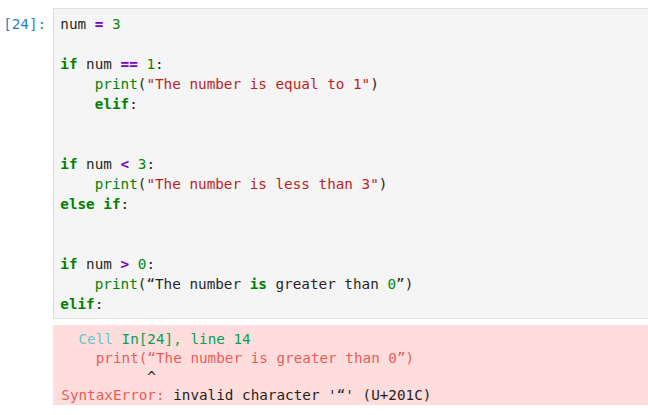
1. The syntax rules of the elif ladder
Important points to note regarding the syntax are:
-
Indentation: All the statements should have spaces. All the if, elif, and else expressions should not have any space and should be aligned.
-
It is elif, and not else if
-
There should be an expression for every elif
An example of these errors are shown below:
◾Example of getting an error on using the wrong syntax for elif ladder:
2. Can skip the else part
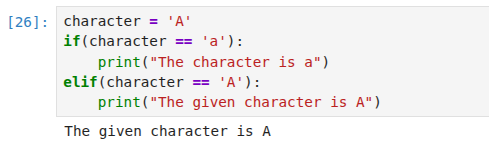
We can skip the else block as shown below.
◾Example of elif ladder without else block:
◾Real-Life Scenario Examples of elif Ladder in Python
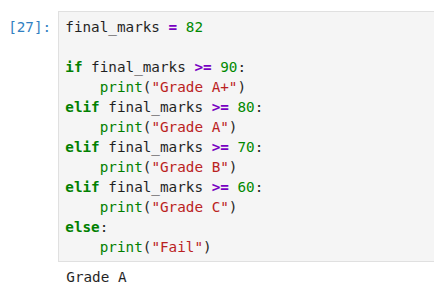
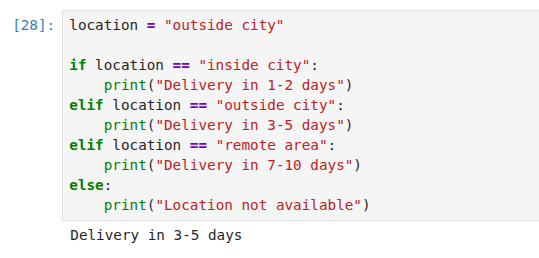
An elif ladder is used when we have multiple possible decisions, and only one condition should be selected.
It works like real-life decision making where we choose one option among many.
Exam Grade System:
Schools assign grades based on marks.
E-commerce Delivery Time:
Online shops estimate delivery time based on location.
✦ Python Nested if-else statements
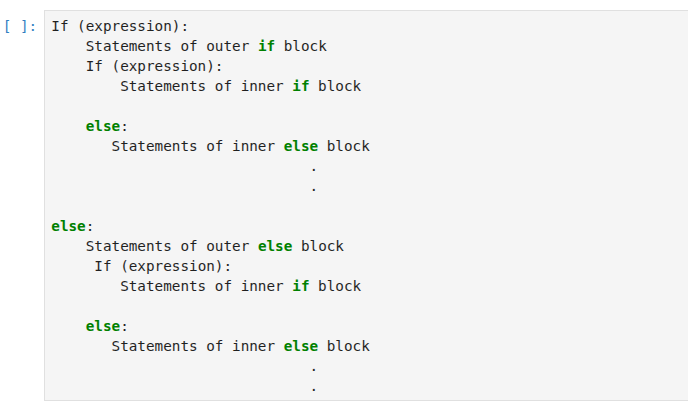
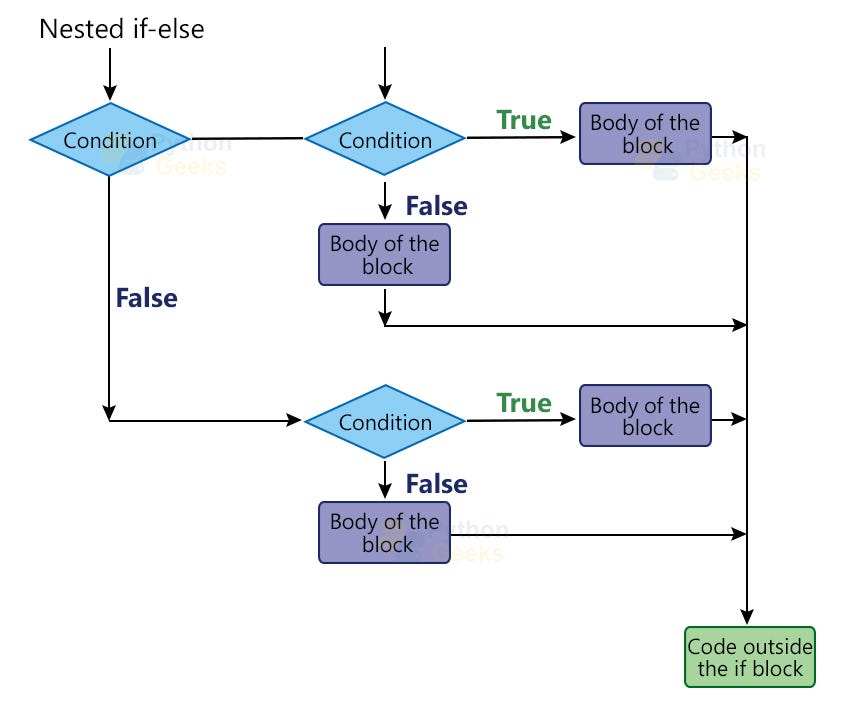
This is another choice to give more than two cases. In this, we have if-else blocks inside either if or else blocks. These are useful when we have to check a series of conditions. The syntax is as follows.
◾Example of nested if-else:
ATM Withdrawal with Security Check (Nested if-else)
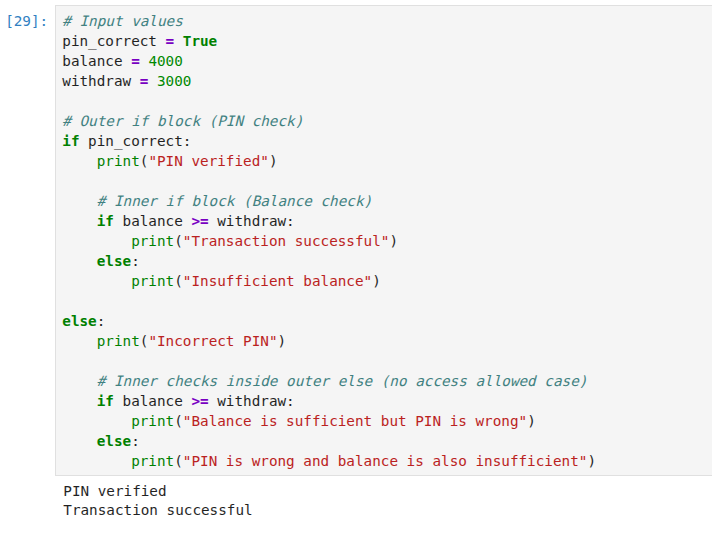
In this ATM example, nested if-else is used to handle a multi-level decision process. First, the system checks the PIN using the outer if condition. If the PIN is correct, it enters the inner if block to check whether the account balance is enough for the withdrawal. If the balance is sufficient, the transaction is completed successfully; otherwise, it shows an insufficient balance message. If the PIN is incorrect, the outer else block runs and access is denied, meaning the balance check is not used for approval. This structure ensures that security validation happens first, followed by financial validation only when the user is authenticated.
1.2 Iterative Statements in Python
Iteration statements, commonly known as loops, are statements in programming used to execute part of code repeatedly based on condition or set of conditions. These constructs are important for performing repetitive tasks efficiently. In this article, we will discuss various types of iteration statements and their use in different programming languages.
Types of Iteration Statements in programming:
There are mainly three types of iteration statements:
- For Loop
- While Loop
- Nested Loop
In programming, the loops are the constructs that repeatedly execute a piece of code based on the conditions. These are useful in many situations like going through every element of a list, doing an operation on a range of values, etc.
There are two types of loops in Python and these are for and while loops. Both of them work by following the below steps:
- Check the condition
- If True, execute the body of the block under it. And update the iterator/ the value on which the condition is checked.
- If False, come out of the loop
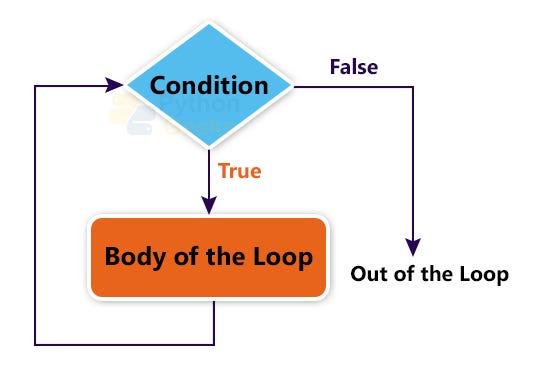
Now let us discuss each of the loop types in the following sections.
✦ Python For Loop
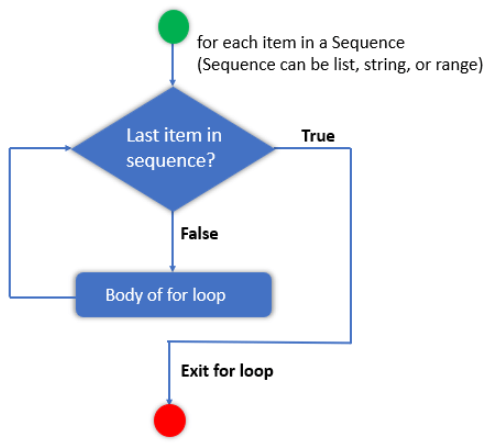
In Python, the for loop is used to iterate over a sequence such as a list, string, tuple, other iterable objects such as range.
With the help of for loop, we can iterate over each item present in the sequence and executes the same set of operations for each item. Using a for loops in Python we can automate and repeat tasks in an efficient manner.
So the bottom line is using the for loop we can repeat the block of statements a fixed number of times. Let’s understand this with an example.
- Fixed number of times: Print the multiplication table of 2. In this case, you know how many iterations you need. Here you need 10 iterations. In such a case use
forloop.
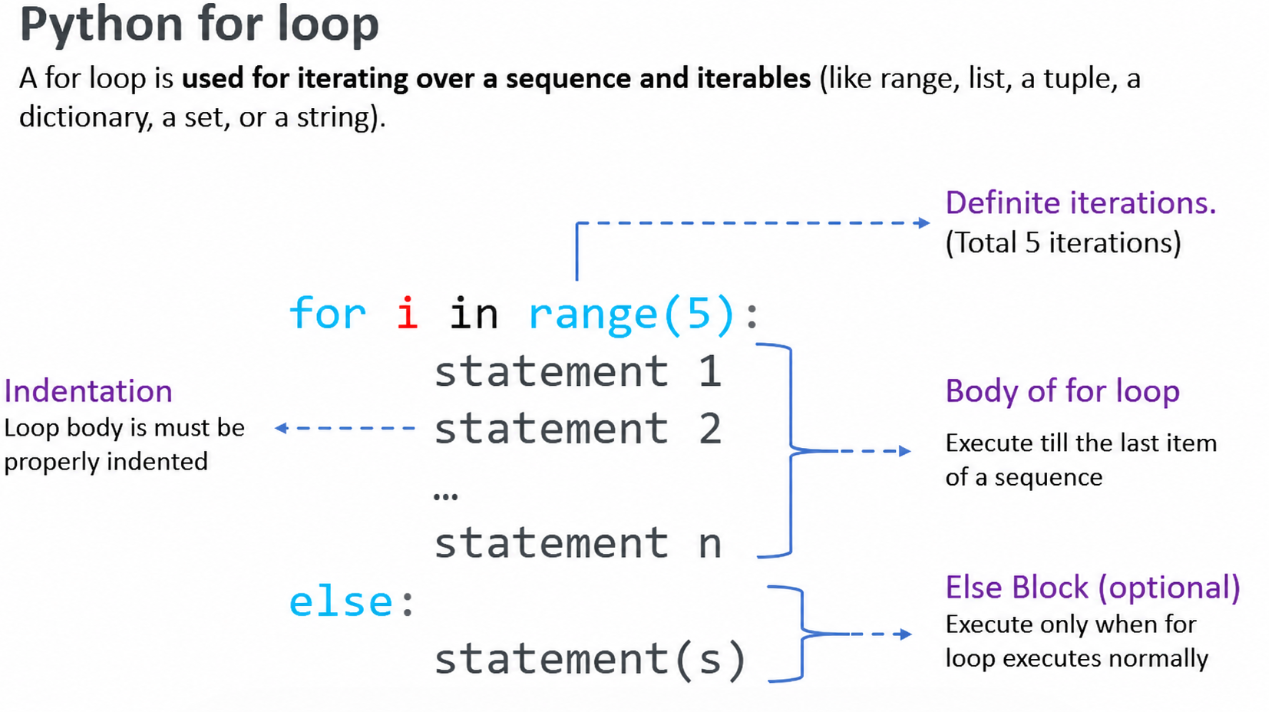
Syntax of for loop
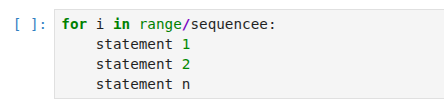
- In the syntax,
iis the iterating variable, and the range specifies how many times the loop should run. For example, if a list contains 10 numbers then for loop will execute 10 times to print each number. - In each iteration of the loop, the variable
iget the current value.
◾Example 01 : Print first 5 numbers using a for loop
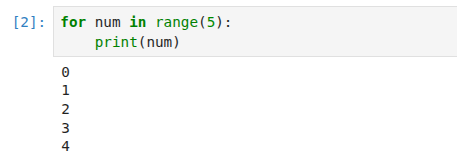
- Here we used the range() function to generate integers from 0 to 4
- Next, we used the
forloop to iterate over the numbers produced by therange()function - In the body of a loop, we printed the current number.
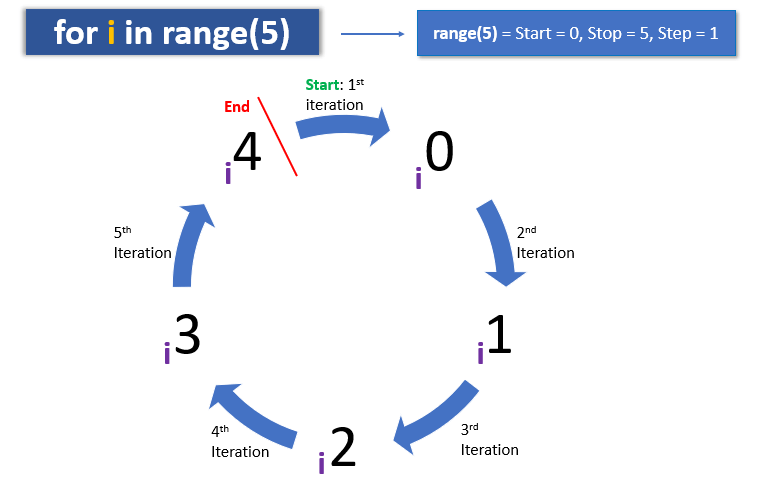
How for loop works
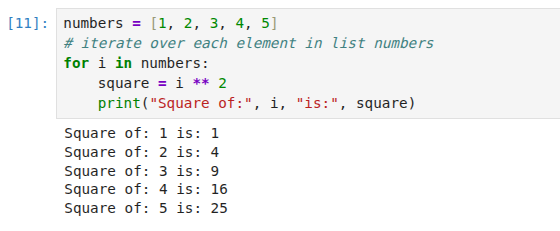
The for loop is the easiest way to perform the same actions repeatedly. For example, you want to calculate the square of each number present in the list.
Write for loop to iterate a list, In each iteration, it will get the next number from a list, and inside the body of a loop, you can write the code to calculate the square of the current number.
◾Example: Calculate the square of each number of list
Python list is an ordered sequence of items. Assume you have a list of 10 numbers. Let’s see how to want to calculate the square of each number using for loop.
Note:The loop runs till it reaches the last element in the sequence. If it reaches the last element in the sequence, it exits the loop. otherwise, it keeps on executing the statements present under the loop’s body
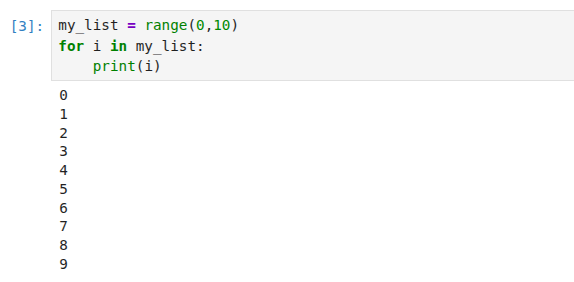
Iterating through range() objects:
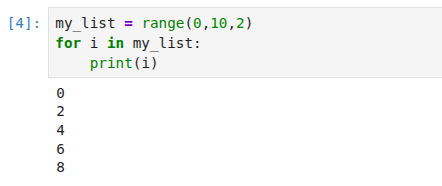
range() is a built-in function in Python and we use it almost exclusively within for loops. What does it do? In a nutshell: it generates a list of numbers. Let’s see how it works:
It accepts three arguments:
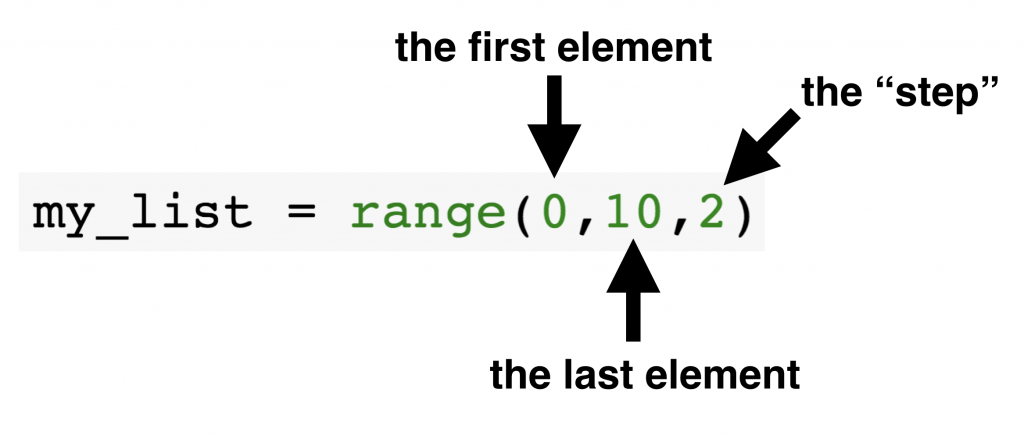
- First element: The starting value of the range.
- Last element: This is not included in the range. Python stops just before it. For example,
range(0, 10)gives numbers from 0 to 9. - Step: The gap between numbers. If the step is
2, every second number will be shown.
Now, can you guess the result of the range above? Here it is:
When range() can be useful? Mostly, in these two cases:
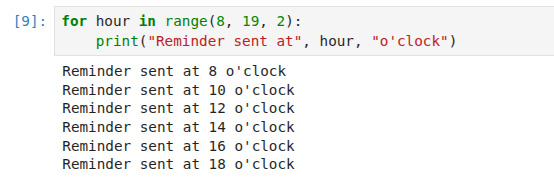
◾Sending reminders every 2 hours Suppose you want to send reminders from 8 AM to 6 PM every 2 hours:
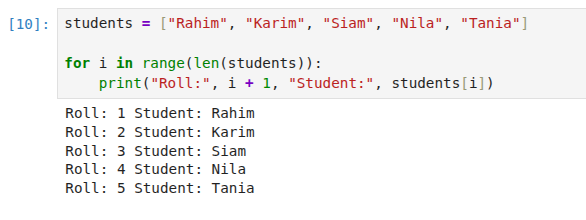
◾Checking student roll numbers Imagine a teacher wants to check attendance for students with roll numbers 1 to 5:
Looping over the iterables:
To iterate over the iterables like list, string, set, tuple, and dictionary, for loop is the most common approach used by the programmers. In this instead of using the range() function, we loop over the iterable. While in the case of dictionaries, the iterable loops over the keys. So we can use the iterable to get the corresponding value.
The below examples show the use of for loop over each iterable.
◾Example of iterating over list:
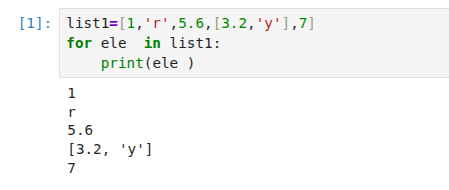
Real-World Scenario: Grocery Shopping You have a shopping list and want to check off each item one by one.
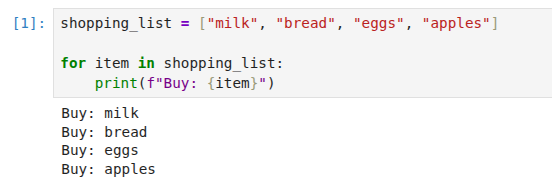
Lists keep order and allow repeats. Perfect for queues, checklists, or step-by-step tasks.
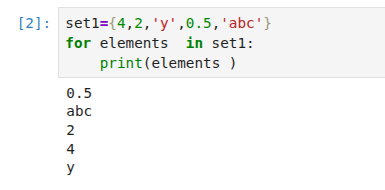
◾Example of iterating over a set:
Real-World Scenario: Party Guest Check-In You only want to greet each guest once, even if their name was added twice by mistake.
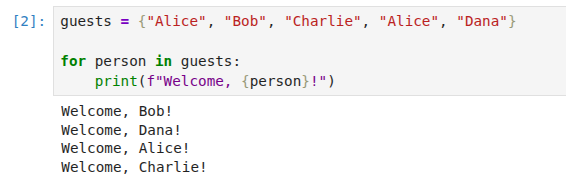
Sets automatically remove duplicates. Great for counting unique visitors, tags, or items.
◾Example of iterating over a tuple:
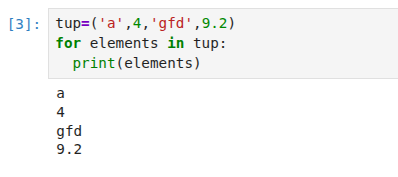
Real-World Scenario: Fixed Work Schedule Your workdays never change, so you store them in a tuple and print the daily schedule.
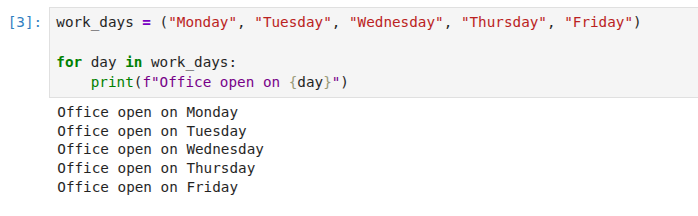
Tuples are fixed and unchangeable. Ideal for constants like days, months, or settings.
◾Example of iterating over a string:
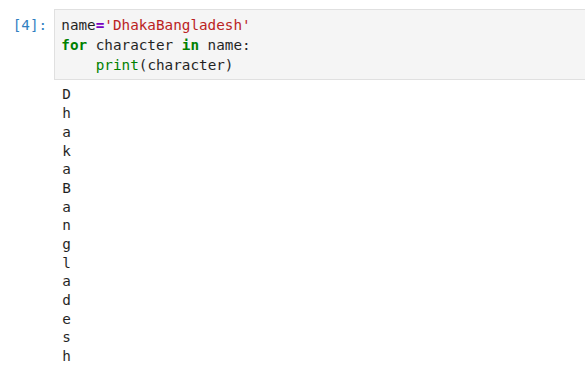
Real-World Scenario: Reading a Security Code You need to process a short password or code one letter at a time.
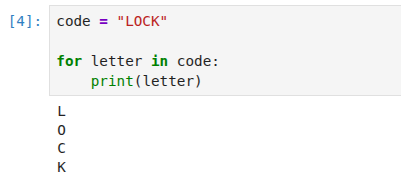
Strings are just sequences of characters. Looping over them lets you read, count, or validate text.
◾Example of iterating over a dictionary:
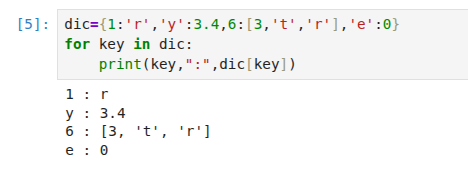
Real-World Scenario: Printing Report Cards You have student names and their scores. Loop through the dictionary to display each one.
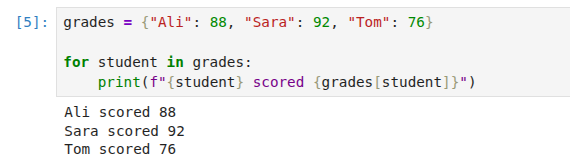
Looping over a dictionary gives you the keys. Use dictionary[key] to get the matching value.
Iterating using indices:
An alternate method used to loop over the ordered iterables is to find the length using the len() function. And then using it as the argument to the range() function. Then using the iterable as an index to access the elements of the iterable.
The below example shows the way to do so on the list.
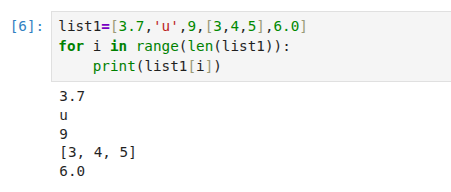
Real-World Scenario: Numbered Task List You want to show each task with a number so users know the exact order.
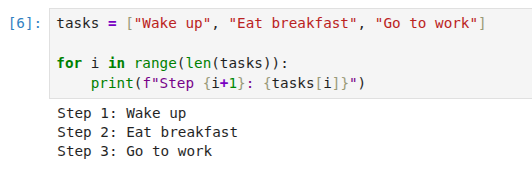
Use indices when you need the position number or when working with multiple lists at the same time.
✦ Python for loop using in if-else statement
The combination of loops and conditionals is where Python becomes truly powerful. You can filter, categorize, or transform data based on logical conditions inside the loop.
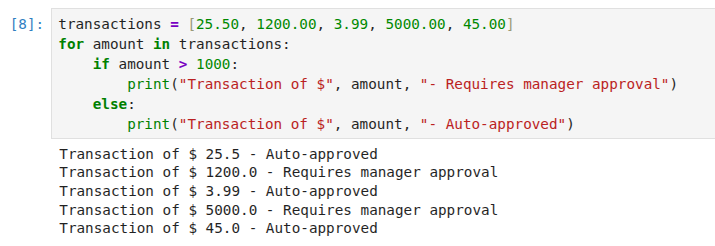
◾Example of iterating over an if-else statement:
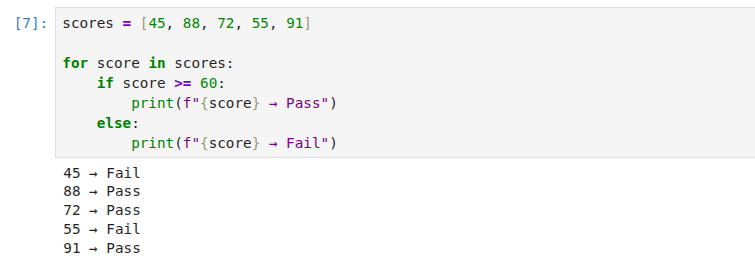
Real-Life Scenario: Bank Transaction Filtering.
A bank processes a list of transaction amounts. Transactions above a certain threshold require manual approval, while smaller ones are approved automatically.
✦ Reverse for loop
In the previous sections, we covered forward iteration over iterables using indices and direct element access. However, there are many situations where you need to traverse data in reverse order. For example, displaying chat messages from newest to oldest, processing financial transactions from most recent to oldest, or reversing a list without creating a copy.
Python provides three elegant ways to achieve reverse looping.
- Reverse For Loop Using Range with Negative Step.
- Reverse For Loop Using the Reversed Function.
- Reverse For Loop Using Slicing with Negative Step.
1. Reverse For Loop Using Range with Negative Step
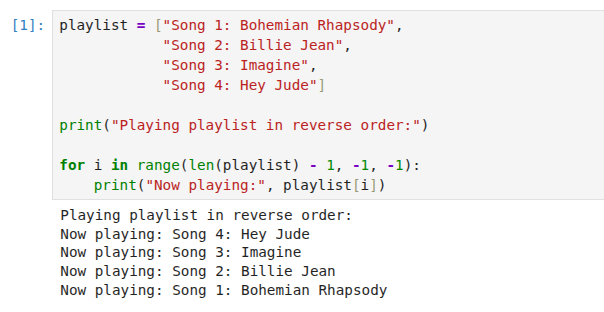
The range() function accepts three parameters: start, stop, and step. By using a negative step value, you can generate indices in descending order. This method is particularly useful when you need to access elements by their position or modify the original sequence.
Syntax: range(start_index, stop_index, -1)
◾Example: Playing a Song Playlist in Reverse.
A music player has a queue of songs. The user selects the “reverse play” feature, which plays songs from last to first.
2. Reverse For Loop Using the Reversed Function
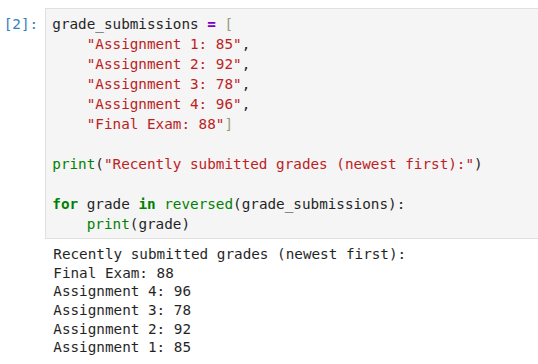
The reversed() function is the most Pythonic and readable way to iterate backward over any iterable. It returns an iterator that yields elements in reverse order without modifying the original sequence. This method works on lists, tuples, strings, and any sequence that supports __reversed__().
◾Example: Displaying Student Grades in Reverse Order.
A teacher enters grades into a gradebook as they are submitted. At the end of the term, the teacher wants to see the most recent grades first.
3. Reverse For Loop Using Slicing with Negative Step
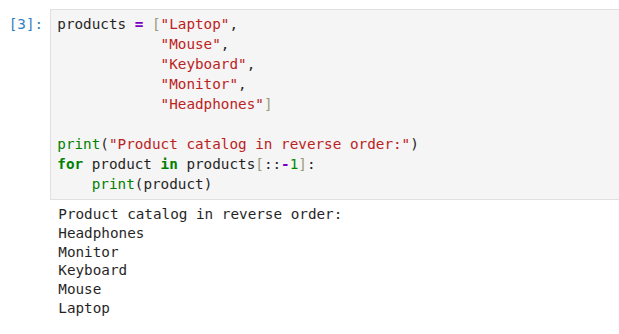
A third alternative is using list slicing with a negative step: for item in iterable[::-1]. This creates a new reversed copy of the sequence. While readable, it uses additional memory and is less efficient than reversed() for large sequences.
◾Example: Product catalog in Reverse Order:
✦ Nested for loops
A nested for loop is simply a for loop inside another for loop. When you have one loop running inside another, the inner loop completes all of its iterations for every single iteration of the outer loop. This means the inner loop restarts and finishes entirely each time the outer loop takes one step forward.
Nested loops are essential for working with tabular data, grids, matrices, and any scenario where you need to compare or combine elements from multiple collections. While beginners often learn nested loops by printing star patterns, the real power emerges when you apply them to practical problems like analyzing sales data, managing seating arrangements, or processing spreadsheets.
Understanding How Nested Loops Execute:
Before diving into real-world examples, understand this fundamental behavior:
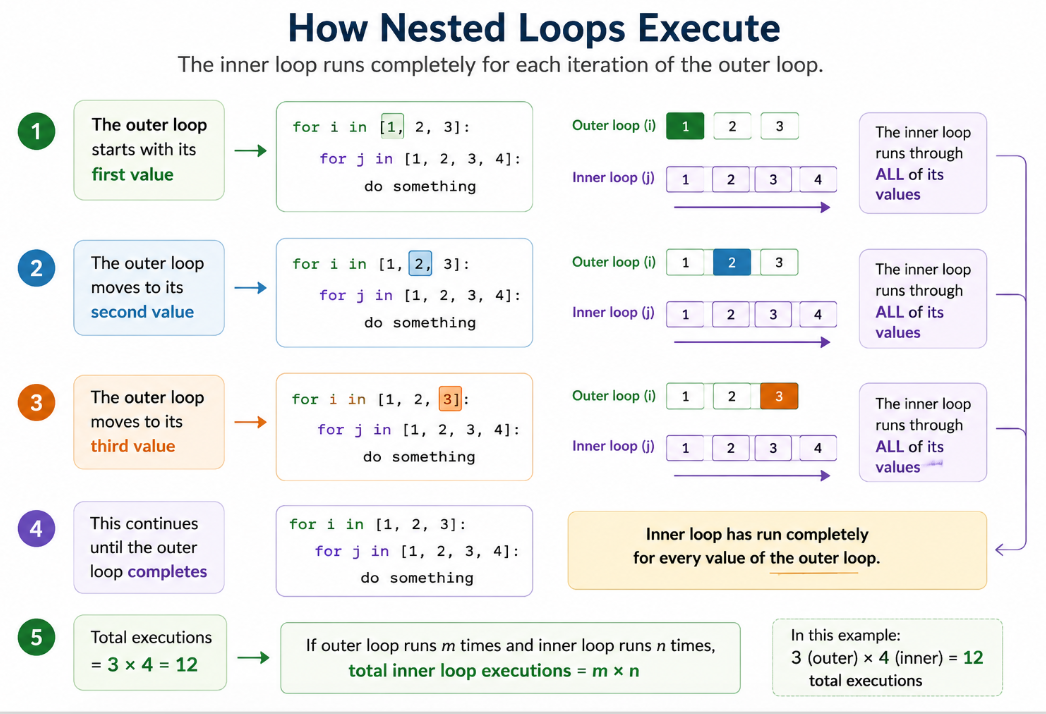
- The outer loop starts with its first value
- The inner loop runs through ALL of its values
- The outer loop moves to its second value
- The inner loop runs through ALL of its values again
- This continues until the outer loop completes
In other words, if the outer loop has 5 iterations and the inner loop has 10 iterations, the inner loop body executes 50 times total (5 x 10).
Nested For Loop Example: The Classroom Seating Chart Example
This is the simplest way to understand nested loops. Think of a classroom with rows of desks. Each row contains multiple desks.
- The outer loop represents each row
- The inner loop represents each desk in that row
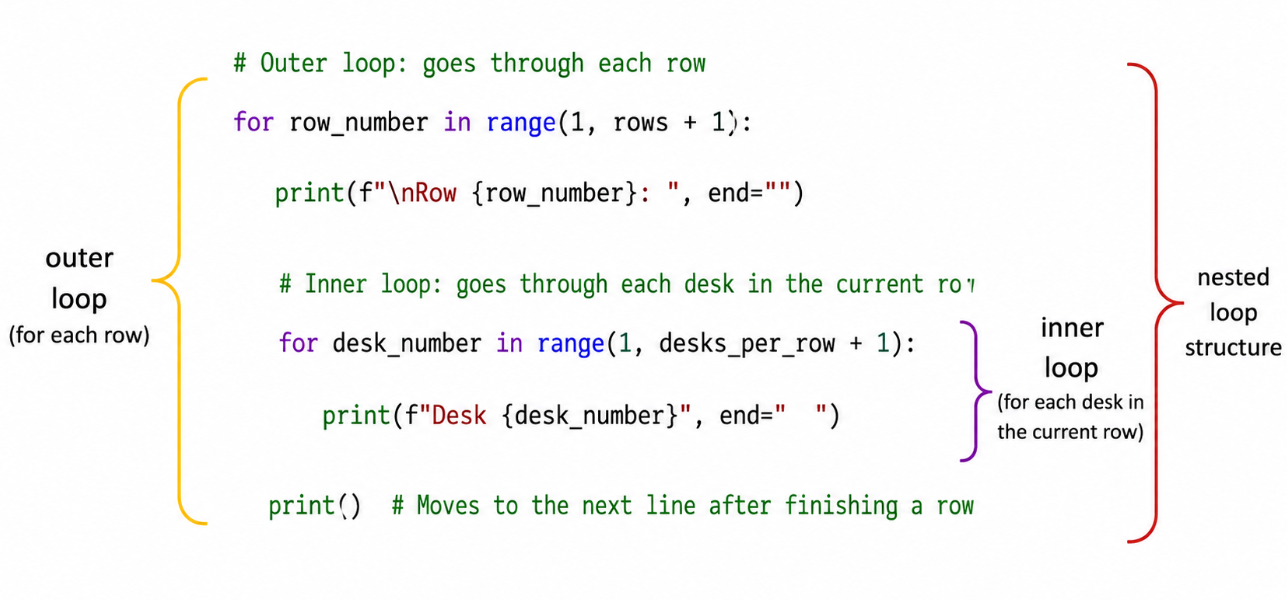
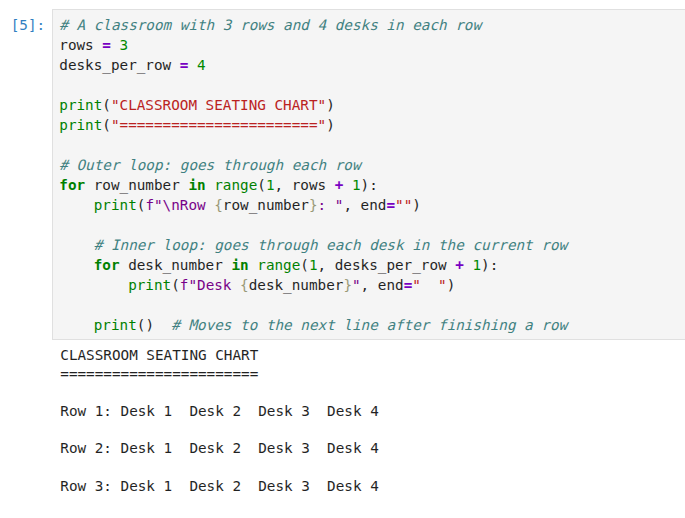
How This Works Step by Step:
- The outer loop starts with
row_number = 1 - The inner loop runs completely:
desk_number = 1, 2, 3, 4 - The outer loop moves to
row_number = 2 - The inner loop runs completely again:
desk_number = 1, 2, 3, 4 - The outer loop moves to
row_number = 3 - The inner loop runs completely one more time
- The outer loop finishes
Total executions: 3 rows × 4 desks = 12 times the inner loop body runs
✦ Python While Loop
In simple words, The while loop enables the Python program to repeat a set of operations while a particular condition is true. When the condition becomes false, execution comes out of the loop immediately, and the first statement after the while loop is executed.
A while loop is a part of a control flow statement which helps you to understand the basics of Python.
We use a while loop when the number of iteration is not known beforehand. For example, if you want to ask a user to guess your luck number between 1 and 10, we don’t know how many attempts the user may need to guess the correct number. In such cases, use a while loop.
- Indefinite Iteration: An unknown number of iterations. Ask the user to guess the lucky number. You don’t know how many attempts the user will need to guess correctly. It can be 1, 20, or maybe indefinite. In such cases, use a
whileloop.
So, when number of iteration is not fixed always use the while loop.
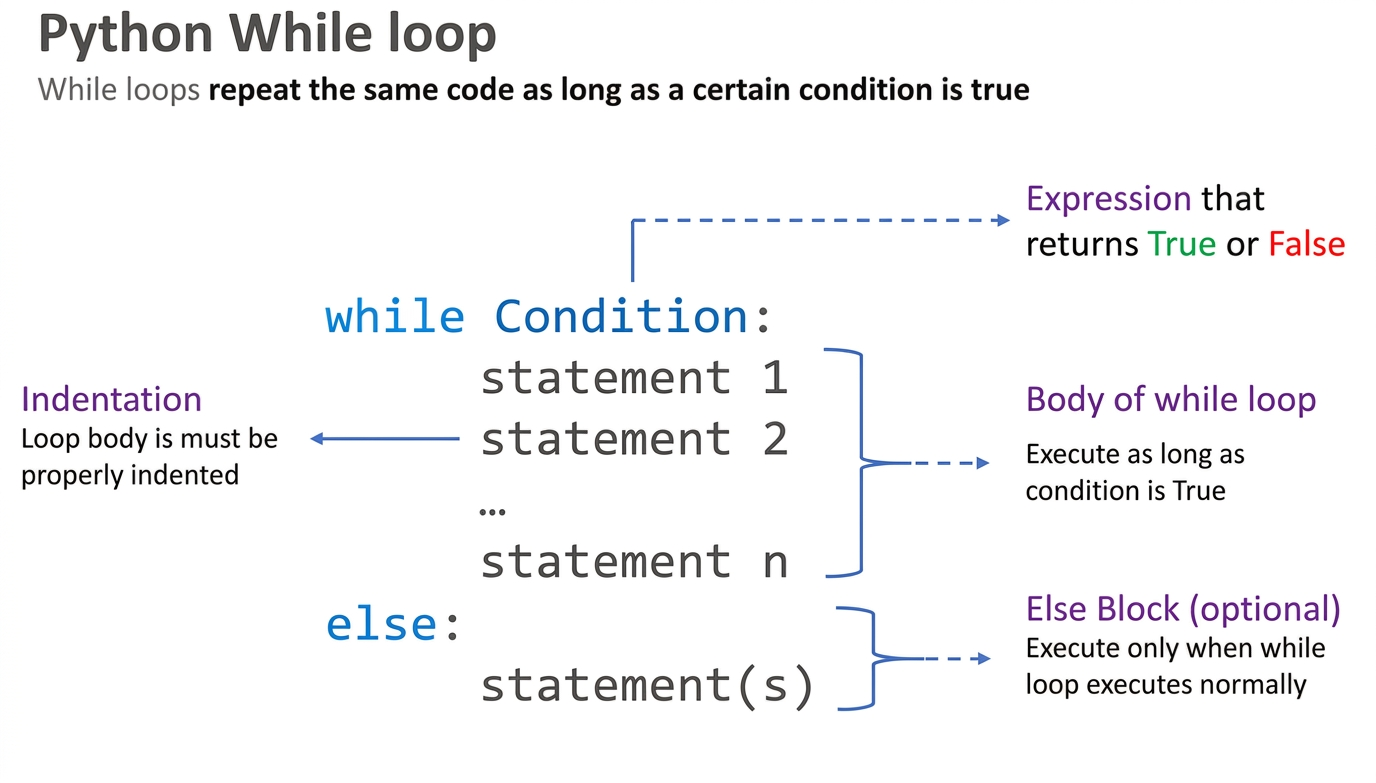
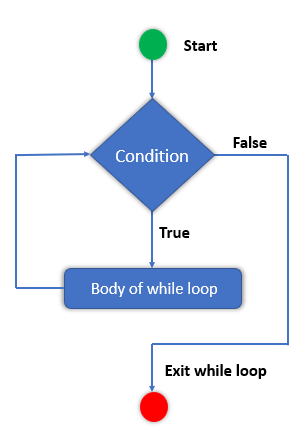
- The while statement checks the condition. The condition must return a boolean value. Either True or False.
- Next, If the condition evaluates to true, the while statement executes the statements present inside its block.
- The while statement continues checking the condition in each iteration and keeps executing its block until the condition becomes false.
Flowchart of while loop
Infinite While Loop in Python
An infinite while loop refers to a while loop where the while condition never becomes false. When a condition never becomes false, the program enters the loop and keeps repeating that same block of code over and over again, and the loop never ends.
The following example shows an infinite loop:
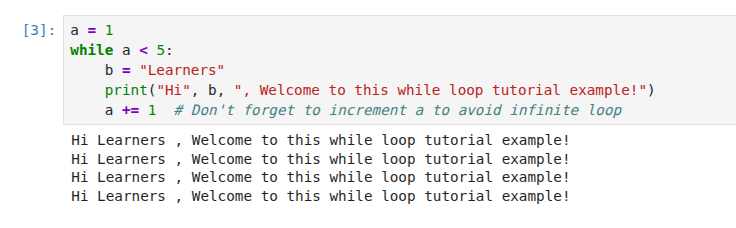
If we run the above code block, it will execute an infinite loop that will ask for our names again and again. The loop won’t break until we press ‘Ctrl+C’.
Let’s see a simple example to understand the while loop in Python
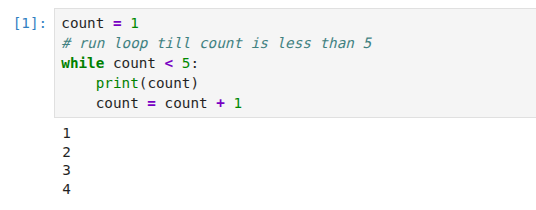
◾Example 01: Print numbers less than 5
In the above example, the while loop executes the body as long as the counter variable is less than 5. In each iteration, we are incrementing the counter by 1. Eventually, the counter variable will no longer be less than 5, and the while loop will stop executing.
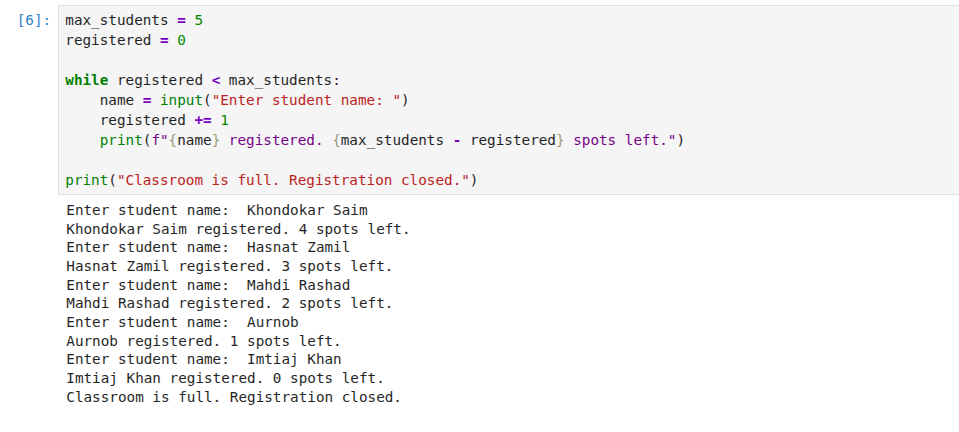
◾Example 02: Classroom Registration with Maximum Capacity
Scenario: Register students until classroom is full (max 5 students).
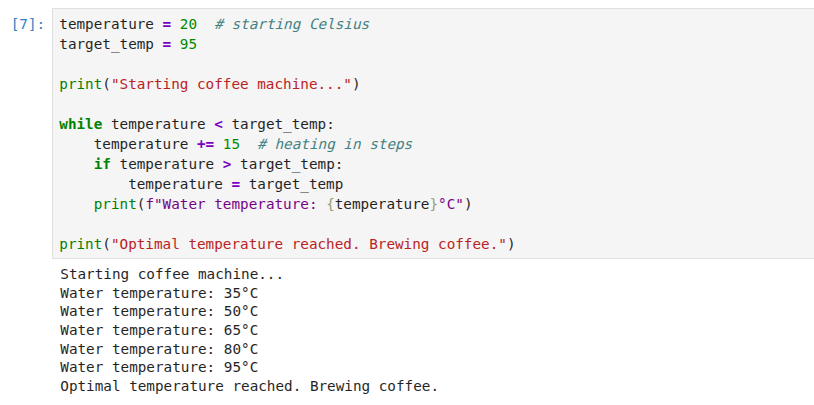
◾Example 03: Coffee Machine Brewing Cycle
Scenario: Coffee machine heats water until it reaches optimal temperature (95°C).
✦ Python Nested While Loop
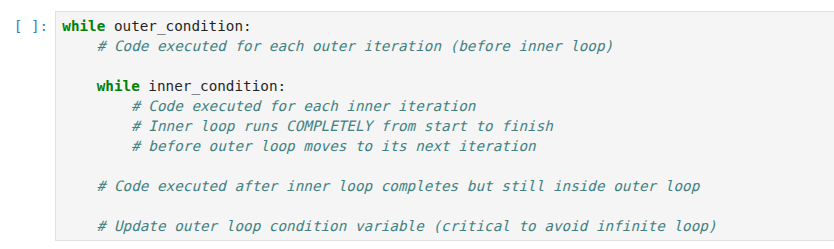
A nested while loop is a while loop inside another while loop. The inner loop completes all its iterations for each single iteration of the outer loop.
Basic syntax of a nested while loop
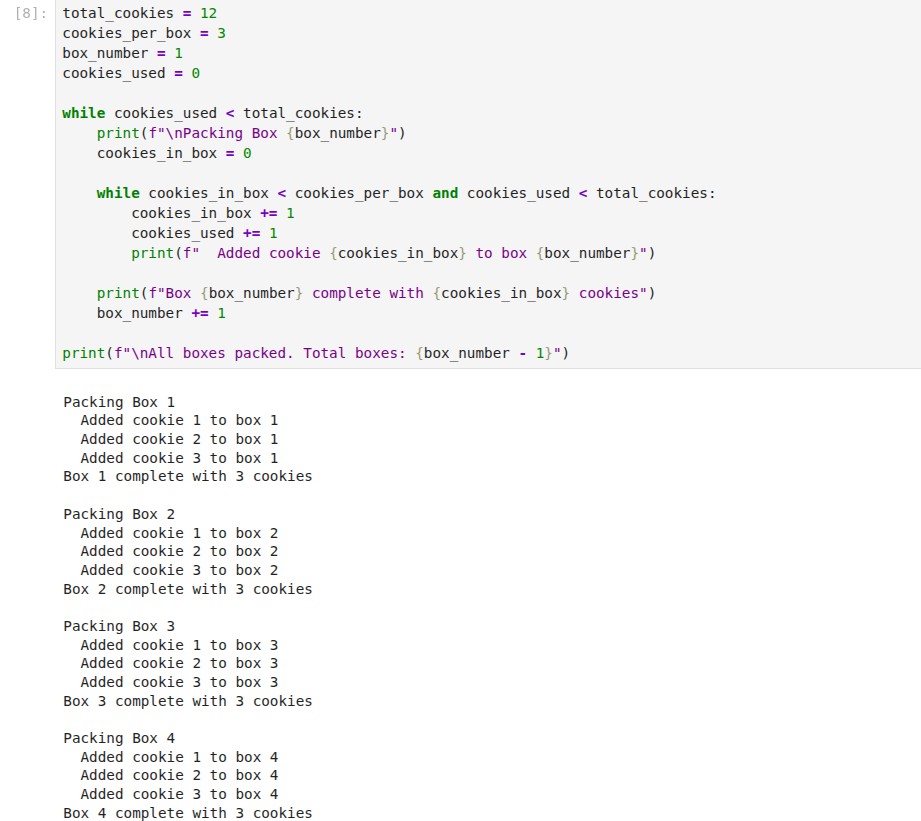
◾Example 01: Bakery Packing Cookies into Boxes
Scenario: A bakery packs 3 cookies into each box. Multiple boxes are packed until all cookies are used.
✦ Performance Comparison: while loop vs for-loop
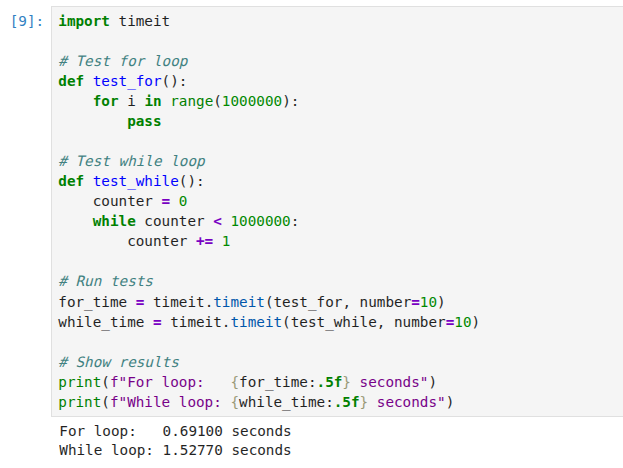
In terms of performance efficiency between the for loop and while loop in Python, for loops are generally faster and more memory efficient than while loops because they majorly iterate over the predefined range of values with additional checks. However, if we talk about the while loops, they generally provide more flexibility for the scenarios where you need to iterate over the specific conditions dynamically until that condition is satisfied.
◾Example to measure performance benchmarks:
1.3 Transfer Statements in Python
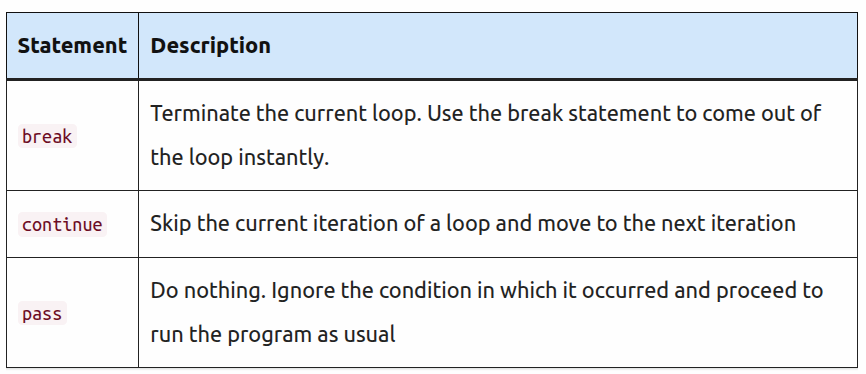
In Python, transfer statements (also known as control flow transfer statements or jump statements) are used to alter the normal flow of execution in loops or functions. The main transfer statements in Python are:
- break
- continue
- pass
✦ Break Statement in Python
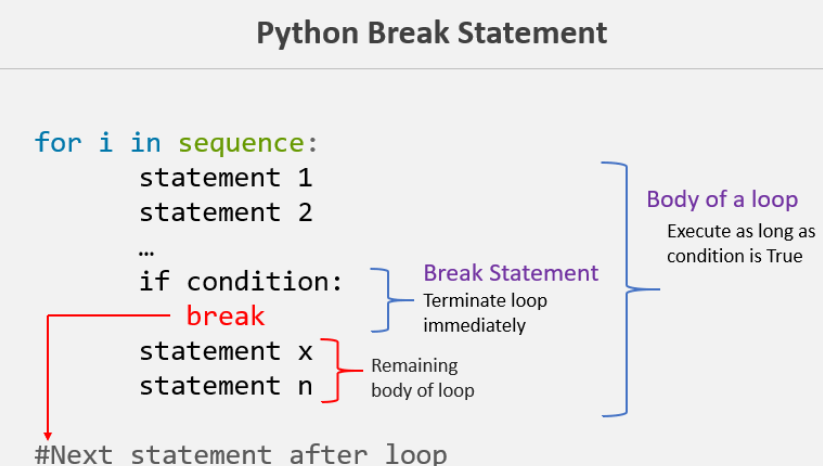
The break statement is used inside the loop to exit out of the loop. In Python, when a break statement is encountered inside a loop, the loop is immediately terminated, and the program control transfer to the next statement following the loop.
In simple words, A break keyword terminates the loop containing it. If the break statement is used inside a nested loop (loop inside another loop), it will terminate the innermost loop.
For example, you are searching a specific email inside a file. You started reading a file line by line using a loop. When you found an email, you can stop the loop using the break statement.
We can use Python break statement in both for loop and while loop. It is helpful to terminate the loop as soon as the condition is fulfilled instead of doing the remaining iterations. It reduces execution time.
Syntax of break:
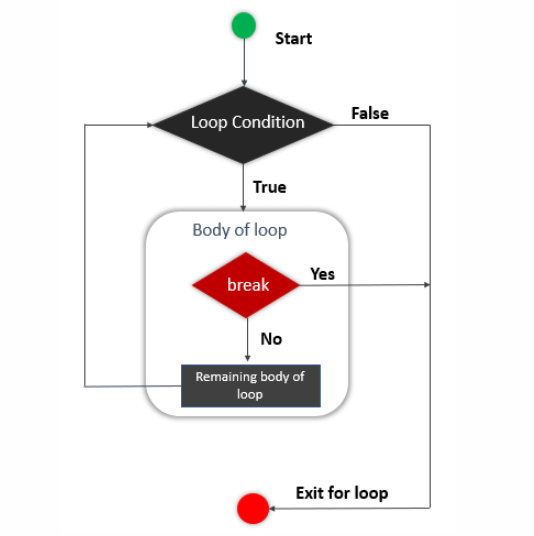
Flow chart of a break statement
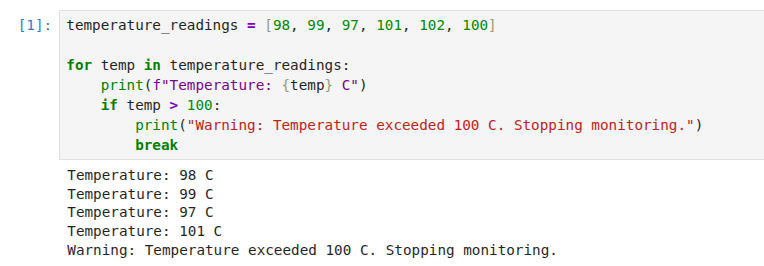
◾Example 01: Using break on for loop in Python — Reading Sensor Data Until a Threshold is Exceeded
A sensor reads temperature every second. Stop the loop when temperature exceeds 100 degrees.
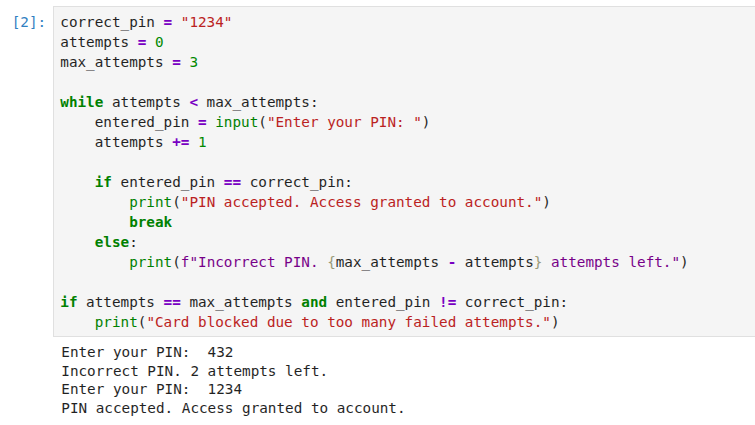
◾Example 02: Using break on while loop in Python — ATM Withdrawal Attempts
User has 3 attempts to enter the correct PIN. Break the loop if they succeed earlier.
✦ Continue Statement in Python
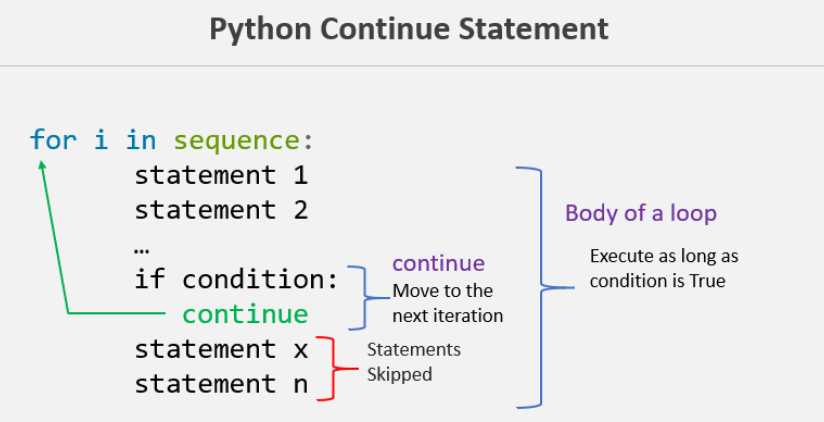
The continue statement skip the current iteration and move to the next iteration. In Python, when the continue statement is encountered inside the loop, it skips all the statements below it and immediately jumps to the next iteration.
In simple words, the continue statement is used inside loops. Whenever the continue statement is encountered inside a loop, control directly jumps to the start of the loop for the next iteration, skipping the rest of the code present inside the loop’s body for the current iteration.
In some situations, it is helpful to skip executing some statement inside a loop’s body if a particular condition occurs and directly move to the next iteration.
Syntax of continue:
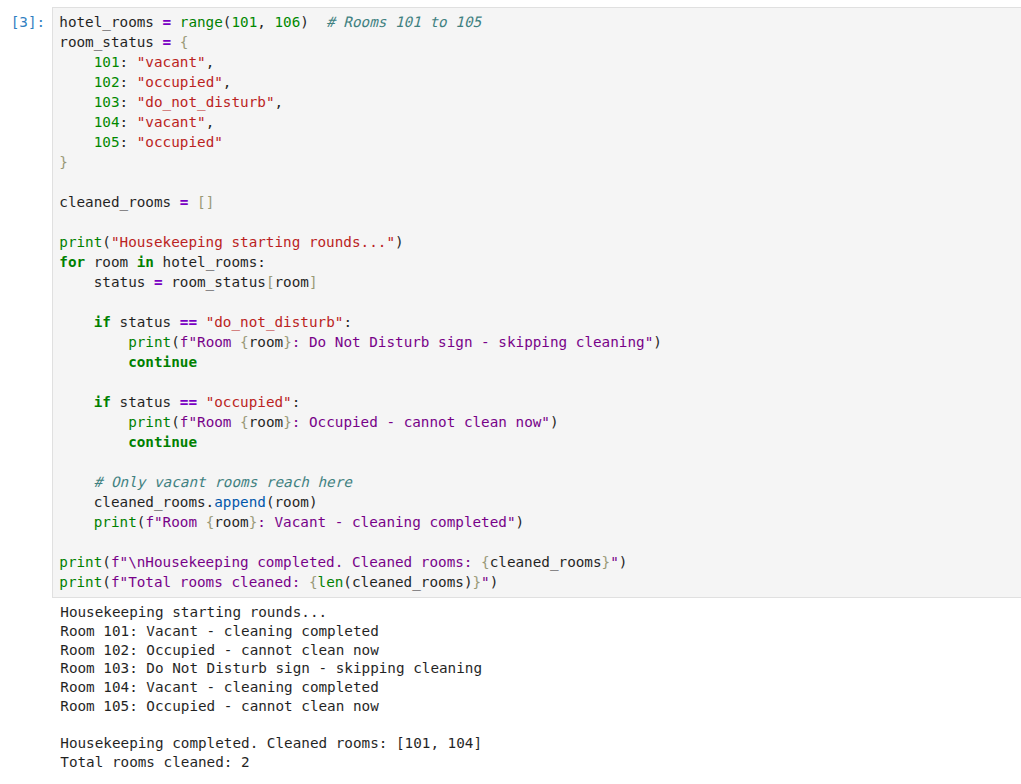
◾Example 01: Using continue for loop in Python — Hotel Room Cleaning Skip Occupied Rooms.
Housekeeping staff cleans only vacant rooms, skipping rooms with “Do Not Disturb” sign.
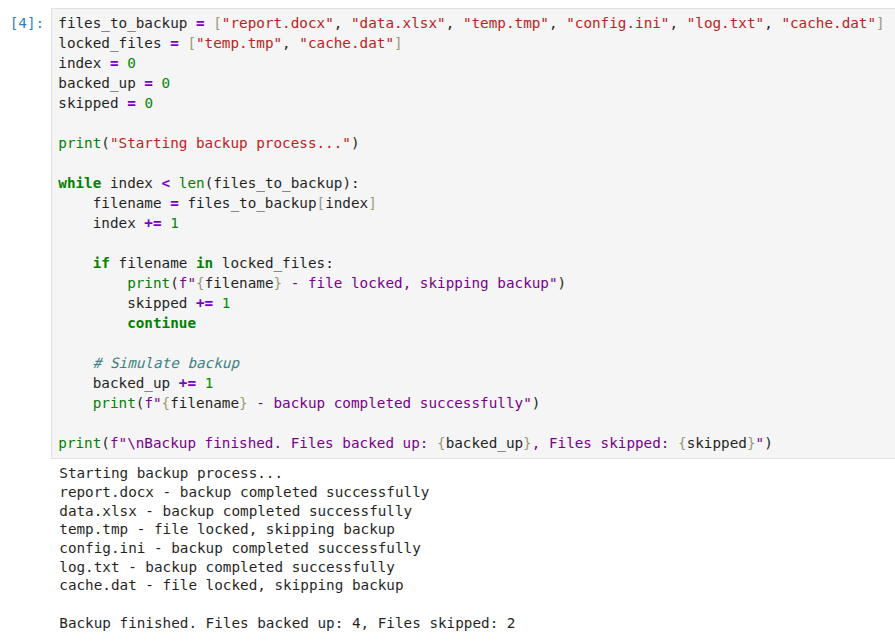
◾Example 02: Using continue on while loop in Python — Data Backup System Skip Locked Files
Backup system processes files but skips any files that are currently locked or in use.
✦ Pass Statement in Python
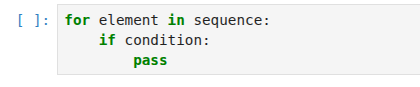
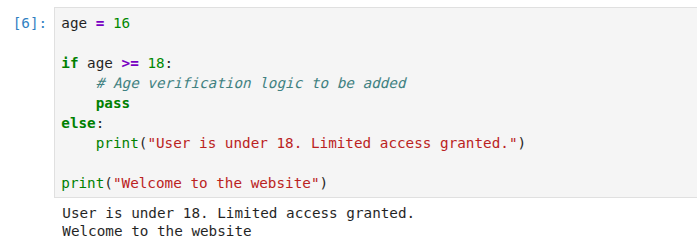
The pass is the keyword In Python, which won’t do anything. Sometimes there is a situation in programming where we need to define a syntactically empty block. We can define that block with the pass keyword.
A pass statement is a Python null statement. When the interpreter finds a pass statement in the program, it returns no operation. Nothing happens when the pass statement is executed.
It is useful in a situation where we are implementing new methods or also in exception handling. It plays a role like a placeholder.
Syntax of pass statement:
◾Example: Pass statement — Future Age Restriction Check
메타데이터
- post_id
- 228f07190892
- slug
- python-programming-basics-for-data-science-part-4-python-control-flow-statements-and-loops-228f07190892
- url
- https://medium.com/@saimw1083/python-programming-basics-for-data-science-part-4-python-control-flow-statements-and-loops-228f07190892
- canonical_url
- https://medium.com/@saimw1083/python-programming-basics-for-data-science-part-4-python-control-flow-statements-and-loops-228f07190892
- author_url
- https://medium.com/@saimw1083
- status
- ok
- fetched_at
- 2026-07-12 00:22:36