TryHackMe — Networking Core Protocols | Cyber Security 101 (THM)
Hey everyone! TryHackMe just announced the NEW Cyber Security 101 learning path, and there are tons of giveaways this time! This article…
TryHackMe — Networking Core Protocols | Cyber Security 101 (THM)
Hey everyone! TryHackMe just announced the NEW Cyber Security 101 learning path, and there are tons of giveaways this time! This article might help you out, but I’ve kept the summary short for easy understanding. Enjoy hacking!
Introduction
This room is the third room in a series of four rooms about computer networking:
- Networking Concepts
- Networking Essentials
- Networking Core Protocols (this room)
- Networking Secure Protocols
Room Prerequisites
To benefit from this room, we recommend that you know the following:
- ISO OSI model and layers
- TCP/IP model and layers
- Ethernet, IP, and TCP protocols
In other words, starting this room after Networking Concepts is the recommended approach.
Learning Objectives
By the time you finish this room, you will have learned about the following protocols:
- WHOIS
- DNS
- HTTP and FTP
- SMTP, POP3, and IMAP
DNS: Remembering Addresses
DNS helps map domain names to IP addresses, allowing you to visit websites by name instead of memorizing complex IP addresses. DNS operates at the Application Layer (Layer 7) of the OSI model, and it typically uses UDP port 53.
Key DNS Records:
- A Record: Maps a domain name to an IPv4 address. Example:
example.com→172.17.2.172. - AAAA Record: Maps a domain to an IPv6 address. Example:
example.com→2606:2800:21f:cb07:6820:80da:af6b:8b2c. - CNAME Record: Maps one domain name to another. Example:
www.example.com→example.com. - MX Record: Directs email to the appropriate mail server for a domain.
If you want to look up the IP address of a domain from the command line, you can use a tool such as nslookup. Consider the example in the terminal below where we look up example.com.
user@TryHackMe$ nslookup www.example.com
Server:         127.0.0.53
Address:        127.0.0.53#53
Non-authoritative answer:
Name:   www.example.com
Address: 93.184.215.14
Name:   www.example.com
Address: 2606:2800:21f:cb07:6820:80da:af6b:8b2c
The query above led to four packets. In the terminal below, we can see that the first and third packets send DNS queries for the A and AAAA records, respectively. The second and fourth packets show the DNS query responses.
user@TryHackMe$ tshark -r dns-query.pcapng -Nn
    1 0.000000000 192.168.66.89 → 192.168.66.1 DNS 86 Standard query 0x2e0f A www.example.com OPT
    2 0.059049584 192.168.66.1 → 192.168.66.89 DNS 102 Standard query response 0x2e0f A www.example.com A 93.184.215.14 OPT
    3 0.059721705 192.168.66.89 → 192.168.66.1 DNS 86 Standard query 0x96e1 AAAA www.example.com OPT
4 0.101568276 192.168.66.1 → 192.168.66.89 DNS 114 Standard query response 0x96e1 AAAA www.example.com AAAA 2606:2800:21f:cb07:6820:80da:af6b:8b2c OPT- tshark: Starts TShark, the command-line version of Wireshark.
- -r dns-query.pcapng: Reads the DNS query data from a file (
dns-query.pcapng). - -n: Prevents TShark from resolving IP addresses to hostnames, speeding up the analysis.
Example Output: This will show DNS queries and responses, detailing how the client requested the A and AAAA records for www.example.com, and how the DNS server responded with the corresponding IP addresses(DNS).
Answer the questions below
Which DNS record type refers to IPv6?
Answer: AAAA
Which DNS record type refers to the email server?
Answer: MX
WHOIS: Domain Information Lookup
WHOIS allows you to look up domain registration details, such as who owns a domain, when it was registered, and its expiration date. This is useful for identifying the organization or individual behind a website.
You can look up the WHOIS records of any registered domain name using one of the online services or via the command-line tool whois, available on Linux systems, among others. As expected, a WHOIS record provides information about the entity that registered a domain name, including name, phone number, email, and address. In the screenshot shown below, you can see when the record was first created and when it was last updated. Moreover, you can find the registrant’s name, address, phone, and email.
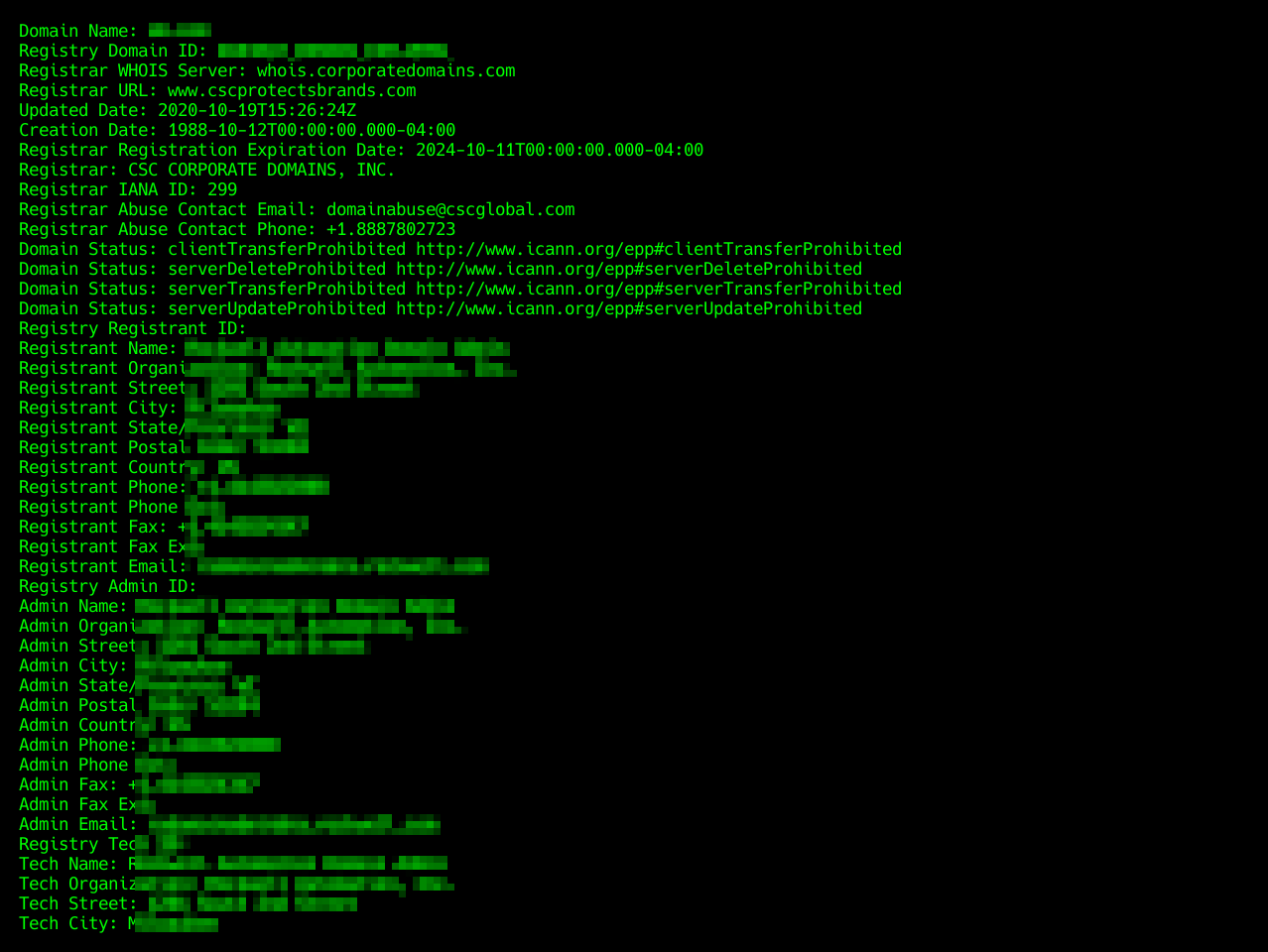
In the terminal output below, we have used the whois command to look up a domain whose WHOIS record is protected by privacy protection.
user@TryHackMe$ whois [REDACTED].com
[...]
Domain Name: [REDACTED].COM
Registry Domain ID: [REDACTED]
Registrar WHOIS Server: whois.godaddy.com
Registrar URL: https://www.godaddy.com
Updated Date: 2017-07-05T16:02:43Z
Creation Date: 1993-04-02T00:00:00Z
Registrar Registration Expiration Date: 2026-10-20T14:56:17Z
Registrar: GoDaddy.com, LLC
Registrar IANA ID: 146
Registrar Abuse Contact Email: abuse@godaddy.com
Registrar Abuse Contact Phone: +1.4806242505
[...]
Registrant Name: Registration Private
Registrant Organization: Domains By Proxy, LLC
Registrant Street: DomainsByProxy.com
[...]
This will show information like the registrant’s contact details, domain creation date, and expiration date.
Answer the questions below
When was the x.com record created? Provide the answer in YYYY-MM-DD format.
Answer: 1993–04–02
When was the twitter.com record created? Provide the answer in YYYY-MM-DD format.
Answer: 2000–01–21
HTTP(S): Accessing the Web
HTTP (Hypertext Transfer Protocol) and HTTPS (Secure HTTP) define how your browser communicates with web servers. HTTPS adds encryption for security. These protocols typically use TCP port 80 (HTTP) and TCP port 443 (HTTPS).
Common HTTP Methods:
- GET: Retrieves data from a server (e.g., HTML files, images).
- POST: Submits new data to the server (e.g., form data).
- PUT: Creates or updates a resource on the server.
- DELETE: Removes a resource from the server.
Using Wireshark, we can examine the exchange between the Firefox browser and the web server more closely. The screenshot below from Wireshark shows the text sent by our browser in red and the web server response in blue. As you can tell, a lot of information is exchanged between the client and the server that does not get rendered to the user. Examples include the web server version and when the page was last modified.

As you remember from Networking Concepts, we used the telnet client to connect to the web server running on MACHINE_IP at port 80. We had to send a couple of lines: GET / HTTP/1.1 and Host: anything to get the page we wanted. (On some servers, you might get the file without sending Host: anything.) You can use this method to access any page and not just the default page /. To get file.html, you would send GET /file.html HTTP/1.1, for instance (GET /file.html might work depending on the web server in use). This approach is efficient for troubleshooting as you would be “talking HTTP” with the server.
Answer the questions below
Use
telnetto access the fileflag.htmlonMACHINE_IP. What is the hidden flag?
Answer: THM{TELNET-HTTP}
telnet 10.10.60.35 80

GET /flag.html HTTP/1.1
Host: anything
wget http://10.10.60.35/flag.html
cat flag.htmlAND
curl http://10.10.60.35/flag.html -o flag.html

cat flag.html
FTP: Transferring Files
FTP (File Transfer Protocol) is designed for transferring files between a client and server. It’s faster than HTTP for large file transfers and typically uses TCP port 21.
Example Commands:
- USER: Provides the username for login.
- PASS: Provides the password.
- RETR: Downloads a file from the server.
- STOR: Uploads a file to the server.
FTP server listens on TCP port 21 by default; data transfer is conducted via another connection from the client to the server.
In the terminal below we executed the command ftp MACHINE_IP to connect to the remote FTP server using the local ftp client. Then we went through the following steps:
- We used the username
anonymousto log in - We didn’t need to provide any password
- Issuing
lsreturned a list of files available for download type asciiswitched to ASCII mode as this is a text fileget coffee.txtallowed us to retrieve the file we want
The command exchange via the FTP client is shown in the terminal below.
user@TryHackMe$ ftp MACHINE_IP
Connected to MACHINE_IP (MACHINE_IP).
220 (vsFTPd 3.0.5)
Name (MACHINE_IP:strategos): anonymous
331 Please specify the password.
Password:
230 Login successful.
Remote system type is UNIX.
Using binary mode to transfer files.
ftp> ls
227 Entering Passive Mode (10,10,41,192,134,10).
150 Here comes the directory listing.
-rw-r--r--    1 0        0            1480 Jun 27 08:03 coffee.txt
-rw-r--r--    1 0        0              14 Jun 27 08:04 flag.txt
-rw-r--r--    1 0        0            1595 Jun 27 08:05 tea.txt
226 Directory send OK.
ftp> type ascii
200 Switching to ASCII mode.
ftp> get coffee.txt
local: coffee.txt remote: coffee.txt
227 Entering Passive Mode (10,10,41,192,57,100).
150 Opening BINARY mode data connection for coffee.txt (1480 bytes).
WARNING! 47 bare linefeeds received in ASCII mode
File may not have transferred correctly.
226 Transfer complete.
1480 bytes received in 8e-05 secs (18500.00 Kbytes/sec)
ftp> quit
221 Goodbye.
We used Wireshark to examine the exchanged messages more closely. The client’s messages are in red, while the server’s responses are in blue. Notice how various commands differ between the client and the server. For example, when you type ls on the client, the client sends LIST to the server. One last thing to note is that the directory listing and the file we downloaded are sent over a separate connection each.

Answer the questions below
Using the FTP client
ftpon the AttackBox, access the FTP server atMACHINE_IPand retrieveflag.txt. What is the flag found?
Answer: THM{FAST-FTP}
root@ip-10-10-101-191:~# ftp 10.10.60.35
Connected to 10.10.60.35.
220 (vsFTPd 3.0.5)
Name (10.10.60.35:root): anonymous
331 Please specify the password.
Password:
230 Login successful.
Remote system type is UNIX.
Using binary mode to transfer files.
ftp> ls
200 PORT command successful. Consider using PASV.
150 Here comes the directory listing.
-rw-r--r--    1 0        0            1480 Jun 27 08:03 coffee.txt
-rw-r--r--    1 0        0              14 Jun 27 08:04 flag.txt
-rw-r--r--    1 0        0            1595 Jun 27 08:05 tea.txt
226 Directory send OK.
ftp> get flag.txt
local: flag.txt remote: flag.txt
200 PORT command successful. Consider using PASV.
150 Opening BINARY mode data connection for flag.txt (14 bytes).
226 Transfer complete.
14 bytes received in 0.00 secs (9.1451 kB/s)
ftp> quit
221 Goodbye.
root@ip-10-10-101-191:~# cat flag.txt
THM{FAST-FTP}
SMTP: Sending Email
SMTP (Simple Mail Transfer Protocol) is used to send emails and typically runs on TCP port 25. It defines how your email client communicates with mail servers.
Key SMTP Commands:
- HELO/EHLO: Identifies the client to the server.
- MAIL FROM: Specifies the sender’s email address.
- RCPT TO: Specifies the recipient’s email address.
- DATA: Begins sending the email message content.
- . (Point): is sent on a line by itself to indicate the end of the
- QUIT: Ends the session.
The terminal below shows an example of an email sent via telnet. The SMTP server listens on TCP port 25 by default.
user@TryHackMe$ telnet MACHINE_IP 25
Trying MACHINE_IP...
Connected to MACHINE_IP.
Escape character is '^]'.
220 example.thm ESMTP Exim 4.95 Ubuntu Thu, 27 Jun 2024 16:18:09 +0000
HELO client.thm
250 example.thm Hello client.thm [10.11.81.126]
MAIL FROM: <user@client.thm>
250 OK
RCPT TO: <strategos@server.thm>
250 Accepted
DATA
354 Enter message, ending with "." on a line by itself
From: user@client.thm
To: strategos@server.thm
Subject: Telnet email
Hello. I am using telnet to send you an email!
.
250 OK id=1sMrpq-0001Ah-UT
QUIT
221 example.thm closing connection
Connection closed by foreign host.
Obviously, sending an email using telnet is quite cumbersome; however, it helps you better understand the commands that your email client issues under the hood. The Wireshark capture shows the exchange in colours; the client’s messages are in red, while the server’s responses are in blue.

Now that we have covered some basic HTTP, FTP, and SMTP commands, you should have gained a solid understanding of how protocols are designed and used. It should be effortless to learn how other text-based protocols, such as POP3 and IMAP, work.
Answer the questions below
Which SMTP command indicates that the client will start the contents of the email message?
Answer: DATA
What does the email client send to indicate that the email message has been fully entered?
Answer: .
POP3: Receiving Email
POP3 (Post Office Protocol version 3) is used to download emails from a mail server to your local device. It is typically used when you want to retrieve emails and delete them from the server afterward. POP3 runs on TCP port 110.
Key POP3 Commands:
- USER: Identifies the user.
- PASS: Provides the user’s password.
- LIST: Lists all available emails with their sizes.
- RETR <message_number>: Retrieves the specified email.
- DELE <message_number>: Marks an email for deletion.
- QUIT: Ends the POP3 session and applies changes, like deletions.
In the terminal below, we can see a POP3 session over telnet. Since the POP3 server listens on TCP port 110 by default, the command to connect to the TELNET port is telnet MACHINE_IP 110. The exchange below retrieves the email message sent in the previous task.
user@TryHackMe$ telnet MACHINE_IP 110
Trying MACHINE_IP...
Connected to MACHINE_IP.
Escape character is '^]'.
+OK [XCLIENT] Dovecot (Ubuntu) ready.
AUTH
+OK
PLAIN
.
USER strategos
+OK
PASS
+OK Logged in.
STAT
+OK 3 1264
LIST
+OK 3 messages:
1 407
2 412
3 445
.
RETR 3
+OK 445 octets
Return-path: <user@client.thm>
Envelope-to: strategos@server.thm
Delivery-date: Thu, 27 Jun 2024 16:19:35 +0000
Received: from [10.11.81.126] (helo=client.thm)
        by example.thm with smtp (Exim 4.95)
        (envelope-from <user@client.thm>)
        id 1sMrpq-0001Ah-UT
        for strategos@server.thm;
        Thu, 27 Jun 2024 16:19:35 +0000
From: user@client.thm
To: strategos@server.thm
Subject: Telnet email
Hello. I am using telnet to send you an email!
.
QUIT
+OK Logging out.
Connection closed by foreign host.
Someone capturing the network packets would be able to intercept the exchanged traffic. As per previous Wireshark captures, the commands in red are sent by the client, and the lines in blue are the server’s. It is also clear that someone capturing the traffic can read the passwords.

Connecting to a POP3 server requires authentication. Use the following login credentials when needed:
- Username:
linda - Password:
Pa$$123
Answer the questions below
Looking at the traffic exchange, what is the name of the POP3 server running on the remote server?
Answer: Dovecot
Use
telnetto connect toMACHINE_IP’s POP3 server. What is the flag contained in the fourth message?
Answer: THM{TELNET_RETR_EMAIL}
root@ip-10-10-101-191:~# telnet 10.10.60.35 110
Trying 10.10.60.35...
Connected to 10.10.60.35.
Escape character is '^]'.
+OK [XCLIENT] Dovecot (Ubuntu) ready.
AUTH
+OK
PLAIN
.
USER linda
+OK
PASS Pa$$123
+OK Logged in.
STAT
+OK 4 2216
LIST
+OK 4 messages:
1 690
2 589
3 483
4 454
.
RETR 4
+OK 454 octets
Return-path: <user@client.thm>
Envelope-to: linda@server.thm
Delivery-date: Thu, 12 Sep 2024 20:12:42 +0000
Received: from [10.11.81.126] (helo=client.thm)
 by example.thm with smtp (Exim 4.95)
 (envelope-from <user@client.thm>)
 id 1soqAj-0007li-39
 for linda@server.thm;
 Thu, 12 Sep 2024 20:12:42 +0000
From: user@client.thm
To: linda@server.thm
Subject: Your Flag

Hello!
Here's your flag:
THM{TELNET_RETR_EMAIL}
Enjoy your journey!
.
IMAP: Synchronizing Email
IMAP (Internet Message Access Protocol) is a more advanced email protocol than POP3, allowing you to synchronize your emails across multiple devices. Unlike POP3, IMAP stores emails on the server, keeping them accessible from different locations. IMAP uses TCP port 143.
Key IMAP Commands:
- LOGIN: Authenticates the user with a username and password.
- SELECT <mailbox>: Selects the mailbox folder to work with.
- FETCH <message_number>: Retrieves the content of a specific message.
- MOVE <sequence_set> <mailbox>: Moves a message to a different folder.
- LOGOUT: Ends the IMAP session.
Knowing that the IMAP server listens on TCP port 143 by default, we will use telnet to connect to MACHINE_IP’s port 143 and fetch the message we sent in an earlier task.
user@TryHackMe$ telnet 10.10.41.192 143
Trying 10.10.41.192...
Connected to 10.10.41.192.
Escape character is '^]'.
* OK [CAPABILITY IMAP4rev1 SASL-IR LOGIN-REFERRALS ID ENABLE IDLE LITERAL+ STARTTLS AUTH=PLAIN] Dovecot (Ubuntu) ready.
A LOGIN strategos
A OK [CAPABILITY IMAP4rev1 SASL-IR LOGIN-REFERRALS ID ENABLE IDLE SORT SORT=DISPLAY THREAD=REFERENCES THREAD=REFS THREAD=ORDEREDSUBJECT MULTIAPPEND URL-PARTIAL CATENATE UNSELECT CHILDREN NAMESPACE UIDPLUS LIST-EXTENDED I18NLEVEL=1 CONDSTORE QRESYNC ESEARCH ESORT SEARCHRES WITHIN CONTEXT=SEARCH LIST-STATUS BINARY MOVE SNIPPET=FUZZY PREVIEW=FUZZY PREVIEW STATUS=SIZE SAVEDATE LITERAL+ NOTIFY SPECIAL-USE] Logged in
B SELECT inbox
* FLAGS (\Answered \Flagged \Deleted \Seen \Draft)
* OK [PERMANENTFLAGS (\Answered \Flagged \Deleted \Seen \Draft \*)] Flags permitted.
* 4 EXISTS
* 0 RECENT
* OK [UNSEEN 2] First unseen.
* OK [UIDVALIDITY 1719824692] UIDs valid
* OK [UIDNEXT 5] Predicted next UID
B OK [READ-WRITE] Select completed (0.001 + 0.000 secs).
C FETCH 3 body[]
* 3 FETCH (BODY[] {445}
Return-path: <user@client.thm>
Envelope-to: strategos@server.thm
Delivery-date: Thu, 27 Jun 2024 16:19:35 +0000
Received: from [10.11.81.126] (helo=client.thm)
        by example.thm with smtp (Exim 4.95)
        (envelope-from <user@client.thm>)
        id 1sMrpq-0001Ah-UT
        for strategos@server.thm;
        Thu, 27 Jun 2024 16:19:35 +0000
From: user@client.thm
To: strategos@server.thm
Subject: Telnet email
Hello. I am using telnet to send you an email!
)
C OK Fetch completed (0.001 + 0.000 secs).
D LOGOUT
* BYE Logging out
D OK Logout completed (0.001 + 0.000 secs).
Connection closed by foreign host.
The screenshot below shows the exchanged messages between the client and the server as seen from Wireshark. The client only needed to send four commands, shown in red, and the “long” server responses are shown in blue.

Answer the questions below
What IMAP command retrieves the fourth email message?
Answer: FETCH 4 body[]
root@ip-10-10-101-191:~# telnet 10.10.60.35 143
Trying 10.10.60.35...
Connected to 10.10.60.35.
Escape character is '^]'.
* OK [CAPABILITY IMAP4rev1 SASL-IR LOGIN-REFERRALS ID ENABLE IDLE LITERAL+ STARTTLS AUTH=PLAIN] Dovecot (Ubuntu) ready.
A LOGIN linda Pa$$123
A OK [CAPABILITY IMAP4rev1 SASL-IR LOGIN-REFERRALS ID ENABLE IDLE SORT SORT=DISPLAY THREAD=REFERENCES THREAD=REFS THREAD=ORDEREDSUBJECT MULTIAPPEND URL-PARTIAL CATENATE UNSELECT CHILDREN NAMESPACE UIDPLUS LIST-EXTENDED I18NLEVEL=1 CONDSTORE QRESYNC ESEARCH ESORT SEARCHRES WITHIN CONTEXT=SEARCH LIST-STATUS BINARY MOVE SNIPPET=FUZZY PREVIEW=FUZZY PREVIEW STATUS=SIZE SAVEDATE LITERAL+ NOTIFY SPECIAL-USE] Logged in
B SELECT inbox
* FLAGS (\Answered \Flagged \Deleted \Seen \Draft)
* OK [PERMANENTFLAGS (\Answered \Flagged \Deleted \Seen \Draft \*)] Flags permitted.
* 4 EXISTS
* 0 RECENT
* OK [UIDVALIDITY 1719824692] UIDs valid
* OK [UIDNEXT 9] Predicted next UID
B OK [READ-WRITE] Select completed (0.001 + 0.000 secs).
C FETCH 4 body[]
* 4 FETCH (BODY[] {454}
Return-path: <user@client.thm>
Envelope-to: linda@server.thm
Delivery-date: Thu, 12 Sep 2024 20:12:42 +0000
Received: from [10.11.81.126] (helo=client.thm)
 by example.thm with smtp (Exim 4.95)
 (envelope-from <user@client.thm>)
 id 1soqAj-0007li-39
 for linda@server.thm;
 Thu, 12 Sep 2024 20:12:42 +0000
From: user@client.thm
To: linda@server.thm
Subject: Your Flag

Hello!
Here's your flag:
THM{TELNET_RETR_EMAIL}
Enjoy your journey!
)
C OK Fetch completed (0.001 + 0.000 secs).
Conclusion
In the previous room, we discussed the TELNET protocol; this room focused on other fundamental protocols: DNS, HTTP, FTP, SMTP, POP3, and IMAP. With the protocols covered, we now have a better understanding of how domain names are resolved, how web pages are served, and how email is sent and received. Another primary purpose of this room is to give you a good understanding of how a protocol functions behind the graphical interfaces.
The table below summarizes the default port numbers of the protocols we have covered so far.

Thank You!
메타데이터
- post_id
- 22f3e09ab8e8
- slug
- tryhackme-networking-core-protocols-cyber-security-101-thm-22f3e09ab8e8
- url
- https://medium.com/@Z3pH7/tryhackme-networking-core-protocols-cyber-security-101-thm-22f3e09ab8e8
- canonical_url
- https://medium.com/@Z3pH7/tryhackme-networking-core-protocols-cyber-security-101-thm-22f3e09ab8e8
- author_url
- https://medium.com/@Z3pH7
- status
- ok
- fetched_at
- 2026-07-22 10:25:21