Background 🌏
This article focuses on building the latest version of Apache DolphinScheduler-3.1.3 using the Ambari cluster. Future integrations into…
Setting up Apache DolphinScheduler 3.1.3 on Ambari Cluster: A Comprehensive Guide
Background 🌏
This article focuses on building the latest version of Apache DolphinScheduler-3.1.3 using the Ambari cluster. Future integrations into Ambari will be attempted.
1.Installation Preparations 🔧
To install Apache DolphinScheduler, the following dependencies are required in your environment:
- JDK8: Download JDK (1.8+), install, and set the JAVA_HOME environment variable. Also, append its bin directory to the PATH environment variable.
- Database: Choose either PostgreSQL (8.2.15+) or MySQL (5.7+). If selecting MySQL, you’ll also need JDBC Driver 8.0.16.
- Registration Center: ZooKeeper (3.4.6+).
2. Cluster Installation 🖥
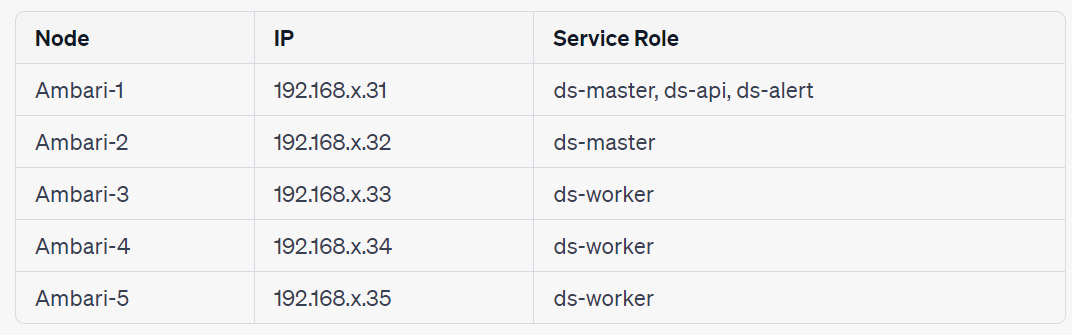
2.1 Configure Apache DolphinScheduler User 👥
Create the Apache DolphinScheduler user and ensure sudo privileges without a password:
# To create a user, you need to log in as root
useradd dolphinscheduler

# add password
echo "dolphinscheduler" | passwd --stdin dolphinscheduler

# Configure sudo password-free
sed -i '$adolphinscheduler  ALL=(ALL)  NOPASSWD: NOPASSWD: ALL' /etc/sudoers
sed -i 's/Defaults    requirett/#Defaults    requirett/g' /etc/sudoers

# Modify the directory permissions so that the deployment user has the operation permission to the apache-dolphinscheduler-*-bin directory after the binary package is decompressed
chown -R dolphinscheduler:dolphinscheduler apache-dolphinscheduler-*-bin
Configure password-free
su dolphinscheduler
ssh-keygen -t rsa -P '' -f ~/.ssh/id_rsa
cat ~/.ssh/id_rsa.pub >> ~/.ssh/authorized_keys
chmod 600 ~/.ssh/authorized_keys
Password-free completion between clusters
ssh-copy-id -i ~/.ssh/id_rsa.pub dolphinscheduler@主机2.2 Configure MySQL 📂
Apache DolphinScheduler’s metadata is stored in a relational database. Create the necessary database and user:
mysql5.6/5.7
mysql -uroot -p
mysql> CREATE DATABASE dolphinscheduler DEFAULT CHARACTER SET utf8 DEFAULT COLLATE utf8_general_ci;
# 修改 Modify {user} and {password} to your desired username and password
mysql> GRANT ALL PRIVILEGES ON dolphinscheduler.* TO '{user}'@'%' IDENTIFIED BY '{password}';
mysql> GRANT ALL PRIVILEGES ON dolphinscheduler.* TO '{user}'@'localhost' IDENTIFIED BY '{password}';
mysql> flush privileges;
mysql8: Create a database and specify the encoding format
mysql> CREATE DATABASE dolphinscheduler DEFAULT CHARACTER SET utf8 DEFAULT COLLATE utf8_general_ci;Open permissions
# Modify {user} and {password} to your desired username and password
mysql> CREATE USER '{user}'@'%' IDENTIFIED BY '{password}';
mysql> GRANT ALL PRIVILEGES ON dolphinscheduler.* TO '{user}'@'%';
mysql> CREATE USER '{user}'@'localhost' IDENTIFIED BY '{password}';
mysql> GRANT ALL PRIVILEGES ON dolphinscheduler.* TO '{user}'@'localhost';
mysql> FLUSH PRIVILEGES;
The following error may occur during execution:
ERROR 1819 (HY000): Your password does not satisfy the current policy requirements

Execute the following command to view mysql password requirement rules
show variables like 'validate_password%';
Modify the verification registration to LOW and reset it.
set global validate_password.policy=LOW;
2.3 Start zk 🚀
2.4 Modify ds Configuration Files 📜
2.4.1 Place MySQL’s JDBC driver in the ds lib directory:
cp ../mysql-connector-java-8.0.16.jar ./lib
cp ../mysql-connector-java-8.0.16.jar ./api-server/libs/
cp ../mysql-connector-java-8.0.16.jar ./alert-server/libs/
cp ../mysql-connector-java-8.0.16.jar ./master-server/libs/
cp ../mysql-connector-java-8.0.16.jar ./worker-server/libs/
2.4.2 Modify the install_env.sh configuration file in the bin/env directory:
You only need to change INSTALL MACHINE, DolphinScheduler ENV, Database, and Registry Server.
2.4.3 Modify the dolphinscheduler_env.sh file:
Configure JAVA_HOME, database, registration center, and other related configurations in bin/env/dolphinscheduler_env.sh.
2.5 Initialize the Database 🔄
bash tools/bin/upgrade-schema.sh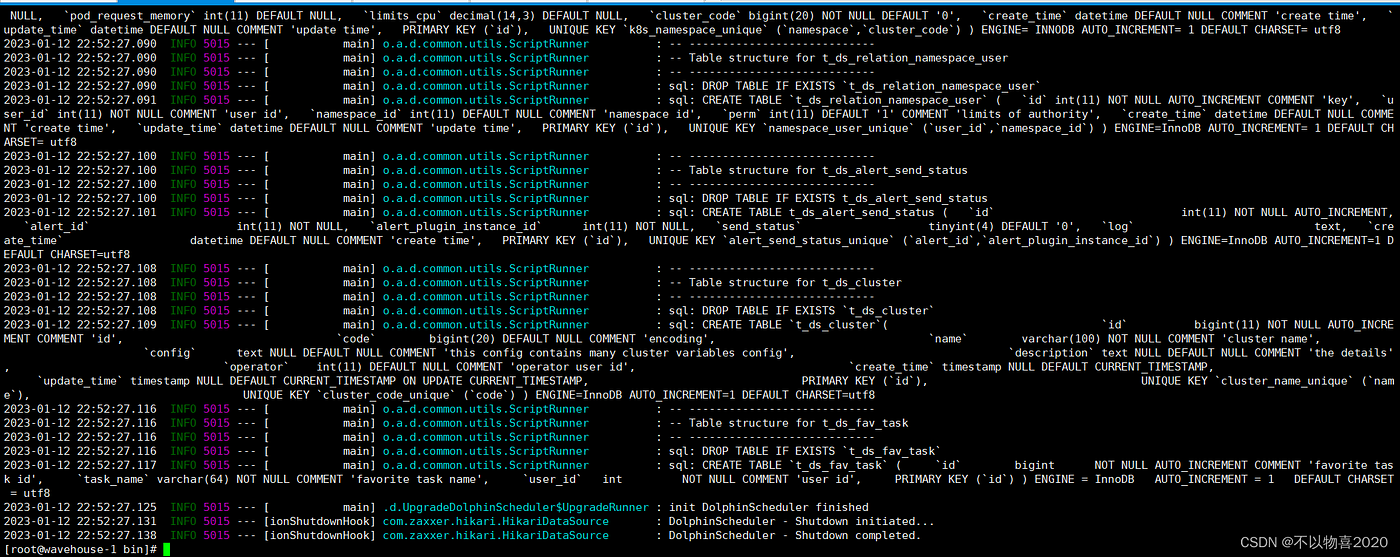
2.6 Start DS ⚡
sh install.shThe error is as follows:
9:32:47.555 [main] INFO org.apache.zookeeper.common.X509Util - Setting -D jdk.tls.rejectClientInitiatedRenegotiation=true to disable client-initiated TLS renegotiation
09:32:47.561 [main] INFO org.apache.zookeeper.ClientCnxnSocket - jute.maxbuffer value is 1048575 Bytes
09:32:47.578 [main] INFO org.apache.zookeeper.ClientCnxn - zookeeper.request.timeout value is 0. feature enabled=false
ZooKeeper -server host:port -client-configuration properties-file cmd args
addWatch [-m mode] path # optional mode is one of [PERSISTENT, PERSISTENT_RECURSIVE] - default is PERSISTENT_RECURSIVE
addauth scheme auth
close
config [-c] [-w] [-s]
connect host:port
create [-s] [-e] [-c] [-t ttl] path [data] [acl]
delete [-v version] path
deleteall path [-b batch size]
delquota [-n|-b|-N|-B] path
get [-s] [-w] path
getAcl [-s] path
getAllChildrenNumber path
getEphemerals path
history
listquota path
ls [-s] [-w] [-R] path
printwatches on|off
quit
reconfig [-s] [-v version] [[-file path] | [-members serverID=host:port1:port2;port3[,…]]] | [-add serverId=host:port1:port2;port3[,…]] [-remove serverId[,…]*]
redo cmdno
removewatches path [-c|-d|-a] [-l]
set [-s] [-v version] path data
setAcl [-s] [-v version] [-R] path acl
setquota -n|-b|-N|-B val path
stat [-w] path
sync path
version
whoami
Command not found: Command not found rmr
09:32:47.584 [main] ERROR org.apache.zookeeper.util.ServiceUtils - Exiting JVM with code 12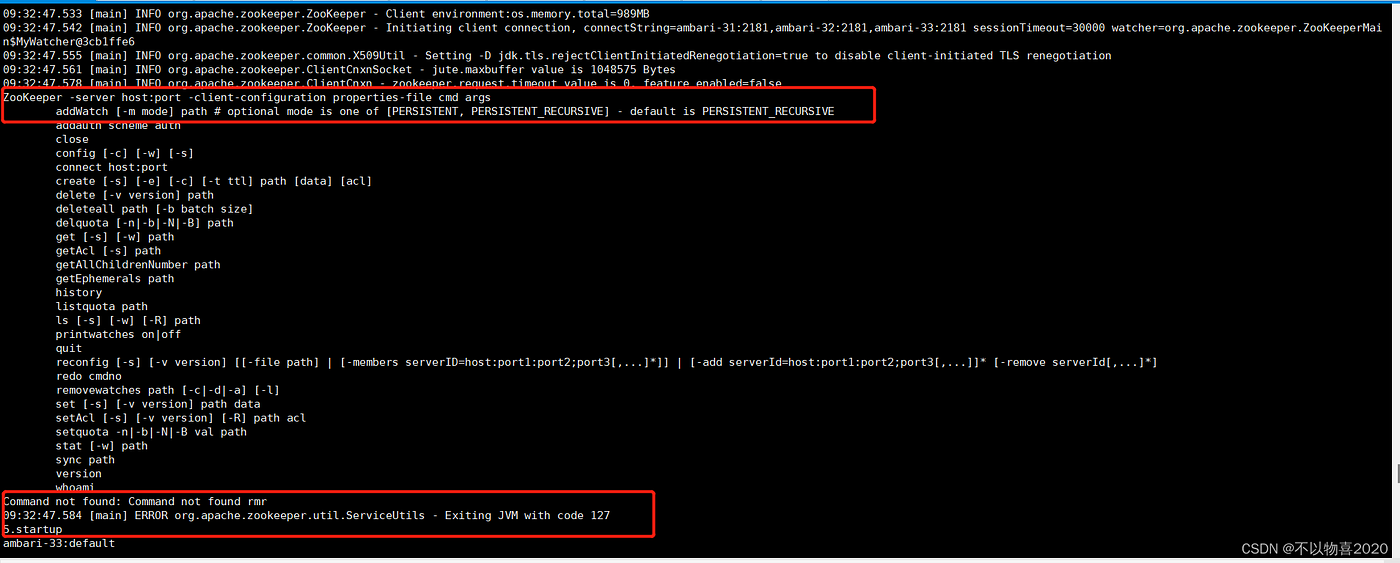
Looking at the specific generation log, I found the following error:
Caused by: org.apache.dolphinscheduler.registry.api.RegistryException: Failed to put registry key: /nodes/master
239 at org.apache.dolphinscheduler.plugin.registry.zookeeper.ZookeeperRegistry.put(ZookeeperRegistry.java:186)
240 at org.apache.dolphinscheduler.service.registry.RegistryClient.initNodes(RegistryClient.java:247)
241 at org.apache.dolphinscheduler.service.registry.RegistryClient.afterConstruct(RegistryClient.java:77)
242 at sun.reflect.NativeMethodAccessorImpl.invoke0(Native Method)
243 at sun.reflect.NativeMethodAccessorImpl.invoke(NativeMethodAccessorImpl.java:62)
244 at sun.reflect.DelegatingMethodAccessorImpl.invoke(DelegatingMethodAccessorImpl.java:43)
245 at java.lang.reflect.Method.invoke(Method.java:498)
246 at org.springframework.beans.factory.annotation.InitDestroyAnnotationBeanPostProcessorL i f e c y c l e E l e m e n t . i n v o k e ( I n i t D e s t r o y A n n o t a t i o n B e a n P o s t P r o c e s s o r . j a v a : 389 ) 247 a t o r g . s p r i n g f r a m e w o r k . b e a n s . f a c t o r y . a n n o t a t i o n . I n i t D e s t r o y A n n o t a t i o n B e a n P o s t P r o c e s s o r LifecycleElement.invoke(InitDestroyAnnotationBeanPostProcessor.java:389) 247 at org.springframework.beans.factory.annotation.InitDestroyAnnotationBeanPostProcessorLifecycleElement.invoke(InitDestroyAnnotationBeanPostProcessor.java:389)247atorg.springframework.beans.factory.annotation.InitDestroyAnnotationBeanPostProcessorLifecycleMetadata.invokeInitMethods(InitDestroyAnnotationBeanPostProcessor.java:333)
248 at org.springframework.beans.factory.annotation.InitDestroyAnnotationBeanPostProcessor.postProcessBeforeInitialization(InitDestroyAnnotationBeanPostProcessor.java:157)
249 … 46 common frames omitted
250 Caused by: org.apache.zookeeper.KeeperException$UnimplementedException: KeeperErrorCode = Unimplemented for /dolphinscheduler/nodes/master
251 at org.apache.zookeeper.KeeperException.create(KeeperException.java:106)
252 at org.apache.zookeeper.KeeperException.create(KeeperException.java:54)
253 at org.apache.zookeeper.ZooKeeper.create(ZooKeeper.java:1450)
254 at org.apache.curator.framework.imps.CreateBuilderImpl$18.call(CreateBuilderImpl.java:1216)
255 at org.apache.curator.framework.imps.CreateBuilderImpl$18.call(CreateBuilderImpl.java:1193)
256 at org.apache.curator.RetryLoop.callWithRetry(RetryLoop.java:93)
257 at org.apache.curator.framework.imps.CreateBuilderImpl.pathInForeground(CreateBuilderImpl.java:1190)
258 at org.apache.curator.framework.imps.CreateBuilderImpl.protectedPathInForeground(CreateBuilderImpl.java:605)
259 at org.apache.curator.framework.imps.CreateBuilderImpl.forPath(CreateBuilderImpl.java:595)
260 at org.apache.curator.framework.imps.CreateBuilderImpl.forPath(CreateBuilderImpl.java:48)
261 at org.apache.dolphinscheduler.plugin.registry.zookeeper.ZookeeperRegistry.put(ZookeeperRegistry.java:184)
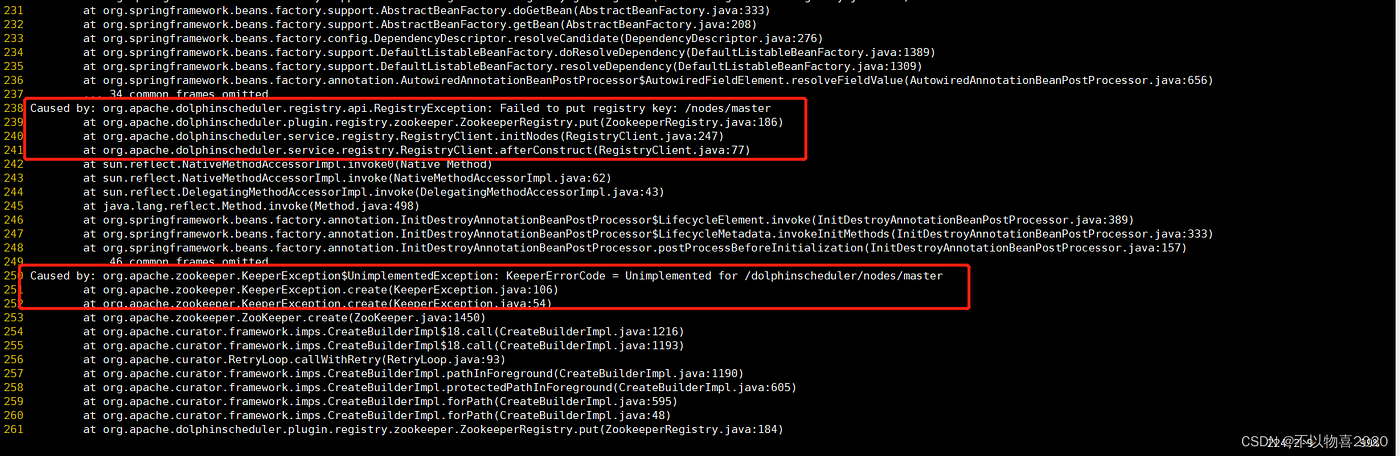
Potential Issue: If you encounter an error related to DS’s compatibility with the zk version, you may need to upgrade zk.
Solution: Download and install zk version 3.8.
Success: After successfully restarting DS, visit the master node URL and log in with the default credentials.

Note: The -DskipTests=true argument is to skip testing, which can be time-consuming.
Access the master node url connection:
http://<your_ip>:12345/dolphinscheduler/ui/loginDefault account password: admin/dolphinscheduler123
- [Additional] DS Source Code Modification and Packaging 📦
The current DS-3.1.3 version does not support Trino. You can modify the source code to add support for Trino data sources. After modifications, recompile and package using the provided command.
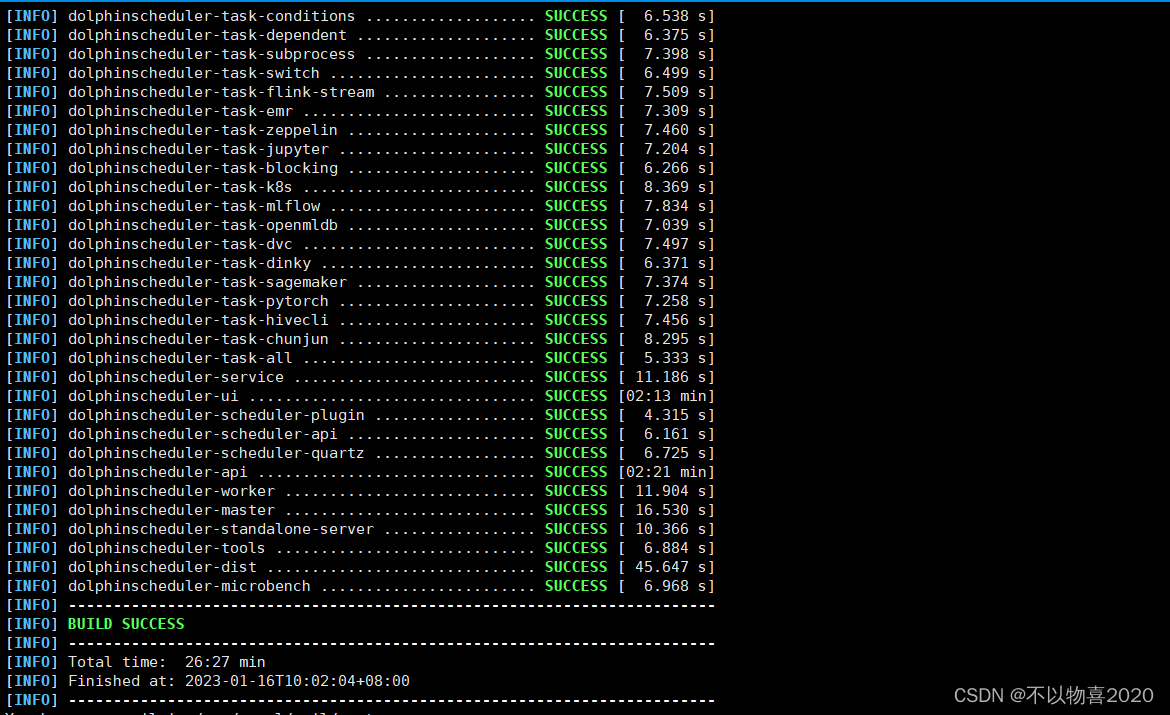
Then enter your maven warehouse to find the packaged ds-3.1.3 installation package
cd /root/.m2/repository/org/apache/dolphinscheduler/dolphinscheduler-dist/3.1.3
ll -h
References 📚 [1] “Quick Start with Zookeeper”: link
Copyright statement: This article is an original article of CSDN blogger “Don’t like things 2020”, and follows the CC 4.0 BY-SA copyright agreement. For reprinting, please attach the original source link and this statement. Original link: https://blog.csdn.net/Keyuchen_01/article/details/128653687
메타데이터
- post_id
- 2388948fc277
- slug
- background-2388948fc277
- url
- https://medium.com/@ApacheDolphinScheduler/background-2388948fc277
- canonical_url
- https://medium.com/@ApacheDolphinScheduler/background-2388948fc277
- author_url
- https://medium.com/@ApacheDolphinScheduler
- status
- ok
- fetched_at
- 2026-07-25 07:06:12