The Frontend Components You No Longer Need JavaScript For
HTML and CSS quietly absorbed the UI patterns we used to script by hand. Here’s what to hand back to the browser.
The Frontend Components You No Longer Need JavaScript For
HTML and CSS quietly absorbed the UI patterns we used to script by hand. Here’s what to hand back to the browser.
For years the reflex was simple: if something opened, closed, snapped, filtered, or reacted to input, you reached for JavaScript. HTML gave us documents, CSS gave us styling, JavaScript gave us behavior.
The platform has moved on. Browsers now ship disclosure widgets, popovers, dialog backdrops, scroll snapping, lazy loading, scroll-driven animation, and enough selectors to hold real UI state. Aaron T. Grogg’s NoLoJS project frames the shift well: the goal isn’t “no JavaScript ever,” it’s moving simple interactions back to HTML and CSS where the browser handles them for free.
That matters because every unnecessary script has a cost — it delays rendering, adds failure modes, and makes simple UI harder to maintain. Sometimes the best optimization isn’t a clever bundle split. It’s deleting code you no longer need.
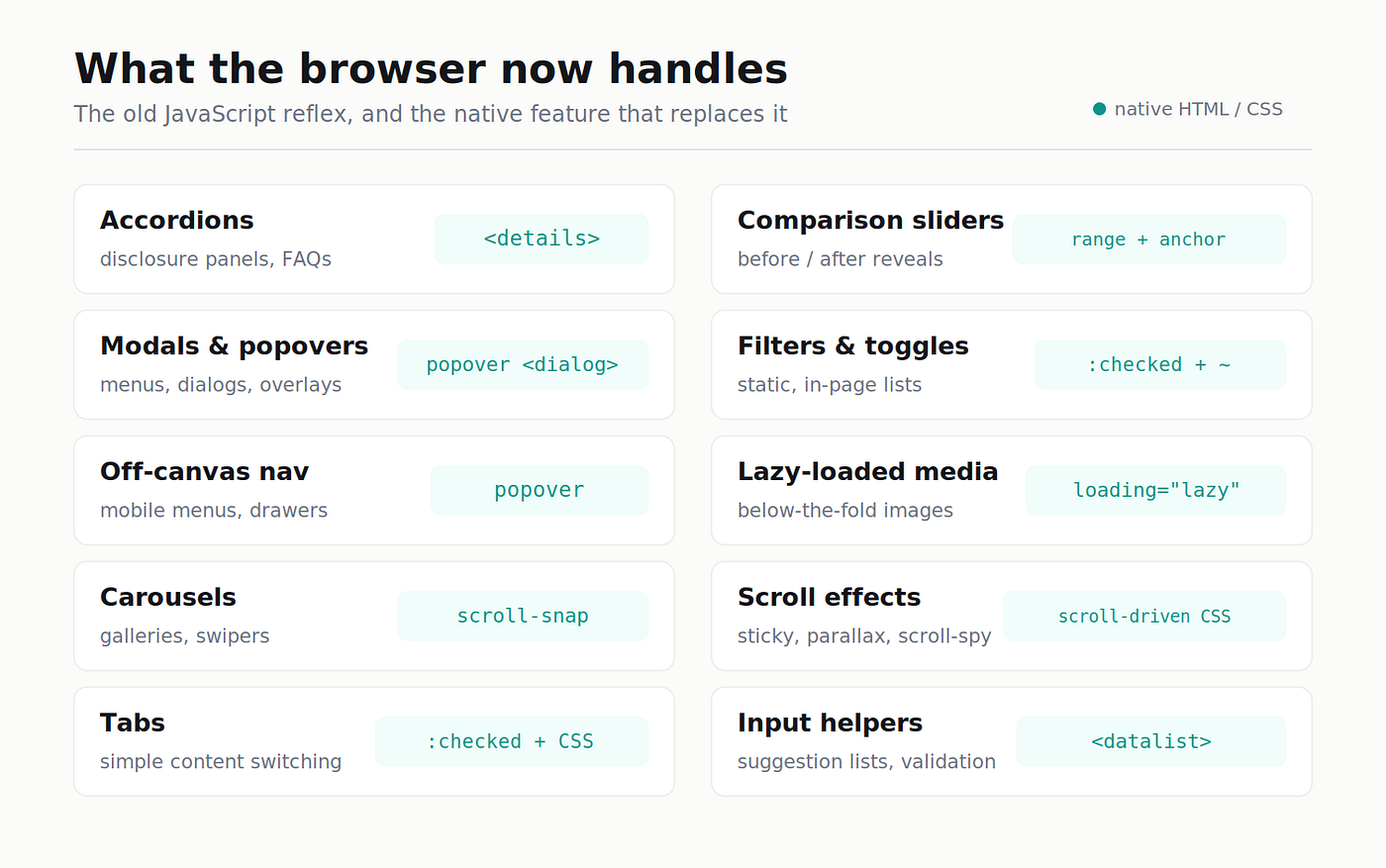
1. Accordions
The textbook “you don’t need JavaScript for this anymore” component. <details> and <summary> give you a disclosure widget that opens and closes with no event listeners, and it's been broadly supported for years.
<details>
  <summary>What is NoLoJS?</summary>
  <p>A way to build common UI patterns with no or low JavaScript.</p>
</details>
CSS handles the marker, icon rotation, spacing, and animation. Perfect for FAQs, settings panels, help sections, and pricing explainers. Reach for JS only when the open state must sync with analytics, routing, or app state.
2. Modals & Popovers
The platform finally gives us real primitives for overlays. The popover attribute creates lightweight, declarative menus and surfaces; <dialog> with ::backdrop handles true modal treatment in the top layer — without the old pile of focus, escape, and outside-click code.
<button popovertarget="menu">Open menu</button>

<div id="menu" popover>
  <a href="/settings">Settings</a>
  <a href="/logout">Log out</a>
</div>
One production note: popovers are usually non-modal. If the user must decide something before returning to the page, <dialog> is the better semantic fit.
3. Off-Canvas Navigation
Drawers and mobile menus no longer need “toggle a class and hope.” The popover model lets the browser own the open/closed state while CSS handles placement, transitions, and backdrop — for mobile nav, filter drawers, side panels, and account menus. Still test keyboard behavior carefully when the panel acts like a modal.
<button popovertarget="menu">Toggle menu</button>
<ul popover id="menu">
  <li>Nav option 1</li>
  <li>Nav option 2</li>
</ul>
#menu {
translate: -100vw; /* start offstage */
&:popover-open {
translate: 0; /* slide in when open */
@starting-style { translate: -100vw; } /* animate the entry */
}
}Great for mobile nav, filter drawers, side panels, and account menus. Still test keyboard behavior carefully when the panel acts like a modal
4. Carousels & Swipers
CSS scroll-snap already knows how to scroll; you just tell it where to stop.
.carousel {
  display: flex;
  overflow-x: auto;
  scroll-snap-type: x mandatory;
}
.carousel > * {
  flex: 0 0 100%;
  scroll-snap-align: start;
}
Great for galleries, product previews, testimonials, and onboarding strips. Reach for JS for dynamic slide fetching, autoplay logic, or per-slide analytics.
5. Tabs
The honest one: tabs can be CSS-only, but they shouldn’t always be. Scroll snap, scroll markers, and anchor positioning can build a tabbed panel with zero JavaScript — the ::scroll-marker of each panel becomes its tab.
<ul class="tabs">
  <li class="tab" aria-label="Tab 1">…panel one…</li>
  <li class="tab" aria-label="Tab 2">…panel two…</li>
</ul>
.tabs {
display: grid;
grid-auto-flow: column;
grid-auto-columns: 100%;
overflow-x: hidden;
scroll-snap-type: x mandatory;
scroll-marker-group: before; /* generates the tab row */
}
.tab { scroll-snap-align: start; }
.tab::scroll-marker { content: attr(aria-label); } /* the tab label */
.tab::scroll-marker:target-current { /* active-tab styling */ }Use CSS for simple visual switching. App-level tab systems with strict ARIA keyboard behavior are still safer in JavaScript — and scroll markers are very new, so treat this as progressive enhancement.
6. Image Comparison Sliders
A native <input type="range"> is already a draggable handle. Pair it with CSS anchor positioning to drive the before/after reveal — no JS required — for design shots, photo edits, and renovation portfolios. Caveat: anchor positioning is newer than <details> or ::backdrop, so test support and plan a fallback.
<div class="container">
  <div id="left"><img src="before.jpg" alt="Before"></div>
  <div id="right"><img src="after.jpg" alt="After"></div>
  <input type="range">
</div>
.container { position: relative; display: grid; overflow: hidden; }
#left, #right { position: absolute; inset: 0; }
input { width: 100%; z-index: 1; }
input::-webkit-slider-thumb { anchor-name: --thumb; }
#right { left: anchor(--thumb center); } /* reveal follows the thumb */Useful for design shots, photo edits, and renovation portfolios. Caveat: anchor positioning is newer than <details> or ::backdrop, so test support and plan a fallback.
7. Filters & Category Toggles
If the items are already in the page and the logic is simple, you don’t need a state machine. :checked, sibling selectors, and data attributes can show and hide groups — ideal for small portfolio-style lists where SEO matters and nothing is fetched. Reach for JS once filters hit the URL, query an API, or combine many conditions.
<input id="css" name="css" type="checkbox"><label for="css">CSS</label>
<input id="js"  name="js"  type="checkbox"><label for="js">JS</label>

<ul>
  <li><span data-category="css">CSS</span></li>
  <li><span data-category="js">JS</span></li>
</ul>
/* hide everything once any box is checked... */
:has(:checked) li { display: none; }
/* ...then show only the matching categories */
:has([name="css"]:checked) li:has([data-category="css"]),
:has([name="js"]:checked) li:has([data-category="js"]) {
display: list-item;
}Ideal for small portfolio-style lists where SEO matters and nothing is fetched. Reach for JS once filters hit the URL, query an API, or combine many conditions
8. Lazy-Loaded Media
One of the easiest wins on the list — it’s now an attribute.
<img src="/dashboard.png" loading="lazy" decoding="async" alt="Dashboard preview">That replaces the old Intersection Observer + data-src swap for ordinary below-the-fold images and iframes. Reach for JS only for analytics-aware loading, custom placeholders, or streaming behavior.
9. Scroll Effects
Scroll UI has moved well past addEventListener("scroll", …). Smooth scrolling, sticky content, shrinking headers, scroll shadows, scroll-spy navigation, and scroll-driven animations are now CSS — which lets the browser optimize the work instead of running a janky listener on every frame. Reach for JS when scroll position drives business logic, data loading, or complex timelines.
/* smooth in-page jumps, respecting motion preferences */
@media (prefers-reduced-motion: no-preference) {
  html { scroll-behavior: smooth; }
}

/* pin a heading while its section scrolls past */
.section-heading { position: sticky; top: 0; }

/* drop a shadow on the header only once the page has scrolled */
html { container-type: scroll-state; }
@container scroll-state(scrollable: top) {
  header { box-shadow: 0 2px 8px rgb(0 0 0 / 0.3); }
}
The same toolkit covers shrinking headers, scroll-spy nav, and scroll-driven animations. Reach for JS when scroll position drives business logic, data loading, or complex timelines — and note that scroll-state queries are bleeding-edge.
10. Input Helpers
HTML forms ship more behavior than most of us use. <datalist>, input types, and validation attributes replace a surprising amount of custom code.
<input id="city" name="city" list="cities">
<datalist id="cities">
  <option value="Bengaluru">
  <option value="Mumbai">
  <option value="Delhi">
</datalist>
It won’t replace a backend-connected autocomplete, but it’s plenty for suggestion lists, admin forms, and internal tools.
When to Still Use JavaScript
This isn’t an argument against JavaScript — it’s an argument against spending it on interactions the browser already handles. The line is actually pretty clean:
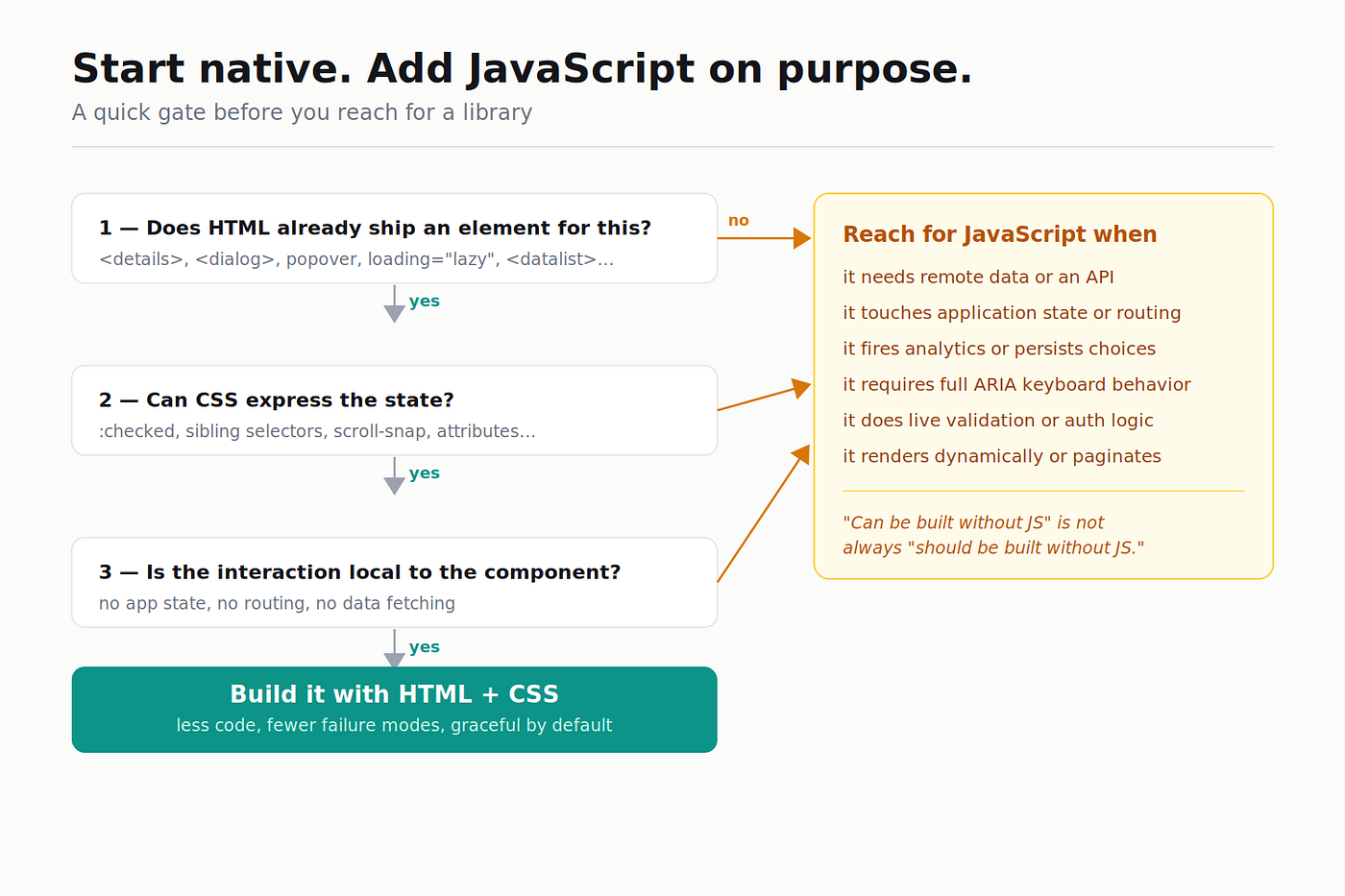
Reach for JavaScript when a component needs remote data, application state, routing, analytics, complex keyboard behavior, live validation, dynamic rendering, persistence, or business rules. Leave it to HTML and CSS when the component only needs open/close state, native form behavior, simple scrolling, basic disclosure, static filtering, or declarative lazy loading
A Quick Checklist
Before building your next component, ask:
- Does HTML already have an element for this?
- Can CSS express the state with selectors or attributes?
- Is the interaction local to this component?
- Does it need to sync with application state, API data, or custom accessibility behavior?
If the answer to the first three is yes, start with HTML and CSS. If question four is yes, bring in JavaScript on purpose.
The Takeaway
The frontend platform is quietly absorbing work we used to delegate to scripts. Accordions can be <details>. Popovers can be an attribute. Backdrops can be ::backdrop. Carousels can be scroll-snap. Lazy loading can be loading="lazy".
That doesn’t make JavaScript less important — it makes it more focused. Its best use was never managing every piece of UI chrome; it’s handling what HTML and CSS can’t: data, state, orchestration, personalization, and real-time behavior.
So next time you reach for useState or a component library to build a basic interaction, pause for a second. The browser might already know how to do it.
Sources & further reading
- Aaron T. Grogg — NoLoJS: Reduce the JS Workload with No- or Lo-JS options (and the
aarontgrogg/NoLoJSGitHub repo) - MDN —
<details>, thepopoverglobal attribute, the::backdroppseudo-element, and theloadingattribute reference
메타데이터
- post_id
- 239ae8d44bf4
- slug
- the-frontend-components-you-no-longer-need-javascript-for-239ae8d44bf4
- url
- https://medium.com/@ys1113457623/the-frontend-components-you-no-longer-need-javascript-for-239ae8d44bf4
- canonical_url
- https://medium.com/@ys1113457623/the-frontend-components-you-no-longer-need-javascript-for-239ae8d44bf4
- author_url
- https://medium.com/@ys1113457623
- status
- ok
- fetched_at
- 2026-06-20 20:29:01





