Swift Concurrency — Image Load
WWDC25: Embracing Swift concurrency | Apple
Swift | iOS
Swift Concurrency — Image Load
Summary - WWDC25: Embracing Swift concurrency | Apple

There are no new pictures of me this season🏖️, I’ve just been studying from last winter. I hope it pays off in the end.
Breaking ties to the main actor
- Move main actor code to @MainActor functions
- Use await to access the main actor asynchronously
- Add nonisolated to code that does not need the main actor
Key point for this session.
- @concurrent : always runs in the background (not always the best, small)
- nonisolated : (no thread change) follows previous thread -> WWDC23 Beyond the basic of structured concurrency
URL : value type
that means, when we copy that into the background thread, it copys independently. so, even the (background) url gets changed, original Url has no effect with the new value.
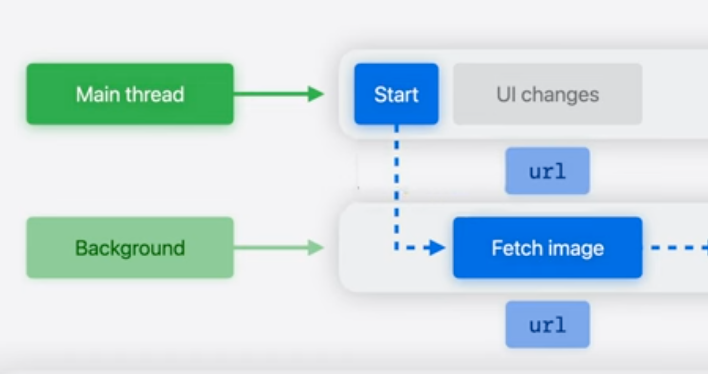
url(value type) safe to share, because it duplicates.
- Sendable(protocol): always safe to share concurrently = inherited for value type = copied independently, return a new value
- Actors (main actor …) protect non-Sendable state = not shared at the same time. only ever accessed by one task at a time. return a reference.
for non-sendable classes
in @concurrent, you need to use await for mainthread tasks (all are available). there are 3 ways you can do:
//reference type
nonisolated class MyImage {
  var width: Int
  var height: Int
  var pixels: [Color]
  var url: URL
}

//------- A
@concurrent
func scaleAndDisplay(urlString: String) async {
  let image = loadImage(urlString)
  image.scaleImage(by: 0.5)
  await view.displayImage(image) ✅ mainthread saperately
}

//------- B
// It makes sure the task order.
func scaleAndDisplay(urlString: String) async {
  Task { @concurrent
    let image = loadImage(urlString)
    image.scaleImage(by: 0.5)
    await view.displayImage(image) ✅mainthread saperately
  }
}

//------- C
// A capture of the image variable.
// closure with shared state is still safe
// as long as it isn't called concurrently
func scaleAndDisplay(urlString: String) async {
  let image = loadImage(urlString)
  await perform(afterDelay(0.1) {
    image.scaleImage(by: 0.5) ✅ change saperately in the background thread
  }
  view.displayImage(image) ✅ mainthread
}

func perform(afterDelay delay: Double, body: () -> Void) async throws -> Image {
  if #available(iOS 16.0, *) {
      try await Task.sleep(for: .seconds(delay))
   } else {
      // Fallback on earlier versions
   }
   body()

  }
Actors
- coordinate access to data across many tasks
But most classes are not actors
- UI-facing classes : @MainActor
- Model classes: @MainActor or non-Sendable
Conclusion
- Share Sendable types in concurrent code
- Use mutable classes and closures in one task at a time
- Change mutable state before sending to another task

Blazing Keyboard Time!
If you use Actor with codable(decodable) you will face this error:

- Check build setting

Target -> Building Settings -> Default Actor Isolation
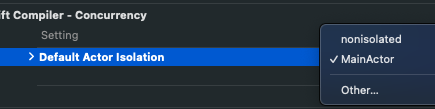
If you use MainActor for default, Xcode will implicitly isolate these types to @MainActor
Class, Struct, Enum
Fixed: use nonisolated
nonisolated struct APIResponse<T: Codable & Sendable>: Codable {
    let info: Info?
    let results: T // actual data
}
Your one clap 👏 makes me encouraged 🔥 Thank you🙇♀️
메타데이터
- post_id
- 2418c2c91c56
- slug
- swift-concurrency-image-load-2418c2c91c56
- url
- https://medium.com/@hailey.plist/swift-concurrency-image-load-2418c2c91c56
- canonical_url
- https://medium.com/@hailey.plist/swift-concurrency-image-load-2418c2c91c56
- author_url
- https://medium.com/@hailey.plist
- status
- ok
- fetched_at
- 2026-07-17 04:53:12