Performance Testing with Locust (Python) — Part 1
From Fundamentals to Architecture (With Real-Life Examples)
Performance Testing with Locust (Python) — Part 1
From Fundamentals to Architecture (With Real-Life Examples)
What Happens When 7,000 Users Suddenly Hit Your App?
Imagine this.
Your application works perfectly for 5,000 users.
Suddenly during a sale or product launch, 7,000 users arrive at the same time.
Does it slow down?
Does it crash?
Does it recover automatically?
This is where Performance Testing becomes critical.
In this article, I’ll explain the fundamentals of performance testing and introduce Locust, a powerful Python-based load testing tool.
What is Performance Testing?
Performance testing checks:
- Stability
- Speed (Response Time)
- Behavior under load
It ensures the application works smoothly when many users use it simultaneously.
Example
Think of a bank ATM.
If 2 people use it → No issue. If 20 people stand in line → It becomes slow. If 200 people try at once → It may hang or fail.
Performance testing simulates this scenario before it happens in real life.
Why Performance Testing is Needed?
Performance testing helps to:
- Understand system strength
- Identify bottlenecks early
- Prevent downtime
- Ensure stability & reliability
- Improve user experience
- Plan infrastructure capacity
- Avoid expensive fixes after production release
Performance = Business Success
Slow apps drive users away.
Fast apps increase:
- User engagement
- Conversions
- Revenue
Performance directly impacts business growth.
Types of Performance Testing
1 .Load Testing (Normal Expected Traffic)
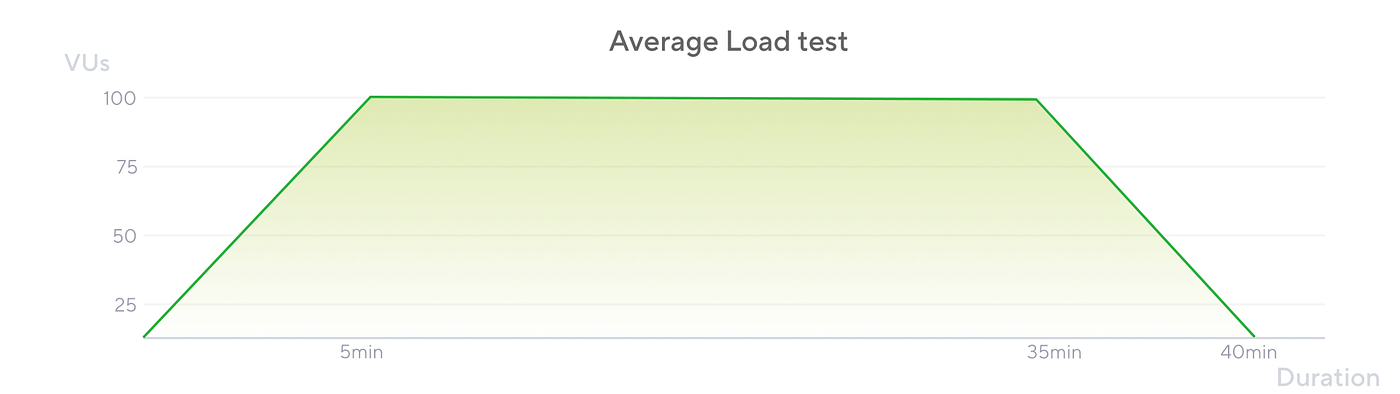
Testing the system under expected user load.
Real-Life Example
A restaurant expects 200 customers on a weekend. Load testing checks if the kitchen can handle those 200 customers smoothly.
What we measure:
- Response time
- CPU & Memory usage
- Error rate
- RPS (Requests per second)
Goal: System should handle expected traffic successfully.
2. Stress Testing (Beyond Maximum Capacity)

Testing beyond the system’s maximum capacity.
Real-Life Example
Black Friday Sale. Instead of 5,000 users, 20,000 users try to buy at once.
What we measure:
- When does it break?
- Does response time spike?
- Does it crash gracefully?
- Does it recover automatically?
Goal: Discover the break point.
3. Volume Testing (Huge Data)

Testing with massive data volume.
Real-Life Example
Your e-commerce app grows from 10,000 products to 5 million products. Can search still respond quickly?
What we measure:
- DB query performance
- Index performance
- Report generation time
- Memory usage
4. Scalability Testing

Testing system growth capability.
Real-Life Example
When traffic increases, we add more servers. Does performance improve after scaling?
i)Before scaling → Response time increases ii)After scaling → Response time stabilizes
5.Spike Testing (Sudden Traffic Brust)

Sudden extreme traffic spike.
Real-Life Example
i)A celebrity tweets about your app. ii)Suddenly thousands of users log in within seconds.
What happens?
6.Endurance Testing
Continuous load over long duration.
Real-Life Example
Netflix runs 24/7. Can your system stay stable for 48 hours under load?
We check:
- Memory leaks
- CPU overuse
Important Performance Concepts
Real Users vs Virtual Users
i)Real users → Actual humans ii)Virtual users → Simulated using tools like Locust
Virtual users allow us to simulate thousands of users without inviting real people.degradation
- DB connection leaks
Concurrent Users vs Requests
Concurrent Users → Number of active users at same time Requests → Actions performed (login, search, submit)
RPS (Requests per Second) depends on:
- Number of users
- Frequency of actions
Throughput and Response Time
i)Throughput → How much load system handles ii)Response Time → How fast system responds
Example:
If a supermarket handles 500 customers per hour → High throughput. If billing takes 10 minutes per customer → Bad response time.
Bottlenecks (Critical Concept)
A bottleneck is the slowest part of the system.
i)Even if everything else is fast, ii)One slow component slows the entire system.
Application Bottleneck
Caused by inefficient code.
Common reasons:
- Nested loops
- Synchronous calls
- Memory leaks
- Thread exhaustion
If P99 = 5 seconds → 1 out of 100 users experience 5-second delay.
Database Bottleneck
Caused by:
- Missing indexes
- Full table scans
- Slow joins
- Locking issues
Fast app + Slow DB = Slow system.
Network Bottleneck
Occurs when:
- App and DB are in different regions
- High latency
- Bandwidth limitations
🦗 Introduction to Locust
What is Locust?
Locust is an open-source, Python-based performance testing tool.
Instead of recording scripts,you write Python code to define user behavior.

Why the Name “Locust”?

Locusts move in large swarms.
Similarly, this tool sends thousands of virtual users to your application.
🏗 Locust Architecture
Locust follows a Master–Worker architecture.
- Master Node → Controls test
- Worker Node → Simulates traffic
- Web UI → Control & live metrics
Flow:
- Define user behavior
- Start Locust
- Configure number of users
- Monitor results
🍽 Real-Life Analogy of Locust
Imagine testing a restaurant kitchen.
Instead of inviting 500 real customers, you simulate 500 customers ordering food simultaneously.
That’s exactly what Locust does for your application.
메타데이터
- post_id
- 249c3d05cf52
- slug
- performance-testing-with-locust-python-part-1-249c3d05cf52
- url
- https://medium.com/@meganrajmegan/performance-testing-with-locust-python-part-1-249c3d05cf52
- canonical_url
- https://medium.com/@meganrajmegan/performance-testing-with-locust-python-part-1-249c3d05cf52
- author_url
- https://medium.com/@meganrajmegan
- status
- ok
- fetched_at
- 2026-06-09 18:04:40




