From Fork to Pull Request: My First Open‑Source Contribution (DMI)
Open‑source contribution used to feel intimidating to me. Forks, remotes, upstream, pull requests — it all sounded abstract until I worked…
From Fork to Pull Request: My First Open‑Source Contribution (DMI)
Open‑source contribution used to feel intimidating to me. Forks, remotes, upstream, pull requests — it all sounded abstract until I worked through a real, production‑style GitHub workflow as part of the DevOps Micro Internship (DMI).
This assignment wasn’t about building a big feature. It was about learning how engineers actually collaborate in shared codebases.
The Goal
Contribute a small, verifiable change to an existing open‑source repository using standard industry practices:
- Fork an upstream repository
- Clone my fork locally
- Configure
originandupstreamremotes - Create a feature branch
- Make a clean, single‑file change
- Sync with upstream
- Open a Pull Request back to the original repository
This is the exact workflow used by distributed teams and open‑source projects.
Step 1: Forking the Upstream Repository
The upstream repository for this task was:
**pravinmishraaws/devops-micro-internship-interviews**
Since contributors don’t usually have direct write access to upstream repositories, the first step was to fork it into my own GitHub account.
This created:
github.com/Treasurematrix/devops-micro-internship-interviews
Forking establishes ownership of a personal copy while preserving a link to the original project.
Step 2: Authenticating GitHub Access (SSH)
Before pushing any code, I needed my local machine to authenticate with GitHub securely.
I chose SSH authentication, which is commonly used in professional environments to avoid repeated password prompts.
This involved:
- Generating an SSH key pair
- Adding the public key to GitHub
- Verifying access with:
ssh -T git@github.comOnce authenticated successfully, my terminal could communicate with GitHub without friction.
Step 3: Cloning My Fork and Setting Up Remotes
A critical detail in open‑source workflows is cloning your fork, not the upstream repository directly.
git clone git@github.com:ChiomaNwosu/devops-micro-internship-interviews.git
cd devops-micro-internship-interviews
By default, this sets:
origin→ my fork
Next, I added the original repository as upstream:
git remote add upstream git@github.com:pravinmishraaws/devops-micro-internship-interviews.git
git remote -v
This setup allows me to:
- Pull updates from upstream
- Push my changes only to my fork
- Open pull requests safely
Step 4: Creating a Feature Branch
Instead of working directly on main, I created a dedicated feature branch:
git checkout -b feature-readme-updateThis keeps the default branch clean and makes the change easy to review or discard if needed.
Step 5: Making a Small, Focused Change
The assignment required editing only one file: pull_request.md.
My task was simple and intentional:
- Add my name to the end of the Student List
- Preserve the existing format
- Avoid modifying any other entries
This reinforces an important professional habit: one change per commit.
Step 6: Committing with Intent
After confirming the change:
git status
git add pull_request.md
git commit -m "docs: add my name to student list"
Using a clear, descriptive commit message makes reviews easier and keeps project history readable.
Step 7: Syncing with Upstream
Before pushing my branch, I synced with upstream to avoid conflicts:
git fetch upstream
git checkout main
git merge upstream/main
git checkout feature-readme-update
git rebase main
This step mirrors real‑world team environments where upstream changes frequently.
Step 8: Pushing and Opening a Pull Request
I pushed my feature branch to my fork:
git push -u origin feature-readme-updateThen I opened a Pull Request targeting:
- Base repo: pravinmishraaws/devops-micro-internship-interviews
- Base branch: main
- Head repo: Treasurmatrix/devops-micro-internship-interviews
- Compare branch: feature-readme-update
The PR clearly described the intent of the change and followed the project’s contribution expectations.
What I Learned
This assignment reinforced several key lessons:
- Open‑source contribution is about process, not just code
- Fork + upstream workflows protect shared codebases
- Small, scoped changes are easier to review and maintain
- Clean commit messages and PRs are professional signals
Most importantly, collaboration skills are just as critical as technical skills in DevOps and engineering roles.
Final Thoughts
This experience demystified open‑source contribution for me. What once felt complex now feels structured and repeatable.
I’m leaving this assignment more confident in my ability to collaborate in shared repositories — a foundational skill for DevOps, cloud, and software engineering teams.
You can view my fork here:
👉 https://github.com/Treasurematrix/devops-micro-internship-interviews
P.S. This post is part of the DevOps Micro Internship (DMI) Cohort-2 by Pravin Mishra. You can start your DevOps journey by joining this Discord community https://discord.pravinmishra.com/
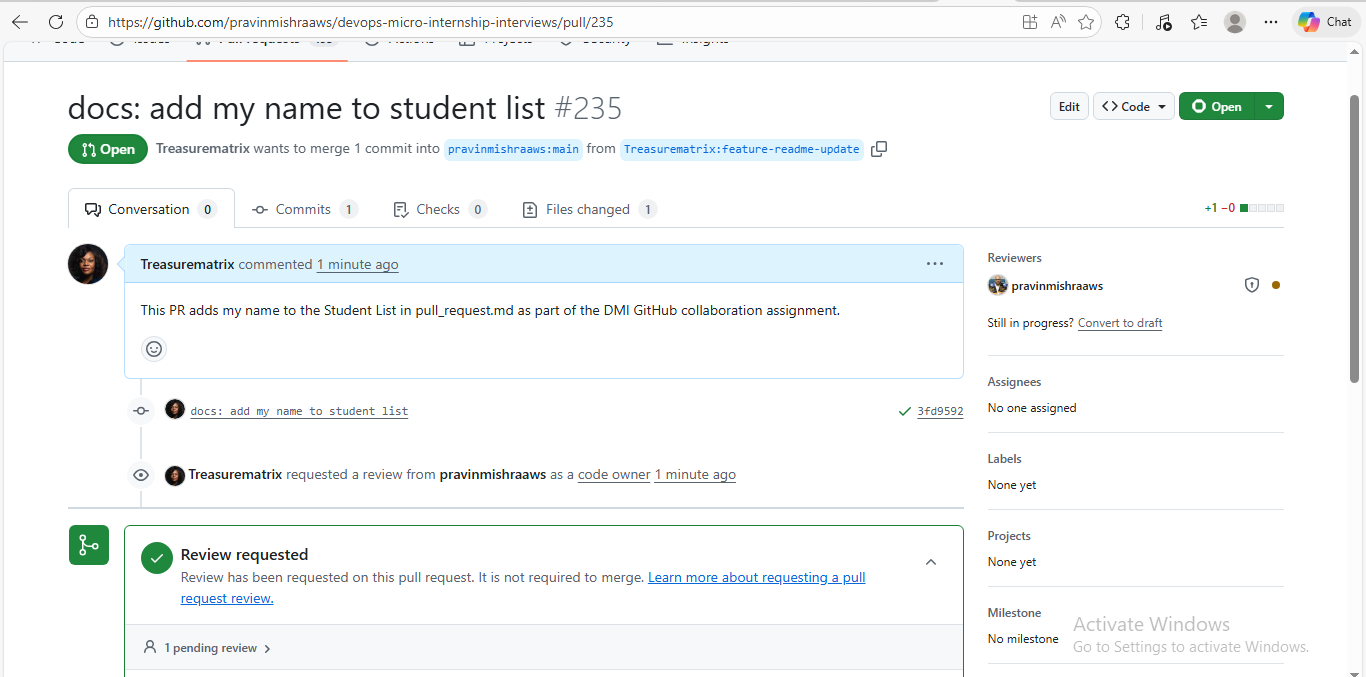

Learning in public, one pull request at a time.
메타데이터
- post_id
- 249fc80b4652
- slug
- from-fork-to-pull-request-my-first-open-source-contribution-dmi-249fc80b4652
- url
- https://medium.com/@chiomanwosu2019/from-fork-to-pull-request-my-first-open-source-contribution-dmi-249fc80b4652
- canonical_url
- https://medium.com/@chiomanwosu2019/from-fork-to-pull-request-my-first-open-source-contribution-dmi-249fc80b4652
- author_url
- https://medium.com/@chiomanwosu2019
- status
- ok
- fetched_at
- 2026-06-23 03:48:11




