Best File Organizer Software in 2026: 7 Tools to Clean Up Your Mac and Windows Automatically
Tired of your Downloads folder looking like a digital landfill? Here’s the file organizer software that actually solves it — for both Mac…
Best File Organizer Software in 2026: 7 Tools to Clean Up Your Mac and Windows Automatically
Tired of your Downloads folder looking like a digital landfill? Here’s the file organizer software that actually solves it — for both Mac and Windows users.
Why You Need File Organizer Software in 2026
Let’s be honest. Your Downloads folder has 4,000 files. Your Desktop is unrecognizable. You can’t find that PDF your boss sent you last week, even though you know you downloaded it.
This isn’t a personality flaw. It’s a system problem.
The average knowledge worker downloads 30–50 files per day. Without an automatic file organizer running in the background, chaos is inevitable. Manual sorting takes hours per week. Most people just give up and use search instead — but search only works when you remember the filename.
The solution? File organizer software that watches your folders and automatically sorts files by rules you define. Set it up once, forget about it forever.
In this guide, I’ll walk you through the 7 best file organizer software options for 2026, covering both Mac and Windows. Whether you need a simple automatic file organizer or a powerful rule-based engine, there’s something here for you.
Download Free => https://filearbor.com/
What Makes Great File Organizer Software?
Before we dive into the list, here’s what to look for in any file organizer software:
- Cross-platform support — Works on both Mac and Windows ideally, so you don’t have to learn two tools
- Rule-based automation — Sort files by extension, date, name, size, or custom patterns
- Folder watching — Monitors folders in real-time and acts immediately
- Native performance — Doesn’t eat up your CPU or RAM
- Reasonable pricing — One-time payment beats endless subscriptions
- Custom rules — Regex support is a huge plus for power users
With that criteria in mind, let’s go.
1. FileArbor — The Best Cross-Platform File Organizer Software
Platforms: Mac & Windows Pricing: Free tier + one-time payment (~$24.99) Best for: Anyone who wants a simple automatic file organizer that works everywhere
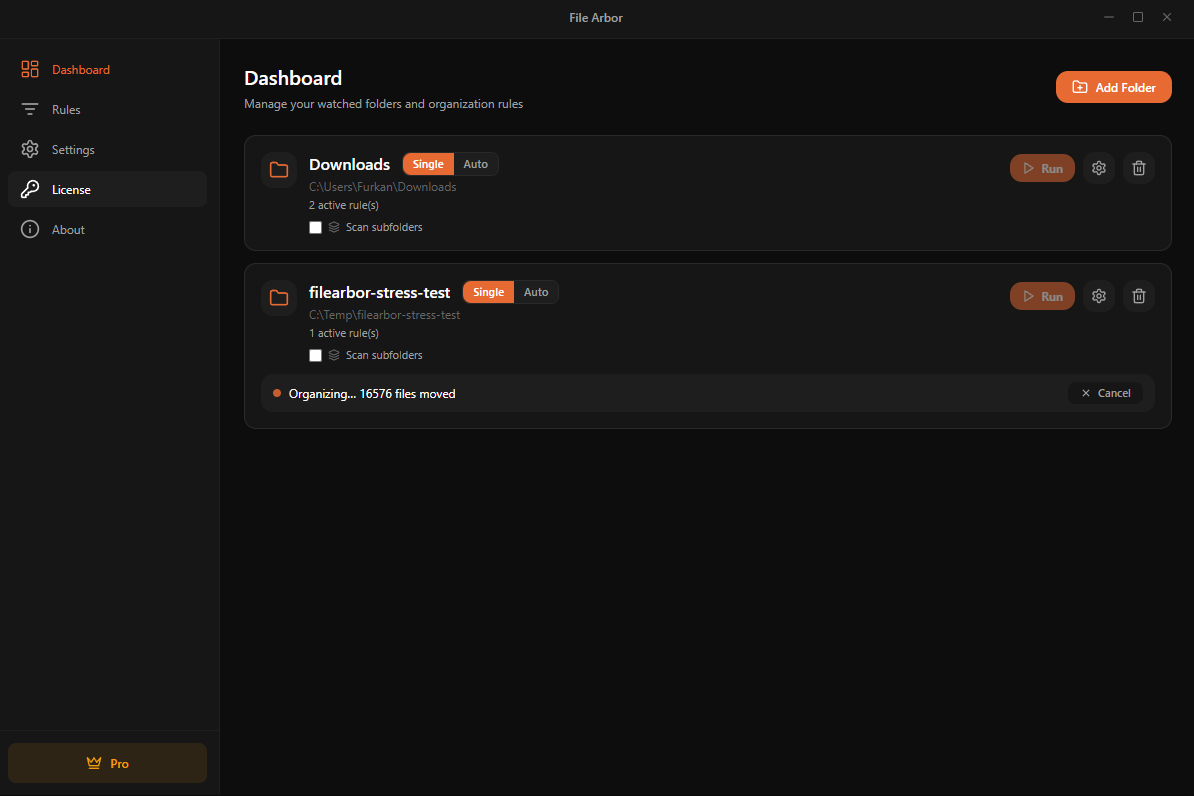
FileArbor is the file organizer software I’ve been building and using for the past year. Full disclosure: it’s mine. But I built it because nothing else solved my actual problem — I needed an automatic file organizer that worked on both my MacBook and my Windows desktop, with the same rules synced across both.
Here’s what makes FileArbor different:
- True cross-platform support. One tool, both operating systems. Native builds for Mac (Apple Silicon + Intel) and Windows.
- Rule-based automation. Sort by extension, date, regex patterns, or any combination.
- Subfolder scanning. Most file organizers only watch the top level. FileArbor goes deeper if you want.
- Free tier. Organize up to 20 files per day for free. No credit card.
- One-time payment. No subscription nonsense. Pay once, own it.
- Privacy-first. Everything runs locally. Your files never leave your machine.
If you’ve been searching for a “Hazel for Windows” alternative — or just a clean automatic file organizer that doesn’t require a PhD to configure — FileArbor is the answer.
Try FileArbor free at filearbor.com
2. Hazel — The Mac File Organizer Classic
Platforms: Mac only Pricing: ~$42 one-time Best for: Mac power users who don’t need Windows support
Hazel is the OG of file organizer Mac software. It’s been around since 2006 and is genuinely powerful. If you’re a Mac-only user with a healthy budget and don’t mind the learning curve, Hazel is excellent.
Pros:
- Extremely powerful rule engine
- Mature ecosystem with tons of community recipes
- Deep AppleScript integration
Cons:
- Mac only — no Windows version exists, and the developer has confirmed there are no plans to build one
- Pricier than alternatives
- Steeper learning curve
If you’re considering Hazel but also use Windows, you’ll need a separate Windows file organizer — which defeats the purpose. This is exactly why FileArbor exists.

3. File Juggler — Solid Windows File Organizer
Platforms: Windows only Pricing: ~$30 one-time Best for: Windows users who want a Hazel-like experience
File Juggler is one of the better Windows file organizer options. It does what it says — watches folders and applies rules.
Pros:
- Reliable folder monitoring
- Decent rule engine
- Established product
Cons:
- Windows only
- UI feels dated
- No Mac counterpart for cross-device users
4. DropIt — Free Windows File Organizer
Platforms: Windows only Pricing: Free (open source) Best for: Budget-conscious Windows users
DropIt is the free option for Windows users. You drag files onto a floating icon, and it sorts them based on your rules.
Pros:
- Completely free and open source
- Lightweight
- No installation required (portable version)
Cons:
- Manual workflow (you drag files to it)
- No automatic folder watching in the traditional sense
- Windows only
- UI is rough around the edges
If you want a free Windows file organizer and don’t mind some friction, DropIt works. If you want truly automatic file organization, look elsewhere.
5. Maid — Open-Source File Organizer for Power Users
Platforms: Mac, Windows, Linux (CLI) Pricing: Free Best for: Developers comfortable with config files
Maid is a Ruby-based file organizer software that runs from the command line. You define rules in a Ruby file and run it on a schedule.
Pros:
- Free and open source
- Cross-platform
- Infinitely customizable
Cons:
- Requires Ruby installation and CLI comfort
- No GUI
- Setup is intimidating for non-developers
If you live in the terminal, Maid is fine. For everyone else, the friction is too high.
6. Easy File Organizer — Simple and Straightforward
Platforms: Mac & Windows Pricing: Free + paid tier Best for: Users who want a one-click solution
Easy File Organizer focuses on simplicity. Click a button, files get sorted by type. That’s pretty much it.
Pros:
- Dead simple
- Cross-platform
- Free version available
Cons:
- Very limited rule customization
- No real automation (you trigger it manually)
- Not suitable for advanced workflows
Good for grandma. Not good for anyone who wants real automatic file organization.
7. Sparkle — The Newcomer
Platforms: Mac only Pricing: Subscription-based Best for: Mac users who like modern interfaces
Sparkle is a newer file organizer Mac app with a clean, modern UI.
Pros:
- Beautiful interface
- Decent rule engine
Cons:
- Mac only
- Subscription pricing (no one-time payment)
- Smaller community

How to Choose the Right File Organizer Software for You
The right file organizer software depends on three questions:
1. Do you use both Mac and Windows?
If yes, your options narrow fast. Hazel won’t work. File Juggler won’t work. You need true cross-platform file organizer software like FileArbor or Maid (if you’re a developer).
2. How much do you want to configure?
If you want a simple “set rules and forget it” experience, FileArbor or Hazel are your best bets. If you want infinite power and don’t mind config files, Maid is fine.
3. What’s your budget?
Free options exist (DropIt, Maid) but come with friction. The sweet spot for most people is one-time payment software in the $25–$45 range. Avoid subscriptions for a tool you’ll use for years.
My Honest Recommendation
If you only use Mac and have $42 to spend, get Hazel. It’s the most mature file organizer Mac software available.
If you only use Windows, File Juggler is solid, or DropIt if you want free.
If you use both Mac and Windows — which most people do in 2026 — get FileArbor. It’s the only file organizer software I’ve found that genuinely works the same way on both platforms, with one set of rules, one license, and one workflow.
I built FileArbor because I needed it. Now thousands of users are organizing their files automatically across both Mac and Windows with it.
Try FileArbor free → filearbor.com
No subscription. No credit card for the free tier. Just download, set your rules, and watch your Downloads folder organize itself.
Final Thoughts on File Organizer Software
The right automatic file organizer can save you hours per week. That’s not an exaggeration — if you download 30+ files per day, manual sorting compounds into real time.
Pick a tool, set it up once, and let it run. Your future self will thank you.
If you’ve tried any of these tools or have a recommendation I missed, drop a comment below. And if you want a cross-platform file organizer that just works, give FileArbor a shot.
If you found this useful, give it a clap and follow for more productivity software guides. You can also follow FileArbor’s journey at filearbor.com.
Tags: productivity, software, mac, windows, file-management, automation, indie-hacker, saas
메타데이터
- post_id
- 255fcc7fd808
- slug
- best-file-organizer-software-in-2026-7-tools-to-clean-up-your-mac-and-windows-automatically-255fcc7fd808
- url
- https://medium.com/@fuumifamily/best-file-organizer-software-in-2026-7-tools-to-clean-up-your-mac-and-windows-automatically-255fcc7fd808
- canonical_url
- https://medium.com/@fuumifamily/best-file-organizer-software-in-2026-7-tools-to-clean-up-your-mac-and-windows-automatically-255fcc7fd808
- author_url
- https://medium.com/@fuumifamily
- status
- ok
- fetched_at
- 2026-08-10 04:35:32




