Angular: *ngIf vs [hidden] — What Really Happens in the DOM?
Understanding the real difference between conditional rendering and visibility control in Angular
Angular: *ngIf vs [hidden] — What Really Happens in the DOM?
Understanding the real difference between conditional rendering and visibility control in Angular
When building Angular applications, developers often face a common question:
*Should I use
*ngIfor[hidden]to show or hide elements?*
At first glance, both seem to achieve the same goal — controlling visibility. But internally, they behave very differently, especially when it comes to DOM rendering, performance, and lifecycle management.
Let’s explore what actually happens.
The Scenario
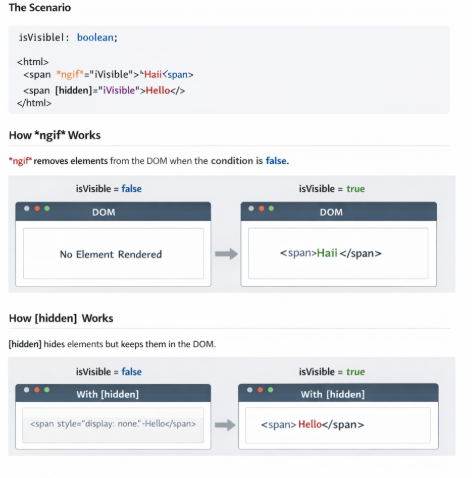
isVisible!: boolean;<span *ngIf="isVisible">Haii</span>
<span [hidden]="!isVisible">Hello</span>Both elements depend on the same condition, yet Angular handles them in completely different ways.
How *ngIf Works
*ngIf is a structural directive in Angular.
When the condition is false:
- Angular removes the element from the DOM
- The
<span>tag does not exist at all - Any bindings, event listeners, or child components are destroyed
When the condition becomes true again:
- Angular recreates the element
- Lifecycle hooks run again
- Change detection starts from scratch
DOM Behavior
<!-- When isVisible = false -->
<!-- Element does not exist in the DOM -->
When to Use *ngIf
- For heavy or complex components
- When elements are not always needed
- When you want to optimize performance
- If you don’t need to preserve component state
How [hidden] Works
[hidden] is not an Angular directive — it’s a native HTML property.
When the condition evaluates to true:
- The element remains in the DOM
- The browser applies
display: none - The UI hides the element, but it still exists in memory
DOM Behavior
<span hidden>Hello</span>Even though it’s invisible:
- Event listeners remain active
- Component state is preserved
- No lifecycle hooks are triggered
When to Use [hidden]
- For frequently toggled elements
- For lightweight UI components
- When you need to preserve state
- For animations or quick UI switches
Key Differences
Feature*ngIf [hidden]DOM Presence❌ Removed✅ Present Rendering Create / Destroy Always rendered Lifecycle Hooks Re-run Not affected Performance Better for heavy UI Better for frequent toggles State Preservation❌ No✅ Yes
Which One Should You Choose?
✅ Use *ngIf when:
- You want to conditionally create or destroy elements
- The component is expensive to render
- You care about memory and performance
✅ Use [hidden] when:
- You want to toggle visibility only
- The element should remain in the DOM
- You need to preserve user input or component state
Final Thoughts
Although *ngIf and [hidden] look similar in templates, they solve different problems.
Visibility control is not the same as DOM control.
Understanding this distinction helps you build efficient, scalable, and maintainable Angular applications.
메타데이터
- post_id
- 25616a9cf3ef
- slug
- angular-ngif-vs-hidden-what-really-happens-in-the-dom-25616a9cf3ef
- url
- https://medium.com/@vasuki-dev/angular-ngif-vs-hidden-what-really-happens-in-the-dom-25616a9cf3ef
- canonical_url
- https://medium.com/@vasuki-dev/angular-ngif-vs-hidden-what-really-happens-in-the-dom-25616a9cf3ef
- author_url
- https://medium.com/@vasuki-dev
- status
- ok
- fetched_at
- 2026-07-14 04:58:54




