Beyond the Stack: Mastering Tail Recursion in Kotlin using tailrec
Learn how to write elegant, stack-safe recursive code that performs equivalently to traditional loops without the risk of crashes.
Beyond the Stack: Mastering Tail Recursion in Kotlin using tailrec
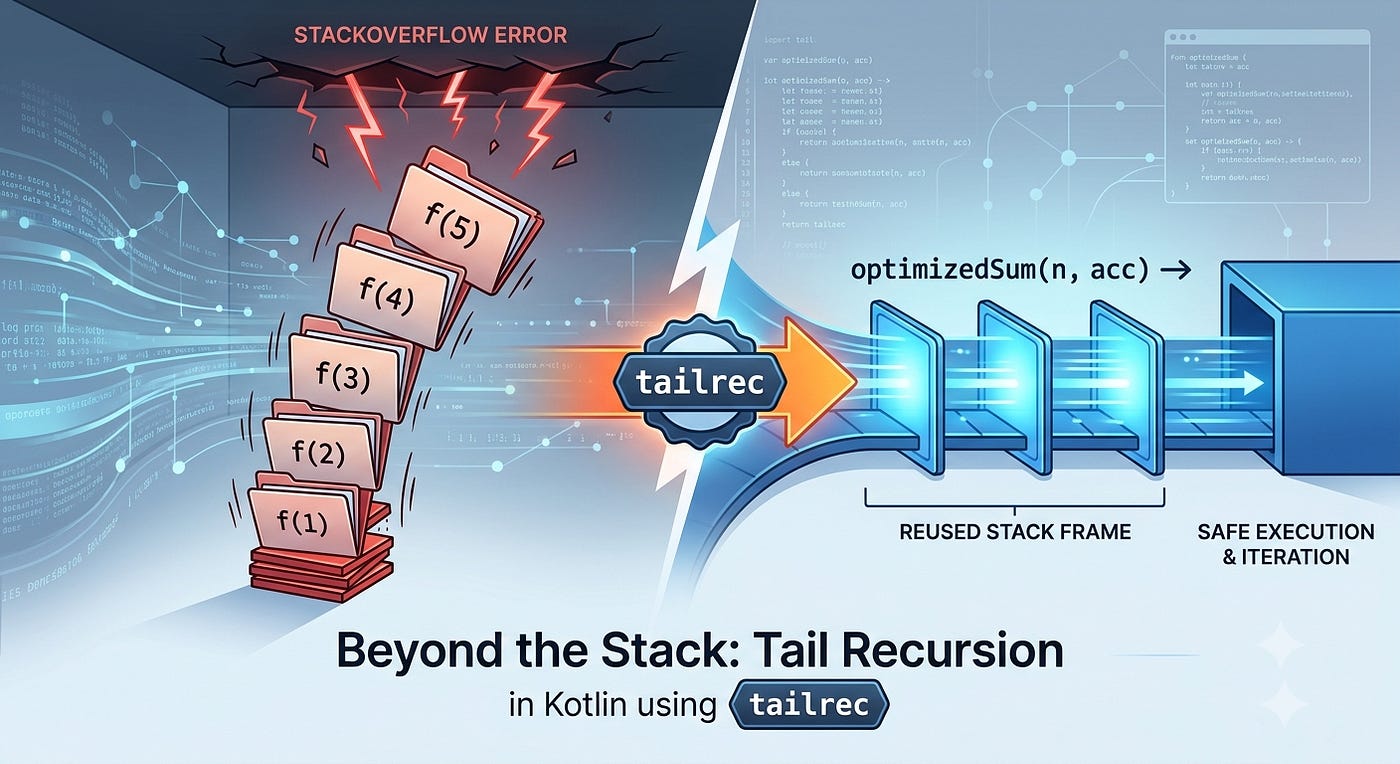
Beyond the Stack: Mastering Tail Recursion in Kotlin using tailrec
Not a Medium Member? “Read For Free”
If you’ve been programming for a while, you’ve likely been warned about the ultimate boogeyman of deeply nested function calls: the dreaded StackOverflowError.
Standard recursion is elegant. It breaks down complex problems into bite-sized, self-referential pieces. But it has a dark side. Every time a function calls itself, the system pushes a new “frame” onto the call stack to remember where it left off. If your dataset is large enough, you will likely crash your application.
But what if you could write elegant recursive code that runs with the safety and efficiency of a standard for loop? Enter tail recursion and Kotlin’s magical tailrec modifier.
The Core Concept: What is Tail Recursion?
In standard recursion, the recursive call is usually part of an expression. The function has to wait for the recursive call to finish before it can perform the final calculation (like multiplying a number or adding 1). Because it has “unfinished business,” the system must keep its stack frame alive.
Tail recursion is a specific type of recursion where the recursive call is the very last thing the function execution does. There is no leftover work, no pending math, and no state to look back on.
💡 The Visual Mental Model
Standard Recursion is like stacking plates. Every time the function calls itself, you add a new plate to the stack. If your stack gets too high, the whole pile crashes down.
Tail Recursion is like reusing the exact same plate. Instead of adding a new one, you just wipe the plate clean (mutate the state) and pass it forward to the next step.
Standard Recursion (Frames Growing Vertically):
[ standardSum(3) ]  -> Waits for standardSum(2)
  [ standardSum(2) ]  -> Waits for standardSum(1)
    [ standardSum(1) ]  -> Returns 1 (Stack reaches max depth)

Tail Recursion (Single Frame Mutated Horizontally):
[ optimizedSum(n=3, acc=0) ] -> [ optimizedSum(n=2, acc=3) ] -> [ optimizedSum(n=1, acc=5) ]
Because the current stack frame is no longer needed after the recursive call, the Kotlin compiler can perform Tail Call Optimization (TCO). It secretly converts your recursive code into a standard, high-performance iterative loop, completely removing the risk of stack overflows on large datasets.
Example 1: Standard Recursion vs. Accumulator Strategy
Let’s look at a classic example: calculating the sum of numbers from 1 to N.
Here is how you might write it using standard recursion:
// Standard Recursion (Risks a StackOverflowError for large inputs)
fun standardSum(n: Long): Long {
    if (n <= 1L) return n
    // Not a tail call! The compiler must wait for standardSum(n - 1)
    // to finish so it can add 'n' to the result.
    return n + standardSum(n - 1)
}
While standardSum(5L) will work perfectly fine, calling standardSum(100_000L) will likely crash your application.
To fix this, we rewrite it for tail recursion by passing the “running total” forward into the next function call using an accumulator. Then, we add the tailrec keyword to let Kotlin optimize it.
// Fully optimized with tailrec
tailrec fun optimizedSum(n: Long, accumulator: Long = 0L): Long {
    if (n <= 0L) return accumulator
    // The 'tailrec' modifier tells Kotlin to compile this into a loop
    return optimizedSum(n - 1, accumulator + n)
}
Example 2: A Practical Use Case (Factorial Optimization)
Summing numbers is great for theory, but let’s look at a classic mathematical operation where state accumulation shines: Factorials.
A standard recursive factorial ($n!$) multiplies $n$ by the result of the next factorial call. By introducing an accumulator, we can make it completely stack-safe.
// Stack-safe, optimized Factorial calculation
tailrec fun factorial(n: Int, accumulator: Int = 1): Int {
    if (n <= 1) return accumulator
    // State is calculated first, then passed cleanly into the next call
    return factorial(n - 1, n * accumulator)
}

fun main() {
    println(factorial(5)) // Output: 120 (Executed as a loop under the hood)
}
What the Compiler Actually Sees
Under the hood, the Kotlin compiler transforms your elegant factorial function into something that looks like this iterative loop:
// Conceptual view of the compiled bytecode
public static final int factorial(int n, int accumulator) {
    while(true) {
        if (n <= 1) {
            return accumulator;
        }
        accumulator = n * accumulator;
        n = n - 1;
        // The recursion is gone! It's just a loop now.
    }
}
The Golden Rules of tailrec
Kotlin’s tailrec works only for direct self-recursion and requires the recursive call to be the final operation. You cannot just slap it on any recursive function. Kotlin enforces strict rules:
- The Absolute Last Action: The recursive call must be the final expression executed. You cannot perform operations after or around the call.
- Direct Self-Recursion Only: The function must call itself. Kotlin’s
tailreccannot optimize mutual recursion (where Function A calls Function B, which calls Function A). - No Try-Catch-Finally Encapsulation: The tail-recursive call must not be placed inside a
try,catch, orfinallyblock. This restriction exists because of conflicts between stack unwinding mechanics during exceptions and loop optimization. - No Open/Virtual Functions: The function cannot be
open(overridable). If a subclass could override the method, it could break the tail-recursive behavior, making compile-time optimization impossible.
If you break these rules, the code will still compile, but the Kotlin compiler will issue a warning letting you know that the function will behave like standard recursion and remain vulnerable to stack overflows.
🚫 Pro-Level Insight: When NOT to Use tailrec
Just because you can turn recursion into a tail-recursive function doesn’t mean you should. Avoid tailrec when:
- The solution is naturally branching: If you are traversing a complex tree structure (like a binary tree or an advanced Depth-First Search), you inherently have multiple recursive paths. Forcing this into a single tail-recursive call often requires complex state tracking that destroys readability.
- A standard
whileloop is clearer: If your accumulator logic becomes a maze of parameters, a simplewhileorforloop is often much easier for your team to read and maintain. - You expect small inputs: If your recursion depth is guaranteed to never exceed a dozen calls, standard recursion is perfectly fine and requires zero boilerplate.
Summary: Iteration vs. Recursion vs. Tail Recursion
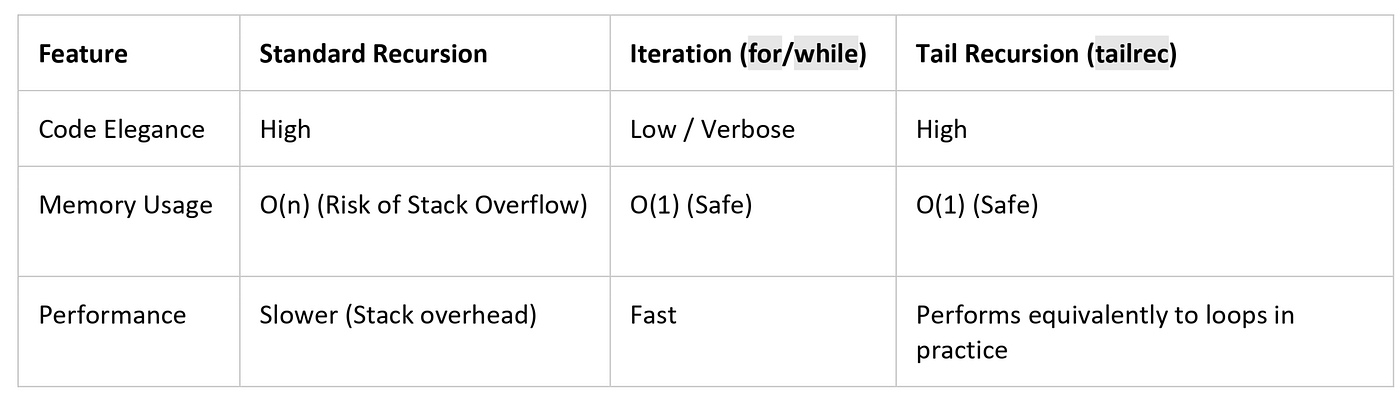
Summary: Iteration vs. Recursion vs. Tail Recursion
Micro-Benchmark Note: Do not use
tailrecexpecting it to beat aforloop in raw speed. Because the compiler compilestailrecinto a loop, their performance and time complexities are essentially identical. The win here is code expressiveness, not extra speed.
🙋 Frequently Asked Questions (FAQs)
Does tailrec make my code run faster than a traditional for loop?
In practice, it performs equivalently to loops because the compiler literally translates it into a loop. Tiny performance differences might occasionally exist due to specific JVM runtime optimizations, but the primary benefit of tailrec is writing clean, functional code without paying a safety or memory penalty.
Can I use tailrec if Function A calls Function B, and Function B calls Function A?
No. This is known as mutual recursion. Kotlin’s tailrec optimizer only supports direct self-recursion (a function calling itself). It cannot optimize recursive loops involving multiple functions.
What happens if the JVM updates to support TCO natively?
If the underlying JVM platform implements native Tail Call Optimization in the future, your Kotlin code will remain perfectly safe. Kotlin’s compiler will still handle the optimization at compile time into bytecode loops, ensuring backwards compatibility.
The Ultimate Takeaway
If your recursion grows the stack, rethink it. If it can carry state forward, make it tail-recursive.
- Have you ever run into an unexpected
StackOverflowErrorin production? How did you end up fixing it?- Do you prefer writing clean tail-recursive functions, or do you find traditional
whileloops easier to read and maintain?
Let me know your thoughts or share your custom accumulator patterns in the comments below!
📱 Go Beyond Using Jetpack Compose
If you’re building on Android, understanding what happens under the hood separates developers who use Compose from those who master it. I highly recommend “Mastering Jetpack Compose Internals”. It’s a deep, architecture-first walkthrough of the composition tree, the slot table, snapshot state, and the runtime that powers modern Android UI — capped off with a full case study building a real app called Mosaic.
- E-book: Available on Google Play
- Kindle Edition: Available on Amazon
- Also available in Paperback & Hardcover
Before you go
Thousands of developers share what they’re building, learning, and discovering across our publications every month. One account connects you to our entire network of publications and communities.
메타데이터
- post_id
- 261ec7c81e86
- slug
- beyond-the-stack-mastering-tail-recursion-in-kotlin-using-tailrec-261ec7c81e86
- url
- https://blog.venturemagazine.net/beyond-the-stack-mastering-tail-recursion-in-kotlin-using-tailrec-261ec7c81e86
- canonical_url
- https://blog.venturemagazine.net/beyond-the-stack-mastering-tail-recursion-in-kotlin-using-tailrec-261ec7c81e86
- author_url
- https://medium.com/@sivavishnu0705
- status
- ok
- fetched_at
- 2026-07-08 20:12:56