Using Rust and Ptrace to invoke syscalls
Using ptrace and rust to invoke syscalls in external processes
Using Rust and Ptrace to invoke Syscalls

🔊 Introduction
Forewarning this article will be targeted directly for Linux 🐧 x86_64 CPU architecture distributions. x86_32, ARM32, and ARM64 CPU architectures will not work but are absolutely viable given minor code changes to generalize over the architecture’s specific register structures and instruction encodings. Continuing, my setup for this tutorial will be a windows machine and I’ll be using WSL to side load a Ubuntu 20.04.4 LTS distribution which I will be working from. The language of choice for this article will be **Rust. As of writing the most current stable version of Rust is 1.65.0 **which I will be using. Rust Crate dependencies I use will have their respective versions cited. If you want to skip ahead or just see the resultant code, the complete project can be found at https://github.com/0xFounders/ptrace_syscalls
📚 Itinerary
- Create our test victim process
- Create our host process
- Invoke system call in victim process
- Pointer arguments
- Resource Dump/Future Readings, Future Work
🧪 Create our test victim process
For this project we will need a process to use as our test. Our test process would preferably be a long running process with some indicator of normal control flow to confirm we didn’t corrupt anything post augmentation. As such, a program consisting of a simple infinite while loop that prints to the console will serve as a perfect test victim.
log — https://crates.io/crates/log
The log crate is just a light weight, blessed™ logging crate which we will use for collecting log data. It allows us to collect log data at different levels for readability: trace, log, info, warn, error.
pretty_env_logger — https://crates.io/crates/pretty_env_logger
The log crate is just a thin facade, pretty_env_logger will actually handle taking the collected data and outputting to the console for us. It also out of box provides nice formatting and color encoded text.
Implementation
Below is my simple implementation of an ideal victim process for testing. Please note, I’ll be working with Cargo Workspaces where the victim bin and host bin will be in the workspace together. If you want to pursue a different workflow just be aware how you run your application with cargo may differ.
[embed]
For a sanity check here’s what the project structure looks like in Visual Studio Code. Note how the target folder is in the parent directory versus under the victim folder. This is due to our workspace workflow which collects all member build outputs into a common target folder.

🏠 Create our host process
Ptrace Overview
To begin per the Linux man page documentation we can get a quick gist of what the Ptrace interface is generally designed to facilitate.
https://man7.org/linux/man-pages/man2/ptrace.2.html
The ptrace() system call provides a means by which one process (the “tracer”) may observe and control the execution of another process (the “tracee”), and examine and change the tracee’s memory and registers. It is primarily used to implement breakpoint debugging and system call tracing.
We will be pushing the limits of Ptrace in order to externally invoke system calls in a remote process. For instance, by the end of this article we be able to use the mmap/munmap syscalls to allocate memory in the Userspace process as well as take control of the Userspace application’s instruction pointer and registers to call any arbitrary syscall. For now we will set up our host to simply attach to the process and inspect the registers of the current control flow. We are going to need some more crates to get this done.
thiserror — https://crates.io/crates/thiserror
Another blessed™ crate which
provides a convenient derive macro for the standard library’s
[std::error::Error](https://doc.rust-lang.org/std/error/trait.Error.html) trait.
we will be using thiserror to facilitate error handling to provide a panic free experience.
sysinfo — https://crates.io/crates/sysinfo
The sysinfo crate provides us a quality of life function to find a process by name versus Pid. This will be useful when rapidly prototyping, because we can hard code our target process name as, “victim”. You could debate this is feature bloat to include a whole crate dependency for simply getting a process’s pid by name. And I would agree. But, laziness 🦥 prevails when experimenting…
nix — https://crates.io/crates/nix
The nix crate will provide us some quality of life bindings to ptrace which abstract over some of the functionality providing Result types for easier error handling. It also provides constants for page and memory mapping/protections we will need later in the Pointer Arguments section.
Implementation
[embed]
Demonstration
Cool, we were able to attach to the victim process and intercept its current registers printing them to the console.

Into the fray, intercepting registers
If this means absolutely nothing to you, I encourage you take a look at the structure of the x86_64 registers. Specifically take note of the rip register that is our current instruction pointer and the rax register the return value register. The rip register will be of particular interest to us once we start trying to hijack the victim process’s control flow 😈

https://web.stanford.edu/class/cs107/guide/x86-64.html
🖥️ Invoke system call in victim process
Overview
- Using ptrace intercept the process control flow and get the current registers
- Cache the current registers, the current instruction pointer, and the current instructions
- Write to the current instruction pointer assembly instructions which invoke a syscall
- Set all the respective register arguments for the syscall
- Single step the process execution expecting a SIGTRAP as the next signal
- Cache the resultant registers as the result of the syscall
- Restore the original registers, and the original instructions to continue normal application execution
Syscall Assembly
The opcode for syscall in x86_64 is 0x0F05. So we need the current instruction pointer to be pointing to that opcode in order to divert the control flow to a syscall. We can not simply write two bytes with ptrace because it expects a WORD which is widely confusing because this actually means a u64 on x86_64. WORD typically refers to a u16 by all accounts in my experience in the Windows ecosystem. This caused me some confusion during this project. Regardless, we can easily extend the 2 byte opcode into 8 bytes with No Operation instructions, NOP (0x90). The technique to extend an instruction with NOPs to align it is sometimes referred to as a, “NOP Sled”.

https://www.felixcloutier.com/x86/syscall.html

https://c9x.me/x86/html/file_module_x86_id_217.html
syscalls — https://crates.io/crates/syscalls
The syscalls crate will provide us constants to the corresponding syscall number/rax. Refer to the usage of the Sysno enum in the implementation.
Implementation
[embed]
For our savvy readers you will instantly pick up on the resultant register’s rax value. The rax register will correspond to the syscall return argument. In this example the victim process has a pid of 13958 and the host getpid syscall correctly returns the same pid of 13958 in the rax register. I do appreciate a good sanity check 🧠.

getpid syscall
Now how about a syscall accepting an argument, I’ll use exit where the first argument corresponds to the application exit code.
sys_call(Sysno::exit, 42, 0, 0, 0, 0, 0)?;
The host crashed and victim exited, but that’s to be expected we did exit after all. Note the exit code is our specified integer 42, so the argument stuck.
Hm how about one where an argument is an output variable. We can use the time syscall. It expects a pointer to a time_t variable to write the current unix timestamp to.
// tyepdef time_t int64
time_t time(time_t *tloc);
Setting up the syscall and providing our output variable
// Call time syscall
let mut output = 0i64;
let result = user_process.sys_call
 (Sysno::time, &mut output as *mut _ as u64, 0, 0, 0, 0, 0)?;
log::info!("Syscall Result: {:#?}", result);
log::info!("Time: {}", output);
And…. nothing? The time is zero that doesn’t seem right.

time syscall with local pointer

Expected time response, unix i64 timestamp
If we run the date command to output the current unix timestamp we can note the widely different output. The time result should be something at least in proximity to the date command output. Unless we are in a fever dream 😴 and went back in time to January 1, 1970 at exactly midnight (epoch) the time shouldn’t be 0…
Unix time is the number of seconds that have elapsed since 00:00:00 UTC on 1 January 1970, excluding leap seconds. This time is named the Unix epoch, because it is the start of the Unix time.

↪️ Pointer arguments
The root cause of our issue running the times syscall is that we are specifying a memory address in our host process memory space. The same way we can’t write to the victim process memory without using operating specific functions, the victim can not write to our host process memory without utilizing these operations. We can resolve this by instead directly allocating memory in the victim process and using the address of that space as the argument then later reading from that memory to retrieve the output. It should come as no surprise that we will be using the mmap and munmap syscalls to handle managing data in the victim process.
Mmap
mmap() creates a new mapping in the virtual address space of the calling process. The starting address for the new mapping is specified in addr. The length argument specifies the length of the mapping (which must be greater than 0).
If addr is NULL, then the kernel chooses the (page-aligned) address at which to create the mapping; this is the most portable method of creating a new mapping.
void *mmap(void *addr, size_t length, int prot, int flags,
                  int fd, off_t offset);
Munmap
The munmap() function shall remove any mappings for those entire pages containing any part of the address space of the process starting at addr and continuing for len bytes. Further references to these pages shall result in the generation of a SIGSEGV signal to the process. If there are no mappings in the specified address range, then munmap() has no effect.
The implementation may require that addr be a multiple of the page size as returned by sysconf().
int munmap(void *addr, size_t len);Solution
- Use mmap syscall to reserve virtual memory in victim process
- Read or write the virtual memory as needed
- Supply syscall pointer arguments from references to the virtual memory we reserved in the victim
Implementation
⚠️How we read and write to the process memory has been refactored to directly read from the process’s memory file. This releases us from the requirements of ptrace’s WORD sizing restrictions. By virtue of everything essentially being a file in linux, Rust’s standard File functionality can be leveraged for interacting with the process’s memory file. This implementation change will make interacting with our mmap’d memory significantly easier. The inspiration for this change is from the awesome crate pete providing more a exhaustive safe rust ptrace api. Code derivative of the pete crate will be cited accordingly.

Obligatory Linux everything is a file joke
⚠️In order to provide a somewhat complete, correct api we need to move the bulk off our code into a separate lib file so we have a namespace/mod file to be able to leverage visibility modifiers. With all the code in main.rs, the main function can access functions which should really be treated as private in implementations because they are defined in the same file.
[embed]

Awesome the time output is realistic and not zero’d :)
There remains one scenario we didn’t go over now, how about an input pointer argument in a syscall. The chdir sycall should suffice.
int chdir(const char *path);And, with a few minor edits to the main.rs wallah.
use std::ffi::CString;

use host::{HostError, HostResult, UserProcess};
use nix::{
    libc::{MAP_ANONYMOUS, MAP_PRIVATE, PROT_READ, PROT_WRITE},
    unistd::Pid,
};
use syscalls::Sysno;
use sysinfo::{ProcessExt, System, SystemExt};

fn main() -> HostResult<()> {
    pretty_env_logger::formatted_builder()
        .filter_level(log::LevelFilter::Trace)
        .init();

    let process_name = "victim";
    log::info!("Host Process Pid: {}", std::process::id());

    // Create sysinfo object and refresh to collect current os state
    let mut sys = System::new_all();
    sys.refresh_all();

    // Find our target process or die
    let process = sys
        .processes_by_name(process_name)
        .take(1)
        .next()
        .ok_or_else(|| HostError::ProcessNotFound(process_name.to_string()))?;

    // Cast our sysinfo::Pid into a nix::unistd::Pid
    let pid = Pid::from_raw(process.pid().into());

    // Attach to the process
    let user_process = UserProcess::attach(pid)?;

    // Refactor out the expect later, but the input should never fail because we know the input does not contain an internal 0 byte.
    let output_message = CString::new("/home/chase").expect("CString::new failed");

    // We want the bytes of the Cstring.
    let output_message = output_message.as_bytes();

    // Allocate 8 bytes of data, i64 is 8 bytes
    let mut user_memory = user_process.allocate_memory(
        0,
        output_message.len() as u64,
        (PROT_READ | PROT_WRITE) as u64,
        (MAP_PRIVATE | MAP_ANONYMOUS) as u64,
        u64::MAX,
        0,
    )?;
    log::info!("UserMemory Result Address: {:#X}", user_memory.address());

    // Read the memory and demonstrate it is zero'd out
    let read = user_process.read_user_memory(&user_memory, user_memory.len() as usize)?;
    log::info!("Allocated Memory: {:?}", read);

    // Write to the memory out cstring
    user_process.write_user_memory(&mut user_memory, 0, output_message)?;

    // We can check if the call succeeded by the resultant rax value.
    let result = user_process
        .sys_call(Sysno::chdir, user_memory.address(), 0, 0, 0, 0, 0)?
        .rax;

    log::info!("Result {result:?}");

    Ok(())
}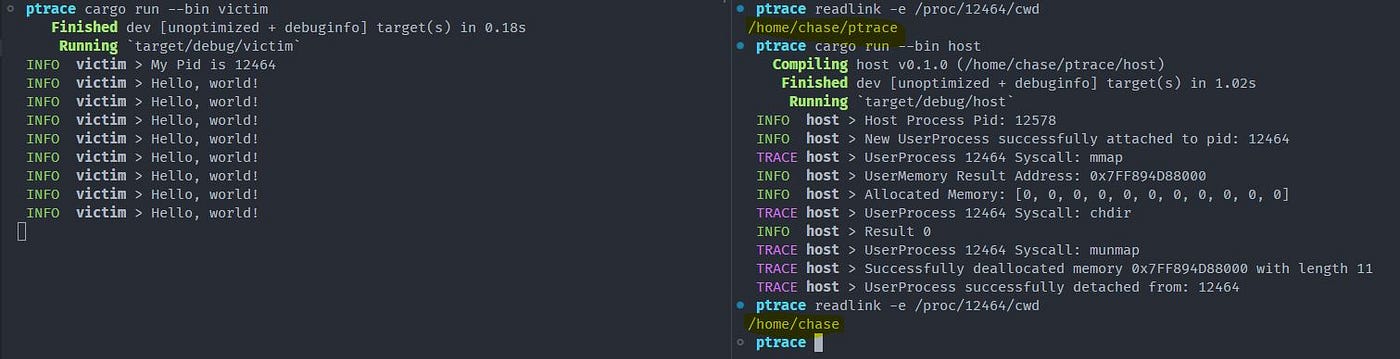
The process’s current working directory is changed after running our program and shows our expected /home/chase
Conclusion
We’ve designed a pretty decent api for using ptrace on x86_64 to invoke syscall in remote processes. This is pretty cool, but we are currently limited to the capabilities of the provided syscalls. Really it would be very useful if in the future we could call userspace functions in the victim process such as libc puts so we can output to the victim’s console. In the next article, we will do just that and learn how to identify the address of a userspace function in an external process with a coup de grâce of invoking dlopen in the victim process to load an arbitrary shared object into its address space a technique notoriously known as process injection 💉.
Resource Dump/Future Readings, Future Work
Final project Github Project
Resources
- https://man7.org/linux/man-pages/man5/proc.5.html
- https://hackeradam.com/x86-64-linux-syscalls/
- https://stackoverflow.com/questions/2535989/what-are-the-calling-conventions-for-unix-linux-system-calls-and-user-space-f
- https://blog.packagecloud.io/the-definitive-guide-to-linux-system-calls/
Future Work
- Support x86_32
- Support ARM32
- Support ARM64
- (Maybe?) Support stack arguments e.g. syscall calls with more than the amount of register arguments. I’m relatively sure x86_64 has no syscalls requiring stack arguments e.g. more than 6 arguments, though I am not confident that is true for the other architectures.
메타데이터
- post_id
- 262dc585fcd3
- slug
- using-rust-and-ptrace-to-invoke-syscalls-262dc585fcd3
- url
- https://medium.com/@ohchase/using-rust-and-ptrace-to-invoke-syscalls-262dc585fcd3
- canonical_url
- https://medium.com/@ohchase/using-rust-and-ptrace-to-invoke-syscalls-262dc585fcd3
- author_url
- https://medium.com/@ohchase
- status
- ok
- fetched_at
- 2026-07-26 11:53:40