Beginner Front-End Web Development Projects to Start Your Portfolio
So you just started your journey into Web Development and you’re wondering where to even start. It can be overwhelming the first time…
Beginner Front-End Web Development Projects to Start Your Portfolio
So you just started your journey into Web Development and you’re wondering where to even start. It can be overwhelming the first time you’re faced with the task of doing a project on your own with no tutorial. Following step-by-step tutorials is great to build the initial understanding of what exactly HTML and CSS do and how to use them. However, you will need to eventually branch off on your own to truly test your knowledge and the sooner, the better.
Doing independent projects will increase your confidence and “figure-it-out” skills given that you have the proper tools to be on your own.
First, if you haven’t already, download Visual Studio Code and take some time to get familiar with the interface, maybe even watch a YouTube tutorial. A VERY helpful extension is Live Server which allows you to easily view the changes you make to your webpage without having to refresh or copy/paste the path every single time.
Next, get familiar with the websites developer.mozilla.org and w3schools.com. These websites are crucial for problem solving and have almost all the information you’ll need to answer your questions. Knowing how to find the answers you need on your own will be an extremely important skill to have when you start applying for jobs.
Now that you have VS Code setup and tools for trouble shooting, you’re ready to start building whatever your heart desires! But if you’re completely out of ideas (as I was at first), here are 5 projects with increasing difficulty to sharpen your skills as they develop.
1. Vacation Blog
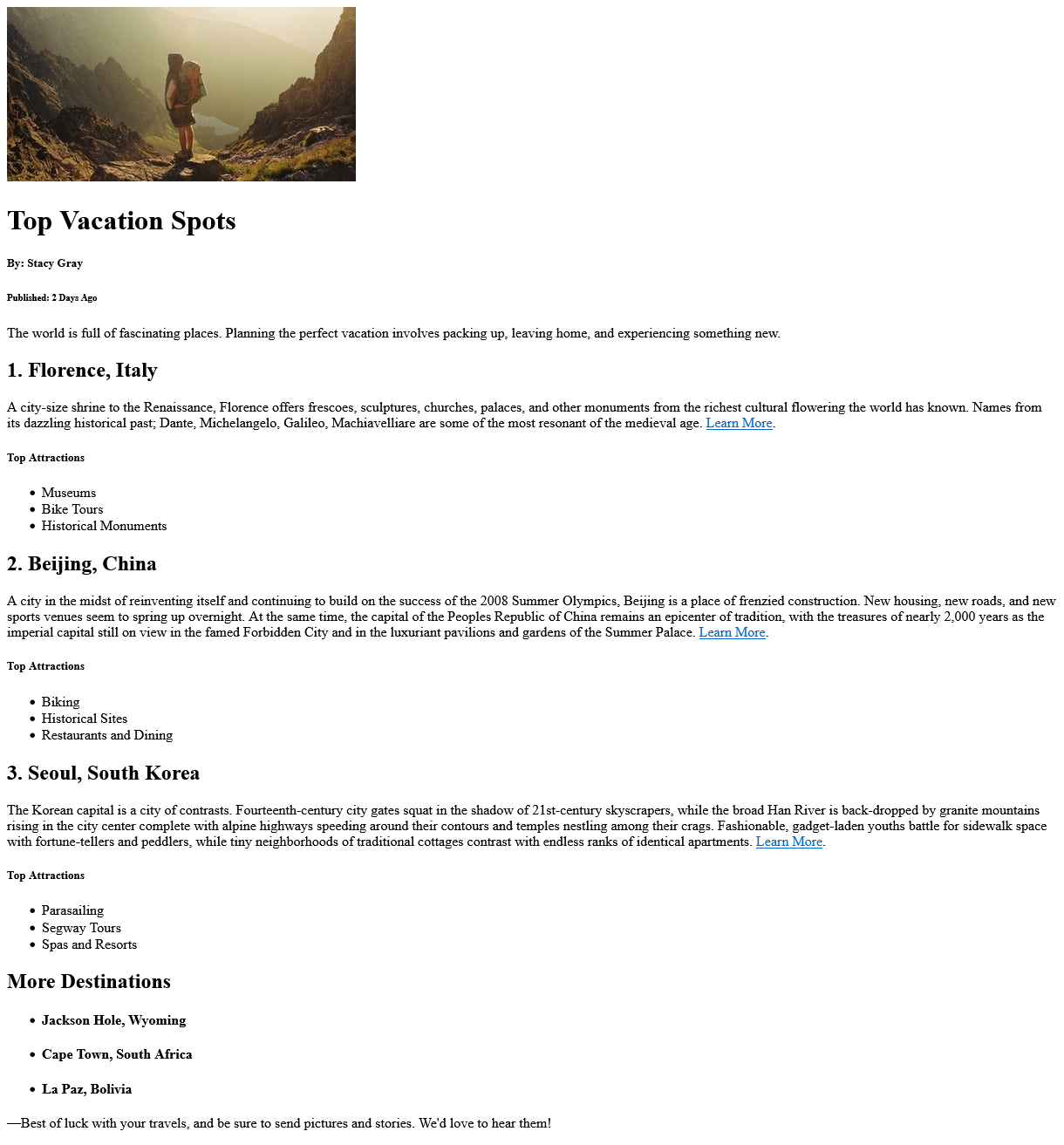
You don’t have to do vacation spots, you can choose any topic that you’re interested in but try to follow this template. The main goal for this project is to build a blog layout and get comfortable with the flow of the page. You’ll utilize <img>, <h>, <p>, <ol>, and nested <ul> lists demonstrating your understanding of building out a basic HTML framework.
Once your page looks similar to the image above, you’re all ready to link a style sheet and add some cool colors. Take this opportunity to showcase your creative abilities and design a page you’re proud of.

Keep it basic and have fun with it!
2. Favorite and Non-favorites Table

<Table> tags can certainly come in handy in larger websites so it’s important to make sure you have strong foundation. Focus on building out a table that is evenly spaced and visually clean. Add some styling to make it pop and boom, you’ve created a webpage that represents a little bit of your personality, pretty cool.
3. Styled Survey Form

Almost every modern website has some sort of survey form, information is very valuable. Future employers will want to see that you’re capable of building a form that is user friendly so that it is more likely to be filled out to completion. You might not yet have the knowledge to do anything with the data being submitted but you should still ensure that the form is built with the required attributes as if you did. Add some backgrounds, set widths, and maybe set up some cool pseudo-class rules on the submit button. As always, make it your own style and really try to capture your creative side.
4. Basic Grid and Flex Layout

Now comes the introduction of CSS Grid and Flex which will be crucial tools for building out realistic web pages that respond nicely to different screen sizes. You can replace the boxes with images or whatever you’d like but make sure you have the same amount of content. Take your time with this one and push your limits until you have a strong grasp on how to use the features. After all, you will likely use grid and/or flex on every page you make in the future.
5. E-Store Homepage

Now it’s time to combine every little piece to make an awesome home page for a fictional store of your choice! If you struggled with any specific topics before, this project will help clarify the issues your having. Just remember to not rush through it and don’t expect to whip it out easy-peasy. If you do, that’s incredible and you definitely have a natural talent for web development but the majority of new devs will struggle a bit until it finally clicks.
To accomplish this page you’ll need a solid understanding of how and when to utilize containers and also how to organize the content within the container. Little hint; the photo gallery at the bottom will look better using grid rather than flex. Feel free to play around with both so you can see what I’m talking about for yourself.
You may find yourself feeling frustrated as you run into different issues but I promise you, the answer to your problem is available on the internet and you will soon become familiar with where to find it. So keep your head up and have fun with it, the feeling when you sit back and look at your finished work will be worth every bit of struggle. Truly an amazing feeling.
메타데이터
- post_id
- 264dbb3aaec3
- slug
- beginner-front-end-web-development-projects-to-start-your-portfolio-264dbb3aaec3
- url
- https://medium.com/@sgvcoding/beginner-front-end-web-development-projects-to-start-your-portfolio-264dbb3aaec3
- canonical_url
- https://medium.com/@sgvcoding/beginner-front-end-web-development-projects-to-start-your-portfolio-264dbb3aaec3
- author_url
- https://medium.com/@sgvcoding
- status
- ok
- fetched_at
- 2026-08-06 13:11:19




