Stop Paying OpenAI for Every Keystroke : Your Browser Is Now an AI. The Cloud Didn’t See It Coming.
How WebLLM, Transformers.js, and a new wave of on-device models are quietly reshaping what a web app can do — and why Adobe, Google…
Stop Paying OpenAI for Every Keystroke : Your Browser Is Now an AI. The Cloud Didn’t See It Coming.
How WebLLM, Transformers.js, and a new wave of on-device models are quietly reshaping what a web app can do — and why Adobe, Google, Tokopedia, and Bilibili already made the switch.
There’s a quiet revolution happening inside your browser tab, and most developers haven’t noticed it yet.
You type a message. A language model reads it, thinks, and replies — in full, streaming, token by token. No loading spinner while a request flies to an AWS data center. No API key. No bill at the end of the month. The model lives entirely in your browser, and it runs on your own GPU.
This isn’t a demo. It isn’t a toy. Adobe already ships it in Photoshop Web. Google already runs it in Chrome on your laptop. Tokopedia used it to cut manual KYC reviews by nearly 70%. Bilibili used it to make bullet-screen comments flow behind the speaker’s face — all in the browser, for 330 million users.
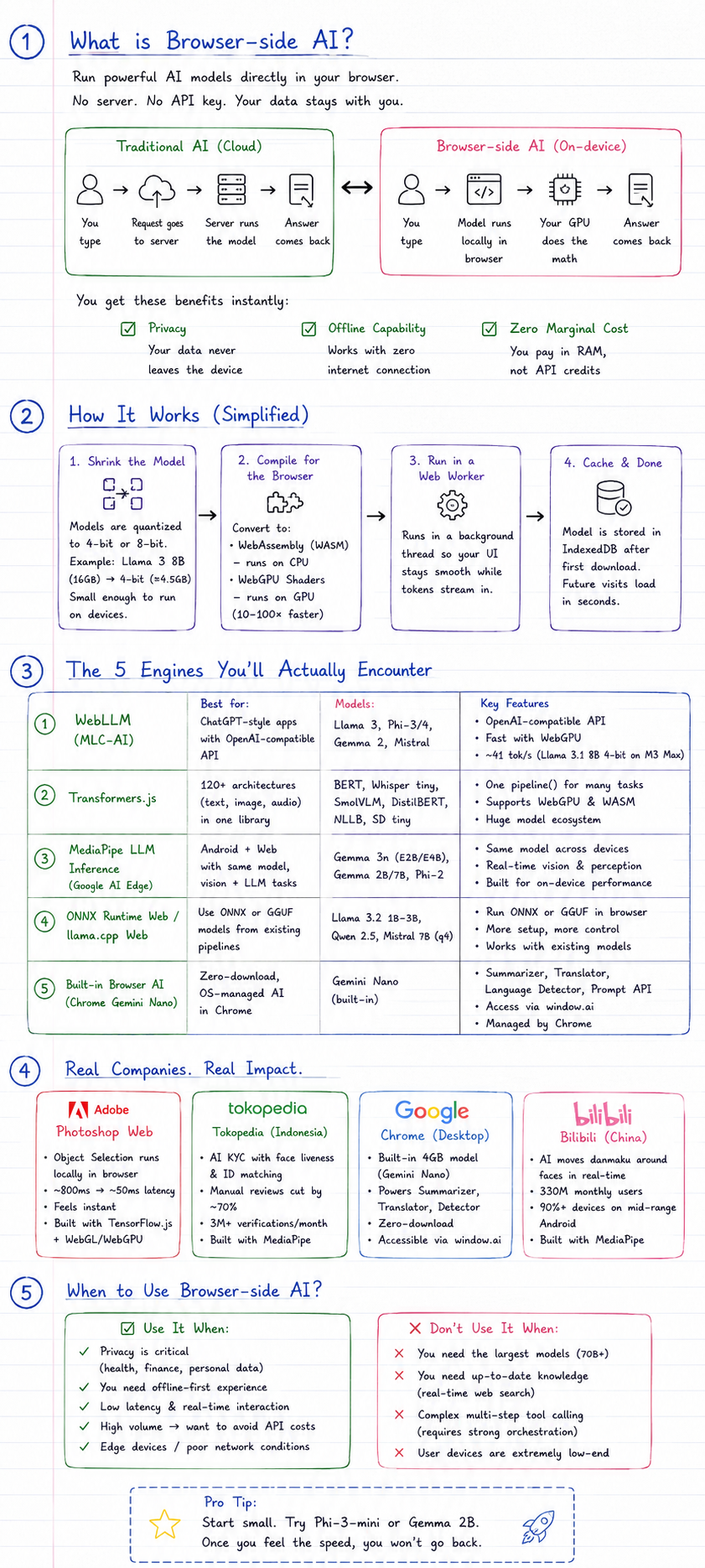
WebLLM is just the most famous name, but the bigger idea is running the AI model inside your browser tab instead of calling OpenAI or Gemini in the cloud.
This is browser-side AI. And in 2026, it’s ready for production.
Wait, the AI runs in my tab?
Let’s make sure we’re on the same page before diving into the case studies.
Traditional AI looks like this:
You type → Your request goes to a server → Server runs the big model → Answer comes back
Browser-side AI looks like this:
You type → Your browser runs the model locally → Answer comes back
The model weights — the “brain” — are downloaded once (think 300 MB to 2 GB), stored in your browser’s IndexedDB cache, and then your device’s GPU does all the math. From the second visit onward, there’s no download. No round-trip. No server involved at all.
Three things fall into your lap instantly:
- Privacy — your data never leaves the device
- Offline capability — works with zero internet connection
- Zero marginal cost — you pay in RAM, not API credits
How It Actually Works (Without Making Your Eyes Glaze Over)
Step 1: Shrink the model
Full-size language models like Llama 3 8B weigh ~16 GB in float32. That won’t fit in a browser tab. So they get quantized — compressed to 4-bit or 8-bit precision. A 4-bit Llama 3 8B becomes ~4.5 GB. A Phi-4-mini becomes ~2 GB. Small enough to download, cache, and run on a laptop or mid-range phone.
Step 2: Compile for the browser
Browsers can’t run PyTorch. So models are pre-converted into one of two forms:
- WebAssembly (WASM) — runs on CPU, slow but works on any device
- WebGPU shaders — runs on GPU, 10–100× faster, now available in all four major browsers since November 2025
Step 3: Run in a Web Worker
LLM inference is heavy enough to freeze your UI for seconds at a time. So the model runs inside a Web Worker — a background thread — so the interface stays responsive while tokens stream in.
Step 4: Cache and done
After the first download, the model sits in IndexedDB. Future visits load in seconds. No re-download, no waiting.
The 5 Engines You’ll Actually Encounter
Not all browser AI is the same. Here’s the landscape:
1. WebLLM (MLC-AI)
Best for: ChatGPT-style apps with an OpenAI-compatible API
Built by researchers from CMU, SJTU, and NVIDIA, WebLLM uses Apache TVM to compile optimized WebGPU kernels. It exposes a chat.completions.create() API identical to OpenAI's — meaning you can replace a cloud endpoint with a browser-local one by changing a single URL. On an Apple M3 Max, Llama 3.1 8B at 4-bit runs at ~41 tokens/sec. Phi 3.5 Mini hits ~71 tokens/sec. That's fast enough to feel instant.
Models: Llama 3, Phi-3/4, Gemma 2, Mistral GitHub: mlc-ai/web-llm
2. Transformers.js
Best for: 120+ model architectures — text, images, audio — in one library
This is the Swiss Army knife. One pipeline() call handles text generation, translation, summarization, object detection, speech-to-text, and more. You choose device: 'webgpu' for speed or device: 'wasm' for compatibility.
const pipe = await pipeline('text-generation', 'Xenova/Phi-3-mini-4k-instruct-q4', { device: 'webgpu' });
const output = await pipe('Explain transformers in one paragraph');
Models: BERT, Whisper tiny, SmolVLM, DistilBERT, NLLB (translation), Stable Diffusion tiny Docs: huggingface.co/docs/transformers.js
3. MediaPipe LLM Inference (Google AI Edge)
Best for: Android + Web with the same model, vision + LLM tasks
Google’s MediaPipe runs the same Gemma model on your phone and browser without re-downloading. Its real power is in perception tasks: face detection, hand tracking, body segmentation, object detection — all running at real-time framerates. This is what Tokopedia and Bilibili shipped in production.
Models: Gemma 3n E2B/E4B (text+image+audio), Gemma 2B/7B, Phi-2 Docs: ai.google.dev/edge/mediapipe
4. ONNX Runtime Web / llama.cpp Web
Best for: Developers wanting standard GGUF files or ONNX models from existing pipelines
If you already have a model in ONNX or GGUF format (common from Hugging Face or Ollama), these runtimes let you run them in the browser directly. More setup, more control.
Models: Llama 3.2 1B–3B, Qwen 2.5, Mistral 7B q4
5. Built-in Browser AI (Chrome Gemini Nano)
Best for: Zero-download, OS-managed AI in Chrome
Chrome 138 quietly shipped a 4 GB weights.bin file to compatible devices. It powers Summarizer, Language Detector, Translator, and scam-detection APIs — all accessible via window.ai with no library needed. The model is managed by Chrome itself, not your app.
APIs: Summarizer, Translator, LanguageDetector, Prompt API Access: chrome://flags/#enable-ai-features (desktop only, needs 22 GB disk + 4 GB VRAM)
The Companies That Already Shipped This
Adobe — Photoshop Web
Source: TensorFlow Blog, March 2023
Adobe needed Photoshop’s Object Selection tool to feel synchronous — when you drag a selection, it should respond like a brush, not like a network request. Cloud inference with its ~800ms latency killed that feel entirely.
Their solution: port the ML models to TensorFlow.js and run them client-side via WebGL/WebGPU. The result was a 30% to 200% speed improvement depending on the task. Adobe now uses a hybrid model — on-device for latency-sensitive tools like selection, cloud for heavy tasks that can tolerate a wait — because the browser tab’s memory limit (~4 GB in Chrome) means not every model fits locally.
Google Chrome — Gemini Nano
Source: Infosecurity Magazine, 2025 · Google Security Blog
Google’s own browser is perhaps the most aggressive deployment of browser-side AI at scale. Chrome’s Enhanced Protection mode now uses an on-device Gemini Nano to analyze visited pages in real time for scam signals — fake virus alerts, fake lock screens, phishing patterns.
The result, per Google: blocking hundreds of millions of scam attempts daily and an 80% reduction in scammy search results in pilot testing. Beyond security, Gemini Nano also powers “Help Me Write,” smart paste, page summarization, and AI-assisted tab grouping — all running locally, never sending your content to a Google server.
Tokopedia — Seller KYC Verification
Source: web.dev case study
Tokopedia has 14 million sellers on its platform. Each one must submit a national ID card (KTP) plus a selfie for identity verification. The problem: millions of submissions were blurry, poorly lit, or incorrectly framed — and sending all of them to server-side GPU processing was expensive.
Their fix: deploy MediaPipe’s Face Detection model (MediaPipeFaceDetector-TFJS) in the browser. Before a seller even clicks "Submit," the browser checks whether their selfie has both eyes visible, the face is well-lit, and it passes basic quality criteria. Only clean submissions get sent to the backend.
The outcome:
- ~20% improvement in the KYC rejection rate
- ~70% reduction in manual approval cases
- Server GPU costs slashed by filtering out invalid images before they ever hit the network
A hybrid fallback routes older low-end phones to server inference, so no user is left behind.
Bilibili — Bullet-Screen Comments Behind the Speaker
Source: web.dev case study
Bilibili is China’s largest video platform — 330 million monthly active users, famous for its “danmaku” bullet-screen comments that scroll across the video in real time. The problem: those comments cover the speaker’s face. Annoying.
The elegant solution: use MediaPipe’s Selfie Segmenter to extract a per-frame silhouette of the presenter, then use CSS mask-image to route comments behind the character outline instead of in front of it.
The challenge: doing this server-side for every concurrent video stream at Bilibili’s scale would be prohibitively expensive. Running it in the browser meant each user’s device does its own segmentation.
Results after rollout:
- +30% session duration
- +19% click-through rate
- Near-zero server cost for the feature
Why Not Just Use a Backend LLM?
This is the real question. Cloud AI — calling OpenAI, Gemini, or your own self-hosted server — is mature, powerful, and supports much larger models. So when does browser-side AI actually win?
When browser AI wins

browser AI wins
When cloud AI wins

cloud AI wins
The honest answer? Most production apps should use both. Run perception tasks (face detection, text classification, real-time effects) on-device. Send complex reasoning tasks to the cloud. That’s exactly what Adobe does.
The Honest Pros and Cons
✅ Pros
1. True privacy by architecture The data never leaves the device. This isn’t a policy promise — it’s a physical impossibility. For healthcare, legal, and enterprise use cases, this matters enormously.
2. Zero API cost at inference time Once the model is cached, every inference is free. No per-token billing. For high-frequency, low-complexity tasks (classification, summarization, intent detection), this can eliminate a meaningful line item.
3. Works offline After the first load, the model is cached in IndexedDB. A user on a train with no signal gets the same experience as one on fiber.
4. No cold start / low latency No round-trip to a server. For real-time applications, this is non-negotiable.
5. OpenAI-compatible API (WebLLM) Swap a cloud endpoint for a browser-local one with a one-line change. Zero migration cost.
❌ Cons
1. First-visit download is jarring Downloading 1–4 GB on a user’s first visit is a significant UX problem. You need a good onboarding flow — progress bar, explanation, opt-in. Apps that just silently start downloading lose users.
2. Model quality ceiling is low The best browser models in 2026 are 3–8 billion parameters at 4-bit precision. They’re genuinely useful but nowhere near GPT-4 class. Complex reasoning, long-context analysis, coding on large codebases — these still require cloud.
3. Hardware fragmentation A Phi-3-mini 4B running at 71 tokens/sec on an M3 Mac runs at ~5 tokens/sec on an integrated GPU Windows laptop and fails entirely on some Android phones. You need WASM fallbacks, graceful degradation, and hybrid routing logic.
4. Memory constraints are brutal Chrome tabs have ~4 GB memory limit. A 7B model at 4-bit just barely fits. A 13B model doesn’t. You’re always optimizing around this ceiling.
5. WebGPU browser gaps As of 2026, all four major browsers support WebGPU — but mobile Firefox on Android is still catching up. Roughly 70–75% of mobile users can run WebGPU; ~90% on desktop. Plan for WASM fallbacks.
6. No fine-tuning at runtime You can’t adjust the model weights based on user behavior. What you download is what you get. Personalization happens through prompt engineering alone.
7. Silent downloads are controversial Google’s automatic 4 GB Gemini Nano download to Chrome profiles without explicit consent sparked real backlash. If you’re shipping browser AI, be transparent about the download. Users notice.
What Models Actually Run Well in 2026
Don’t expect miracles. These are the sweet spots:

For a mid-range laptop, a 1–3B model at q4 loads in ~45 seconds on first visit, ~3 seconds after caching, and runs at ~10–20 tokens/sec. That’s usable. A 7B model on the same hardware will push its memory limits.
The Bigger Picture
We’re at an inflection point. For the last three years, “add AI to your product” meant “call an API.” That mental model is shifting.
The browser is becoming a runtime for intelligence. Not for everything — not yet, and maybe not ever for the most complex tasks. But for a growing category of use cases — the ones that need speed, privacy, or offline capability — sending data to a server is starting to look like the wrong default.
Adobe didn’t move object selection on-device because server AI was bad. They moved it because synchronous UI requires local latency, and local latency requires running on the device.
Tokopedia didn’t build browser-side KYC because they distrust the cloud. They built it because it was cheaper and faster to validate at the edge before spending money on server processing.
Google didn’t put Gemini Nano in Chrome because their cloud infrastructure can’t handle it. They did it because on-device is architecturally better for security — an LLM that evaluates a scam page locally can’t be intercepted or bypassed via a network attack.
The pattern is consistent: when latency, privacy, or cost is the primary constraint, moving the model to the browser wins.
Where to Start This Week
If you want to experiment:
Chat app, OpenAI-compatible: Start with WebLLM and Phi-4-mini or Llama 3.2 3B at q4. Works in React in ~15 lines of code.
Pre-upload validation (face/quality check): Use MediaPipe Face Detector TFJS. The package is 24 KB. No model download needed.
Transcription or translation: Use Transformers.js with Xenova/whisper-tiny or Xenova/nllb-200-distilled-600M. Both are under 300 MB.
Already on Chrome? Hit chrome://flags/#enable-ai-features and try the built-in Summarizer and LanguageDetector APIs — no download, no library, no setup.
The ceiling is low compared to GPT-4. The floor is surprisingly high. And the architecture is genuinely different from anything we’ve shipped in web apps before.
Your users’ GPUs are already there. The models are small enough to fit. The only question is what you’ll build.
Resources and further reading:
메타데이터
- post_id
- 26666e3cec2c
- slug
- your-browser-is-now-an-ai-the-cloud-didnt-see-it-coming-26666e3cec2c
- url
- https://medium.com/@imrohitkushwaha2001/your-browser-is-now-an-ai-the-cloud-didnt-see-it-coming-26666e3cec2c
- canonical_url
- https://medium.com/@imrohitkushwaha2001/your-browser-is-now-an-ai-the-cloud-didnt-see-it-coming-26666e3cec2c
- author_url
- https://medium.com/@imrohitkushwaha2001
- status
- ok
- fetched_at
- 2026-07-15 16:48:10






