Network Troubleshooting series — Lab 1
Here is the problem statement:
Network Troubleshooting series — Lab 1
Here is the problem statement:
## Topology
## Problem Statement
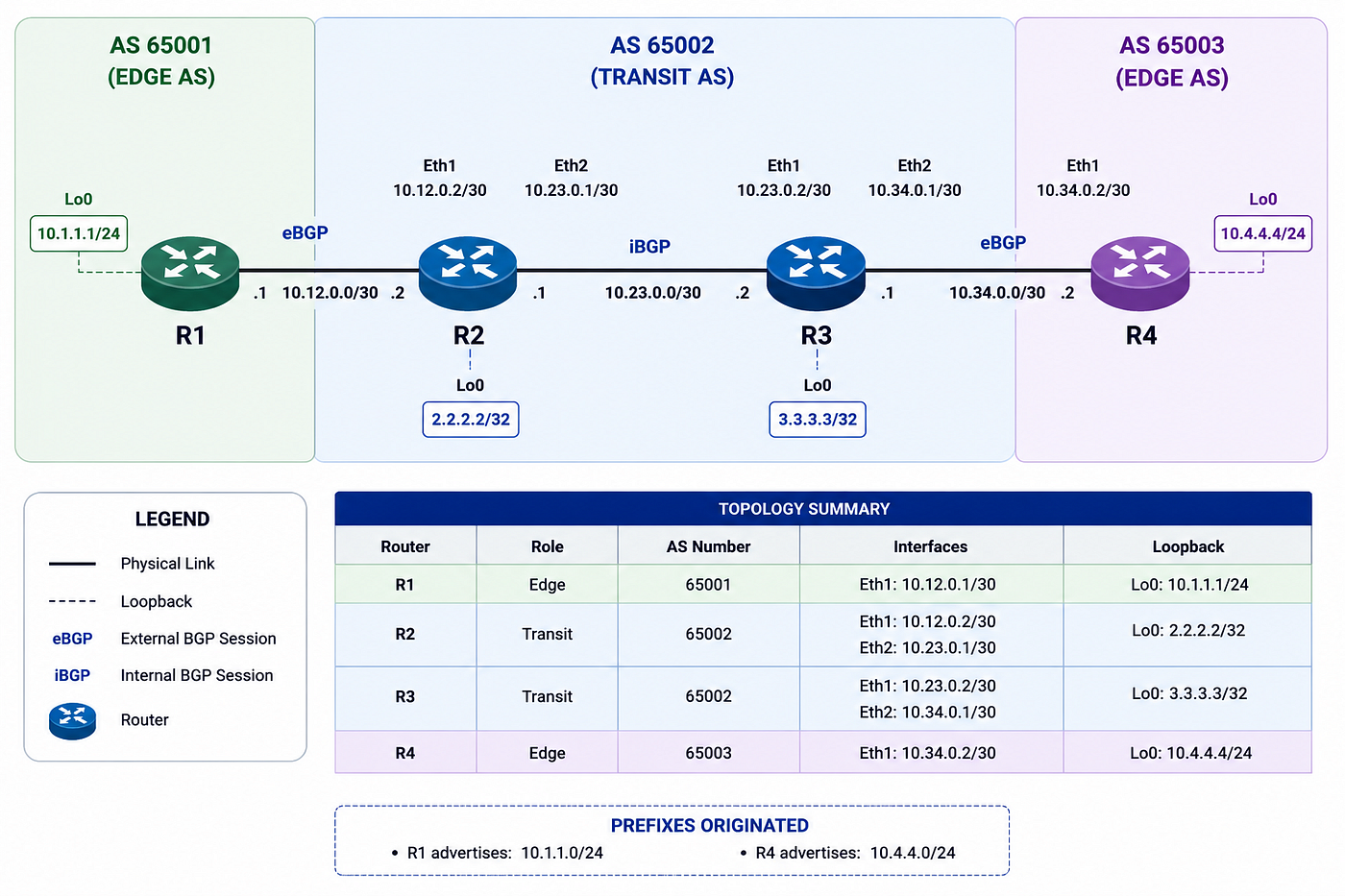
A customer connected to AS65001 (R1) has opened a ticket against the transit provider AS65002 (R2/R3) stating that they cannot reach a partner network hosted in AS65003 (R4), and vice versa.
Let’s start working on it:
From R1, I tried reaching the loopback on R4.
Cannot ping 1 end to other :
 aman@Amankumar-Singh:~/lab_1$ docker exec -it clab-bgp-ttshoot-r1 ping -I 10.1.1.1 10.4.4.4
 PING 10.4.4.4 (10.4.4.4) from 10.1.1.1: 56 data bytes
 ^C
 — — 10.4.4.4 ping statistics — -
 3 packets transmitted, 0 packets received, 100% packet loss
 aman@Amankumar-Singh:~/lab_1$ docker exec -it clab-bgp-ttshoot-r4 ping -I 10.4.4.4 10.1.1.1
 PING 10.1.1.1 (10.1.1.1) from 10.4.4.4: 56 data bytes
 ^C
 — — 10.1.1.1 ping statistics — -
 3 packets transmitted, 0 packets received, 100% packet loss
 aman@Amankumar-Singh:~/lab_1$
My first instinct: Did BGP even come up?
config on R2, simple config:
 r2# show running-config
 Building configuration…

 Current configuration:
 !
 frr version 8.4_git
 frr defaults traditional
 hostname r2
 domainname localdomain
 log file /var/log/frr/frr.log informational
 no ipv6 forwarding
 !
 interface eth1
 ip address 10.12.0.2/30
 exit
 !
 interface eth2
 ip address 10.23.0.1/30
 exit
 !
 interface lo
 ip address 2.2.2.2/32
 exit
 !
 router bgp 65002
 bgp router-id 2.2.2.2
 no bgp ebgp-requires-policy
 neighbor 10.12.0.1 remote-as 65001
 neighbor 10.23.0.2 remote-as 65002
 exit
 !
 end
 r2#
 r2# show ip bgp summary

 IPv4 Unicast Summary (VRF default):
 BGP router identifier 2.2.2.2, local AS number 65002 vrf-id 0
 BGP table version 3
 RIB entries 3, using 576 bytes of memory
 Peers 2, using 1434 KiB of memory

 Neighbor V AS MsgRcvd MsgSent TblVer InQ OutQ Up/Down State/PfxRcd PfxSnt Desc
 10.12.0.1 4 65001 27 27 0 0 0 00:21:35 1 1 N/A
 10.23.0.2 4 65002 26 26 0 0 0 00:21:35 1 1 N/A

 Total number of neighbors 2

 r3# show ip bgp summary

 IPv4 Unicast Summary (VRF default):
 BGP router identifier 3.3.3.3, local AS number 65002 vrf-id 0
 BGP table version 3
 RIB entries 3, using 576 bytes of memory
 Peers 2, using 1434 KiB of memory

 Neighbor V AS MsgRcvd MsgSent TblVer InQ OutQ Up/Down State/PfxRcd PfxSnt Desc
 10.23.0.1 4 65002 27 27 0 0 0 00:22:00 1 1 N/A
 10.34.0.2 4 65003 28 28 0 0 0 00:22:00 1 1 N/A

 Total number of neighbors 2
The configuration looked fine and every BGP session was Established. That ruled out neighbor establishment issues, authentication problems, interface mismatches, and AS-number mistakes.
So if the control plane was healthy, why wasn’t the data plane working?
I stopped looking at the neighbors and started looking at the routes themselves.
 r3# show bgp ipv4 unicast
 BGP table version is 3, local router ID is 3.3.3.3, vrf id 0
 Default local pref 100, local AS 65002
 Status codes: s suppressed, d damped, h history, * valid, > best, = multipath,
 i internal, r RIB-failure, S Stale, R Removed
 Nexthop codes: @NNN nexthop’s vrf id, < announce-nh-self
 Origin codes: i — IGP, e — EGP, ? — incomplete
 RPKI validation codes: V valid, I invalid, N Not found

 Network Next Hop Metric LocPrf Weight Path
 i10.1.1.0/24 10.12.0.1 0 100 0 65001 i
 *> 10.4.4.0/24 10.34.0.2 0 0 65003 i

 Displayed 2 routes and 2 total paths
 r3#

 r2# show bgp ipv4 unicast
 BGP table version is 3, local router ID is 2.2.2.2, vrf id 0
 Default local pref 100, local AS 65002
 Status codes: s suppressed, d damped, h history, * valid, > best, = multipath,
 i internal, r RIB-failure, S Stale, R Removed
 Nexthop codes: @NNN nexthop’s vrf id, < announce-nh-self
 Origin codes: i — IGP, e — EGP, ? — incomplete
 RPKI validation codes: V valid, I invalid, N Not found

 Network Next Hop Metric LocPrf Weight Path
 *> 10.1.1.0/24 10.12.0.1 0 0 65001 i
 i10.4.4.0/24 10.34.0.2 0 100 0 65003 i

 Displayed 2 routes and 2 total paths
That was the clue.
Nothing was wrong with BGP. Nothing was wrong with the prefixes.
The problem was the NEXT_HOP attribute.
By default, when a router advertises an eBGP-learned route to an iBGP peer, it preserves the original next hop. R2 forwarded 10.1.1.0/24 to R3 with a next hop of 10.12.0.1, while R3 forwarded 10.4.4.0/24 to R2 with a next hop of 10.34.0.2. Neither receiving router could reach those external links.
This is exactly what next-hop-self is designed to solve.
 r2(config)# router bgp 65002
 exitr2(config-router)# address-family ipv4 unicast
 r2(config-router-af)# neighbor 10.23.0.2 next-hop-self
 r2(config-router-af)# exit-address-family
 r2(config-router)# exit

 r3# conf t
 r3(config)# router bgp 65002
 exitr3(config-router)# address-family ipv4 unicast
 r3(config-router-af)# neighbor 10.23.0.1 next-hop-self
 r3(config-router-af)# exit-address-family
 r3(config-router)# exit
 r3(config)#

 r3# show bgp ipv4 unicast
 BGP table version is 4, local router ID is 3.3.3.3, vrf id 0
 Default local pref 100, local AS 65002
 Status codes: s suppressed, d damped, h history, * valid, > best, = multipath,
 i internal, r RIB-failure, S Stale, R Removed
 Nexthop codes: @NNN nexthop’s vrf id, < announce-nh-self
 Origin codes: i — IGP, e — EGP, ? — incomplete
 RPKI validation codes: V valid, I invalid, N Not found

 Network Next Hop Metric LocPrf Weight Path
 *>i10.1.1.0/24 10.23.0.1 0 100 0 65001 i
 *> 10.4.4.0/24 10.34.0.2 0 0 65003 i

 Displayed 2 routes and 2 total paths

 r2# show bgp ipv4 unicast
 BGP table version is 4, local router ID is 2.2.2.2, vrf id 0
 Default local pref 100, local AS 65002
 Status codes: s suppressed, d damped, h history, * valid, > best, = multipath,
 i internal, r RIB-failure, S Stale, R Removed
 Nexthop codes: @NNN nexthop’s vrf id, < announce-nh-self
 Origin codes: i — IGP, e — EGP, ? — incomplete
 RPKI validation codes: V valid, I invalid, N Not found

 Network Next Hop Metric LocPrf Weight Path
 *> 10.1.1.0/24 10.12.0.1 0 0 65001 i
 *>i10.4.4.0/24 10.23.0.2 0 100 0 65003 i

 Displayed 2 routes and 2 total paths
After configuring next-hop-self, the NEXT_HOP changed from the external interface addresses to the directly reachable iBGP peer addresses. The routes immediately became valid.
You might wonder why we configure next-hop-self only on iBGP peers. The reason is that eBGP already changes the next hop automatically when advertising routes to another AS. iBGP intentionally preserves the original next hop because larger networks usually rely on an IGP to provide reachability. In this lab, there is no IGP, so preserving the original next hop breaks forwarding.
Another important question is why the route wasn’t advertised further. Before a BGP route can be installed into the routing table, its next hop must be reachable. If the next hop cannot be resolved, the route is considered unusable because forwarding packets would result in a black hole. Once next-hop-self makes the next hop reachable, the route is installed into the RIB and can be advertised to downstream peers.
메타데이터
- post_id
- 26fec0bc762c
- slug
- network-troubleshooting-series-lab-1-26fec0bc762c
- url
- https://medium.com/@aks001235/network-troubleshooting-series-lab-1-26fec0bc762c
- canonical_url
- https://medium.com/@aks001235/network-troubleshooting-series-lab-1-26fec0bc762c
- author_url
- https://medium.com/@aks001235
- status
- ok
- fetched_at
- 2026-07-16 00:44:52