WSL Containers, SPGO, and the New Windows Developer Stack
Linux containers inside your .exe, 165 Unix commands on PATH, and a 33% faster binary without a single instrumented build
WSL Containers, SPGO, and the New Windows Developer Stack
Linux containers inside your .exe, 165 Unix commands on PATH, and a 33% faster binary without a single instrumented build
WSL Containers, SPGO, and the New Windows Developer Stack
This article walks through four changes that landed in the Windows developer stack this year and explains how each one actually works: a declarative configuration file that provisions a machine in one idempotent command, a Linux container runtime and API that ship inside WSL, a native port of the GNU coreutils surface, and a compiler optimization pipeline that collects profile data from ordinary release binaries. For each one, you will get the underlying architecture and commands to reproduce the result on your own machine. By the end, you should be able to decide which of these belongs in your workflow and which one needs a disposable test box first.
Reference here.
The split that explains everything
There have always been two Windows developer audiences that barely overlap. One builds on Windows: Node, Python, Go, containers, WSL, a terminal, and a package manager. The other builds for Windows: SDKs, MSIX packaging, app identity, code signing, and the MSVC toolchain.
A Node developer on Windows never touched packaging. A WinUI developer never thought about virtiofs. What is interesting about the current wave of tooling is that these two worlds are converging, and the connective tissue is the command line.
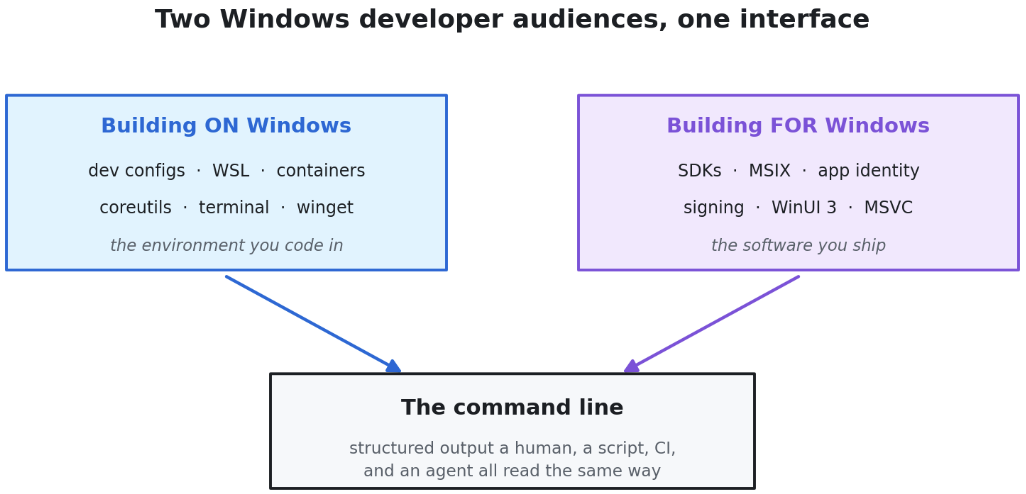
Nearly every new piece here is a CLI first and a GUI second, because a CLI with structured output is the only interface both a human and an agent can drive. Hold that thought until the section on agent skills, where it stops being a philosophical claim and becomes a build system.
Part 1: Building on Windows
The developer configuration file, and why idempotency is the feature
Fresh Windows box. You spend an afternoon collecting Python, Node, packages, and every tool you like before you write a line of code. Everyone has a setup script. Almost nobody has one they trust to run twice.
The fix is a WinGet configuration file: a YAML document that WinGet parses and hands to PowerShell Desired State Configuration. It is declarative rather than imperative. You do not write “install Git.” You declare that Git is present, and the DSC resource tests that assertion before it acts. That property is what turns a setup script into infrastructure. If Git is already there, the run verifies and moves on.
The repository is microsoft/WindowsDeveloperConfig. It ships three flavors: a full workstation config, a WSL comfort shell, and per-language workload configs (TypeScript, Python, .NET, Go, Java, Rust, PHP, WinForms, WinUI 3, and more). The workstation flow is a single DSC document, dev-config.winget, and reading it is worth twenty minutes, because it solves the one problem every setup script punts on: the reboot.
Installing the Virtual Machine Platform for WSL requires a restart. The config handles it with a phased design. Phase one applies OS tweaks, installs roughly thirteen packages through WinGet (PowerShell 7, Git, GitHub CLI, GitHub Copilot CLI, VS Code, .NET SDK, Python, uv, Node LTS, nvm, the WinApp CLI, plus optional Oh My Posh and PowerToys), installs Cascadia Code and Cascadia Mono Nerd Fonts, and configures Windows Terminal and the PowerShell profile. Then, it writes a RunOnce registry key and hard-reboots the machine. On next login, winget configure resumes itself and installs Ubuntu.
winget configure -f .\windows-dev-config\dev-config.winget --accept-configuration-agreements --disable-interactivityTwo things will bite you. First, on older builds winget configure must be enabled once with winget configure --enable. Second, when invoked from a non-elevated environment, WinGet configuration depends on the Microsoft Visual C++ Redistributable, and its absence surfaces as an opaque internal error rather than a missing-dependency message. You can also dry-run the whole thing:
winget configure test --file .\Workloads\typescript\configuration.wingetThis is generally available now, documented as Windows Developer Configurations, and the same image backs the Windows 365 developer configuration.
The new Run dialog is community code inside Windows
Windows also picked up movable taskbars (left, top, bottom) and a redesigned Run dialog. The interesting part is not the UI. It is the lineage.
PowerToys Run came first. The team rebuilt it as Command Palette, a WinUI 3 launcher with a real extension model: extensions are standalone .NET processes that register through their app manifest and communicate with the host over a WinRT API (Microsoft.CommandPalette.Extensions), each running out of process. That architecture, not the pixels, is what landed inside the new Run dialog.
Work through what that means. An MIT-licensed community utility became the architecture of an operating system dialog that ships to a billion machines. If you sent a pull request to Command Palette, there is a reasonable chance your code is now in Windows. There are more than sixteen thousand contributors across Terminal, WSL, PowerToys, and WinGet. This is the least discussed and most consequential fact in the entire release.
Intelligent Terminal: an agent pane, not an agent takeover
When you launch an agent CLI today, it takes over the whole terminal. You leave your prompt. Intelligent Terminal keeps your prompt and gives the agent a pane beside it.
The behavior worth understanding is what happens on failure. A command fails, the terminal notices, and the agent pane lights up with the error already loaded into context. It reasons about the failure and proposes a direction rather than a command, because it cannot know your intent. Ask it to fix a broken password-validation regex and it will ask whether you want an uppercase requirement or a unique-character requirement. That restraint is the design.
Architecturally it is an experimental, MIT-licensed fork of Windows Terminal, not a feature branch of it. That fork decision matters: experimental agent code cannot regress the stable Terminal that millions of people run, and if the design does not land it can be abandoned cleanly. It speaks the Agent Client Protocol (ACP), an open JSON-RPC standard, and auto-detects ACP-compatible agent CLIs already on your machine. GitHub Copilot CLI is the default and the only one the first-run experience installs for you. Claude Code, OpenAI Codex, and Gemini CLI are supported, with Claude launched through an ACP wrapper because it does not speak ACP natively.
The detail that matters for anyone evaluating this inside a managed fleet: Intelligent Terminal is a local transport layer. It passes your prompts and shell context to the agent CLI over stdio using ACP. The terminal itself calls no cloud API and persists no conversation history. Whatever reaches a cloud reaches it through the agent CLI you chose. Auditability of autonomous command execution is the open question in a 0.1 release, and it is a fair one to raise before you deploy it broadly.
Worth memorizing: Ctrl+Shift+. toggles the agent pane, Ctrl+Alt+. opens it with a detected error in context, Ctrl+Shift+/ opens session management, and typing ? followed by a prompt in the Command Palette delegates a task to a background tab so your shell never blocks.
Coreutils for Windows: 165 entries, one binary, written in Rust
You can now pipe to grep at a PowerShell prompt without WSL, without Cygwin, and without Git Bash.
Coreutils for Windows is a Microsoft-maintained build of the uutils/coreutils project, the Rust reimplementation of GNU coreutils that already ships in modern Linux distributions, bundled with uutils/findutils and a GNU-compatible grep. It is packaged as a single multi-call binary that exposes each utility under its standard name, so you get cat.exe, grep.exe, tail.exe, env.exe, and the rest.
winget install Microsoft.CoreutilsYou will see two different counts quoted for this. The headline command surface is described as “over 75.” Pipe the actual command listing to wc and you get 165 entries. Both are true, they are counting different things, and neither number changes the fact that test.exe, tail.exe, and env.exe are now on your PATH.
The tradeoffs are real and mostly undocumented in the announcements. Several of these names collide with CMD and PowerShell built-ins, and which one wins depends on your shell, your PATH order, and PowerShell’s alias table. The installer ships a shim so existing DOS sort and find invocations keep working, and integrates with PSReadLine so quoting behaves more like a UNIX shell. A handful of utilities are absent because Windows lacks the underlying POSIX primitives: chmod, chown, chroot, tty, who, and, because Windows has no POSIX signals, kill and timeout.
One warning for the people who will reach for this first. These tools emit strings, not PowerShell objects. Excellent at the prompt. A dependency you will regret inside a production script.
wslc.exe: a container CLI that ships in the box
WSL now includes a binary called wslc.exe, aliased to container, that builds, runs, and manages Linux containers with no additional engine. No Docker Desktop, no Podman, no Rancher.
wsl --update --pre-release
wslc version
# throwaway container
wslc run --rm -it ubuntu:latest bash -c "echo Hello world from WSL container!"# background web server, publish 8080 on Windows to 80 in the container
wslc run -d --rm -p 8080:80 --name web nginx
curl localhost:8080
wslc container list
wslc exec web cat /etc/os-release
wslc container stop webIf you have used Docker, that muscle memory transfers unchanged. Build a Containerfile from python:3.13, run a service, publish port 8000, open localhost:8000 in your browser, and the thing works.
So why build another container CLI when Docker Desktop, Podman Desktop, and Rancher Desktop all exist and are good?
Two reasons that hold up. First, the CLI exists as the twin of an API, and the team wanted to be opinionated about how the two fit together. The wslc system session command has no Docker or Podman analogue, and it exists because sessions are a first-class concept in the API. You will see why in a moment. Second, the platform work underneath flows back to everyone. The lower-level virtual machine improvements, including a claimed doubling of cross-OS file performance when Linux reads Windows files, benefit Docker, Podman, and Rancher for free.
Public preview shipped in WSL 2.9.3 behind wsl --update --pre-release, with general availability targeted for fall 2026.
Comfort shell
Small feature, large daily impact. The same WindowsDeveloperConfig repo ships a WSL comfort shell: a setup script that lands zsh or bash, Starship, Homebrew, a set of CLI tools, and a themed Windows Terminal profile onto your Ubuntu distro. It is the difference between a distro and a development environment, and it takes one command.
The architecture underneath WSL containers
This is where it gets genuinely novel, and where the documentation is thinnest. Here is what is actually running.

Four-layer stack diagram of the WSL container architecture.
Three properties of this design deserve emphasis.
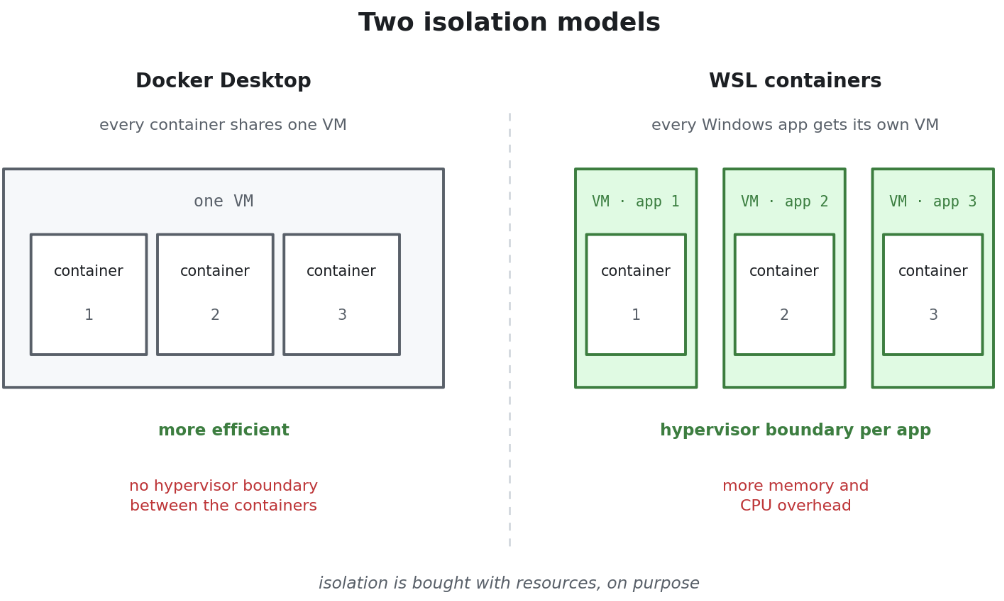
Per-app isolation, traded against efficiency. Docker Desktop runs every container inside one shared VM. WSL containers give every Windows application that uses the API its own Hyper-V-backed VM, with its own storage, networking, and resource budget. The CLI flow gets a VM too. That is strictly less efficient and strictly more isolated. It is the reason this is being positioned as enterprise-ready rather than as a convenience. Open Task Manager while a container-backed app is running and you will see its VM as a distinct process.
Networking is relayed, not bridged. The new default mode, consomme, passes Linux traffic through the Windows network stack, so Linux processes inherit the host’s networking environment, security policy, and enterprise integrations. If you have ever fought a corporate VPN from inside a container, you already understand why this matters more than a benchmark.
Cold start is measured in seconds. Roughly two and a half seconds from cold start to a running Linux process: session initialization, then container start, then your code.
For fleets: administrators can govern WSL distro and container usage through Group Policy and ADMX, including an allowlist of permitted container registries, and the Microsoft Defender for Endpoint plugin for WSL now understands container events, currently in private preview.
Part 2: Building for Windows
WinApp CLI: making native Windows development scriptable
The Windows App Development CLI is a single command-line interface for managing Windows SDKs, packaging, generating app identity, manifests, certificates, and build tools. Read that list again and notice what it replaces: about six tools, three wizards, and a Stack Overflow tab.
winget install Microsoft.winappcli --source winget
winapp --version
It is open source at microsoft/winappCli, works with any app framework (there are Electron samples in the repo), ships a VS Code extension that can launch your app with package identity and attach a debugger on F5, and provides a setup-WinAppCli GitHub Action for CI runners.
The part developers skip and then regret is package identity. Identity is what unlocks interactive native notifications, File Explorer integration, taskbar integration, and share sheet participation. Without it, your app is a process. With it, your app is a Windows citizen. winapp manifest and winapp pack take you from a build folder to a signed MSIX.
Win Dev Skills: the CLI is the protocol
Now the two halves of the stack snap together.
microsoft/win-dev-skills is an agent plugin. In the current vocabulary, a plugin is a bundle: skills, MCP servers, and custom agents in one installer. It ships eight skills covering setup, the build and run workflow, WinUI design, WinUI code review, UI testing, packaging, WPF migration, and session reporting for bug filing.
copilot plugin marketplace add microsoft/win-dev-skills
copilot plugin install winui@win-dev-skills
The efficiency argument is straightforward: the skills hand the agent current, structured information, so it does not burn tokens on a web search that returns a three-year-old answer about WinUI 3.
The capability argument is subtler, and it lives in the winapp commands the skills call. A packaged WinUI 3 app cannot simply be launched as an .exe. It has to be installed and activated through the correct pipeline. winapp run does that and streams the app's debug output back to the agent, so when the app crashes the agent sees an exception instead of silence. winapp ui exposes Microsoft UI Automation from the command line: enumerate elements, assert state, click controls, run accessibility audits. That single command is what makes automated UI testing legible to an agent at all.
Feed an agent a GUI and it is blind. Feed it a CLI that emits structured output and it has a feedback loop. Every capability the agent gains is one you can script yourself. That is the historical reason CLIs won, and it is the reason they are winning again.
PowerToys: Grab and Move
Hold Alt, click anywhere inside a window, drag. If you keep fifty tabs open in a browser and can never find a free millimeter of title bar, this quietly reclaims a piece of every day.
SPGO: a 33% speedup with no instrumented build
Sample Profile-Guided Optimization is the least glamorous item on this list and probably the highest return on an afternoon.
Why classic PGO stalled. Traditional profile-guided optimization works. Teams report 5% to 10%. The cost structure is what killed adoption. You need instrumentation compiled into your app. You need a second fork in your build pipeline, which nobody who owns a build pipeline is eager to add. And the instrumented binary runs slowly enough that the profile you collect stops resembling what your users experience, which quietly degrades profile quality at exactly the moment you are trusting it.
What SPGO changes. SPGO replaces instrumentation with CPU hardware performance counters. You profile your ordinary release binary, running the way your users run it. Overhead is low enough to sample real workloads.
Consider a stack-based virtual machine computing Fibonacci, with a dispatch switch on the opcode. In a bytecode interpreter, some branches are taken constantly and others almost never, and no static heuristic can tell which is which. That is exactly the information a profile carries. Baseline, no SPGO: nearly three seconds. After the pipeline: two seconds. Roughly a 33% improvement from a rebuild.
Here is the full flow as it exists in the shipping MSVC toolchain:

Why is the ETL-to-SPD conversion two steps instead of one? Because real software has many hot workflows. Benchmarks, user interaction, startup, file open. You capture each one separately, in parallel, on different machines, then merge every SPT into a single SPD. The split is what makes multi-scenario, multi-machine profile collection tractable. If one scenario matters more than the others, pass its SPT to SPDConvert more than once.
Field results. The documented typical range is 5% to 15%. Adobe, working on Photoshop, reported 20% on x64 and 13% on ARM64 across combined benchmarks, on top of already fully optimized release binaries.
The engineering commentary is the part worth internalizing: the wins landed on brush and stroke responsiveness, file open times, and CPU-bound filters, which are the latency-sensitive interactions where a professional actually feels the machine. That team had previously evaluated instrumented PGO and abandoned it, because the instrumented build introduced a nonstandard configuration and ran slowly enough to trip operational timeouts, which made the training data unrepresentative.
Treat it as a loop, not a switch. Your code evolves. Your users’ behavior evolves independently of your code. Refresh the profile, feed it back, rebuild. Because the flow is nonintrusive, with no instrumented fork and no second build configuration, it drops into an existing pipeline as an additional step rather than a parallel universe. That is what makes it sustainable rather than a one-time heroic optimization.
Constraints, because there are always constraints. SPGO targets x86, x64, and ARM64 native code only, and it is unavailable for anything running on the CLR, including the native portion of a /clr mixed assembly. Matching happens by PDB GUID and age, so an SPD from a different build than the binary is skipped with a warning. If your sampling run was too thin, the toolchain says so explicitly and estimates the sample density multiple it wants; your remedies are longer runs, a lower setProfInt value, or more merged SPT files. If your CPU supports Last Branch Records, use them: each interrupt yields the last sixteen to thirty-two branches taken rather than a single instruction pointer, which is far richer control-flow data. /EMBEDSPD embeds the profile inside the PDB for distribution, at the cost of PDB size. And for incremental adoption there is a linker option that leaves unprofiled functions on ordinary LTCG optimization instead of penalizing them.
The WSL container API: Linux inside a Windows app
Say you want a native Windows app, and you already have the Linux code, in a Containerfile, and you do not want to rewrite it. Put the Containerfile inside the C# project and add one package reference:
dotnet add package Microsoft.WSL.ContainersThe project file then declares the container by name, source, and output. From that moment, dotnet build and dotnet run build the container as part of the build. Edit the Containerfile, rebuild, and it is picked up. The Linux image is source code, versioned alongside the C#. MSBuild and CMake both hook into the flow.
The API surface is small and follows the lifecycle you would expect:
using Microsoft.WSL.Containers;

// 1. Verify the platform is present
ComponentFlags missing = WslcService.GetMissingComponents();
if (missing != ComponentFlags.None) { /* prompt: wsl --install */ }

// 2. Create the VM with an explicit resource budget
var settings = new SessionSettings("MyApp", @"C:\WslcData")
{
    CpuCount = 4,
    MemoryMB = 4096
};
var session = new Session(settings);
session.Start();

// 3. Pull an image, configure the container, publish only what you need
//    (port mappings, volume mounts scoped to specific Windows folders,
//     optional GPU access), then start it and read its Process objects
//     for stdout, stderr, stdin, signals, and exit codes.
Publish port 8000 and nothing else. Mount one Windows folder and nothing else.

Grant GPU access if the workload needs it. Volume mounts scoped by the developer, inside a hard hypervisor boundary, is a different security posture from “the container can see the daemon.”
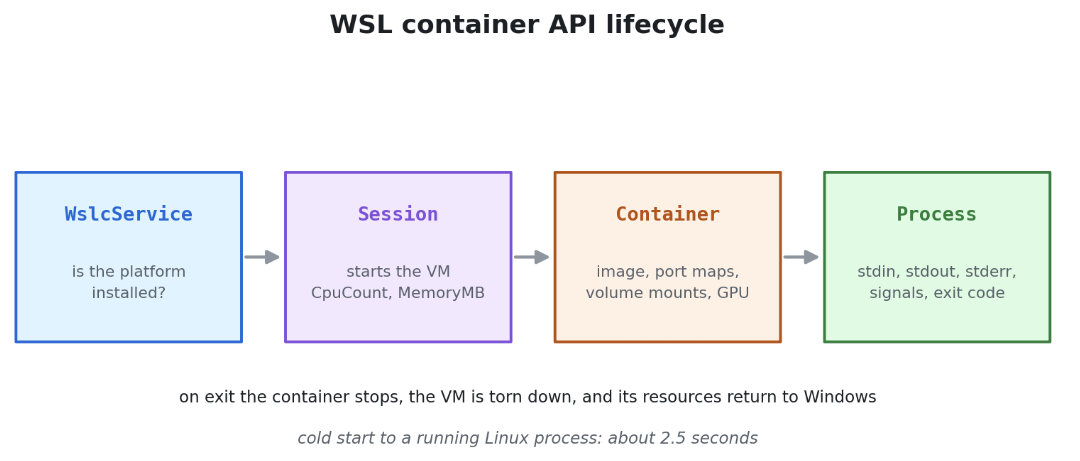
Run the WinUI front end and it is indistinguishable from any other Windows app. Drop in a PDF, get Markdown. Your users do not need to know that Linux is running behind the app. They need the app to work. When the process exits, the VM is torn down and its resources are returned.
There is a lazy-wslc project, a terminal user interface dashboard for your containers, in the spirit of lazydocker. Dev Containers support landed in the VS Code extension's pre-release channel: set the Docker Path setting to wslc, and "reopen in container" and "attach to running container" work.
The case that proves it
MoonRay is DreamWorks Animation’s production path tracer, open sourced under Apache 2.0 and now an Academy Software Foundation project. It rendered “The Wild Robot,” “The Bad Guys 2,” “Puss in Boots: The Last Wish,” and “Kung Fu Panda 4.” It is a Linux codebase, deeply so.

You can now run moonray.exe from a Windows prompt. Windows paths with backslashes. Windows .rdla scene files as input. A JPEG as output. In between, a WSL container spins up, saturates every core, renders, shuts itself down, and cleans up its VM. Turn off the debug output and there is no evidence that Linux was involved at all.

That is the argument for WSL containers, stated as an artifact rather than a slogan. Not “run Linux on Windows.” Instead: ship Linux-only capability inside a Windows application, to users who will never install a runtime and never see a container. For a decade the answer to “our engine only builds on Linux” was a port, a rewrite, or a VM the customer had to manage. The answer is now a NuGet package and about thirty lines of C#.
What to do next
Standardize the box. Put dev-config.winget or a per-language workload config into your team repo. New hire, new laptop, new cloud PC: one command, idempotent, testable with winget configure test.
Get the shell you want. winget install Microsoft.Coreutils for the utilities, comfort shell for the WSL side. Stop rewriting grep pipelines into Select-String and back.
Try wslc on a disposable machine first. It requires the WSL pre-release channel. Test the narrow slice you actually depend on, in this order: a single-container web app, then a GPU workload, then private registry pulls behind your proxy, then Dev Containers. Compose compatibility is not a headline capability of the preview. If your team lives in docker compose, validate before you plan a migration.
Run SPGO once, on your hottest binary. The full loop is five steps and one afternoon. If your app is large, branchy, and full of tight inner loops, you are the target profile. Then automate the loop into your build pipeline, because the profile decays as the code and the users change.
Give your agent a CLI. Install the WinApp CLI and the Win Dev Skills plugin, then watch what changes when the agent can run your app, read its crash output, and drive its UI. The lesson generalizes far past WinUI. Whatever you want an agent to build, expose it as commands with structured output and a feedback loop, not as a GUI.
Final Thoughts
Each of these tools removes a translation step that used to sit between you and the machine. The config file removes the gap between “how my laptop is set up” and “how the build agent is set up.” Coreutils removes the gap between the pipeline you write on Linux and the one you rewrite on Windows. WSL containers remove the gap between Linux code and a Windows application. SPGO removes the gap between how your code is optimized and how it is actually used.
The reason the command line keeps showing up in every one of these stories is that a command with structured output is the smallest thing you can hand to a person, a script, a CI runner, or an agent and expect all four to get the same answer. Build systems have understood this for forty years. Agents make the point again, louder.
The other thing I keep noticing is the license file. The launcher that became a Windows dialog is MIT. The container CLI is open. The utilities are a Rust rewrite maintained in public. The renderer behind an animated feature film is Apache 2.0.
16,000 people have contributed to these repositories! If something in this stack is missing for your workflow, that gap is not somebody else’s problem to solve on a roadmap you cannot see. Go file the issue. Read the DSC document. Send the pull request. Then run winget configure on a fresh machine and watch the thing you fixed install itself.
References
Microsoft Learn:
Windows Developer Configurations: https://learn.microsoft.com/en-us/windows/dev-configs/?WT.mc_id=AZ-MVP-5000671
WinGet Configuration: https://learn.microsoft.com/en-us/windows/package-manager/configuration/?WT.mc_id=AZ-MVP-5000671
WSL container overview (CLI and API): https://learn.microsoft.com/en-us/windows/wsl/wsl-container?WT.mc_id=AZ-MVP-5000671
Get started with containers on WSL: https://learn.microsoft.com/en-us/windows/wsl/tutorials/wsl-containers?WT.mc_id=AZ-MVP-5000671
Windows Subsystem for Linux documentation: https://learn.microsoft.com/en-us/windows/wsl/?WT.mc_id=AZ-MVP-5000671
Coreutils for Windows overview: https://learn.microsoft.com/en-us/windows/core-utils/overview?WT.mc_id=AZ-MVP-5000671
Sample Profile-Guided Optimization tutorial: https://learn.microsoft.com/en-us/cpp/build/sample-profile-guided-optimization?WT.mc_id=AZ-MVP-5000671
Profile-guided optimizations overview: https://learn.microsoft.com/en-us/cpp/build/profile-guided-optimizations?WT.mc_id=AZ-MVP-5000671
Windows App Development CLI: https://learn.microsoft.com/en-us/windows/apps/dev-tools/winapp-cli/?WT.mc_id=AZ-MVP-5000671
PowerToys: https://learn.microsoft.com/en-us/windows/powertoys/?WT.mc_id=AZ-MVP-5000671
PowerToys Command Palette: https://learn.microsoft.com/en-us/windows/powertoys/command-palette/overview?WT.mc_id=AZ-MVP-5000671
What is new for Windows developers: https://learn.microsoft.com/en-us/windows/apps/whats-new/whats-new-for-developers?WT.mc_id=AZ-MVP-5000671
GitHub repositories:
Windows Developer Config: https://github.com/microsoft/WindowsDeveloperConfig
Coreutils for Windows: https://github.com/microsoft/coreutils
Intelligent Terminal: https://github.com/microsoft/intelligent-terminal
WinApp CLI: https://github.com/microsoft/winappCli
Win Dev Skills: https://github.com/microsoft/win-dev-skills
PowerToys: https://github.com/microsoft/PowerToys
Windows Terminal: https://github.com/microsoft/terminal
WSL: https://github.com/microsoft/WSL
WSL container demo resources, including the MoonRay sample: https://github.com/microsoft/Build26-DEM346-whats-new-in-windows-subsystem-for-linux
OpenMoonRay: https://github.com/dreamworksanimation/openmoonray
Engineering blogs:
WSL container public preview: https://devblogs.microsoft.com/commandline/wsl-container-is-now-available-for-public-preview/
Announcing Intelligent Terminal 0.1: https://devblogs.microsoft.com/commandline/announcing-intelligent-terminal-version-0-1/
Introducing SPGO in MSVC: https://devblogs.microsoft.com/cppblog/introducing-sample-profile-guided-optimization-in-msvc/
Boosting Adobe Photoshop performance with MSVC and SPGO: https://devblogs.microsoft.com/cppblog/boosting-adobe-photoshops-performance-with-msvc-and-spgo/
메타데이터
- post_id
- 271dda807b1e
- slug
- wsl-containers-spgo-and-the-new-windows-developer-stack-271dda807b1e
- url
- https://blog.devops.dev/wsl-containers-spgo-and-the-new-windows-developer-stack-271dda807b1e
- canonical_url
- https://blog.devops.dev/wsl-containers-spgo-and-the-new-windows-developer-stack-271dda807b1e
- author_url
- https://medium.com/@daverendon
- status
- ok
- fetched_at
- 2026-07-17 20:05:51