Stop Opening Port 22: Secure EC2 Access with AWS SSM + SSH
For years, the default way to access an EC2 instance has been simple:
Stop Opening Port 22: Secure EC2 Access with AWS SSM + SSH
For years, the default way to access an EC2 instance has been simple:
- Open port 22
- Download a
.pemfile - SSH into the server
It works, until it doesn’t.
Managing SSH keys across teams becomes messy fast. Security groups end up exposing port 22 to the world. Bastion hosts multiply. Auditability disappears. Someone loses a key and suddenly access becomes a nightmare.
That’s where Amazon Web Services Systems Manager Session Manager changes everything.
With AWS SSM, you can connect to EC2 instances entirely over HTTPS using IAM authentication, no inbound ports required.
But here’s the part many engineers miss:
You can also keep using your normal SSH workflows — including VS Code Remote SSH, SCP, SFTP, and port forwarding — while still avoiding public SSH exposure.
This guide walks through both approaches.
Why SSM Is Better Than Traditional SSH
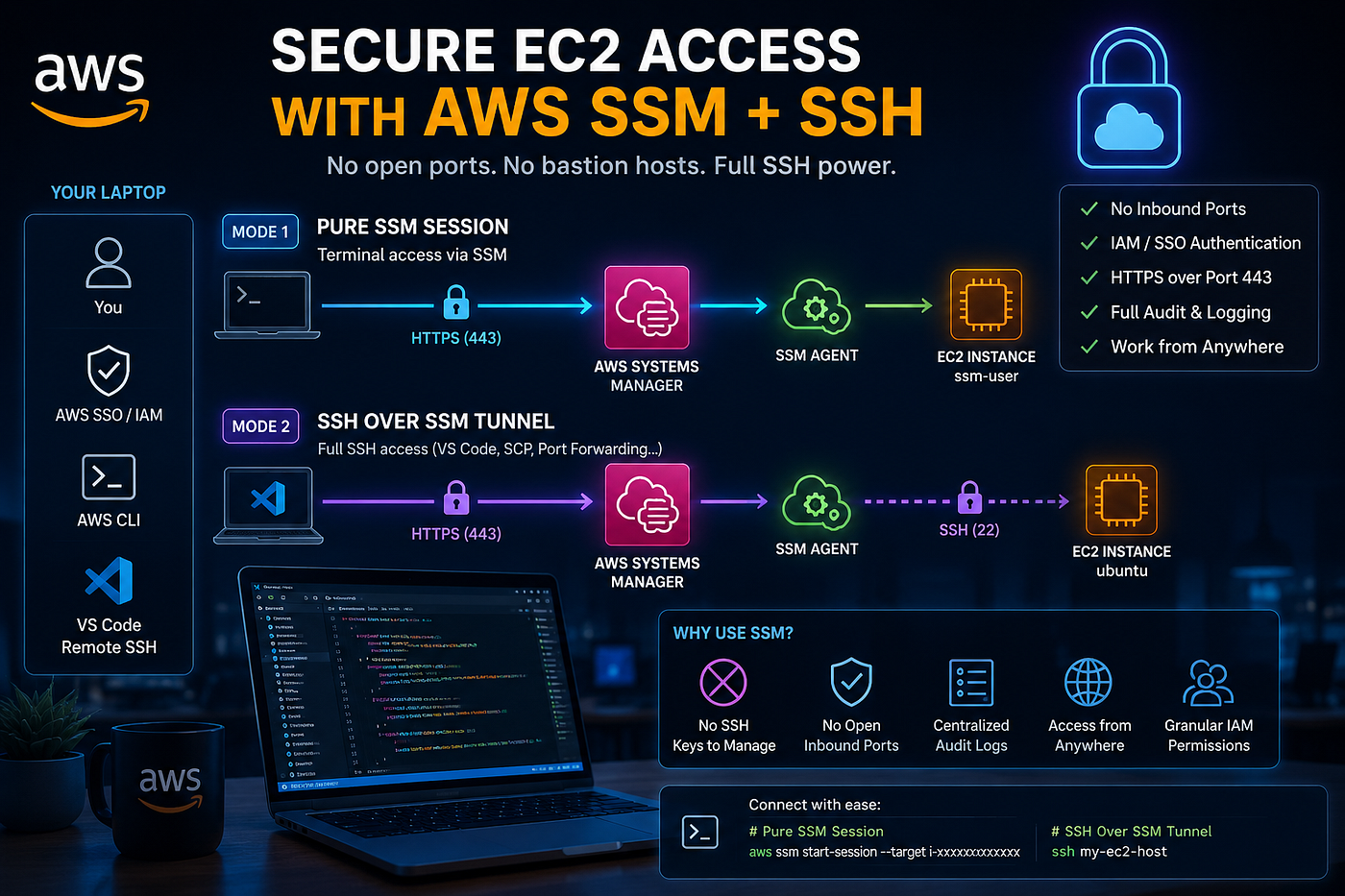
Traditional SSH access introduces several operational and security problems:
- SSH keys must be distributed and rotated manually
- Port 22 often remains publicly exposed
- No centralized audit trail
- Bastion hosts become operational overhead
- Lost keys can lock users out permanently
Using AWS SSM solves these issues:
- No inbound ports required
- Traffic runs entirely over HTTPS (443)
- Authentication integrates with IAM and AWS SSO
- Full session auditing through CloudTrail
- No bastion hosts required
- Works securely from anywhere
The EC2 instance only needs:
- The SSM Agent installed
- An IAM role with SSM permissions
- Outbound internet access (or VPC endpoints)
The Two Ways to Use SSM
This is the key distinction most documentation skips.
There are actually two different connection models.
Mode 1: Pure SSM Session
This is the simplest approach.
You connect directly through the SSM agent running on the instance.
aws ssm start-session \
  --target i-xxxxxxxxxxxxxxxxx \
  --profile engineering
Architecture:
Your Laptop
    │
 HTTPS (443)
    │
AWS Systems Manager
    │
SSM Agent on EC2
    │
ssm-user shell
Characteristics
- No SSH keys required
- No port 22 exposure
- IAM/SSO authentication only
- Browser-compatible
- Extremely secure
- Great for debugging and terminal work
Limitation
You do not get:
- VS Code Remote SSH
- SCP/SFTP
- Native SSH tooling
- Port forwarding
- SSH agent forwarding
This is a terminal session only.
If you need a full development workflow, use Mode 2.
Mode 2 — SSH Over an SSM Tunnel
This is the hidden superpower.
Instead of replacing SSH, SSM becomes the transport layer for SSH.
You still use SSH normally:
- VS Code Remote
- SCP
- SFTP
- Port forwarding
- SSH configs
- Native tooling
But the SSH traffic is tunneled securely through SSM over HTTPS.
No public port 22 required.
Architecture:
Your Laptop
    │
 HTTPS (443)
    │
SSM Tunnel
    │
SSH on Port 22 (internal only)
    │
ubuntu/ec2-user shell
This gives you the best of both worlds:
- Modern AWS-native authentication
- Full developer SSH workflows
Important Clarification
Even though SSM handles the tunnel securely, SSH authentication still happens inside the tunnel.
That means:
- You STILL need an SSH key pair
- Your
.pemfile is still required - SSH authentication still validates normally
SSM replaces network exposure — not SSH authentication itself.
Step-by-Step Setup
1. Install the AWS CLI
Install the AWS CLI from the official AWS documentation.
Verify:
aws --version2. Install the Session Manager Plugin
This plugin is required for both SSM modes.
Install the Session Manager plugin for the AWS CLI — AWS Systems Manager
Windows PowerShell
Invoke-WebRequest -Uri `
"https://s3.amazonaws.com/session-manager-downloads/plugin/latest/windows/SessionManagerPluginSetup.exe" `
-OutFile "$env:TEMP\SessionManagerPluginSetup.exe"

Start-Process `
"$env:TEMP\SessionManagerPluginSetup.exe" `
-Wait
Verify installation:
session-manager-plugin --version3. Configure AWS SSO
Your AWS config might look like this:
[profile engineering]
sso_session = company_sso
sso_account_id = 111122223333
sso_role_name = AdministratorAccess
region = eu-central-1

[sso-session company_sso]
sso_start_url = https://example.awsapps.com/start
sso_region = eu-central-1
sso_registration_scopes = sso:account:access
Login:
aws sso login --profile engineeringAll sensitive identifiers above are anonymized intentionally.
4. Configure SSH Over SSM
Now the powerful part.
Add this to your SSH config:
Windows
Path:
%USERPROFILE%\.ssh\configLinux/macOS
Path:
~/.ssh/configConfig:
Host production-app
    User ubuntu
    IdentityFile ~/.ssh/my-key.pem

    ProxyCommand powershell -Command "
    aws sts get-caller-identity --profile default 2>$null;
    if ($LASTEXITCODE -ne 0) { aws sso login --profile default };
    aws ssm start-session ^
      --target i-xxxxxxxxxxxxxxxxx ^
      --document-name AWS-StartSSHSession ^
      --parameters 'portNumber=22' ^
      --profile engineering
    "

    StrictHostKeyChecking no
    ServerAliveInterval 60
    ServerAliveCountMax 3
Connecting
Pure SSM
aws sso login --profile engineering

aws ssm start-session \
  --target i-xxxxxxxxxxxxxxxxx \
  --profile engineering
Switch user if needed:
sudo su ubuntuSSH over SSM
ssh production-appThat’s it.
You now have:
- Full SSH
- No exposed port 22
- IAM-authenticated access path
- Secure HTTPS transport
Final Thoughts
SSM fundamentally changes how EC2 access should be handled.
You no longer need:
- Public SSH exposure
- Bastion hosts
- VPN dependency
- Shared SSH keys across teams
And with SSH-over-SSM, you don’t even have to sacrifice developer experience.
You keep:
- Native SSH workflows
- VS Code Remote
- SCP
- Port forwarding
while gaining:
- IAM authentication
- HTTPS transport
- centralized auditing
- dramatically reduced attack surface
For infrastructure and platform teams, this is one of the cleanest upgrades you can make to your AWS access model today.
메타데이터
- post_id
- 27536c18d8a2
- slug
- stop-opening-port-22-secure-ec2-access-with-aws-ssm-ssh-27536c18d8a2
- url
- https://medium.com/@bounouh.fedi/stop-opening-port-22-secure-ec2-access-with-aws-ssm-ssh-27536c18d8a2
- canonical_url
- https://medium.com/@bounouh.fedi/stop-opening-port-22-secure-ec2-access-with-aws-ssm-ssh-27536c18d8a2
- author_url
- https://medium.com/@bounouh.fedi
- status
- ok
- fetched_at
- 2026-06-09 15:37:30