Inside Git: Deep Dive Explanation
How it works and role of the .git folder ?
Inside Git: Deep Dive Explanation
How it works and role of the .git folder ?
How Git Works Internally?
Whenever we run the command “git init” , it creates a hidden folder .git inside our directory which consist of lot of information for tracking changes.
Git is content addressable filesystem , means whatever content is git will store it and give you a unique hash which can be used later on to access it.Git uses the SHA-1 hashing algorithm to generate these hashes, ensuring that each piece of content can be uniquely identified and retrieved efficiently.
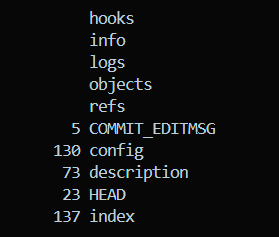
Following are the folders and files present inside the git folder —
- objects/ — Here, Git stores codebase as a series of snapshots with two subfolders pack for compressed snapshots and info for metadata .
- logs/ — Here, Git stores all commit message, author of commit and timestamp.
- refs/ — stores references of commits and branches along with subfolder heads for head branch and tags for tags.
- HEAD — This text file stores the hash of currently checked-out commit
- index — binary file that acts as a temporary holding area between your working directory and your repository.
- config — stores repository level configiration
Git Objects: Blob, Tree, Commit
Git stores objects using SHA-1 hashes. To enable faster access and avoid having too many files in a single directory, Git creates subdirectories using the first two characters of the hash. Inside each directory, the remaining characters of the hash are used as the object file name.
Git uses three core data structures (objects) to store everything in a repository:
- Blob
- Tree
- Commit
These objects together store:
- File contents
- File names & directory structure
- Commit metadata (message, author, history)
You can inspect these objects using:
git cat-file -t <hashid>   # tree
git cat-file -p <hashid>
Commit Object
This stores:
- Commit message
- Author & committer info
- Timestamp
- Hash of the root tree
- Parent commit hash(es)
Commit Structure
tree <tree-hash>
parent <parent-hash>
author Name <email> timestamp
committer Name <email> timestamp

Commit message
Tree Object
This stores:
- File names
- Directory structure
- Mapping of names → blob/tree hashes
- File mode (permissions)
mode   type   hash       name
100644 blob   <hash>     file.txt
040000 tree   <hash>     src/
Blob Object
This stores file content only.

How Git Tracks Changes
When you run git add command , git moves the changes from working directory to staging area and started tracking changes but it does not create any history.
After that when we commit the changes , git creates a new commit object. This commit stores snapshot of project along with metadata such as author, commit message and timestamp in the object directory. It also moves the current branch pointer to the new commit and updates the reference in the HEAD.
When we git checkout , Git updates the address pointed to by HEAD and updates the working directory to match the selected branch or commit.
The git log command reads commit objects and uses hashid to access associated tree and objects, after that git displays commit history and file changes.
Why Git Is So Fast
Git is fast because files are identified using hashes, making content retrieval efficient. Git objects are immutable, which ensures consistency and allows safe reuse of data. Git avoids duplication by storing identical content only once. Additionally, all operations are performed locally, eliminating the need for constant network access.
Conclusion
Git is a powerful and efficient version control system because of its internal design. By using a content-addressable storage model, immutable objects, and SHA-1 hashing, Git ensures data integrity, avoids duplication, and provides fast access to history. The .git folder acts as the backbone of the repository, storing all essential information required to track changes and manage versions. Understanding Git’s internal structure helps developers use Git more effectively, debug issues confidently, and appreciate why Git is both reliable and fast.
메타데이터
- post_id
- 2757efea7ba8
- slug
- inside-git-deep-dive-explanation-2757efea7ba8
- url
- https://medium.com/@sneha12c/inside-git-deep-dive-explanation-2757efea7ba8
- canonical_url
- https://medium.com/@sneha12c/inside-git-deep-dive-explanation-2757efea7ba8
- author_url
- https://medium.com/@sneha12c
- status
- ok
- fetched_at
- 2026-07-14 02:57:02