The token budget behind ArcKit’s plugin split, and how to split a plugin of your own
Every architecture decision has a number behind it. The number behind ArcKit v5.0.0 came from one command: claude plugin details.
The token budget behind ArcKit’s plugin split, and how to split a plugin of your own
Every architecture decision has a number behind it. The number behind ArcKit v5.0.0 came from one command: claude plugin details.
Run it against the old single-plugin ArcKit and Claude Code reports that the toolkit added roughly 15,000 tokens to the system context of every session, before you typed anything. A third of that was jurisdictional compliance for countries the user would never work in. This article is about that measurement, why it justified splitting ArcKit into seven plugins, and how to do the same split on a plugin of your own.
Reading the receipt
claude plugin details arckitclaude plugin details separates two kinds of cost, and the distinction is the whole story.
Always-on cost is paid on every session. It is the metadata that loads into the system context so the model knows what is available: the description of every command, every skill, every agent. Hooks cost nothing here, because they run in the harness rather than the model context. MCP tool schemas resolve at runtime and are not counted either.
On-invoke cost is paid only when a specific command actually fires. This is the full weight of a command: its prompt, its template guidance, its instructions. For ArcKit it ranges from a few hundred tokens for start up to roughly 60,000 for jsp-936, the MOD defence-assurance command. Most commands sit in the 5,000 to 10,000 range. You never pay it unless you run the command.
Always-on is the cost that matters for a structural decision, because it is the cost every user pays whether or not the feature is ever relevant to them. Run claude plugin details arckit against the core plugin today and it reports about 10,042 tokens always-on. The interesting question is what the figure was before the split, and where it went.
Agents, not commands, dominate the core figure
The intuition most plugin authors have is that commands are expensive. For the core plugin the data says otherwise. A core command-skill costs only about 20 to 70 tokens always-on, roughly 35 on average. Seventy-one of them is around 2,600 tokens. The five utility skills add roughly 730 more.
The agents are where the core budget goes. ArcKit’s research agents carry long descriptions, because a good agent description includes the trigger examples that teach the model when to dispatch it. arckit-gcp-research costs about 720 tokens always-on. arckit-datascout about 670. arckit-azure-research about 670. arckit-research about 640. Summed across all the agent descriptors, the agents account for roughly 6,700 tokens, about two-thirds of the entire 10,042-token always-on figure.
Hold that finding, because the overlays behave in exactly the opposite way.
Running the same command on the overlays
ArcKit’s six community overlays carry no agents, no hooks, no MCP servers. They are pure command-skills. So the intuition that “commands are cheap” should hold, and the overlay cost should be small. Run claude plugin details on each and it is not.
- arckit-ca, 12 commands, about 1,465 tokens always-on
- arckit-uae, 12 commands, about 1,342 tokens
- arckit-fr, 12 commands, about 910 tokens
- arckit-au, 8 commands, about 704 tokens
- arckit-eu, 7 commands, about 505 token
- arckit-at, 3 commands, about 323 tokens
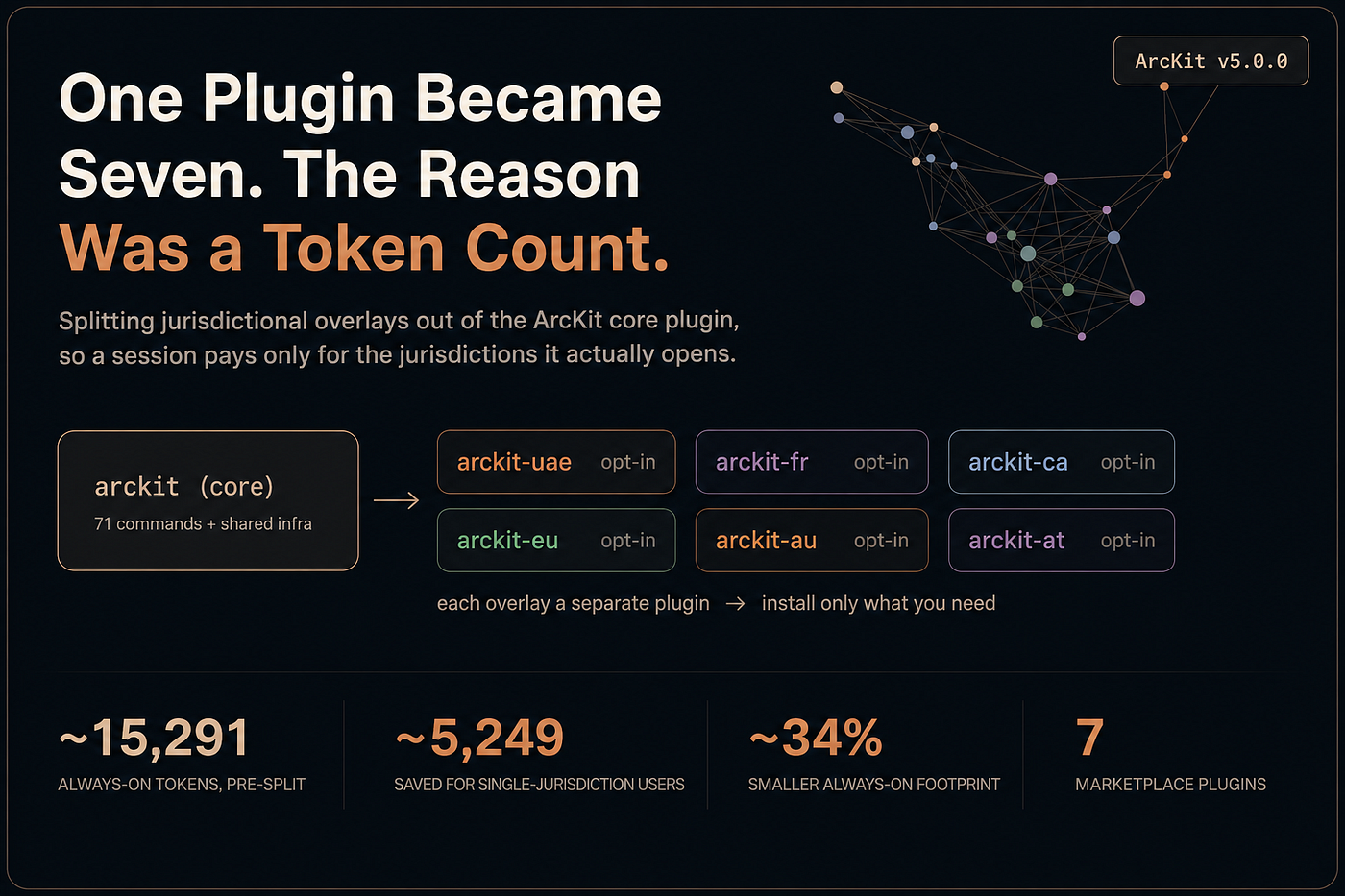
That is about 5,249 tokens always-on across the six overlays. An overlay command costs roughly 70 to 120 tokens always-on, three times what a core command costs. The reason is description length. A core command description is a terse one-liner. An overlay command description has to carry its regulatory context, so it runs two or three sentences: the statute it implements, the framework it scores against, the artefact it produces. That detail is good for the model’s command selection. It is also not free.
Add it up. Before v5.0.0, ArcKit shipped as a single plugin with every overlay welded in. The always-on cost of having ArcKit installed was not 10,042 tokens. It was roughly 10,042 plus 5,249, about 15,291 tokens on every session. And about a third of that, the full 5,249, was jurisdictional compliance for five countries any given user was almost certainly not working in.
Why a third of the budget was the wrong third
A UK Ministry of Defence supplier does not run UAE federal compliance commands. A Canadian federal team has no use for French ANSSI guidance. Under the single-plugin model every one of those users carried the full 5,249-token overlay baseline, on every session, for capabilities they would never invoke.
This is not a rounding error. It is a third of ArcKit’s always-on footprint, and it was growing. Every new jurisdiction ArcKit supported added several hundred more always-on tokens to every existing user’s sessions, including users for whom the new jurisdiction was irrelevant. A cost that is a third of the budget today and unbounded tomorrow is exactly the kind of cost a structural change should remove.
There is a second cost the token figure does not capture. Every command the model sees and has to consider is attention it is not spending on the user’s actual work. A UK architect whose command list is cluttered with Diffusion Restreinte handling and UAE Pass integration is being offered options that are noise. Removing them sharpens the tool as well as the token count.
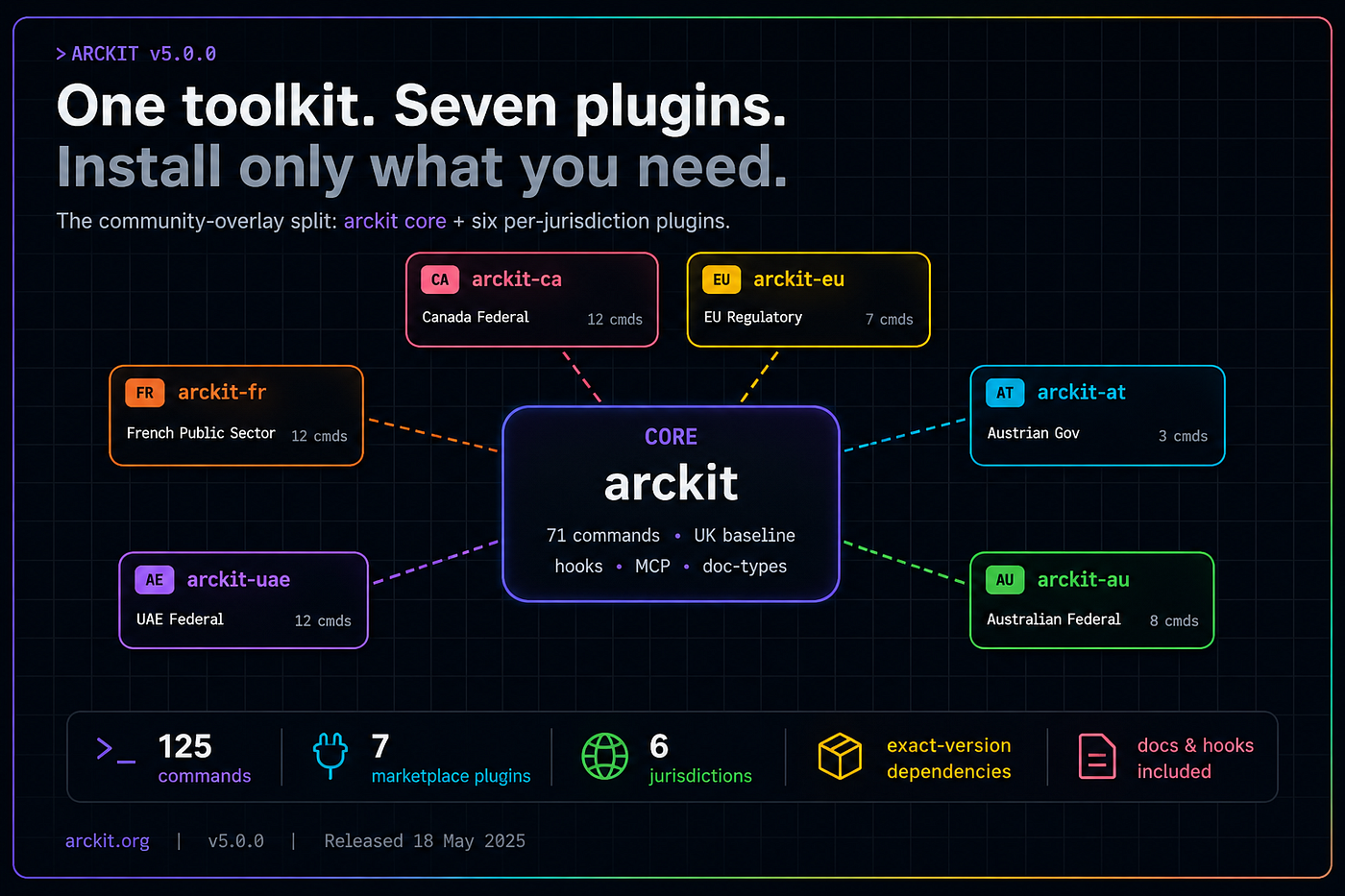
So v5.0.0 splits ArcKit into seven marketplace plugins. The core plugin keeps the UK Government baseline and the shared infrastructure, and reports its honest 10,042-token always-on cost. Each of the six community overlays becomes its own plugin with its own measured baseline. A UK-only user installs core and stops, and their always-on footprint drops from about 15,291 tokens to about 10,042, a cut of roughly 34 percent. A multi-jurisdiction user installs the overlays they need and pays for exactly those. Either way the cost is opt-in and visible, documented in a “What it costs” section of the README rather than hidden in a bundle.
How to split a monolithic plugin
If you maintain a Claude Code plugin that has accreted optional content, here is the split, in the order ArcKit did it.
Measure first
Run claude plugin details on your plugin, and on each unit you are thinking of splitting out, before you change anything. Read the always-on figures. ArcKit’s split was decisive because the measurement was decisive: a third of the always-on budget was optional content. If your numbers come back small, the honest move is to split for relevance and bounded future growth rather than claim a token saving you cannot deliver. Measure so your rationale matches reality.
Find the seam
Decide what is core and what is optional. The test ArcKit used: core is anything that is shared infrastructure or a single source of truth. Optional is anything that serves one audience.
Core kept the hooks, the MCP server definitions, the plugin user configuration, and the doc-type registry that the filename-validation hook reads. Doc types stay in core forever, because the validator must have one authoritative list of valid artefact codes. Each overlay took only what serves its jurisdiction: its commands, its templates, its build recipes, its guides.
Give each split-out unit its own plugin directory
Each overlay becomes a sibling directory with the full plugin shape: a .claude-plugin/plugin.json manifest, its own VERSION, its own CHANGELOG.md, its own README.md. That is what makes it independently installable and independently documented.
Declare the dependency
A split only helps if installing an overlay still pulls in core. Claude Code added a dependencies field to the plugin manifest in version 2.1.110. Every community plugin declares an exact dependency on the core plugin:
{
  "name": "arckit-uae",
  "version": "5.0.0",
  "dependencies": { "arckit": "5.0.0" }
}
Now claude plugin install arckit-uae resolves the dependency, installs core first, then installs the overlay, and reports both. The user asks for the overlay and gets a working toolkit.
Update the marketplace catalogue
The marketplace catalogue has to list every plugin, not just core, so each is discoverable and installable by name. A missing entry is an overlay nobody can find.
Make shared lookups location-aware
Anything in core that resolves files now living in an overlay must learn to look in sibling plugins. ArcKit’s build harness is the example: its recipe lookup became three-tier, checking project overrides, then core, then sibling community plugins via a glob on ${CLAUDE_PLUGIN_ROOT}/../arckit-*/recipes/. The glob picks up any current or future overlay’s recipes with no further code change. This still needs more thinking.
Tag per plugin
The Claude Code plugin system resolves versions from native per-plugin tags. A release script now cuts one tag per plugin (arckit — v5.0.0, arckit-uae — v5.0.0, and so on) alongside the umbrella v5.0.0 tag that triggers the GitHub Release.
Give upgraders a migration path
Existing users have projects that already used overlay commands. ArcKit’s SessionStart hook reads the project manifest, identifies which jurisdictions the project used, and prints the exact claude plugin install command for that project. The banner is one-shot. A split that strands existing users is not a clean split.
Decide what stays monolithic
Not every distribution channel benefits from splitting. ArcKit’s non-Claude extensions (Codex CLI, Gemini CLI, OpenCode CLI, GitHub Copilot) have no parallel-install model, so they stay monolithic and ship the merged content of all seven plugins. Split where the install model rewards it. Stay monolithic where it does not.
What the split is already proving
The first test of any extensible design is the next contribution. Since v5.0.0, a seventh overlay has gone through the same pattern: arckit-uk-nhs, a clinical-safety overlay for NHS suppliers, and the first sector overlay rather than a jurisdiction one. It needed no changes to the build harness, the dependency resolver, or the marketplace machinery beyond its own catalogue entry. It declared its dependency on core, registered its doc types in core, and shipped. Crucially, it added its always-on cost only to the users who install it, not to everyone.
arckit-uk-nhs is also the first overlay that is not a jurisdiction. It is the first sector overlay, and it is in development now. Where the six existing overlays group commands by country, the NHS overlay groups them by industry: clinical safety for digital health suppliers, covering DCB0129 and DCB0160 clinical risk management, the Digital Technology Assessment Criteria, and UK Medical Device Regulation classification. A v4-era ArcKit could not have carried it cleanly. A clinical-safety command set is irrelevant to a defence supplier or a local-authority team, and welding it into a single plugin would have repeated exactly the mistake v5 was built to fix. Because the plugin model is now split, the NHS overlay can ship as arckit-uk-nhs with its own measured baseline, install only for health suppliers who ask for it, and prove that the split generalises past the jurisdiction axis it was first designed for. The eighth and ninth overlays, whether sector or jurisdiction, now have a template that does not care which.
That is the real return on the split. A single-jurisdiction user dropped roughly a third of ArcKit’s always-on footprint. The remaining always-on baseline is now bounded: it does not grow when ArcKit adds an eighth jurisdiction, because that jurisdiction is a separate plugin a separate user installs. The toolkit can keep adding jurisdictions without taxing the users who do not need them.
Where to start
If you use ArcKit: open a v5.0.0 session in any existing project and the migration banner tells you what to install. For the cost picture, the “What it costs” section of the README carries the always-on and on-invoke figures, and /context all reports your own live session footprint.
If you maintain a plugin of your own: run claude plugin details first, on the whole plugin and on every unit you might split out. Let the real always-on figures decide both whether to split and how big a benefit to claim. The dependencies field is the tool that lets you act on the result without stranding anyone.
ArcKit v5.0.0 is on GitHub. The seven plugins are in the marketplace at tractorjuice/arc-kit.
Join the ArcKit Community
- Discord — real-time conversation, help with commands, and what people are building: discord.gg/UsfzrZmr
- LinkedIn Group — announcements, case studies, and longer-form discussion: linkedin.com/groups/17641034
- GitHub — code, issues, and contributions: github.com/tractorjuice/arc-kit
메타데이터
- post_id
- 27d11f5f3502
- slug
- the-token-budget-behind-arckits-plugin-split-and-how-to-split-a-plugin-of-your-own-27d11f5f3502
- url
- https://medium.com/arckit/the-token-budget-behind-arckits-plugin-split-and-how-to-split-a-plugin-of-your-own-27d11f5f3502
- canonical_url
- https://medium.com/arckit/the-token-budget-behind-arckits-plugin-split-and-how-to-split-a-plugin-of-your-own-27d11f5f3502
- author_url
- https://medium.com/@mcraddock
- status
- ok
- fetched_at
- 2026-06-10 08:17:25