Create Efficient Load Testing With Playwright and Artillery!
Greetings, fellow QAs! This article is going to be exceptionally valuable, particularly if you’re new to writing load testing scripts and…
Create Efficient Load Testing With Playwright and Artillery!
Greetings, fellow QAs! This article is going to be exceptionally valuable, particularly if you’re new to writing load testing scripts and feeling overwhelmed. If you’re facing challenges with load testing, unsure of where to begin, and feeling confused by the multitude of available tools, this blog will provide you with a comprehensive understanding of how to quickly and efficiently start writing your own load test cases.
As we’re aware, many tools exist for load testing. However, have you ever considered using your existing automation test cases to perform load testing? This is precisely what we will explore and discover: how it can be accomplished.
Artillery has introduced a new feature that lets you integrate Playwright into your load testing process. This integration allows you to use Playwright as the engine in your Artillery YAML file. By doing this, you can leverage Playwright’s capabilities to write your load test cases effectively.

By specifying Playwright as the engine, Artillery is ready for us to provide further context on how to use Playwright. Let’s proceed with the following steps to configure and utilize Playwright within Artillery.

To group metrics by scenario name, configure the Playwright engine with “aggregateByName: true” and assign names to your scenarios. This allows you to aggregate metrics based on the specified scenario names. Additionally, you can use contextOptions to provide Playwright context details like baseURL and extraHTTPHeaders. Furthermore, launchOptions can be utilized to define the headless mode by setting it to either true or false.
Now, we need to import the function that will serve as our load test case, which artillery will carry out utilizing the playwright engine.

In the phases, we can outline the test strategy. If you want more information, you can refer to my earlier article, which will provide you with valuable information about artillery.

Now it’s time to include our test scenario and specify the necessary playwright function that will serve as our test case.

We can now confirm that our artillery configuration file has been completed.
Playwright, it is now the time to compose our test scenario using the playwright functions in the utils.js file, which will subsequently be loaded into the processor.
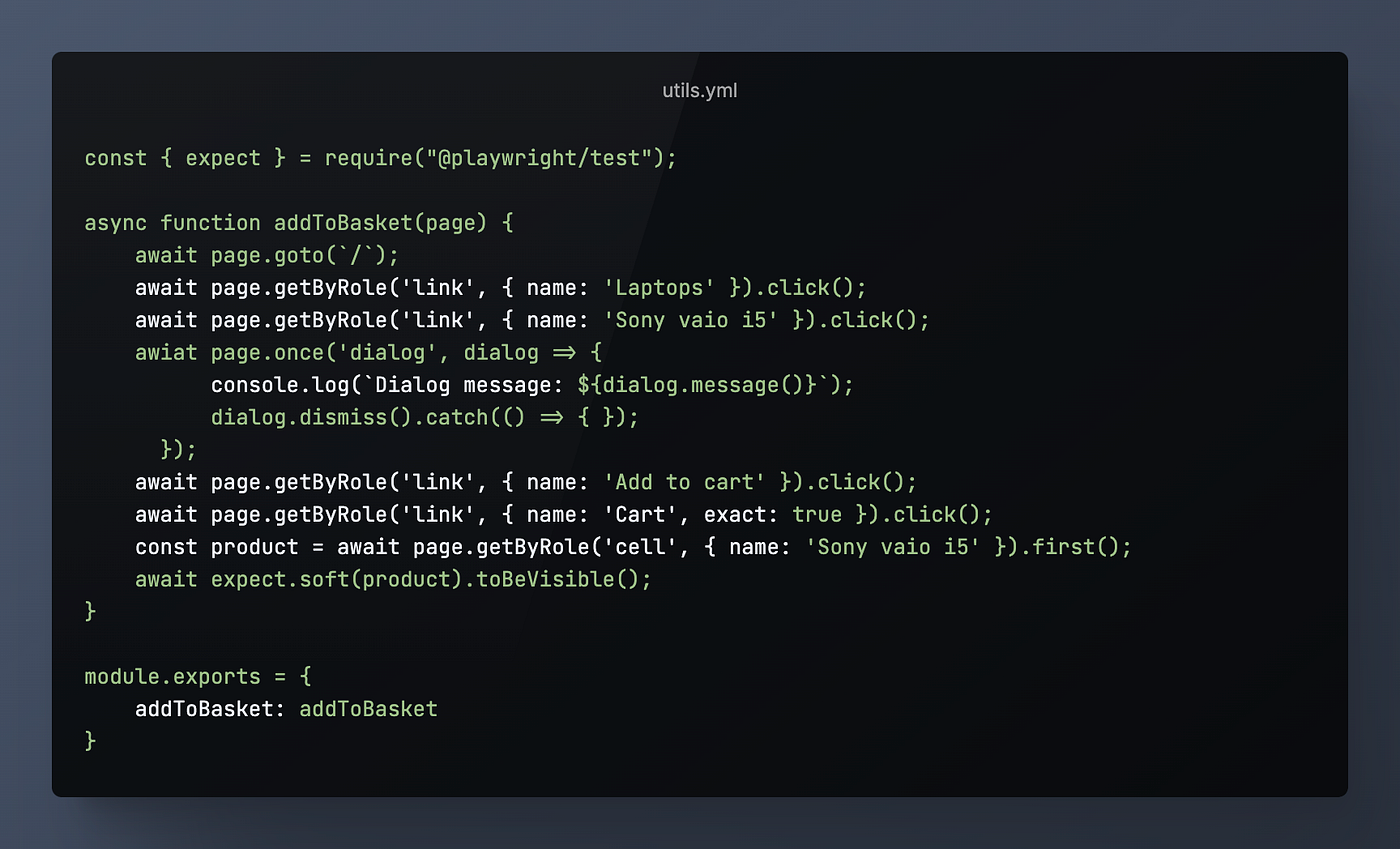
As demonstrated above, we have utilized the common Playwright JavaScript method, similar to writing a typical Playwright test case. However, it’s important to note that there is a limitation where all functions must be written in JavaScript and cannot be in TypeScript.
For the test case, you have the option to write it manually or leverage the privilege of codegen feature to derive the test case. After generating the test case, you can simply copy and paste it into the desired function as shown below

Generating the test script using Codegen
PageObjects approach is highly beneficial as it provides a well-structured workflow, enhances reusability, and improves readability. Considering that we may already have existing PageObjects within our end-to-end (e2e) project, we can use them for our load testing script. This allows us to avoid duplicating work and enables us to perform more comprehensive load testing with greater detail.

Let’s modify “utils.js” to “pageObjects.js" and include the addToBasket test method in it.

Full Script
As you can see, the new script is much smaller than the previous one we made for the article. We moved most of the complex logic from the YAML file to the processor JavaScript file.
config:
  target: "https://demoblaze.com"
  plugins:
    expect: {}
  engines:
    playwright:
      aggregateByName: true
      contextOptions:
        baseURL: "https://demoblaze.com"
      launchOptions:
        headless: false
  processor: "./pageObjects.js"
  phases:
    - duration: 1
      arrivalRate: 2
      name: Warm up
scenarios:
    - name: "Add an item to basked and purchase it"
      engine: playwright
      testFunction: "addToBasket"
Load test Execution

As shown above, our load test is running efficiently through the frontend with reduced effort, Thanks to playwright!
Conclusion
The integration of Artillery and playwright provides a significant advantage in the way we writing load test cases. It offers added flexibility to customize your load tests and efficiently utilize the powerful features of playwright.
Thank you for taking the time to read my blog — I hope it provided some insight and value into your project. Stay tuned for the new upcoming interesting blogs…
메타데이터
- post_id
- 280426db437b
- slug
- create-efficient-load-testing-with-playwright-and-artillery-280426db437b
- url
- https://medium.com/@Amr.sa/create-efficient-load-testing-with-playwright-and-artillery-280426db437b
- canonical_url
- https://medium.com/@Amr.sa/create-efficient-load-testing-with-playwright-and-artillery-280426db437b
- author_url
- https://medium.com/@Amr.sa
- status
- ok
- fetched_at
- 2026-07-25 12:44:45



