Use a UART-interfaced LoRa module with an ESP32-H2 Super Mini Development Board and transmit and…
This tutorial is part of a series of articles about the small ESP32-H2 Super Mini (“SM”) development board. I will explain how to control…
Use a UART-interfaced LoRa module with an ESP32-H2 Super Mini Development Board and transmit and receive LoRa packets
This tutorial is part of a series of articles about the small **ESP32-H2 Super Mini (“SM”) development board. I will explain how to control an external LoRa module with a UART interface so that you can use it in your projects. I store all relevant settings and methods in a separate header file** so that I can add them modularly as needed.
For this tutorial, I have chosen the DX-LR02–900T22D module, which is designed to transmit and receive LoRa packets in an effortless and smart way.
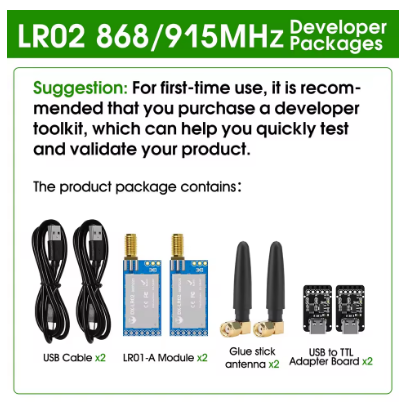
These modules are available on AliExpress for approximately 8 euros. Please pay attention to the supply voltage (we require a minimum of 3.3 volts) and the UART (serial) interface. The advantage of the UART interface is that it's a two-pin bus.
I strongly recommend that you read my two tutorials, “**Simple LoRa transmissions over several kilometers using UART/Serial LoRa modules” and “[Connect a UART-interfaced LoRa module with an ESP32-C6 Super Mini device](https://medium.com/@androidcrypto/connect-a-uart-interfaced-lora-module-with-an-esp32-c6-super-mini-device-bdec93514296)**” before using this example, because with my example you can only send and receive using the modules’ default settings (e.g., regarding transmit power, frequency, and other settings). There you will also find a detailed explanation of how to change the settings.
Don’t mix with EBYTE E220–900T22D modules
Update Feb. 25th, 2026: Please do not confuse the described LoRa UART model with the very similar-looking and similarly named model from EBYTE—the E220–900T22D LoRa module. The technical specifications are similar or identical; however, the command interface is structured differently and is incompatible with the DX-LR02–900T22D module.

Front sides of EBYTE E220–900T22D (upper) and DX-Smart DX-LR02–900T22D (lower) LoRa UART modules
Integration of the LoRa UART header file
In the main sketch, you include this header file as follows.
#include "LORA_UART.H"The header section defines an entry that can later be referenced in the program to include or omit a part of the program (“preprocessor directives”).
For communication between our ESP32-H2 device and the LoRa module, I do not use any library but just the serial interface!
Setup of the UART LoRa module
The LoRa module is connected to the ESP32-H2 via a 2-pin UART connection plus 3.3 volts/GND. On an ESP32-H2 development board, I can choose the desired pin assignment quite freely, and I have chosen the mapping shown above.
In the
void setupLoraUart() {...}method, the UART interface is started with a short timeout period to not miss any incoming packets.
Integration of the LoRa module into the sketch
The LoRa module supports the two main applications of LoRa: sending and receiving data sets (so-called packets).
Receiving packages
Integrating the receiver into an existing sketch is done in a two-step process:
- Add a line to the loop() section:
loraUartLoop();This line ensures that the boolean variable “isReceived” is set to “true” upon reception. Additionally, the internal receive buffer is filled.
- Later in the loop() function, you can decide what should happen to the received data. In my example program, the internal buffer is first output to the Serial Monitor in HEX and then in UTF-8 encoding:
if (isReceived) {
    isReceived = false;
    onboardLedFlashGreen(1, 125);  // flash the LED in GREEN
    // here is the place to work with the data, I'm just printing the received packet
    // HEX and UTF-8 encodings and displaying HEX encoding
    printRxBuffer(rxBufferLength);
    printRxBufferChar(rxBufferLength);
  }
Sending packages
First, a send buffer (“txBuffer”) must be filled with the data packet, and then this packet can be sent using the
transmitData(txLength)command.
Behavior of the sensor at different CPU frequencies
When you select a board in Arduino Tools, you define certain parameters, including the processor speed. However, with the ESP32-H2 Dev Module, there is no way (bug?) to adjust the speed via the Arduino IDE interface.
There is a simple reason for lowering the processor speed: a slower-running processor consumes less power and is therefore a valid option for battery-powered devices to increase runtime.
Therefore, I have included a feature in the test program to reduce the processor speed from 96 MHz (default) to the lowest possible speed of 48 MHz. This is done by enabling (uncommenting) this line in the header:
#define TEST_48MHZ_CPU_FREQUENCYThe result is positive; the program works perfectly even with a CPU speed of 48 MHz.
Test program
The test program tests all the functions of the helper file. To ensure the output is displayed in the “Serial Monitor”, you must enable the parameter “USB CDC on boot enabled” during compilation and upload.
If you want to see the received and sent values even without the Serial Monitor, I recommend connecting an OLED to the ESP32-H2 (tutorial), and there is an extended version of the LoRa UART sketch in the repository for display output.
Source code of the app
You find the complete code of the app in my **GitHub repository**. Since this is a series of articles, all sketches in this series are compiled in one repository. In this repository you will find zip files with all relevant libraries used in this sketch, in case they are no longer available online.
Back to the overview tutorial “**ESP32-H2 Super Mini — Small form factor, big impact (LoRa, ePaper, environment sensor, and battery powered and monitored)**”
Happy coding !
메타데이터
- post_id
- 282cbb74fe76
- slug
- use-a-uart-interfaced-lora-module-with-an-esp32-h2-super-mini-development-board-and-transmit-and-282cbb74fe76
- url
- https://medium.com/@androidcrypto/use-a-uart-interfaced-lora-module-with-an-esp32-h2-super-mini-development-board-and-transmit-and-282cbb74fe76
- canonical_url
- https://medium.com/@androidcrypto/use-a-uart-interfaced-lora-module-with-an-esp32-h2-super-mini-development-board-and-transmit-and-282cbb74fe76
- author_url
- https://medium.com/@androidcrypto
- status
- ok
- fetched_at
- 2026-06-21 19:25:17