DP-900 Deep Dive: Azure File Storage vs Blob Storage Explained
Welcome back to our DP-900 preparation series. In this post, we explore two foundational storage services in Azure — File Storage and Blob…
DP-900 Deep Dive: Azure File Storage vs Blob Storage Explained
Welcome back to our DP-900 preparation series. In this post, we explore two foundational storage services in Azure — File Storage and Blob Storage — and how they support different data formats, access protocols, and performance tiers. Whether you’re storing PDFs, JSON logs, or media files, understanding these services is key to architecting scalable, cost-effective solutions in the cloud.
Azure File Storage: Cloud-Based File Shares for Enterprise Workloads
Azure File Storage provides file-based storage that behaves like a traditional network share — but in the cloud. It’s ideal for scenarios where applications or users need to access files using familiar protocols.
What It Supports
• Unstructured files: PDFs, CSVs, XML, JSON, images, logs
• Access protocols:
◦ SMB (Server Message Block): For Windows systems
◦ NFS (Network File System): For Unix and macOS environments
Key Capabilities
• Scalability: Up to 1000 TB per share
• Concurrency: Supports 2000+ simultaneous connections
• Hybrid access: Can be mounted locally or accessed via Azure File Sync
- Security: Integrated with Azure AD and private endpoints
Azure File Sync: Hybrid File Management Made Easy
Azure File Sync allows you to centralize file shares in Azure while keeping frequently accessed files cached on-premises.
How It Works
-
Install the File Sync agent on your Windows Server
-
Register the server with Azure
-
Create a sync group linking your local path to an Azure File share
-
Enable cloud tiering to offload infrequently used files
Benefits
• Reduces local storage footprint
• Enables multi-site sync and backup
• Preserves NTFS permissions and SMB access
- Ideal for branch offices and hybrid environments
Azure Blob Storage: Internet-Optimized Object Storage
Blob Storage is Azure’s solution for object-based storage, designed for scalability, flexibility, and internet-facing applications.
Structure
• A storage account can have multiple containers
• Each container holds multiple blobs
• Each blob is a single object — blobs cannot contain other blobs
Blob Types

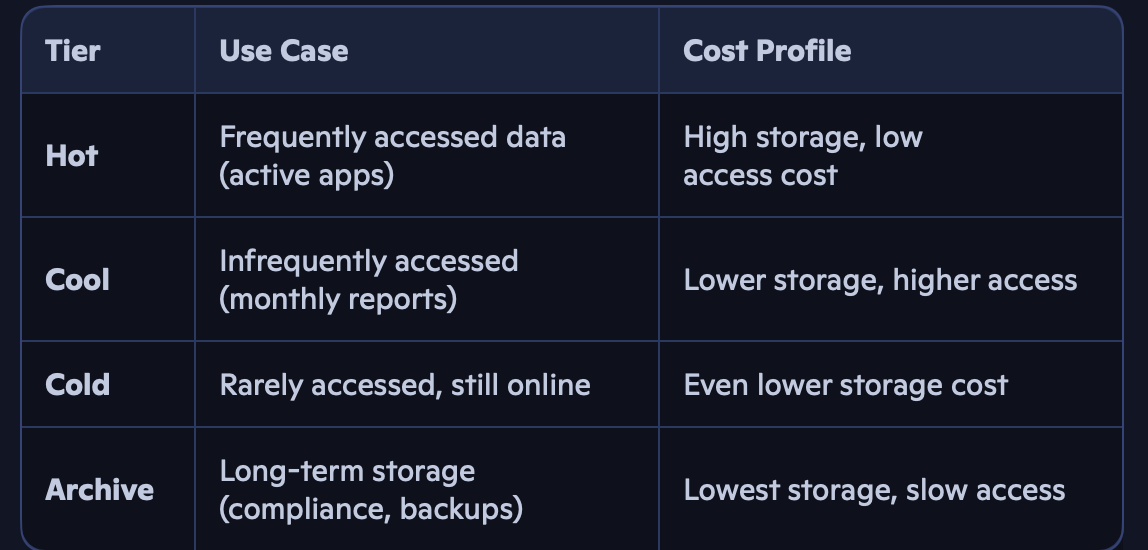
Access Tiers: Optimize Cost vs Performance
Azure Blob and File Storage support tiered access models to balance performance and cost:

These tiers can be automated via lifecycle policies, allowing files to be moved or purged after a set number of days.
Premium vs Standard Storage Accounts
Azure offers two performance tiers for storage accounts:
Premium Storage
• Backed by SSD
• Ultra-fast access and low latency
• Ideal for transactional workloads, databases, and VMs
Standard Storage
• Backed by HDD
• Supports all access tiers (Hot, Cool, Cold, Archive)
- Best for general-purpose file and blob storage
Real-World Use Cases
• Blob Storage: Hosting static websites, storing media files, archiving logs
• File Storage: Migrating legacy file shares, hybrid sync with on-prem servers
• File Sync: Centralizing branch office data, enabling DR and backup
- Lifecycle Policies: Automating archival and cost optimization
Conclusion: Choosing the Right Azure Storage
Understanding the difference between file-based and object-based storage is essential for DP-900 and real-world cloud architecture. Azure gives you the flexibility to store, access, and manage data across protocols, tiers, and performance levels — whether you’re building a scalable web app or syncing enterprise file shares.
메타데이터
- post_id
- 28316f2cbf8d
- slug
- dp-900-deep-dive-azure-file-storage-vs-blob-storage-explained-28316f2cbf8d
- url
- https://medium.com/@maheswararedypr/dp-900-deep-dive-azure-file-storage-vs-blob-storage-explained-28316f2cbf8d
- canonical_url
- https://medium.com/@maheswararedypr/dp-900-deep-dive-azure-file-storage-vs-blob-storage-explained-28316f2cbf8d
- author_url
- https://medium.com/@maheswararedypr
- status
- ok
- fetched_at
- 2026-07-17 10:53:13