Certbot with dns-cloudflare
安裝套件
Certbot with dns-cloudflare
安裝套件
sudo apt install certbot letsencrypt python3-certbot-dns-cloudflare建立 Token
cloudflare 管理帳戶 > 帳戶 API 權杖
點選 建立 Token
API 權杖範本 選擇 編輯區域 DNS 使用範本
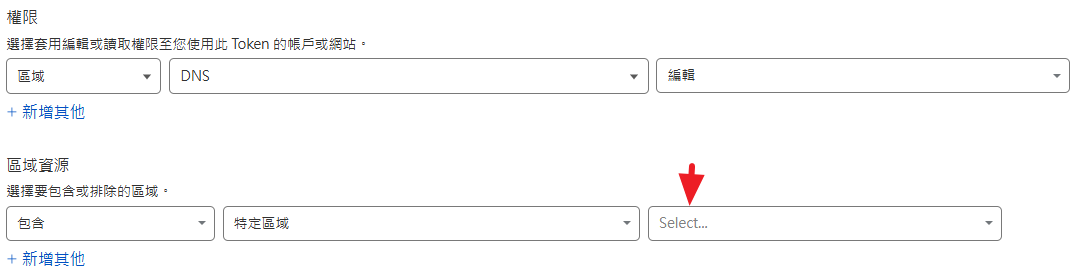
設定區域(域名)
建立證書
~/.secrets/certbot/cloudflare.ini
dns_cloudflare_api_token = xxxx設定權限
sudo chmod 600 ~/.secrets/certbot/cloudflare.ini產生憑證
certbot certonly \
  --dns-cloudflare \
  --dns-cloudflare-credentials ~/.secrets/certbot/cloudflare.ini \
  -d staging.abc.today
Successfully received certificate. Certificate is saved at: /etc/letsencrypt/live/staging.abc.today/fullchain.pem Key is saved at: /etc/letsencrypt/live/staging.abc.today/privkey.pem
메타데이터
- post_id
- 286d9e4b4ae5
- slug
- certbot-with-dns-cloudflare-286d9e4b4ae5
- url
- https://medium.com/@lalalili/certbot-with-dns-cloudflare-286d9e4b4ae5
- canonical_url
- https://medium.com/@lalalili/certbot-with-dns-cloudflare-286d9e4b4ae5
- author_url
- https://medium.com/@lalalili
- status
- ok
- fetched_at
- 2026-07-18 06:54:35
