Spec Kit Explained: How GitHub Is Trying to Fix “Vibe Coding” With Specs That Actually Compile Into…
A deep dive into GitHub’s open-source Spec-Driven Development toolkit — the workflow, the folder structure, the commands, and where it…
Spec Kit Explained: How GitHub Is Trying to Fix “Vibe Coding” With Specs That Actually Compile Into Software
A deep dive into GitHub’s open-source Spec-Driven Development toolkit — the workflow, the folder structure, the commands, and where it actually helps.
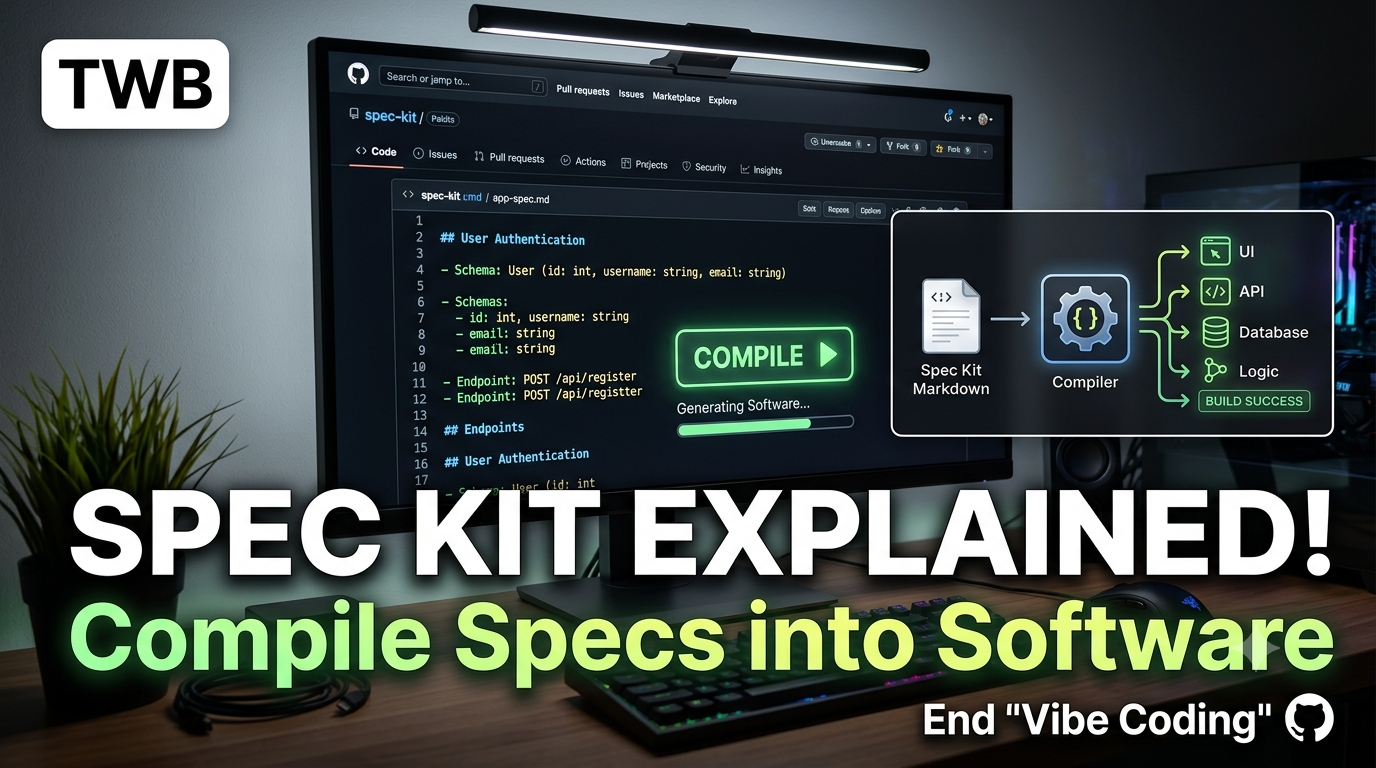
Spec Kit
Happy reading! 🎉 🚧 Free access to the article **here. 👏 Please support by clapping, following & [subscribing](https://techwealthbuzz.com/)! 💬 Drop a comment — I’d love to hear from you! 📲 Let’s connect on X (Twitter): [@vivekprasadx](https://x.com/vivekprasadx)**
If you’ve spent any time pairing with an AI coding agent, you already know the pattern. You type a big, hopeful prompt. The agent writes a pile of code. It mostly works. Then two days later you (or your reviewer) discover it silently assumed something you never said — wrong auth flow, wrong database, wrong edge case for empty states — and now you’re unwinding half a feature.
That gap between what you meant and what got built is exactly the problem GitHub’s Spec Kit is trying to close. It’s an open-source toolkit for something GitHub calls Spec-Driven Development (SDD), and the core idea is refreshingly simple: instead of throwing away the specification once coding starts, make the specification the thing that generates the code — and keep it around as the durable source of truth.
I spent some time going through the official repository, and this post walks through what it actually does, how the pieces fit together, and what a real session with it looks like — code and diagrams included.
The Core Idea: Specs Stop Being Scaffolding
Traditionally, a spec (if you write one at all) is a means to an end. A PM writes a doc, an engineer reads it once, and then the code becomes the only thing anyone trusts. The spec rots in a wiki somewhere.
Spec Kit flips that. The specification isn’t a static artifact you discard — it’s a living file that an AI coding agent reads, refines, and works from at every stage: from your very first “here’s what I want to build” sentence, all the way through planning, task breakdown, and implementation.
The traditional “vibe coding” loop versus the Spec Kit loop looks like this:
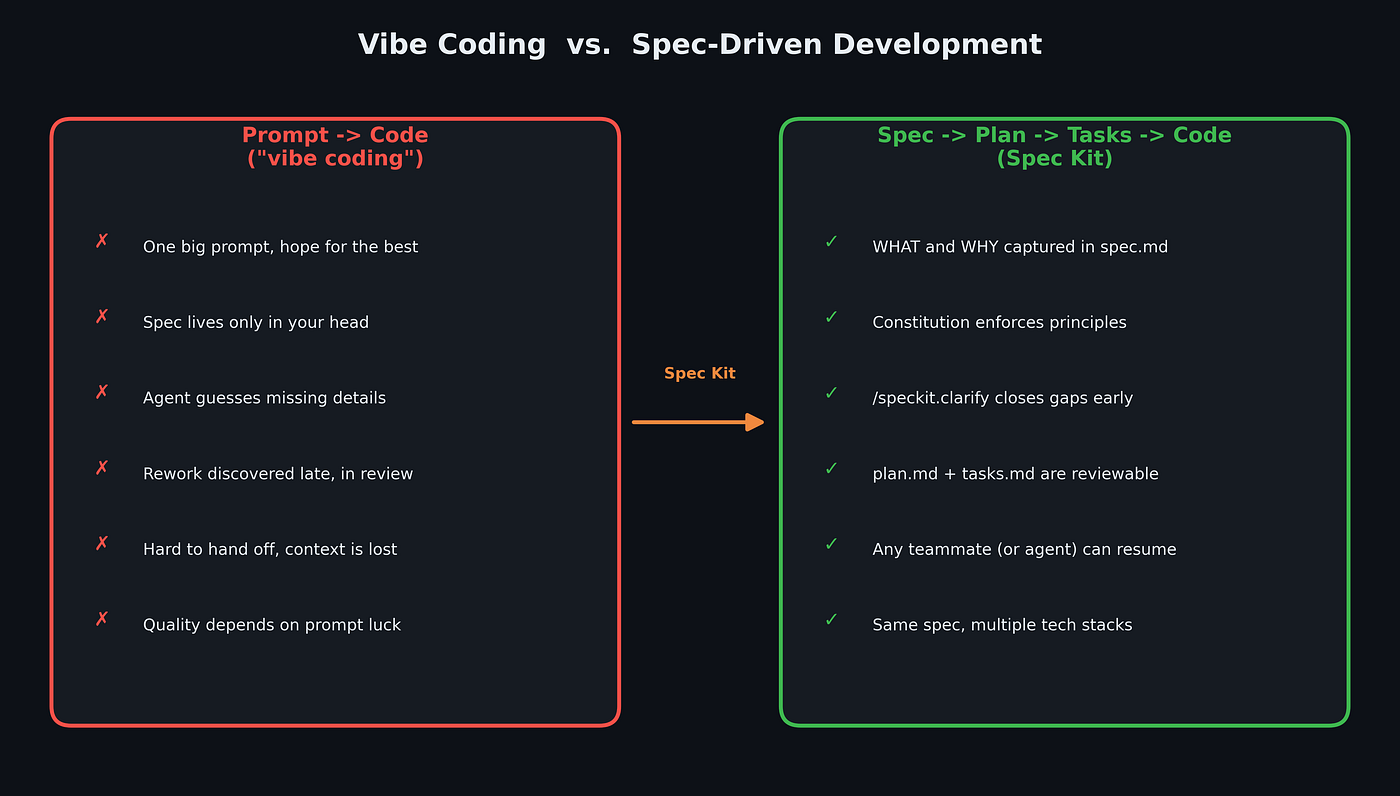
Vibe Coding vs Spec-Driven Development
The right-hand path isn’t slower because you’re adding bureaucracy for its own sake — it’s slower up front because you’re pushing the thinking earlier, where it’s cheap to fix, instead of later, where it’s expensive to fix.
Installing It
Spec Kit ships as a CLI called specify, distributed via [uv](https://docs.astral.sh/uv/) (or pipx). You need Python 3.11+ and Git.
# install the CLI (replace vX.Y.Z with the latest release tag)
uv tool install specify-cli --from git+https://github.com/github/spec-kit.git@vX.Y.Z

# bootstrap a new project, targeting your coding agent of choice
specify init my-project --integration copilot
cd my-project
--integration isn't cosmetic — Spec Kit supports 30+ AI coding agents (Copilot, Claude Code, Gemini CLI, Codex CLI, and others), and it writes agent-specific command files so that the workflow shows up as native slash commands inside whichever tool you're already using. If you'd rather work in your current directory instead of creating a new one:
specify init . --integration claude
# or
specify init --here --integration claude
Once the CLI installs itself into your project, it isn’t a one-time template dump — it stays a first-class citizen of the repo. You can check for and apply updates later:
specify self check              # is a newer release available? (read-only)
specify self upgrade --dry-run  # preview what would change
specify self upgrade            # actually upgrade in place
The Seven-Command Lifecycle
This is the heart of Spec Kit. After specify init, your coding agent gains a set of /speckit.* slash commands, and the intended workflow runs through them roughly in order:
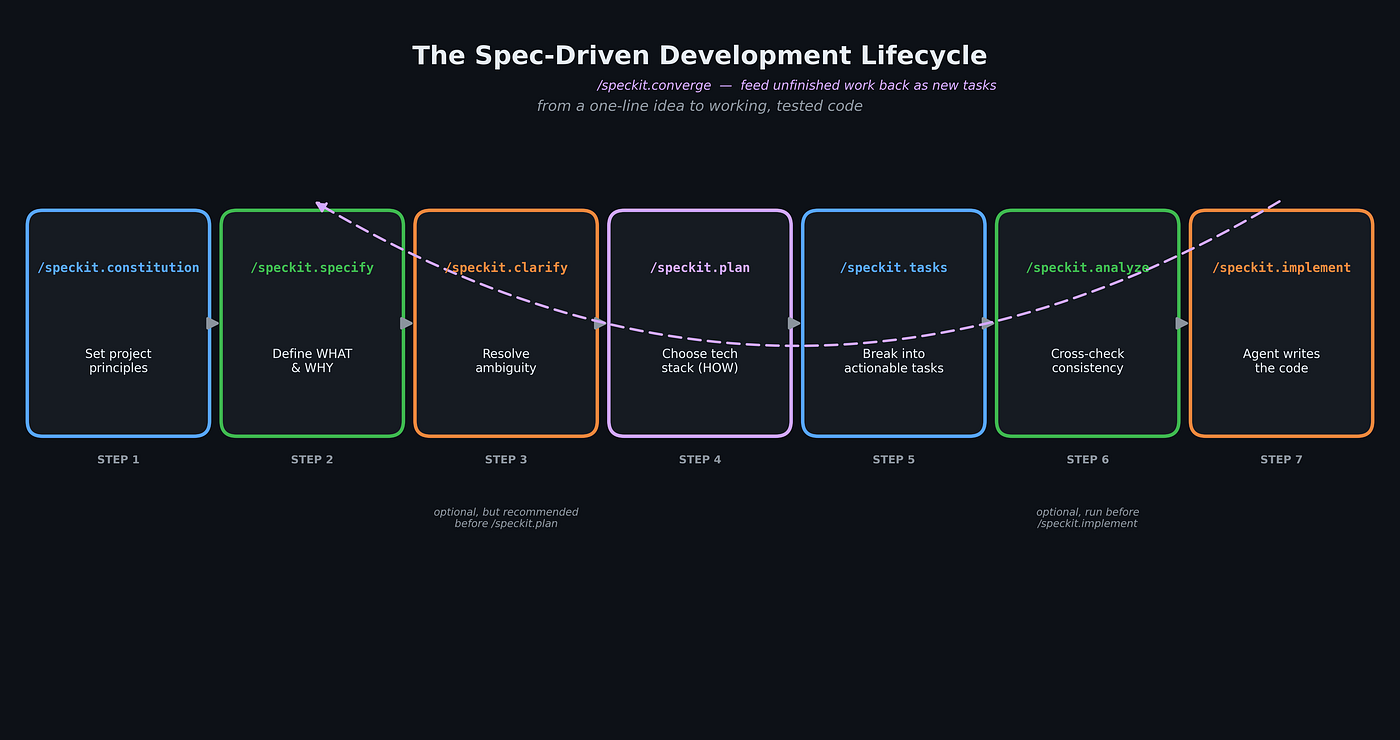
The Spec-Driven Development Lifecycle
Let’s walk through each one with real commands.
1. /speckit.constitution — set the ground rules once
Before you write a single feature spec, you establish the principles every future decision has to respect: code quality bars, testing expectations, performance budgets, UX consistency rules.
/speckit.constitution Create principles focused on code quality, testing
standards, user experience consistency, and performance requirements.
Include governance for how these principles should guide technical
decisions and implementation choices.
This writes (or updates) .specify/memory/constitution.md. Every later phase — spec, plan, tasks, implementation — is expected to check its output against this file. Think of it as the project's CLAUDE.md-for-values: it doesn't describe a feature, it describes how you build things here.
2. /speckit.specify — describe the what and the why
This is where you describe the feature in plain language. The official example in the repo is a Kanban-style app called “Taskify”:
/speckit.specify Develop Taskify, a team productivity platform. It should
allow users to create projects, add team members, assign tasks, comment
and move tasks between boards in Kanban style. I want five users in two
categories — one product manager and four engineers. Let's have the
standard Kanban columns: "To Do," "In Progress," "In Review," and "Done."
There will be no login for this initial phase — when you launch the app
you pick one of the five predefined users and land on the project list.
Notice what’s not in there: no framework, no database, no deployment target. That’s intentional — Spec Kit is explicit that this step is about what and why, not tech stack. The agent turns this into a structured spec.md with user stories and functional requirements, and creates a new feature branch (e.g. 001-create-taskify) along with a specs/001-create-taskify/ directory to hold it.
3. /speckit.clarify — close the gaps before they become bugs
Even a good spec has blind spots. /speckit.clarify runs a structured, sequential question pass over the spec, and logs the answers into a "Clarifications" section rather than losing them in chat history.
/speckit.clarifyGitHub explicitly recommends running this before /speckit.plan — resolving ambiguity here is cheap; discovering it mid-implementation is not. If you're deliberately doing a throwaway spike, you can just tell the agent to skip clarification.
4. /speckit.plan — now bring in the tech stack
Only now do you commit to concrete technical choices:
/speckit.plan The application uses Vite with a minimal number of
libraries. Use vanilla HTML, CSS, and JavaScript wherever possible.
Images are not uploaded anywhere; metadata is stored in a local
SQLite database.
This produces a small constellation of documents inside your feature folder: plan.md, research.md (technology decisions and rationale), data-model.md, quickstart.md, and a contracts/ folder for API/interface specs. If your stack involves something that moves fast (say, a framework that ships breaking changes every quarter), you can explicitly ask the agent to spin up parallel, narrowly scoped research tasks instead of vaguely "researching the library" — the repo's own docs call this out as a common failure mode to watch for.
/speckit.tasks— turn the plan into a checklist
/speckit.tasksThis generates tasks.md: a dependency-ordered, per-user-story breakdown of concrete implementation steps, with [P] markers on tasks that are safe to run in parallel, exact file paths for each task, and checkpoints so you can validate a user story in isolation before moving to the next.
6. /speckit.analyze (optional, but worth the ten seconds) — check for drift
Before you let the agent loose on implementation, /speckit.analyze cross-checks your spec, plan, and tasks for inconsistency — the classic case where the plan quietly contradicts something the spec promised.
/speckit.analyze/speckit.implement— build it
/speckit.implementThis validates that the constitution, spec, plan, and tasks all exist, parses the task graph, and executes tasks in dependency order — following a test-first approach if your tasks were structured that way, and giving progress updates as it goes. It will run local commands your project needs (npm, dotnet, whatever) — so make sure your toolchain is actually installed before you hit go.
If, later, you look at the codebase and realize there’s drift — things half-done, or new requirements that emerged after the fact — there’s an eighth command, **/speckit.converge**, that assesses the current code against spec/plan/tasks and appends the gap as new tasks rather than making you start the whole cycle over.
What Actually Lands on Disk
It’s worth seeing the folder structure directly, because it clarifies where state lives at each stage. After you’ve gone through constitution → specify → plan, a real project tree looks like this:
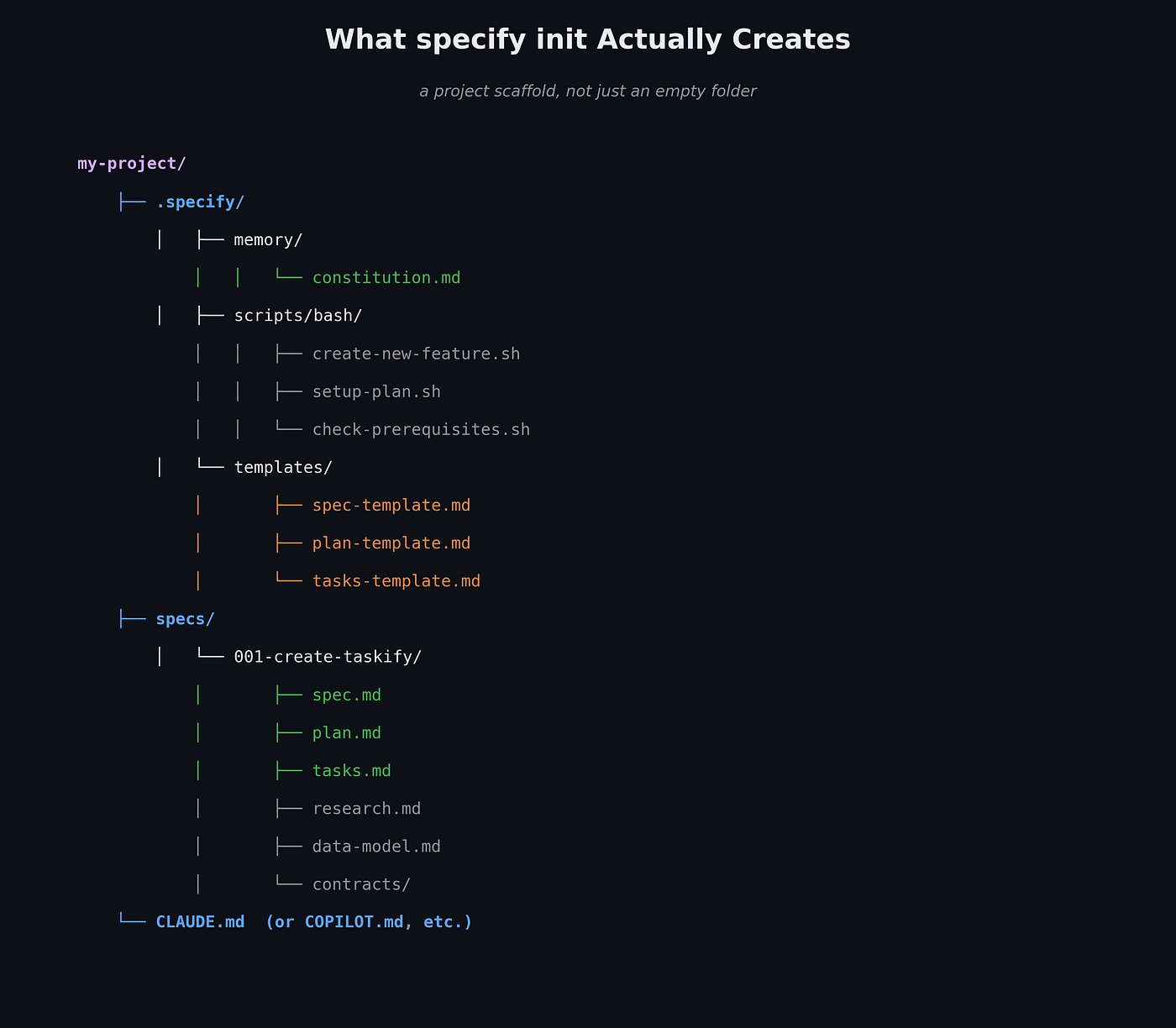
Spec Kit porject structure
Two things stand out here. First, the constitution lives once, at the project root — it’s not duplicated per feature. Second, every feature gets its own numbered folder under specs/, and that folder is the complete paper trail for that feature: what was asked for, what was decided, and what got broken into tasks. If you hand this branch to a teammate — human or agent — they don't need to reconstruct your reasoning from a Slack thread.
Extensions, Presets, and Bundles: Making Spec Kit Your Own
Spec Kit’s default templates won’t fit every team. Maybe you need regulatory traceability sections in every spec, or you want your workflow to speak “pirate” (yes, there’s a real community preset for that, mostly as a proof of how deep the customization goes). Rather than forking the tool, Spec Kit gives you three layered customization mechanisms:
- Extensions add brand-new commands and capabilities — e.g., a Jira sync step, or a post-implementation code-review pass — that don’t exist in core.
- Presets don’t add commands; they reshape the templates and instructions that core (or an installed extension) produces — e.g., forcing every spec to include a compliance checklist, or renaming terminology to match your org’s vocabulary.
- Bundles package a curated set of extensions, presets, and workflows into a single versioned, role-based install — so a whole persona (say, “security researcher” or “business analyst”) gets provisioned with one command.
# extensions: add new capability
specify extension search
specify extension add jira-sync

# presets: change how existing commands behave
specify preset search
specify preset add compliance-traceability

# bundles: provision a whole role in one shot
specify bundle search
specify bundle info security-researcher
specify bundle install security-researcher
When more than one of these defines the same template, Spec Kit resolves it by priority — project-local overrides beat presets, presets beat extensions, extensions beat core defaults:
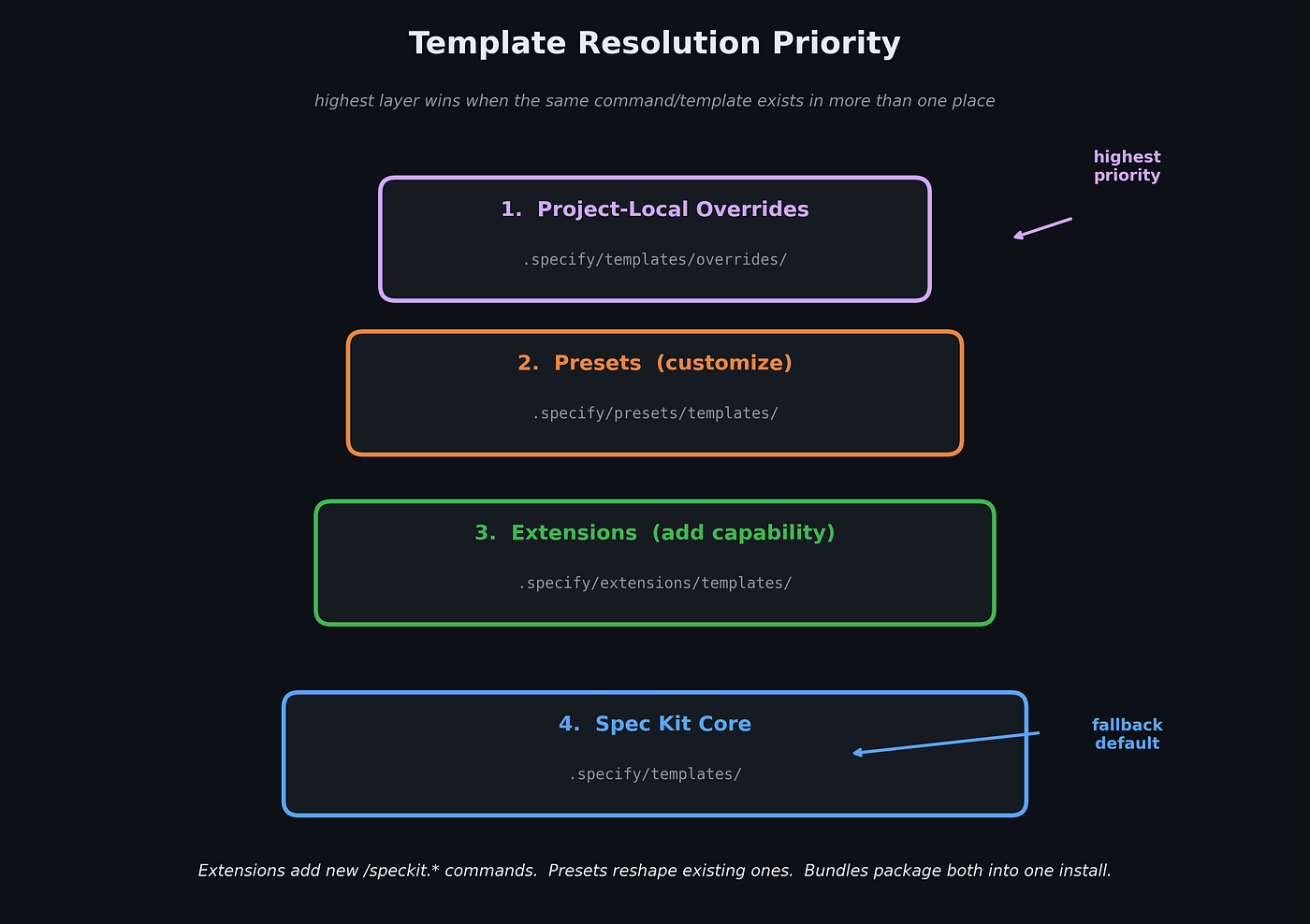
Spec kit Temlate Resolution Priority
This layering is what makes Spec Kit viable for actual engineering orgs instead of just solo hobby projects — you can enforce organizational standards (security review gates, test-first task ordering, localized workflows) without hand-editing the tool’s internals every time you upgrade it.
A Realistic Walkthrough, Compressed
To make this concrete, here’s a compressed version of a real session, start to finish, for a small feature — a rate limiter middleware for an existing API.
specify init . --integration claude/speckit.constitution Focus on defensive coding, 90%+ test coverage on
new modules, and no third-party dependencies without justification./speckit.specify Add rate limiting to our public API. Each API key should
be limited to 100 requests per minute. When a client exceeds the limit,
return HTTP 429 with a Retry-After header. Limits should reset on a
rolling window, not a fixed clock boundary. Admins should be able to
view current usage per key via an internal endpoint./speckit.clarify(the agent asks: “Should rate limit state survive a process restart?” — you answer: “No, in-memory is fine for v1.”)
/speckit.plan Implement using Python and FastAPI. Use an in-memory
sliding-window counter (no Redis for v1). Expose the admin usage
endpoint at GET /internal/rate-limits/{key}.
/speckit.tasks
/speckit.analyze
/speckit.implementWhat comes out the other side isn’t just working code — it’s a spec.md that says why rolling windows were chosen over fixed windows, a plan.md that documents why Redis was deliberately deferred, and a tasks.md that shows the actual build order. Six months from now, when someone asks "why don't we persist rate limit state," the answer is one file away instead of buried in a closed Slack thread.
Where This Actually Helps (and Where It’s Overkill)
Spec Kit is explicit that it’s still an experimental toolkit, and it’s worth being honest about the trade-offs.
It earns its keep when:
- You’re building something non-trivial where “the agent guessed wrong” is expensive to unwind.
- Multiple people (or multiple agent sessions) need to pick up the same feature without a live briefing.
- You’re modernizing a brownfield system and need to distinguish “how the tool is upgraded” from “how the feature’s intended behavior evolved” — Spec Kit’s own docs call out this brownfield loop specifically.
- You want to experiment with the same spec against different stacks — the toolkit’s stated goal is validating that SDD is stack-agnostic.
It’s probably overkill when:
- You’re prototyping a UI sketch you’ll throw away in an hour.
- The “feature” is a one-line config change.
- You’re the only person who will ever read the code, and you already know exactly what you want.
In other words: use it the way you’d use any spec — proportionally to the cost of getting the requirements wrong.
The interesting bet Spec Kit is making isn’t really about slash commands or folder conventions — it’s the claim that as coding agents get more capable, the bottleneck moves from “can it write code” to “did we tell it the right thing to write.” Specs used to be disposable because humans were the ones translating them into code, slowly, with judgment filling every gap. When an agent is doing that translation instead, the ambiguity you used to paper over with instinct becomes a bug waiting to happen.
Spec Kit doesn’t remove ambiguity. It just refuses to let you skip past it quietly — which, if you’ve ever inherited someone else’s “vibe coded” service at 2 AM, is a trade you’ll probably take.
메타데이터
- post_id
- 28c22c4baddf
- slug
- spec-kit-explained-how-github-is-trying-to-fix-vibe-coding-with-specs-that-actually-compile-into-28c22c4baddf
- url
- https://medium.com/@techwealthbuzz/spec-kit-explained-how-github-is-trying-to-fix-vibe-coding-with-specs-that-actually-compile-into-28c22c4baddf
- canonical_url
- https://medium.com/@techwealthbuzz/spec-kit-explained-how-github-is-trying-to-fix-vibe-coding-with-specs-that-actually-compile-into-28c22c4baddf
- author_url
- https://medium.com/@techwealthbuzz
- status
- ok
- fetched_at
- 2026-07-17 06:31:53