I Put the Internet’s Favorite Work Mouse Against a Top Gaming Mouse
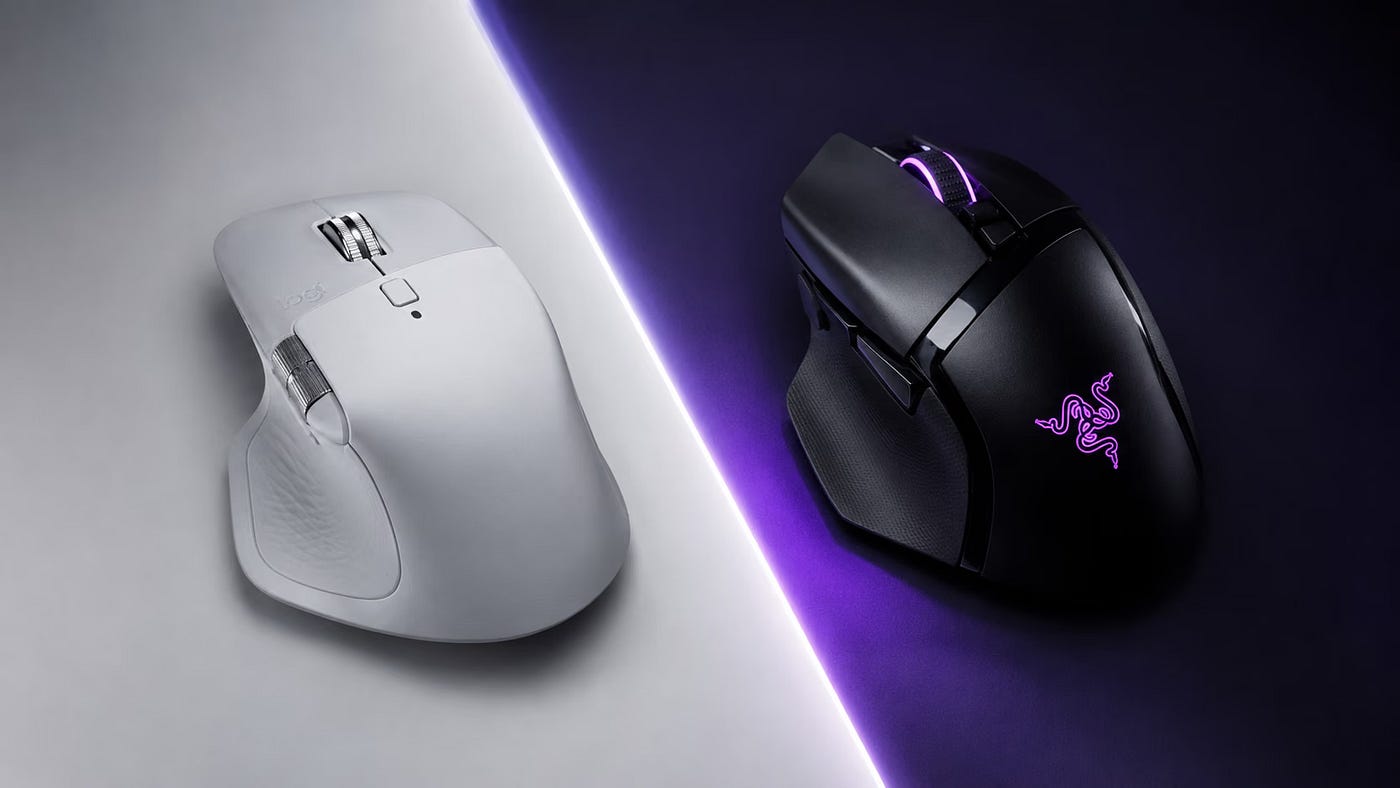
Work. Gaming. Editing. Coding. Photoshop. Mac. Big hands. Two premium mice. One winner.
I Put the Internet’s Favorite Work Mouse Against a Top Gaming Mouse
Work. Gaming. Editing. Coding. Photoshop. Mac. Big hands. Two premium mice. One winner.
Credits: Editorial artwork by author.
Most people do not want two mice.
They do not want one boring mouse for work and one glowing spaceship for gaming.
They want one mouse that can do everything.
One mouse for writing. One mouse for coding. One mouse for editing video. One mouse for Photoshop. One mouse for switching between Mac desktops. One mouse for a little gaming at night when life finally stops asking for things.
That is what makes the Logitech MX Master 4 and the **Razer Basilisk V3 Pro 35K** such an interesting comparison.
On paper, they are not direct rivals.
The **Logitech MX Master 4** is a productivity mouse. It is built for work. It has the famous scroll wheel, the side thumb wheel, a big ergonomic shape, and the kind of calm, serious design that looks right next to a MacBook Pro.
The **Razer Basilisk V3 Pro 35K** is a gaming mouse. It has a 35K sensor, lighter body, RGB lighting, wireless charging support, high polling rate options, and a much more performance-first feel.
But in real life, they fight for the same spot on your desk.
I have both mice. I use a Mac. I have big hands. I spend most of my day doing development work, video editing, Photoshop, writing, and general creative work. I also game from time to time.
And here is a strange little detail most people do not know about me: I used to be a Grandmaster support in League of Legends.
I do not get much time to play anymore because business has this annoying habit of wanting attention. But I still know what a good mouse feels like in a game. I can feel when a mouse is slow. I can feel when it is too heavy. I can feel when it is fighting me.
So this is not a normal review.
This is the real question:
If you want one premium mouse for work and gaming on a Mac, should you buy the Logitech MX Master 4 or the Razer Basilisk V3 Pro 35K?
Let’s get into it.
Quick verdict: Which mouse should you buy?
If your life is mostly work, buy the Logitech MX Master 4.
If your life is split more evenly between work and gaming, buy the Razer Basilisk V3 Pro 35K.
That is the clean answer.
The MX Master 4 is the better mouse for long workdays. It is more comfortable in a big hand. It feels calmer. The side scroll wheel is amazing for timelines, wide canvases, spreadsheets, and creative work. It feels more at home on a Mac.
The Basilisk V3 Pro 35K is the better performance mouse. It is lighter. It feels faster. It is better for gaming. It has wireless charging support. It has a better sensor. It feels more alive.
Here is the simple version.

Which mouse should you buy?
My personal verdict:
The MX Master 4 is the mouse I would keep on my desk for work. The Basilisk V3 Pro 35K is the mouse I would pick if gaming had a bigger seat at the table.
For me, as someone who works on a Mac all day, edits, codes, writes, designs, and only games when I can steal a little time back from the business gods, the MX Master 4 is the better everyday mouse.
But the Basilisk makes the decision much harder than I expected.
Specs at a glance
Specs do not tell the whole story.
Actually, specs are often where people start making bad decisions.
On paper, the Razer looks like the clear winner. It has the bigger sensor number. It is lighter. It supports much higher polling rates with the right Razer accessories. It has wireless charging. It sounds like the future.
But a mouse is not a graphics card.
You do not use it in bursts. You hold it all day.
That changes everything.
Still, specs matter. So here is the clean comparison.

Technical spec sheet comparison
The specs make the Basilisk look more advanced.
The workday makes the answer more interesting.
That is the whole article.
Why these two mice are secretly fighting for the same desk
The Logitech MX Master 4 and the Razer Basilisk V3 Pro 35K are not supposed to be rivals.
One is the poster child for productivity. The other is a premium gaming mouse.
Credits: Photography by author.
But people do not shop in neat product categories.
They shop like this:
“I work all day, but I also game sometimes. I want one good mouse. What should I buy?”
That is why this comparison matters.
The MX Master 4 is not just an office mouse. It is a serious tool for people who live inside their computer. Designers, developers, writers, editors, analysts, founders, and anyone who has 37 tabs open and no idea how that happened.
The Basilisk V3 Pro 35K is not just a gaming mouse. It has enough buttons, enough comfort, and enough scroll-wheel tech to work as a daily driver. It is one of the few gaming mice that can actually sit on a work desk without feeling like it is wearing a neon tracksuit to a board meeting.
Both are premium. Both are ergonomic. Both are right-handed. Both have lots of controls. Both are trying to be the only mouse you need.
The difference is where they start.
The Logitech starts with work and asks, “Can I game a little?”
The Razer starts with gaming and asks, “Can I work all day?”
That is the real comparison.
Comfort and ergonomics for large hands
Let’s start with the part that matters more than most spec sheets admit.
Comfort.
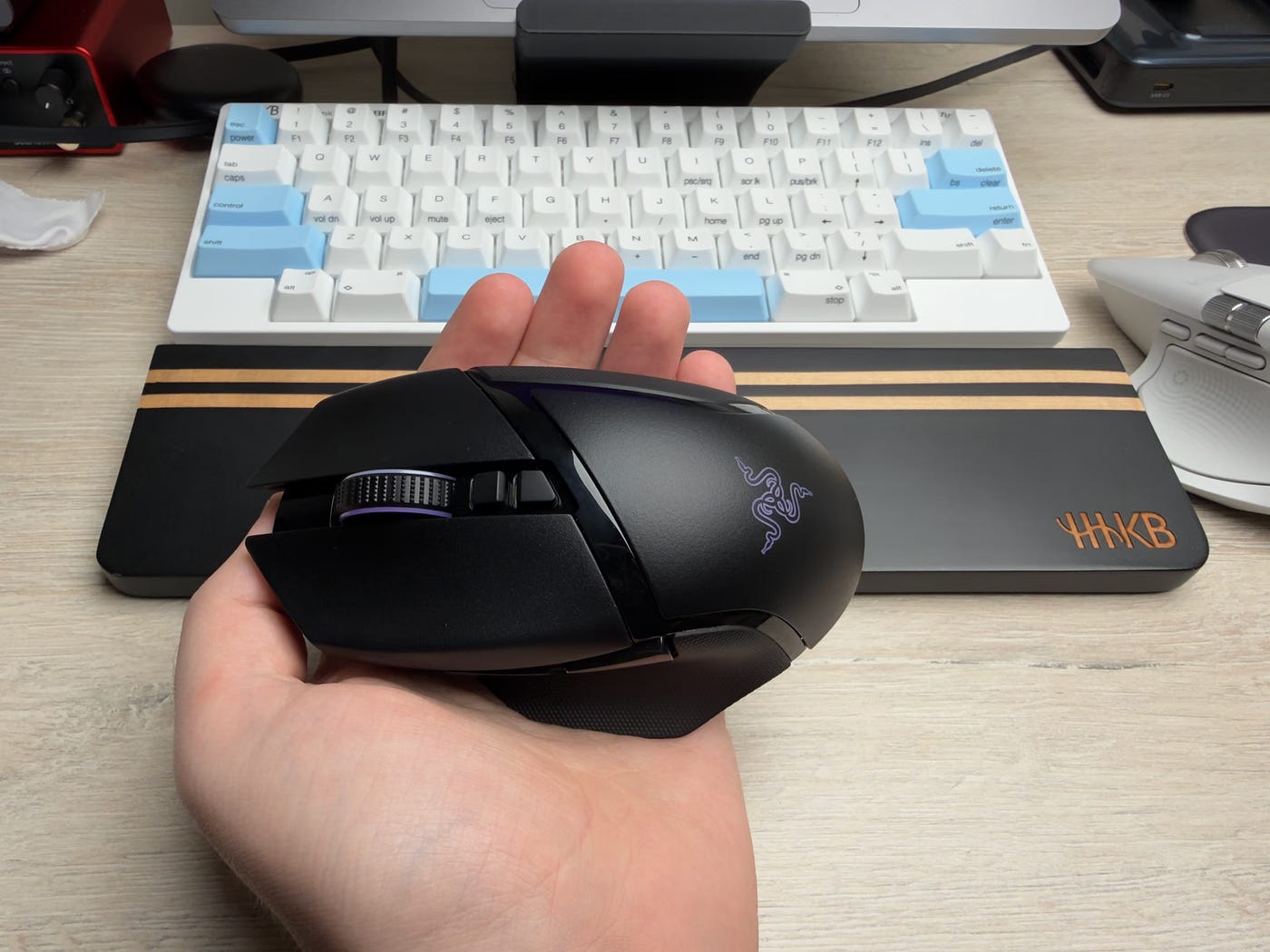
I have big hands. Not cartoonishly big. I am not palming a basketball while reading bedtime stories to mice. But big enough that many smaller mice feel like I am pinching them instead of holding them.
And this is where the MX Master 4 makes a strong first impression.
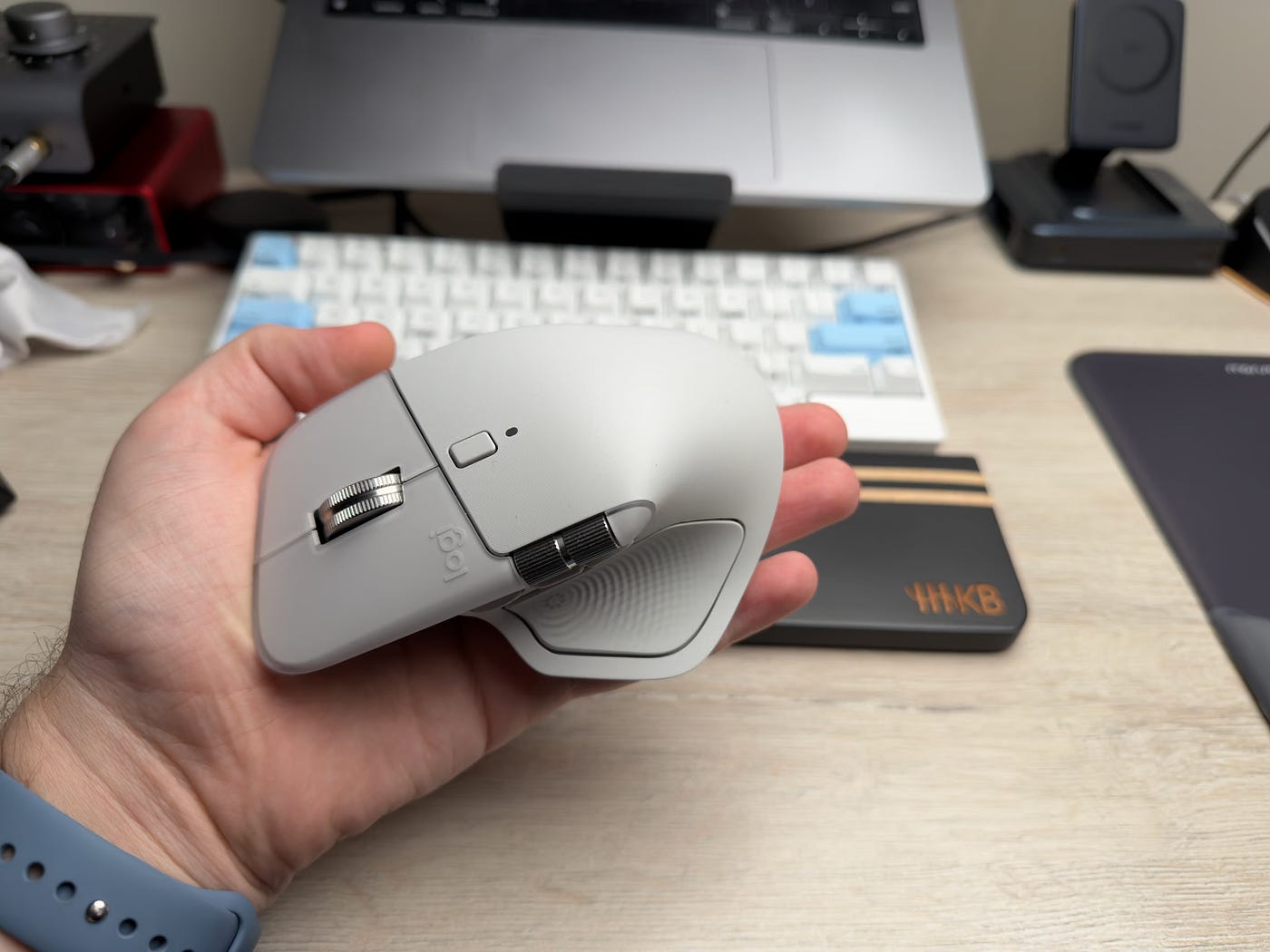
The Logitech feels slightly bigger in my hand. It fills the palm more. It gives my hand somewhere to rest. It feels like it was designed for long sessions, not quick bursts.
The Basilisk is also comfortable. I do not want to make it sound like a tiny claw trap. It is not. The shape is good. The thumb rest helps. The buttons are easy to reach. The grip feels secure.
But the feeling is different.
The MX Master 4 lets my hand rest.
The Basilisk keeps my hand ready.
That is the best way I can explain it.
With the Logitech, my hand settles. My palm drops into the shape. My fingers land naturally. It feels like a work chair that knows you are going to be there for a while.
With the Razer, my hand feels more active. It is lighter. Faster. A little more alert. That is great in games. It is also nice when you want your mouse to feel sharp. But after a few hours of writing, editing, coding, and jumping between apps, I notice the difference.
The MX feels calmer.
That calm matters.
Because a productivity mouse is not about excitement. It is about removing friction.
The best work tools disappear.
They do not keep asking for attention. They do not make your hand adjust every few minutes. They do not turn every cursor move into a tiny performance event.
The MX Master 4 is better at disappearing during work.
The Basilisk is better at waking up during play.
Palm grip, claw grip, and real-life use
I mostly use a relaxed palm grip when working. That means my hand rests on the mouse instead of hovering over it.
For that grip, the MX Master 4 is better.
The higher body and wider shape make it easier to relax. I do not feel like I need to control the mouse with my fingertips all day.
The Basilisk works better if you like a more active grip. It has that gaming-mouse energy where your fingers are ready to react. It does not feel uncomfortable, but it does feel less like a hand rest and more like a control surface.
That is not a bad thing.
It depends what you want.
For long work blocks, I prefer the Logitech.
For gaming, I prefer the Razer.
For switching between both, the question becomes: which version of your day matters more?
Mac setup and software: the part most reviews skip
This is where a lot of mouse reviews fall apart.
They talk about DPI. They talk about buttons. They talk about battery life.
Then they quietly ignore the fact that many people buying premium mice are using Macs.
And macOS changes the story.
I work on a Mac. That means I care about things that a lot of gaming reviews barely mention:
- switching between desktops
- Mission Control
- app switching
- natural scrolling
- horizontal scrolling
- creative app shortcuts
- multi-monitor movement
- whether the software feels like it belongs on macOS
This is where the Logitech has a clear advantage.
The MX Master line has always felt more Mac-friendly. The MX Master 4 continues that. Logitech offers a Mac version. Logi Options+ is built around productivity workflows. It lets you map buttons, create app-specific actions, and make the mouse behave like a proper desktop tool.
The Razer Basilisk V3 Pro 35K can work on a Mac. But it feels more like you are adapting a gaming mouse to macOS.
That distinction matters.
The MX Master 4 feels like it was invited to the Mac.
The Basilisk feels like it got through security with a guest pass.
Desktop switching on Mac
One of the first things I had to do on both mice was map buttons for desktop switching.
On a Mac, I move between desktops all day.
One desktop might have my code editor. Another has Safari or Chrome. Another has Photoshop. Another has Final Cut or Premiere. Another has Slack, email, or some dashboard that is quietly judging my life choices.
The Apple trackpad makes this easy. Swipe left. Swipe right. Done.
With a mouse, you need to recreate that feeling with buttons.
On the MX Master 4, this feels more natural. The thumb area is built for gestures and workflow. Once you map the controls properly, the mouse starts to feel like a real Mac productivity tool.
On the Basilisk, you can also map buttons. But the mental model feels different. You are making a gaming mouse do Mac things. It works, but it takes more fiddling.
This matters because setup friction is still friction.
A great productivity mouse should not make you spend your afternoon building a small operating system for your thumb.
Scrolling on Mac
Scrolling is another big one.
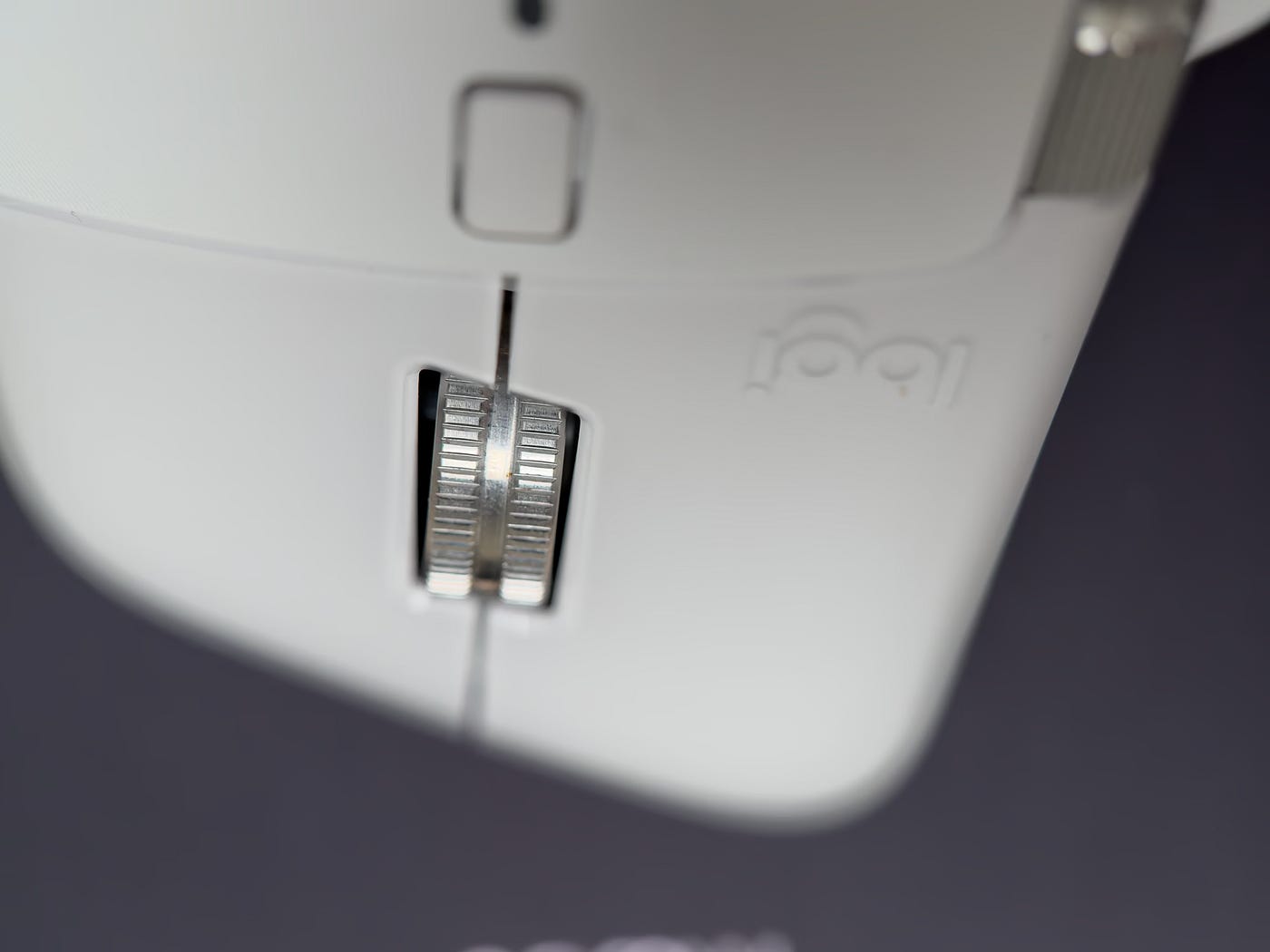
The MX Master 4 scroll wheel is one of the main reasons people buy the mouse. It is fast, smooth, and very satisfying once you get used to it.
Credits: Photography by author.
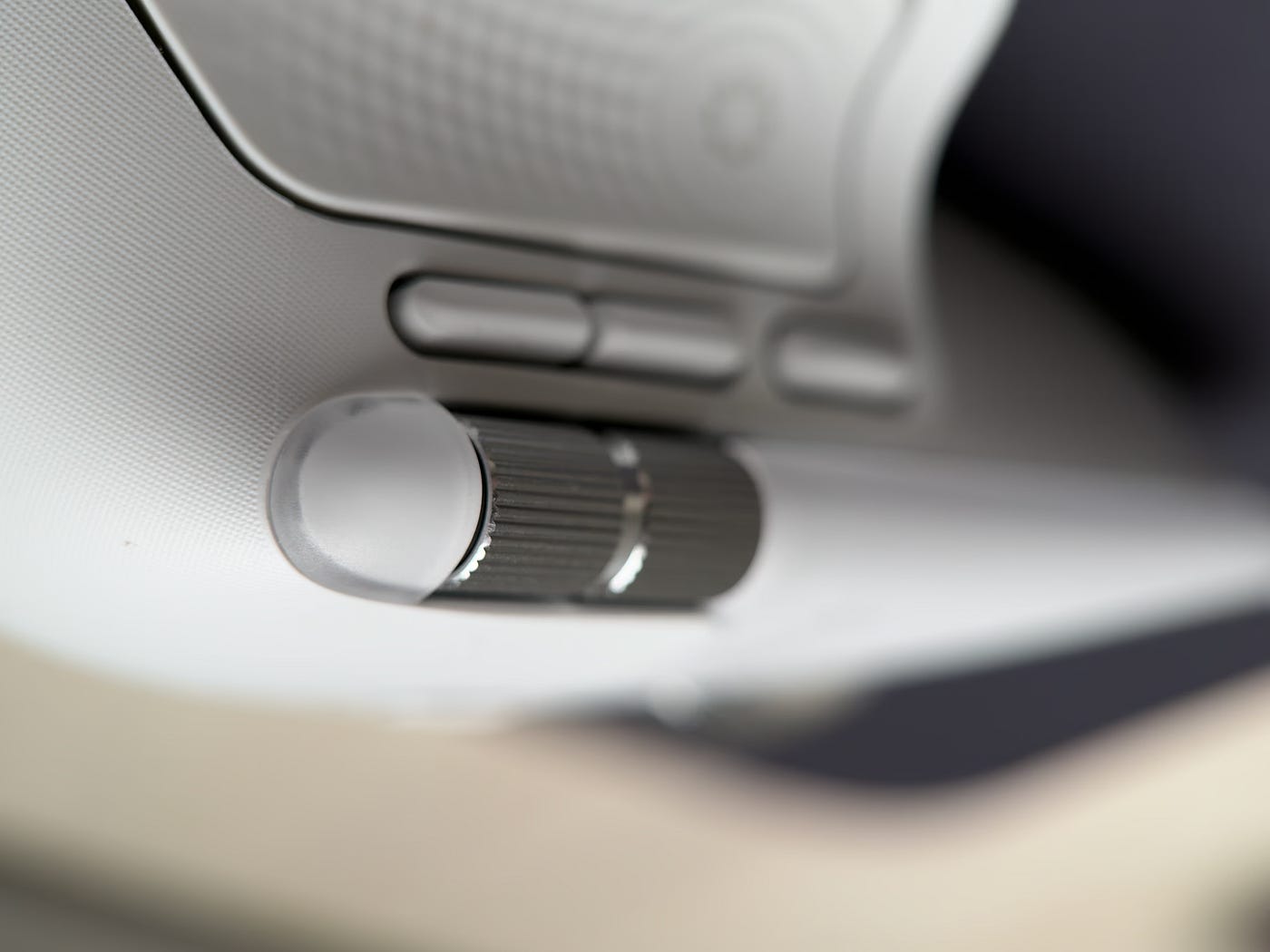
The side thumb wheel is the bigger win for Mac work.
Credits: Photography by author.
That wheel is magic for wide spaces.
Video timelines. Large spreadsheets. Photoshop canvases. Design boards. Webflow layouts. Long code lines. Anything horizontal.
The Basilisk also has a very good scroll wheel. Razer’s HyperScroll wheel is strong. It can feel sharp and fun. The tilt wheel helps too.
But for Mac productivity, the MX setup is better.
The side scroll wheel is not a gimmick.
It is one of those features that sounds small until you use it for a week. Then every normal mouse starts to feel slightly broken.
Software feel
Logitech’s software is not perfect. No mouse software is perfect. For some reason, mouse software as a category feels like it was designed during a power outage.
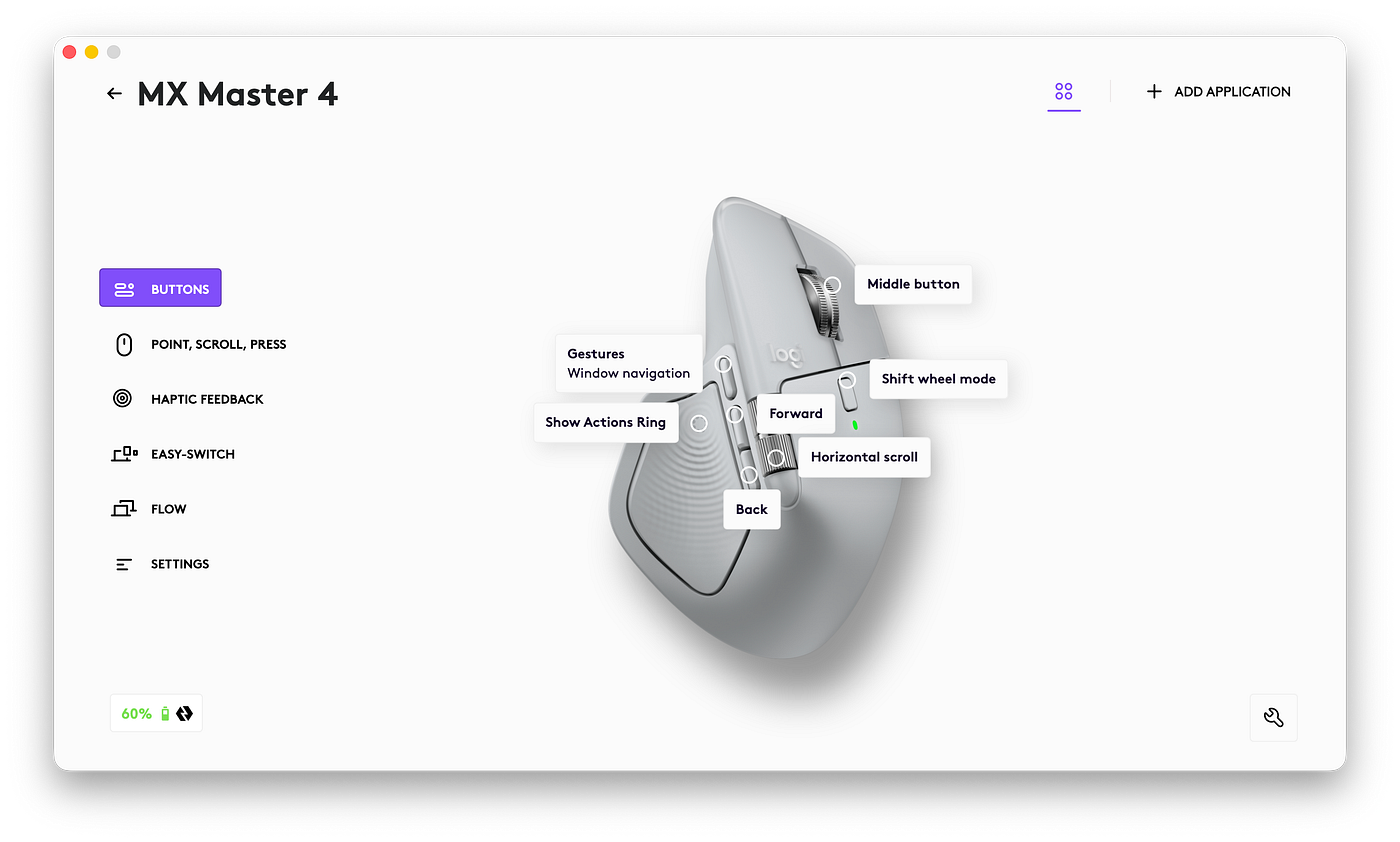
But Logi Options+ makes more sense for productivity.
Credits: Screenshot by author
It is built around the things I actually want to do:
- open Mission Control
- move between desktops
- trigger app shortcuts
- set different actions per app
- adjust scroll behavior
- make the side wheel useful
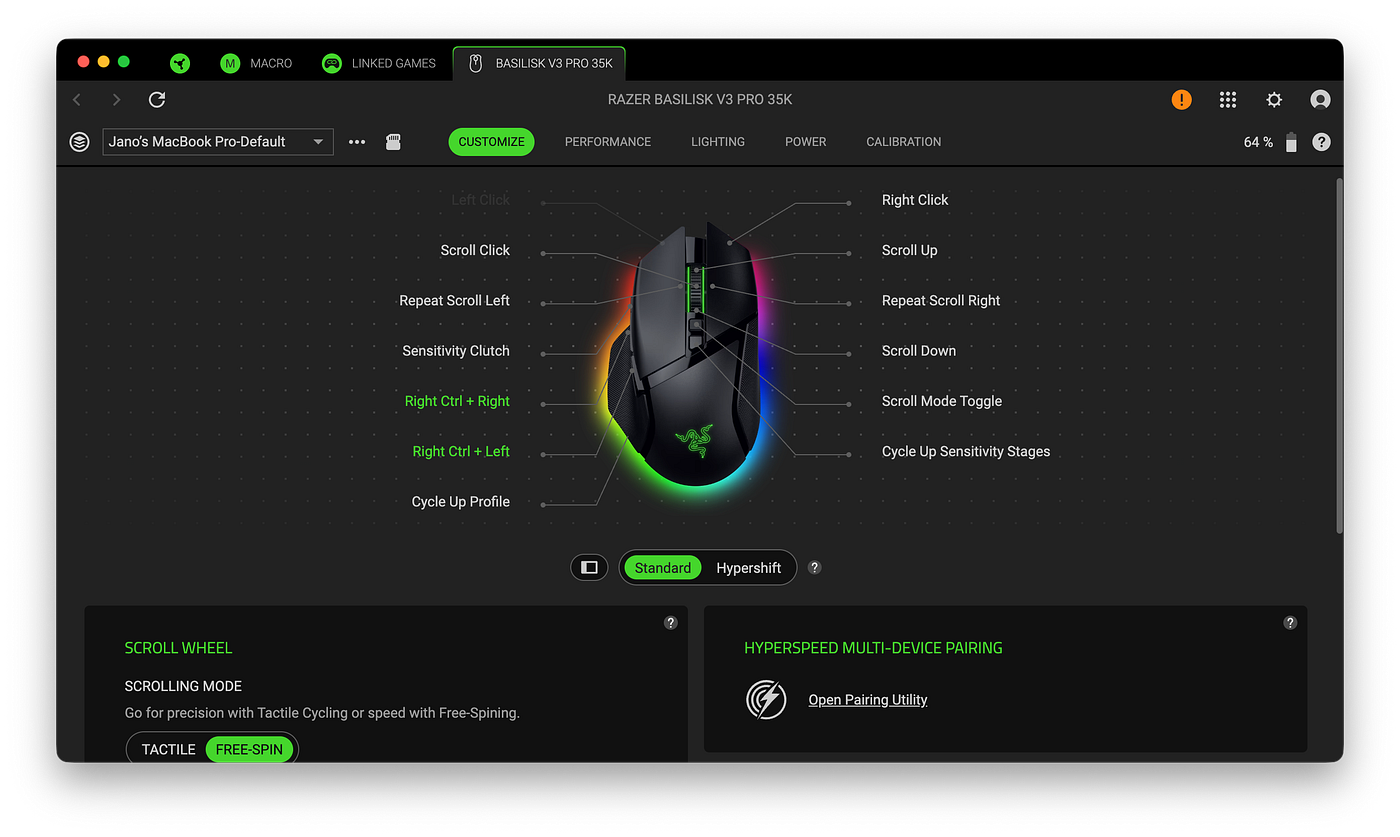
Razer Synapse is more gaming-first.
Credits: Screenshot by author.
That is great if you care about DPI stages, RGB, polling, profiles, and performance tuning. It is less great if your main question is, “How do I make this feel like a Mac trackpad with buttons?”
So the Mac verdict is simple.
The MX Master 4 is the better Mac mouse. The Basilisk V3 Pro 35K can work on Mac, but it asks more from you.
Productivity test: coding, video editing, Photoshop, and real work
This is the heart of the comparison.
Because most people reading this are not choosing between these mice because they only game.
They are choosing because they work.
They want something premium. They want something fast. They want something comfortable. They want something that makes the day feel smoother.
So I tested these mice where I actually live:
- development work
- video editing
- Photoshop
- writing
- research
- browser tabs
- Mac desktops
- general creative work
And this is where the MX Master 4 starts to pull ahead.
Not because it is faster.
Because it is less annoying.
And at work, “less annoying” is a feature.
A big one.
Coding and development
For coding, the MX Master 4 is the better mouse.
Not by a tiny amount either.
The reason is not the sensor. It is not the DPI. It is not the polling rate.
It is workflow.
When I code, I am constantly moving between:
- editor
- terminal
- browser
- docs
- GitHub
- local preview
- design reference
- notes
- sometimes five different things I opened “for a second” three hours ago
A good development mouse should make switching feel easy.
The MX Master 4 does that better.
The side buttons and gesture controls are useful. The thumb wheel is useful. The larger shape is comfortable for long sessions. The scroll wheel makes long pages and docs feel easier to move through.
The Basilisk is not bad for coding. Actually, it is better than I expected. It has enough programmable buttons. It feels precise. It is lighter and easier to move quickly.
But the Basilisk does not feel built around work.
It feels like a very good gaming mouse that happens to be useful for work.
The MX feels like a work tool from the start.
That difference becomes obvious after a few hours.
The Razer feels fast.
The Logitech feels settled.
For development, settled wins.
Coding winner: Logitech MX Master 4
Video editing
Video editing is where the side scroll wheel becomes a serious advantage.
If you edit video, you know the pain.
Timelines are horizontal. Most mice are vertical.
That mismatch is weird.
You spend your day moving left and right, zooming in and out, trimming clips, scrubbing through footage, and trying not to accidentally ruin a cut that took 20 minutes to get right.
The MX Master 4 feels made for this.
The thumb wheel lets you move through a timeline in a way that feels more natural. It is not perfect. It will not replace a proper editing panel or a trackpad for everyone. But for a mouse, it is excellent.
The Basilisk can still edit video. The scroll wheel is good. The tilt wheel helps. The lighter body makes it easier to move quickly. If you map shortcuts well, you can make it a strong editing mouse.
But the MX is better for timelines.
That is the clean answer.
The Razer has speed.
The Logitech has flow.
For video editing, flow matters more.
Video editing winner: Logitech MX Master 4
Photoshop and design work
Photoshop is closer.
This one surprised me a little.
For workflow, the MX Master 4 is better. The extra controls, side wheel, and bigger comfort-first shape help. It feels good for zooming, panning, moving around large files, and setting up app-specific shortcuts.
But the Basilisk has a different strength.
It feels more precise in the hand.
The lighter body and better gaming sensor make small pointer movements feel quick and controlled. If you are doing detail work and like a lighter mouse, the Razer feels really good.
This is one of the few creative areas where I would not call the Logitech the automatic winner.
It depends how you use Photoshop.
If you are mostly navigating, zooming, panning, switching tools, and working across large canvases, the MX Master 4 feels better.
If you care more about pointer speed and that light, responsive feeling, the Basilisk is very strong.
For me, the MX still wins because I value workflow over raw pointer feel.
But this one is close.
Photoshop winner: Logitech MX Master 4, but closer than expected
General work
For general work, the MX Master 4 wins easily.
This includes:
- writing
- research
- spreadsheets
- dashboards
- documents
- landing pages
- browser tabs
- switching between apps
- moving across multiple desktops
This is Logitech’s home field.
The MX Master 4 feels like a mouse for people who spend too much time at a computer and have decided to stop pretending a cheap mouse is fine.
It is comfortable. It scrolls beautifully. It has the side wheel. It fits bigger hands well. It feels serious without being boring.
The Basilisk is still good here. That is what makes this comparison interesting. It is not one of those tiny esports mice that feels amazing in Valorant and useless in Google Sheets.
The Basilisk can work.
But the MX makes work feel smoother.
And smoother wins the day.
General work winner: Logitech MX Master 4
Gaming test: League of Legends and casual gaming
Now we get to the Razer’s home turf.
The Basilisk V3 Pro 35K is the better gaming mouse.
No surprise there.
It is lighter. It feels faster. It has a better sensor. It supports higher performance modes with the right accessories. It feels like it wants to be used in a game.
The MX Master 4 can game.
The Basilisk wants to.
That is the difference.
I mostly play League of Legends.
And yes, I know. That sentence alone should probably come with an apology.
I used to be a Grandmaster support. These days, I play much less. Business has taken over a lot of the time I used to spend in ranked. Probably healthier. Less emotionally damaging too.
But League is still a great test for a mouse.
It is not the same as a first-person shooter. You are not doing constant flick shots. You are clicking, moving, targeting, reacting, controlling camera movement, and making fast decisions.
A mouse still matters.
With the Basilisk, everything feels more immediate.
Clicks feel sharper. Movement feels faster. The lighter body makes it easier to react. It feels more natural for long gaming sessions.
The MX Master 4 is playable, but not ideal.
It is heavier. It feels slower. Not broken. Not unusable. Just not built for that world.
If you only play casual games, the MX is fine.
If you care about ranked performance, the Basilisk is the easy winner.
I would not want to play serious League on the MX Master 4 if I had the Basilisk sitting next to it.
That would feel like choosing hiking boots for a tennis match.
Could you? Yes.
Should you? Please love yourself.
Casual gaming
For casual gaming, the gap gets smaller.
If you play slow games, strategy games, management games, or games where raw mouse speed does not matter much, the MX Master 4 is fine.
It is comfortable. The buttons work. The sensor is good enough. You can absolutely use it.
But the Basilisk still feels better.
It has that gaming polish. The lighter weight matters. The click feel matters. The performance headroom matters, even if you are not using every last bit of it.
The Basilisk is also more fun.
That is not very scientific. But it is true.
The MX Master 4 feels like a great work tool that can play games.
The Basilisk feels like a gaming mouse that is trying to grow up and get a job.
For gaming, I would take the Basilisk every time.
Gaming winner: Razer Basilisk V3 Pro 35K
Scroll wheel battle
This section deserves its own little spotlight.
Because the scroll wheel is one of the biggest reasons to buy either mouse.
Both are good.
But they are good in different ways.
Logitech MX Master 4 scroll wheel
The MX Master 4 has Logitech’s famous MagSpeed scroll wheel.
It is excellent.
You can scroll slowly and precisely. You can also fling through long pages like you are trying to escape a terms and conditions document before it steals your soul.
But the main wheel is only part of the story.
The side thumb wheel is the real productivity weapon.
It is brilliant for:
- video timelines
- Photoshop canvases
- large spreadsheets
- wide websites
- design tools
- horizontal code views
- dashboards
- anything that moves side to side
This is the feature I missed most when using the Basilisk.
The Basilisk can do a lot.
But it does not have that dedicated side wheel.
For work, that is a real loss.
Razer Basilisk V3 Pro 35K scroll wheel
The Basilisk also has a great wheel.
Razer’s HyperScroll tilt wheel is strong. It feels more gaming-focused. It can move between tactile and free-spin style behavior. It has tilt controls. It is fun to use.
For gaming and general browsing, it is excellent.
But for creative work, it does not beat the MX.
The MX scroll setup feels more useful. More practical. More work-focused.
The Basilisk wheel feels advanced.
The MX wheel setup feels essential.
Scroll wheel winner: Logitech MX Master 4 for work, Razer Basilisk for gaming-style control
Battery, charging, and everyday ownership
Battery life is good on both.
This is not one of those categories where one mouse dies after two days and the other becomes a solar-powered miracle.
The MX Master 4 lasts so long that you mostly forget it has a battery.
That is a very underrated kind of luxury.
It is not exciting. It is better than exciting.
It is invisible.
The Basilisk V3 Pro 35K has the cooler charging story. It supports wireless charging with the right Razer accessory. That makes it feel more futuristic. If you like having a clean charging dock setup, the Razer is more fun.
The Logitech feels less needy.
The Razer feels more advanced.

Credits: Photography by author.
That is the split.
For work, I prefer boring battery life.
I want to charge it, forget it, and move on with my life.
But I will admit it: wireless charging on the Basilisk is nice.
It gives the mouse a premium gadget feel that the MX does not have.
Battery and charging winner
For battery simplicity: Logitech MX Master 4
For charging cool factor: Razer Basilisk V3 Pro 35K
Software and customization
Both mice can be customized.
But they are built around different ideas.
The MX Master 4 is built around productivity customization.
The Basilisk is built around gaming customization.
That sounds obvious, but it matters.
Logi Options+
Logi Options+ is where the MX Master 4 becomes much more useful.
You can set app-specific controls. You can customize buttons. You can adjust scroll behavior. You can create shortcuts for creative apps. You can make the mouse feel more like part of your Mac workflow.
This is especially useful if you use apps like:
- Photoshop
- Premiere Pro
- Final Cut Pro
- Lightroom
- Safari
- Chrome
- VS Code
- Webflow
- Figma
- Notion
The best setup is not the default setup.
That is important.
The MX Master 4 is good out of the box.
But it becomes much better once you take time to map the controls to your actual day.
Razer Synapse and Mac friction
The Basilisk gives you a lot of customization too.
You get button mapping, DPI settings, profiles, RGB control, and performance options.
But the Razer software experience is more gaming-first and more Windows-first.
That does not mean the Basilisk is useless on Mac. It is not.
But if you are a Mac user, you should go in with the right expectations.
The mouse hardware is excellent. The Mac workflow takes more work.
That is a very different feeling from the MX Master 4.
With the Logitech, you are customizing a productivity mouse.
With the Razer, you are adapting a gaming mouse.
Both can be done.
One feels more natural.
Software winner for Mac productivity: Logitech MX Master 4
The 80/20 test: which mouse fits your actual life?
This is the best way to decide.
Not specs.
Not brand.
Not RGB.
Your ratio.
How much of your day is work? How much of your day is gaming?
If you are 90% work and 10% gaming
Buy the MX Master 4.
Easy.
You will enjoy the comfort, side scroll wheel, and Mac workflow much more than you will miss the gaming performance.
If you are 80% work and 20% gaming
Still buy the MX Master 4.
This is probably where I sit now.
The Basilisk is tempting, but the MX is the smarter daily mouse.
If you are 70% work and 30% gaming
This is where it gets interesting.
I would still lean MX if your work includes video editing, Photoshop, coding, or long Mac sessions.
But if your gaming time is serious, start looking hard at the Basilisk.
If you are 60% work and 40% gaming
Now it is close.
The Basilisk becomes very compelling here.
It is good enough for work and much better for gaming.
If you are 50% work and 50% gaming
Buy the Basilisk V3 Pro 35K.
At this point, gaming matters too much to compromise.
The Basilisk gives you the performance advantage while still being comfortable and useful enough for work.
If you are gaming-first
Buy the Basilisk.
No drama.
The MX Master 4 is not trying to win that fight.
Who should buy the Logitech MX Master 4?
Buy the Logitech MX Master 4 if you mostly work.
Especially if you use a Mac.
This is the mouse I would recommend to:
- developers
- writers
- founders
- video editors
- designers
- Photoshop users
- spreadsheet people
- Mac users
- people with large hands
- people who want a comfortable all-day mouse
- people who care more about flow than speed
- people who only game casually
The MX Master 4 is not the sexiest mouse in the world.
That is part of its charm.
It is not trying to make your desk look like a gaming tournament. It is trying to make your work feel smoother.
And it does.
The side scroll wheel alone makes it hard to leave.
The shape is comfortable. The buttons are useful. The Mac experience is better. The battery life is easy. The whole thing feels calm and capable.
The MX Master 4 is the better mouse for people who earn money with their computer.
That might be the best way to say it.
Who should buy the Razer Basilisk V3 Pro 35K?
Buy the Razer Basilisk V3 Pro 35K if gaming matters.
Especially if you still want a mouse that can handle work.
This is the mouse I would recommend to:
- gamers who also work
- hybrid work and gaming users
- people who want a faster mouse
- people who care about sensor performance
- people who want wireless charging
- people who like a lighter feel
- people who use a more active grip
- people who want more performance headroom
- people who do not mind setup friction on Mac
The Basilisk V3 Pro 35K is not just a gaming toy.
That is what makes it good.
It has enough comfort and enough buttons to work as a real daily mouse. It does not feel as calm as the MX Master 4, but it also does not feel like a tiny esports mouse that hates spreadsheets.
It is a grown-up gaming mouse.
Mostly.
The RGB still wants attention. Razer can’t help itself.
But under the gamer skin, there is a very capable all-rounder.
The Basilisk is the better mouse for people who want their work mouse to still have a pulse.
Final verdict: the better all-rounder
The Logitech MX Master 4 is the better work mouse.
The Razer Basilisk V3 Pro 35K is the better gaming mouse.
But the better all-rounder depends on which side of your life wins more often.
For me, the answer is the MX Master 4.
I work on a Mac. I have big hands. I write, code, edit, design, and spend long hours moving between apps and desktops. For that life, the MX Master 4 fits better.
It is calmer. It is more comfortable. It is better for Mac productivity. The side scroll wheel is genuinely useful. It makes work feel smoother.
The Basilisk is the mouse I respect more for performance.
But the MX is the mouse I trust more for my actual day.
If I were still grinding ranked League every night, the Basilisk would make the decision much harder.
But I am not.
These days, work gets the bigger slice of the day.
So my winner is clear:
For most Mac users who work all day and game sometimes, buy the Logitech MX Master 4.
But if gaming is a serious part of your life, not just a weekend side quest, the Razer Basilisk V3 Pro 35K may be the better one-mouse setup.
The MX Master 4 is the better mouse for work.
The Basilisk is the better mouse for play.
The best all-rounder is the one that matches the life you actually have.
Not the one you imagine you have when you are watching mouse reviews at 1 a.m.
We have all been there.
FAQ
Is the Logitech MX Master 4 good for gaming?
Yes, the Logitech MX Master 4 is fine for casual gaming.
But it is not the best choice for competitive gaming.
It is heavier than a gaming mouse. It has a lower polling rate. It does not feel as fast or as responsive as the Razer Basilisk V3 Pro 35K.
For casual games, strategy games, and light gaming, it works.
For serious ranked play, I would pick the Basilisk.
Is the Razer Basilisk V3 Pro 35K good for productivity?
Yes. That is what makes it interesting.
The Razer Basilisk V3 Pro 35K is one of the rare gaming mice that can also work well as a productivity mouse.
It has a comfortable ergonomic shape, many customizable controls, a strong scroll wheel, Bluetooth support, and a premium feel.
But it still feels gaming-first.
For pure productivity, the MX Master 4 is better.
For hybrid work and gaming, the Basilisk is excellent.
Which mouse is better for Mac, the Logitech MX Master 4 or the Razer Basilisk V3 Pro 35K?
The Logitech MX Master 4 is better for Mac users.
It feels more natural in a Mac workflow. It has stronger productivity software support. It is easier to set up for desktop switching, app shortcuts, and creative tools.
The Razer Basilisk V3 Pro 35K can work on Mac, but expect more setup friction.
If you are Mac-first, the MX Master 4 is the safer choice.
Does the Razer Basilisk V3 Pro 35K work well on macOS?
It can work well, but it is not as Mac-native as the MX Master 4.
The hardware is great. The comfort is good. The buttons are useful. But the software and setup experience feel more gaming-first and Windows-first.
If you are comfortable tweaking shortcuts and profiles, you can make it work.
If you want the smoother Mac experience, get the MX Master 4.
Which mouse is better for large hands?
The Logitech MX Master 4 is better for large hands.
At least for me.
It feels slightly bigger, more supportive, and more relaxed. The palm support is better for long work sessions.
The Basilisk is still comfortable, but it feels more active and gaming-focused.
For big hands and long workdays, I prefer the MX Master 4.
Which mouse is better for coding?
The Logitech MX Master 4 is better for coding.
The reason is workflow.
The side wheel, scroll behavior, button mapping, and Mac desktop switching all make it easier to move between editor, terminal, browser, docs, and project files.
The Basilisk is good for coding too, but the MX feels more built for that kind of long, focused work.
Which mouse is better for video editing?
The Logitech MX Master 4 is better for video editing.
The side scroll wheel is the big reason.
Video editing timelines are horizontal. The MX Master 4 gives you a dedicated control that feels natural for that kind of movement.
The Basilisk can edit video, but the MX feels better for timeline work.
Which mouse is better for Photoshop?
The MX Master 4 is better for Photoshop workflow.
The Basilisk has the edge in raw pointer feel because it is lighter and more performance-focused.
But for zooming, panning, shortcuts, and moving around large creative files, I prefer the MX Master 4.
So the short answer is:
MX Master 4 for workflow. Basilisk V3 Pro 35K for fast pointer feel.
Which mouse is better for League of Legends?
The Razer Basilisk V3 Pro 35K is better for League of Legends.
It feels faster, lighter, and more gaming-ready.
The MX Master 4 can play League, but it would not be my pick for serious ranked games. It is heavier and less responsive-feeling than the Basilisk.
If gaming matters, get the Razer.
Which mouse has the better scroll wheel for productivity?
The Logitech MX Master 4 has the better scroll setup for productivity.
The main MagSpeed wheel is excellent, but the side thumb wheel is the real advantage.
It is great for video timelines, wide spreadsheets, Photoshop canvases, and horizontal navigation.
The Basilisk scroll wheel is very good, but for productivity, the MX wins.
Is the Logitech MX Master 4 worth it over the Razer Basilisk V3 Pro 35K if you mostly work?
Yes.
If you mostly work, the MX Master 4 is worth it.
The comfort, Mac workflow, side scroll wheel, and productivity-first design matter more than the Basilisk’s higher gaming performance.
For an 80% work and 20% gaming user, I would buy the MX Master 4.
What is the real difference between the MX Master 4 and the Basilisk V3 Pro 35K?
The real difference is this:
The MX Master 4 is built to make work smoother.
The Basilisk V3 Pro 35K is built to make movement faster.
The MX is calmer, larger, and better for long Mac work sessions.
The Basilisk is lighter, sharper, and better for gaming.
That is the whole decision.
Which mouse is the better all-rounder?
For work-first people, the Logitech MX Master 4 is the better all-rounder.
For gaming-first people who also work, the Razer Basilisk V3 Pro 35K is the better all-rounder.
The easiest way to decide:
If your day is mostly work, buy the MX.
If your day is close to half work and half gaming, buy the Basilisk.
Some links in this article may be affiliate links. Buying from these links will support me as an independent creator. All opinions in this piece is my own and not influenced by any of the two brands.
메타데이터
- post_id
- 28e9c90e54be
- slug
- logitech-mx-master-4-vs-razer-basilisk-v3-pro-28e9c90e54be
- url
- https://medium.com/ideas-with-wings/logitech-mx-master-4-vs-razer-basilisk-v3-pro-28e9c90e54be
- canonical_url
- https://medium.com/ideas-with-wings/logitech-mx-master-4-vs-razer-basilisk-v3-pro-28e9c90e54be
- author_url
- https://medium.com/@janoleroux
- status
- ok
- fetched_at
- 2026-06-09 15:37:30