Guide to writing first GraphQL API in GoLang by creating a Book App
Hey everyone! Tired of sifting through endless, unnecessary data from your REST API responses? Wouldn’t it be amazing to fetch just the…
Guide to writing first GraphQL API in GoLang by creating a Book App
Hey everyone! Tired of sifting through endless, unnecessary data from your REST API responses? Wouldn’t it be amazing to fetch just the fields you need for your UI without the clutter? If you’re nodding along, it’s time to dive into GraphQL! It’s not only a more streamlined way to get exactly what you want but also faster than traditional REST. Join me as we embark on an exciting journey to build your very first GraphQL API with GoLang. Let’s get started and revolutionize your API game! 🚀
Okay first, lets create our go project so we could start. You can just type the following commands in tour terminal to quickstart with your go project:
mkdir go-graphql-crud cd go-graphql-crud
go mod init project
Great, you’ve spotted the go.sum file in your directory. Now, let’s get ready to write some GraphQL code! We’ll be using gqlgen, a highly recommended package for this purpose. They’ve earned a stellar reputation in the community, so let’s take their word for it. I’m including a link to the official gqlgen documentation below — be sure to check it out. Reading the docs is a crucial step if you’re serious about leveling up your development skills. Dive in and get started! 📚✨
[embed]gqlgen graphql servers the easy waygqlgen.com
Now, let us add the package into our application. First add github.com/99designs/gqlgen to your project’s tools.go. Proceed with this command in your terminal:
printf '//go:build tools\npackage tools\nimport (_ "github.com/99designs/gqlgen"\n _ "github.com/99designs/gqlgen/graphql/introspection")' | gofmt > tools.go

go mod tidy
You will see a new file tools.go getting formed. Don’t worry, no magic happening here. Now the next step is to initialise gqlgen config and generate models. Why not add these commands in the terminal?
go run github.com/99designs/gqlgen init

go mod tidy
Boom. You get a whole new folder with a name graph and a new file server.go which contains our main function.
If we peek into graph directory, we see different files in there. There is a specific file with name schema.graphqls and this already has some contents in it. Well, this is the file where we write our GraphQL schema. And already the package provider has provided us with a schema of TODO app. If you want to proceed and make your hands dirty with the same schema, you can just run the server.go file and then try out various operations there. But we want to do something better. So why not have our data saved inside of mongodb? Great idea right. So let us begin.
First, we can clear up the content of our schema.graphqls and we will write our own schema here. And do not care about all other files and folders now. Once we write our schema and run, all other files will get auto generated. Isn’t that cool. You need not waste your time writing models for each schema. Okay, less talking and we straight head to writing our first schema here.
We create our book schema.
type Books {
  _id: ID!
  title: String!
  author: String!
  genre: [String!]!
  price: Float!
}
Our book has these fields. The ‘!’ mean that these fields are must. Okay, we will query on this schema. What all query will we perform? As this is a simple project, we shall only perform two queries: 1. Fetch all the books and 2. Fetch a specific book by id. So let us add the queries here:
type Query {
  books: [Books!]!
  book(id: ID!): Books!
}
Now, we need to add mutations. What are mutations? Well, they are the way to change the data in server side. So, Create Update and Delete are three mutations in our case. Lets create them as well.
type Mutation {
  addBook(input: AddBookInput!): Books!
  updateBook(id: ID!, input: UpdateBookInput!): Books!
  removeBook(id: ID!): RemoveBookResponse!
}
Okay, we can see addBook mutation takes AddBookInput as an input param and returns a Books schema. But have we made the AddBookInput ? No right. We have not even made UpdateBookInput and RemoveBookResponse. So, let us create them as well. They are simple to create.
input AddBookInput {
  title: String!
  author: String!
  genre: [String!]!
  price: Float!
}

input UpdateBookInput {
  title: String
  author: String
  genre: [String]
  price: Float
}

type RemoveBookResponse {
  deletedBookId: String!
}
You may be surprised why didn’t I keep the parameters in UpdateBookInput as compulsory. Well they are not compulsory as we may not update every field.
Thus, on a whole, our schema.graphqlsfile will look the follows:
type Books {
  _id: ID!
  title: String!
  author: String!
  genre: [String!]!
  price: Float!
}

type Query {
  books: [Books!]!
  book(id: ID!): Books!
}

type Mutation {
  addBook(input: AddBookInput!): Books!
  updateBook(id: ID!, input: UpdateBookInput!): Books!
  removeBook(id: ID!): RemoveBookResponse!
}

input AddBookInput {
  title: String!
  author: String!
  genre: [String!]!
  price: Float!
}

input UpdateBookInput {
  title: String
  author: String
  genre: [String]
  price: Float
}

type RemoveBookResponse {
  deletedBookId: String!
}
Now do you want to see the magic? Just type:
go run github.com/99designs/gqlgen generate
in your terminal. What do you see? All the contents of your generated.go, resolver.go, schema.resolver.go and models_gen.go is changed and you need not do any of the hardwork there.
Now in schema.resolver.go, we modify the code as below:
package graph

// This file will be automatically regenerated based on the schema, any resolver implementations
// will be copied through when generating and any unknown code will be moved to the end.
// Code generated by github.com/99designs/gqlgen version v0.17.53

import (
 "context"

// this will be different. So dont copy
 "github.com/dipankarupd/go-graphql-crud/db"
 "github.com/dipankarupd/go-graphql-crud/graph/model"
)

// add this line. This is a command to connect to the mongodb database
// we will code this in a while
var database = db.Connect()

// AddBook is the resolver for the addBook field.
func (r *mutationResolver) AddBook(ctx context.Context, input model.AddBookInput) (*model.Books, error) {
  // change to this
 return database.AddBook(input), nil
}

// UpdateBook is the resolver for the updateBook field.
func (r *mutationResolver) UpdateBook(ctx context.Context, id string, input model.UpdateBookInput) (*model.Books, error) {
// change to this
 return database.UpdateBook(id, input), nil
}

// RemoveBook is the resolver for the removeBook field.
func (r *mutationResolver) RemoveBook(ctx context.Context, id string) (*model.RemoveBookResponse, error) {
// change to this
 return database.RemoveBook(id), nil
}

// Books is the resolver for the books field.
func (r *queryResolver) Books(ctx context.Context) ([]*model.Books, error) {
 // change to this
  return database.GetAllBooks(), nil
}

// Book is the resolver for the book field.
func (r *queryResolver) Book(ctx context.Context, id string) (*model.Books, error) {
   // change to this
  return database.GetBook(id), nil
}

// Mutation returns MutationResolver implementation.
func (r *Resolver) Mutation() MutationResolver { return &mutationResolver{r} }

// Query returns QueryResolver implementation.
func (r *Resolver) Query() QueryResolver { return &queryResolver{r} }

type mutationResolver struct{ *Resolver }
type queryResolver struct{ *Resolver }
Since you have modified the contents, you will get a bunch of errors. But don’t get overwhelmend with the error. We will fix each of them. The main reason for the error to occus is that we do not have a package db and methods like Connect, AddBook, RemoveBook, GetAllBooks, GetBook is not yet defined.
Then we shall start writing these methods I suppose. So create a new folder db and inside of it, create a file db.go
Start with connecting to mongodb server now.
package db

var connString = "add-the-mongodb-connection-string-you-get-from-mongodb-atlas"
var dbName = "bookstore"
var collName = "book"

// create a struct which has the mongodb client as a param
type DB struct {
 client *mongo.Client
}

// write the function Connect which returns DB pointer
func Connect() *DB {

 clientOptions := options.Client().ApplyURI(connString)

 // connect to the mongodb:
 client, err := mongo.Connect(context.TODO(), clientOptions)
 if err != nil {
  panic(err)
 }

 fmt.Println("Successfully connected to MongoDB")

 return &DB{
  client: client,
 }

}
Here, we have written the connection logic. Now, we shall start by writing a logic to add a book. Write the method AddBook as below in the same file just below the Connect function
// ...

func (db *DB) AddBook(bookInfo model.AddBookInput) *model.Books {

// open the mongodb collection which you need
 bookColl := db.client.Database(dbName).Collection(collName)

// create a context which times out after 30 seconds
// you need a context to insert in mongodb
 ctx, cancel := context.WithTimeout(context.Background(), 30*time.Second)
 defer cancel()

// perform the insertion logic here
// all the params like title author and all else are gotten from bookInput
 insert, err := bookColl.InsertOne(ctx, bson.M{"title": bookInfo.Title, "author": bookInfo.Author, "genre": bookInfo.Genre, "price": bookInfo.Price})
 if err != nil {
  panic(err)
 }

// add the book Id so we get that in response
// id generated by mongodb
 bookId := insert.InsertedID.(primitive.ObjectID).Hex()

// create a response and return the response
 resp := model.Books{
  ID:     bookId,
  Title:  bookInfo.Title,
  Author: bookInfo.Author,
  Genre:  bookInfo.Genre,
  Price:  bookInfo.Price,
 }
 return &resp
}
AddBook is a method which can be called by the instance of DB. It takes in a parameter: an instance of AddBookInput and returns a book model.
Similarly, we write the logic for GetBook and GetAllBooks
...

func (db *DB) GetAllBooks() []*model.Books {

 bookColl := db.client.Database(dbName).Collection(collName)
 ctx, cancel := context.WithTimeout(context.Background(), 30*time.Second)
 defer cancel()

 var books []*model.Books

 res, err := bookColl.Find(ctx, bson.D{})
 if err != nil {
  panic(err)
 }
 if err := res.All(context.TODO(), &books); err != nil {
  panic(err)
 }
 return books
}

// pass the id of the book you want to get from the params
func (db *DB) GetBook(id string) *model.Books {
 bookColl := db.client.Database(dbName).Collection(collName)
 ctx, cancel := context.WithTimeout(context.Background(), 30*time.Second)
 defer cancel()

 _id, _ := primitive.ObjectIDFromHex(id)

// write the filter logic. This is the param needed for filtering
 filter := bson.M{"_id": _id}

 var book *model.Books

// find the book which you are searching, decode it into book bodel and return
 if err := bookColl.FindOne(ctx, filter).Decode(&book); err != nil {
  panic(err)
 }

 return book

}

...
Similarly, we can write the logic for update and remove a book as well. They are below:
func (db *DB) UpdateBook(id string, bookInfo model.UpdateBookInput) *model.Books {
 bookColl := db.client.Database(dbName).Collection(collName)
 ctx, cancel := context.WithTimeout(context.Background(), 30*time.Second)
 defer cancel()

// update the fields which you have passed in bookInfo: which is of updateBookInput
 updateBookInfo := bson.M{}

 if bookInfo.Title != nil {
  updateBookInfo["title"] = bookInfo.Title
 }

 if bookInfo.Author != nil {
  updateBookInfo["author"] = bookInfo.Author
 }

 if bookInfo.Genre != nil {
  updateBookInfo["genre"] = bookInfo.Genre
 }

 if bookInfo.Price != nil {
  updateBookInfo["price"] = bookInfo.Price
 }

// get the id of book you want to update
 _id, _ := primitive.ObjectIDFromHex(id)

// filter it
 filter := bson.M{"_id": _id}
 update := bson.M{"$set": updateBookInfo}

// update it in mongodb using FindOneAndUpdate
 res := bookColl.FindOneAndUpdate(ctx, filter, update, options.FindOneAndUpdate().SetReturnDocument(1))

 var updatedBook model.Books

 if err := res.Decode(&updatedBook); err != nil {
  panic(err)
 }
 return &updatedBook
}

func (db *DB) RemoveBook(id string) *model.RemoveBookResponse {
 bookColl := db.client.Database(dbName).Collection(collName)
 ctx, cancel := context.WithTimeout(context.Background(), 30*time.Second)
 defer cancel()

 _id, _ := primitive.ObjectIDFromHex(id)

 _, err := bookColl.DeleteOne(ctx, bson.M{"_id": _id})

 if err != nil {
  panic(err)
 }

 return &model.RemoveBookResponse{DeletedBookID: id}
}
All in all, your db.go file will have the below contents:
package db

import (
 "context"
 "fmt"
 "os"
 "time"

 "github.com/dipankarupd/go-graphql-crud/graph/model"
 "github.com/joho/godotenv"
 "go.mongodb.org/mongo-driver/bson"
 "go.mongodb.org/mongo-driver/bson/primitive"
 "go.mongodb.org/mongo-driver/mongo"
 "go.mongodb.org/mongo-driver/mongo/options"
)

var connString = "add-the-mongodb-connection-string-you-get-from-mongodb-atlas"
var dbName = "bookstore"
var collName = "book"

type DB struct {
 client *mongo.Client
}

func Connect() *DB {

 clientOptions := options.Client().ApplyURI(connString)

 // connect to the mongodb:
 client, err := mongo.Connect(context.TODO(), clientOptions)
 if err != nil {
  panic(err)
 }

 fmt.Println("Successfully connected to MongoDB")

 return &DB{
  client: client,
 }

}

func (db *DB) AddBook(bookInfo model.AddBookInput) *model.Books {

 bookColl := db.client.Database(dbName).Collection(collName)
 ctx, cancel := context.WithTimeout(context.Background(), 30*time.Second)
 defer cancel()

 insert, err := bookColl.InsertOne(ctx, bson.M{"title": bookInfo.Title, "author": bookInfo.Author, "genre": bookInfo.Genre, "price": bookInfo.Price})
 if err != nil {
  panic(err)
 }
 bookId := insert.InsertedID.(primitive.ObjectID).Hex()
 resp := model.Books{
  ID:     bookId,
  Title:  bookInfo.Title,
  Author: bookInfo.Author,
  Genre:  bookInfo.Genre,
  Price:  bookInfo.Price,
 }
 return &resp
}

func (db *DB) UpdateBook(id string, bookInfo model.UpdateBookInput) *model.Books {
 bookColl := db.client.Database(dbName).Collection(collName)
 ctx, cancel := context.WithTimeout(context.Background(), 30*time.Second)
 defer cancel()

 updateBookInfo := bson.M{}

 if bookInfo.Title != nil {
  updateBookInfo["title"] = bookInfo.Title
 }

 if bookInfo.Author != nil {
  updateBookInfo["author"] = bookInfo.Author
 }

 if bookInfo.Genre != nil {
  updateBookInfo["genre"] = bookInfo.Genre
 }

 if bookInfo.Price != nil {
  updateBookInfo["price"] = bookInfo.Price
 }

 _id, _ := primitive.ObjectIDFromHex(id)

 filter := bson.M{"_id": _id}
 update := bson.M{"$set": updateBookInfo}

 res := bookColl.FindOneAndUpdate(ctx, filter, update, options.FindOneAndUpdate().SetReturnDocument(1))

 var updatedBook model.Books

 if err := res.Decode(&updatedBook); err != nil {
  panic(err)
 }
 return &updatedBook
}

func (db *DB) GetAllBooks() []*model.Books {

 bookColl := db.client.Database(dbName).Collection(collName)
 ctx, cancel := context.WithTimeout(context.Background(), 30*time.Second)
 defer cancel()

 var books []*model.Books

 res, err := bookColl.Find(ctx, bson.D{})
 if err != nil {
  panic(err)
 }
 if err := res.All(context.TODO(), &books); err != nil {
  panic(err)
 }
 return books
}

func (db *DB) GetBook(id string) *model.Books {
 bookColl := db.client.Database(dbName).Collection(collName)
 ctx, cancel := context.WithTimeout(context.Background(), 30*time.Second)
 defer cancel()

 _id, _ := primitive.ObjectIDFromHex(id)

 filter := bson.M{"_id": _id}

 var book *model.Books

 if err := bookColl.FindOne(ctx, filter).Decode(&book); err != nil {
  panic(err)
 }

 return book

}

func (db *DB) RemoveBook(id string) *model.RemoveBookResponse {
 bookColl := db.client.Database(dbName).Collection(collName)
 ctx, cancel := context.WithTimeout(context.Background(), 30*time.Second)
 defer cancel()

 _id, _ := primitive.ObjectIDFromHex(id)

 _, err := bookColl.DeleteOne(ctx, bson.M{"_id": _id})

 if err != nil {
  panic(err)
 }

 return &model.RemoveBookResponse{DeletedBookID: id}
}
Now, you can run the server.gofile. It will thus run your server in port 8080
Here, you can perform various CRUD operations which you have mentioned.
Let’s check it. First we create a book. For creation, we perform mutation.
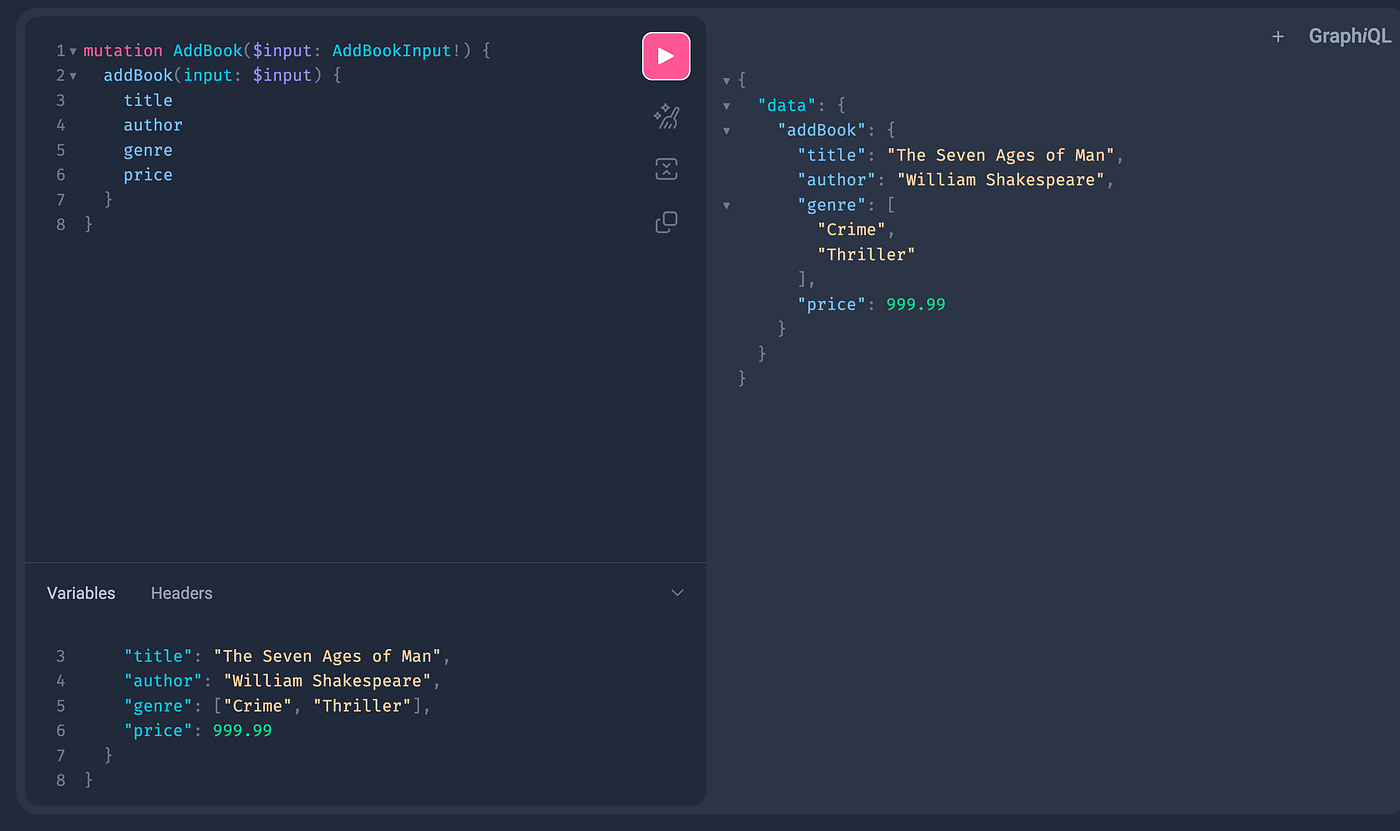
we added the mutation and the variable, and we got the result, book was added. Here is the code you can add:
mutation AddBook($input: AddBookInput!) {
  addBook(input: $input) {
# these are the fields which you will get as a response
    title
    author
    genre
    price
  }
}
{
"input": {
"title": "The Seven Ages of Man",
"author": "William Shakespeare",
"genre": ["Crime", "Thriller"],
"price": 999.99
}
}Similarly, for query to get all books, just write the below:
query GetAllBooks {
  books {
    title
    author
    price
  }
}
And you get the response with only title, author and price for all the books present

Similarly, you can try for deleting a book, updating a book and get a book by ID:
I tried. Here are the results for them:

Get a book by ID

Update a book with the ID

Remove a book
With GraphQL, you can tailor your API responses to include only the fields you need — no more, no less. What we’ve covered here is just the tip of the iceberg; there’s so much more to explore and experiment with in the world of GraphQL.
You’ve made it through the basics, and I hope this journey into GraphQL has been as exciting for you as it is powerful. I’ve packed this blog with insights to get you started, and now it’s your turn to dive in, play around, and craft some amazing APIs.
As we wrap up, I hope you’re inspired to push the boundaries of what you can build with GraphQL. Thanks for joining me on this adventure. Farewell for now, and happy coding! 🚀👋
Source code:
메타데이터
- post_id
- 28ef4cfa74e7
- slug
- guide-to-writing-first-graphql-api-in-golang-by-creating-a-book-app-28ef4cfa74e7
- url
- https://medium.com/@drupd17/guide-to-writing-first-graphql-api-in-golang-by-creating-a-book-app-28ef4cfa74e7
- canonical_url
- https://medium.com/@drupd17/guide-to-writing-first-graphql-api-in-golang-by-creating-a-book-app-28ef4cfa74e7
- author_url
- https://medium.com/@drupd17
- status
- ok
- fetched_at
- 2026-07-22 19:50:38