Learning C#, My Journey pt.1
Hello, World!
Learning C#, My Journey pt.1
Hello, World!
That’s how every programmer's journey started, right? Well, I’m no exception to that. Just like every other programmer who thought, “you know what, I want to be a programmer”, then sat down, opened a YouTube tutorial, and wrote their first piece of functioning code
print(“Hello, World!”)
Or some variation, depending on the language…This one is Python.
Once I had the introduction taken care of and out of the way, I thought to myself, “Sweet! Now on to some more programming.”, but this was not the case. It came with a lot of reading and some studying in between, including learning variables, Strings, Booleans, basic mathematical operations, and more. This makes sense, you cannot achieve your goals without study and practice.
Finally, on to my very first project. A matching game. This matching game will mark the first of my C# hands-on experience.
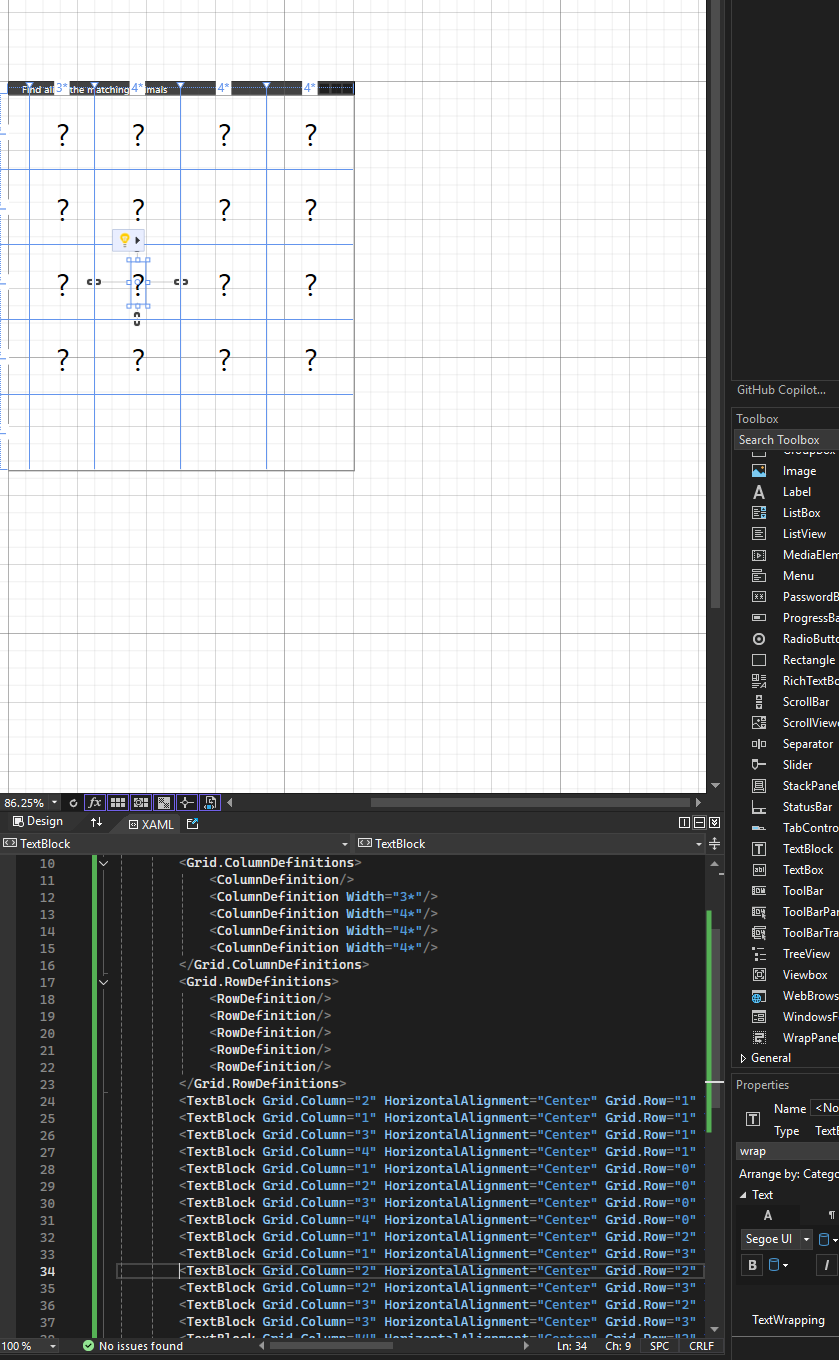
C# project — image matching game at its first stages on its creation.
I quickly learned that the creation of any program, be it a game or software, is mostly planning before you even get to the programming portion of the work. Why? A few reasons. One of them is problem-solving. I want to be a software developer because I want to solve problems, and that is exactly what programming is: a way to solve problems.
To do that, you need to know what problem needs to be solved before you can design a solution. Architecture & Design, planning includes deciding on the structure, flow, and components of the program. Just like in my screenshot, you can see that I set up how I want my matching game to be structured or designed. Third, requirements. What are the requirements? In my game, I know that I need different slots or spaces where the images will go, the ‘?’ question marks are my place holders, and I need images. In this case, I am going to use emojis.

After planning, structuring, and some tea🍵, I started the coding process. Here you can see that I created a list — animalEmoji — with 7 pairs of emojis. After a couple of adjustments and some errors, such as a missing bracket and a name not existing #missedScreenShotOpportunity, I finally got the GUI to appear 😍


This may be a biased opinion, but isn't she beautiful! As Carrie would say, “And just like that...” I have a functioning program running in C# utilizing XAML.

My first journey blog into C# may be short, but I promise you the reading and studying in between was not, and took longer to do than it did to read this post. I learned 2 big things in today's session — 1. Programming is a small portion of developing a program. It’s followed by the most important pieces: the idea, the planning, and the research. And 2. (although I feel obvious) Programming is a lot more than just copying and pasting. I haven't coded in 8 or 10 years, but I was surprised by what I already knew and remembered. That was enough to pick up and understand quickly what I was doing as I went along.
So what did I learn? Let me break it down…
This portion of the code creates a list of strings. The [List<string> animalEmoji] portion declares a list that is going to hold the element type [string]. In my game each sting is an emoji. At first I thought to myself, “can emoji be used as a string?”. Well, the answer is yes. Turnes out that emoji are just Unicode characters, therefore it is a valid string type.
List<string> animalEmoji = new List<string>()
{
"🤣", "🤣",
"🌧️", "🌧️",
"🙈", "🙈",
"😍", "😍",
"🤞🏼", "🤞🏼",
"😈", "😈",
"👨🏼💻", "👨🏼💻",
"🏹", "🏹",
};This portion, after the list declaration, creates a new instance of a [List<string>]. The parentheses [()] call the default constructor, which initializes an empty list. I then fill that list with the emoji values.
= new List<string>()This portion of the code creates a new class called Random. In this project, it's used to create random numbers and, in turn, will randomize the placement of the emojis.
Random random = new Random();This is a loop that will go through every [TextBlock] within [mainGrid]. [mainGrid.Children] contains all UI elements inside the grid. [.OfType<TextBlock>()] will filter only the elements that are [TextBlock]s. This means that it will ignore buttons, images, etc. This loop will target each text cell where an emoji will be displayed, replacing the ? mark.
foreach (TextBlock textBlock in mainGrid.Children.OfType<TextBlock>())This portion of the code will generate a random index between 0 and the current number of emojis left in the list. [animalEmoji.Count] shrinks with each iteration, so the range adjusts dynamically.
int index = random.Next(animalEmoji.Count);This portion will retrieve the emoji at the randomly chosen index, ensuring that each emoji is picked randomly from the list.
string nextEmoji = animalEmoji[index];This assigns the selected emoji to the current [TextBlock] and displays the emoji on the game board.
textBlock.Text = nextEmoji;This will remove the emoji from the list so it cannot be reused. This will ensure that each emoji appears once per pair.
animalEmoji.RemoveAt(index);See you l8r!
메타데이터
- post_id
- 29b82a72ffa4
- slug
- learning-c-my-journey-pt-1-29b82a72ffa4
- url
- https://medium.com/@loyalnewb/learning-c-my-journey-pt-1-29b82a72ffa4
- canonical_url
- https://medium.com/@loyalnewb/learning-c-my-journey-pt-1-29b82a72ffa4
- author_url
- https://medium.com/@loyalnewb
- status
- ok
- fetched_at
- 2026-07-09 06:11:55




