How to Access the Internet from a Private Subnet #01
The first thing that might come to your mind, why do we need private subnets? Or why do they need internet?
How to Access the Internet from a Private Subnet #01
The first thing that might come to your mind, why do we need private subnets? Or why do they need internet?
Let’s get deep dive into it!
Table of Contents:
-
Understanding the difference between Public & Private Subnet
-
The Hero of the Story: NAT Gateway
-
How it Works
-
Conclusion
Understanding the difference between Public & Private Subnet
In Cloud VPC(Virtual Private Cloud), we have two types of subnet one is Public and another is Private. The primary difference lies in the Routing Table associated with the subnet.
Public Subnet: When you want to host your web server in a way that users from the internet can directly communicate and access it. A subnet is only public if its traffic is directed to an IGW(Internet Gateway).
Private Subnet: These are used for sensitive data or internal applications like database, that should never be directly accessible from the public internet. This means they have no Public IP address, making them invisible to hackers on the internet. However, these servers still need to talk to the outside world to download patches or connect to external APIs.
The Hero of the Story: NAT Gateway
NAT Gateway is a managed networking service that allows resources in a private subnet to communicate with the internet, while preventing the internet from initiating a connection with those resources.
Analogy:
Think of it as a one way revolving door: your internal servers can go out and take whatever they need but any stranger from outside can not use the door to get inside.
How It Works:
-
An instance from the private subnet will send a request to the NAT gateway(which sits inside public subnet).
-
The NAT replaces the instance’s private ip with its own ip and sends the request to the Internet through Internet Gateway.
-
The internet sends back to the NAT, which then routes it back to the specific private instance.
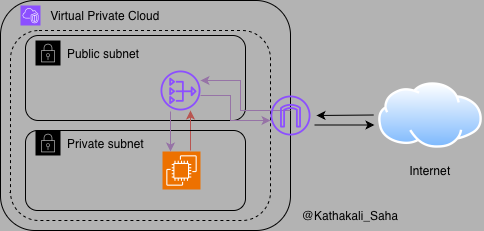
Figure : Resource from the Private Subnet can access the internet via IGW
Reminder:
Creating a NAT Gateway alone isn’t enough, you must update the private subnet’s route table to enable internet access.
Conclusion:
While NAT Gateways are highly convenient, they do come with a per hour charge and data processing fees.
Up next, I’ll walk you through a complete hands-on, step-by-step setup to access the internet from a private subnet.
Stay tuned and follow for more cloud learnings.
메타데이터
- post_id
- 29f5b09a08b2
- slug
- how-to-access-the-internet-from-a-private-subnet-01-29f5b09a08b2
- url
- https://medium.com/@jr.intech22/how-to-access-the-internet-from-a-private-subnet-01-29f5b09a08b2
- canonical_url
- https://medium.com/@jr.intech22/how-to-access-the-internet-from-a-private-subnet-01-29f5b09a08b2
- author_url
- https://medium.com/@jr.intech22
- status
- ok
- fetched_at
- 2026-08-12 23:58:50



